Stop Duplicates,
Start Selling.
Detect and Merge Duplicates, Clean Dynamics 365 CRM Data Using DeDupeD
Delivered Happiness Globally!
What is DeDupeD?
Automated Data Deduplication Tool for Dynamics 365 CRM
DeDupeD is an automated no-code data deduplication solution built exclusively for Microsoft Dynamics 365 CRM and Dataverse. With advanced rule-based and fuzzy matching, real-time duplicate detection, and 1-click quick merging, DeDupeD accurately identifies, prevents, and merges duplicate records across accounts, contacts, leads, and custom entities. By automatically identifying duplicates at the point of entry and intelligently merging existing data, DeDupeD ensures a single, trusted source of customer information, delivering higher data accuracy, complete control over CRM data quality, and making your CRM AI-ready.
Recent Updates
Whitelist specific records from future duplicate checks to maintain data accuracy.
Define customizable rules to automatically select the right master record, ensuring accurate duplicate management.
Auto-merge duplicates generated on the server side, and merge duplicates at field-level based on various merging criteria.
Automate record merge with FetchXML-based business rules, conditional filters, and fallback actions for rule-driven merging, review, or denial.
Information Vault
Benefits of using DeDupeD
Automates duplicate detection, saving CRM admins and sales teams time.
Reduces storage costs by removing redundant customer records in Dynamics 365.
Ensures only accurate, clean client data for seamless sales operations.
Improves data quality, enabling sales teams to engage with customers seamlessly.
Supported On
Dynamics 365 CRM
Online
Features
Here’s how DeDupeD can help you maintain CRM Data Quality
Detect Duplicates Records
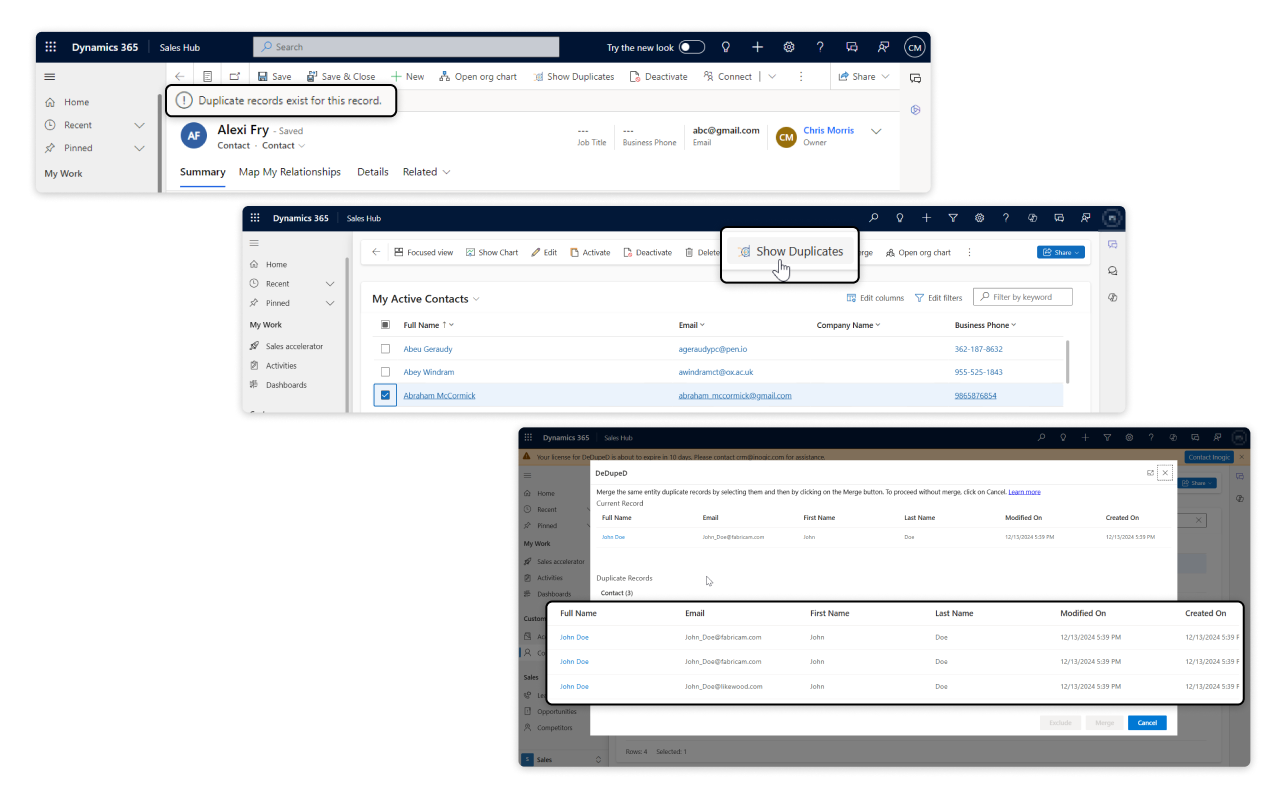
DeDupeD helps users easily identify duplicate records in Dynamics 365 CRM using an advanced, real-time duplicate detection technique that works while data is being added, updated, or reviewed, so bad data never slows down sales or reporting. It automatically finds matching CRM records, even when names, emails, or phone numbers look slightly different, giving teams a clear view of what’s duplicated and why. Users can quickly spot duplicates while creating or updating records, avoiding repeated entries before they enter the CRM. For existing data, DeDupeD makes it simple to scan CRM data and highlight possible duplicates in seconds, saving hours of manual checking. The result is cleaner CRM data, better customer visibility, and more confident decisions—without complex setup or effort. If you’re searching for how to find duplicate records in CRM fast, DeDupeD delivers a smarter, faster, and more user-friendly solution.
Prevent Duplicates Records
DeDupeD prevents duplicate records in Dynamics 365 CRM by stopping them before they are created, keeping CRM data clean, accurate, and consistent from the start. Using real-time, rule-based duplicate prevention, it blocks duplicate records during data entry (client-side) as well as imports, workflows, and backend processes (server-side), even when data comes from multiple sources. DeDupeD also allows teams to exclude specific records from future duplicate checks, giving full control without compromising data quality. The result is fewer errors, no manual clean-up, and a reliable CRM that supports better sales, reporting, and decision-making. If you’re looking for an easy way to prevent duplicate records in CRM, DeDupeD offers a smarter and more user-friendly approach.
Merge Duplicates Records
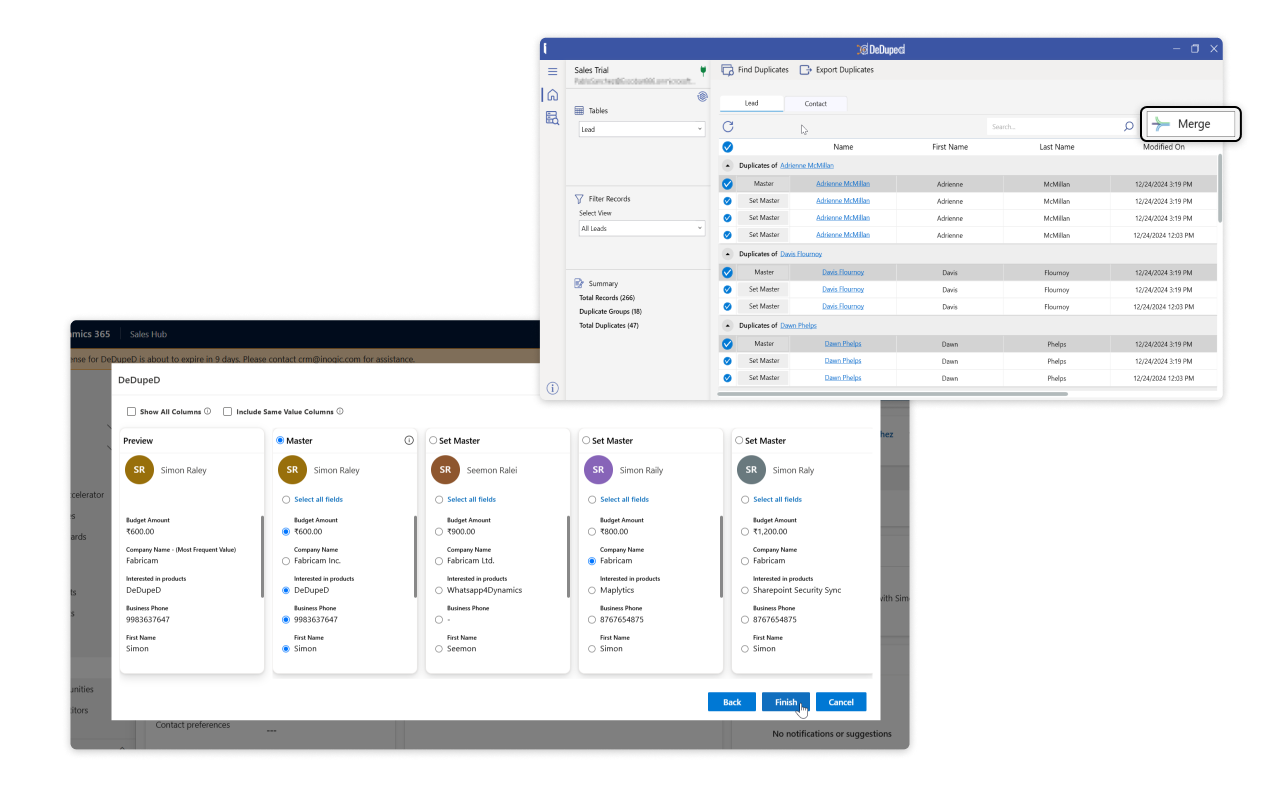
DeDupeD makes it easy to merge duplicate records in Dynamics 365 CRM, helping teams create a single, accurate, and complete view of every customer. With just a few clicks, users can select a master record and intelligently combine data from duplicates, without losing important details. DeDupeD provides flexible field-level merge options, allowing teams to keep the most accurate values, merge text fields, sum numeric data, and apply custom address merge rules. For legacy data, bulk duplicate merging enables thousands of records to be consolidated at once, ensuring clean, consistent CRM data while preserving relationships, history, and reporting accuracy. If you are looking for a better way to merge duplicate CRM records without losing data, DeDupeD offers a clean and confident approach.
More Features
Auto Merge
Automatically merge duplicate records created from data imports, workflows, server-side processes, or Power Automate flows—making CRM data clean and easy to manage.
Scheduled Detection
Automatically find duplicate records on a daily, weekly, or monthly schedule and get the results sent directly to your email.
Customizable Merge UI
Personalize the merge view to look and feel like your existing CRM screens, making it easy for users to review and merge records without confusion.
Advanced Filtering
Use powerful FetchXML filters to catch duplicates even in complex or custom CRM setups.
Form-Based Detection
Turn on duplicate checks only for selected forms to stay in control.
Multiple Matching Methods
Pick from five smart matching methods to find duplicates based on your unique data rules.
testimonials
What Our Customers Are Saying?
Our Blogs
How to Improve Data Accuracy and Eliminate Duplicates in Dynamics 365 CRM
Duplicate data might not seem like a big deal until your CRM starts giving mixed signals, your sales reps chase the same lead twice, or your reports stop adding up.
Step-by-Step Guide to Duplicate Detection and Merge Rules in Dynamics 365 CRM
In Dynamics 365 CRM, you can create Duplicate Matching Rules that tell the system how to compare data across entities like Contacts, Accounts, or Leads..
New Release: Auto-Merge Duplicate Records in Dynamics 365 CRM with Master Rules
Duplicate records are one of the biggest hidden productivity killers in Dynamics 365 CRM. They waste valuable time, cause confusion, and undermine trust…
Frequently Asked Questions
You can find duplicate records in Dynamics 365 by setting up native duplicate detection rules in CRM. As well as you can automate duplicate checks on a monthly, weekly, and daily basis, and detect duplicates On-Demand from anywhere in the CRM by just a click of a button using the DeDupeD App.
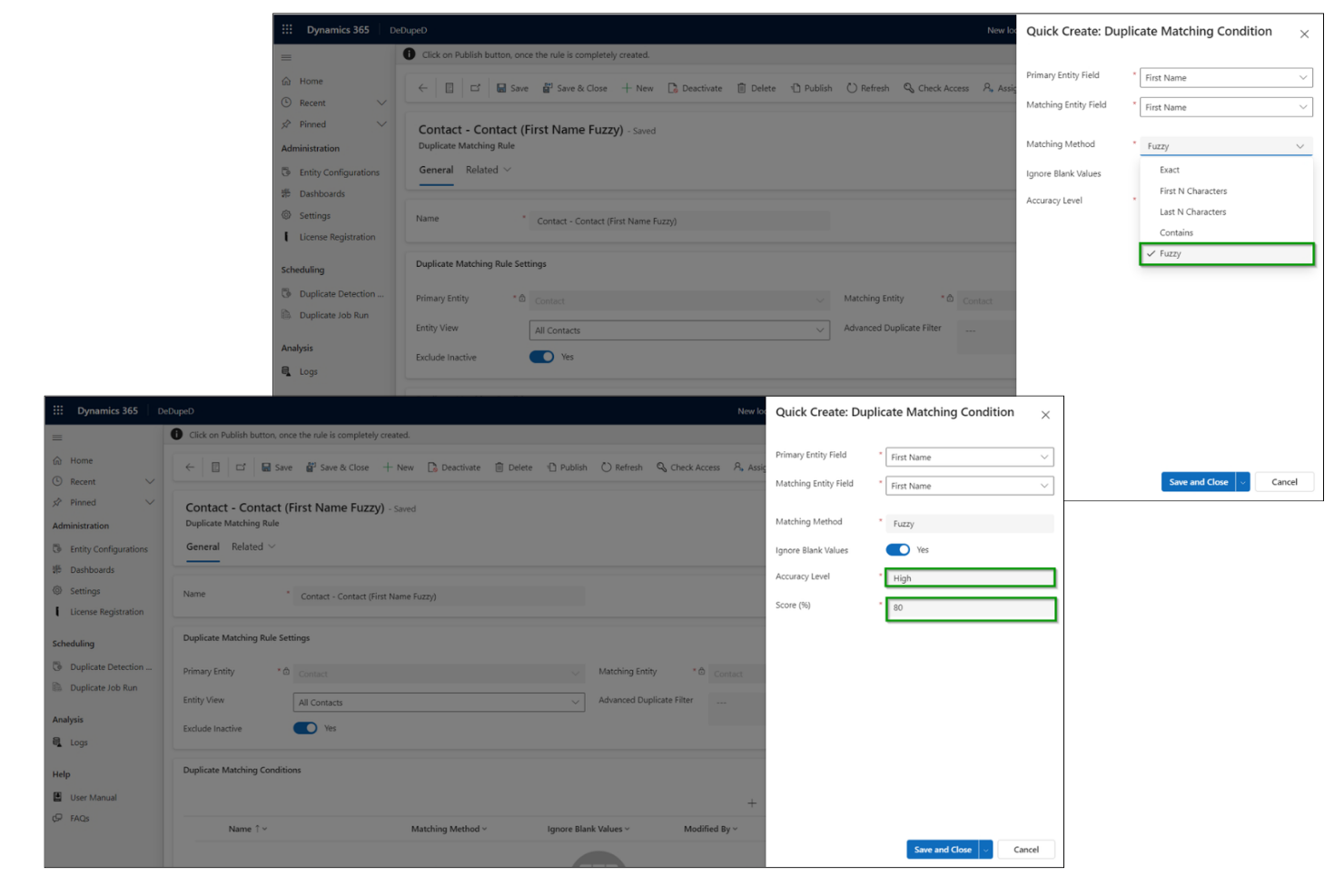
You can detect fuzzy and similar-sounding duplicate records in Dynamics 365 CRM using DeDupeD’s fuzzy matching functionality. You can adjust accuracy levels—Low (broad matches), Medium (balanced, 60-79% score), or High (precise)—to fine-tune results. You can also set a match quality score to improve accuracy and reduce false duplicates, keeping your data clean and reliable.
In Dynamics 365 CRM, you can prevent duplicates from entering the CRM across all entities (OOB or Custom) at both the server and client sides using DeDupeD App.
On server side you can prevent duplicates when creating new records and updating existing records using the Assembly, WPF Application, and Data Import processes, Power Automate, and Workflow. On the client side, you can prevent duplicates upon saving the record and on field changes, reducing the need for frequent manual clean-ups.
You can purge duplicate data in Dynamics 365 CRM by merging up to four duplicate records directly from the merge record dialog box for account, contact, and lead entities. You can also set up bulk system jobs to detect and clean up duplicate records in bulk.
But with DeDupeD, you get advanced capabilities for better results. You can merge up to 10 duplicate records directly from individual CRM record forms for any Dynamics 365 CRM entity (OOB or Custom). Using DeDupeD’s Windows-based tool, you can detect and merge up to N number of historical duplicate records in bulk. Additionally, while merging, you can transform any desired record into a master record and export duplicate records before merging them.
Reach out to us today to know more!