 If you work with Dynamics 365 CRM every day, you’ve likely faced this challenge:
- Two records for the same customer appear in your search results.
- Sales updates one record, while support logs a case in the other.
- Reports pull inconsistent data, frustrating your entire team.
Duplicate records are one of the biggest hidden productivity killers in Dynamics 365 CRM. They waste valuable time, cause confusion, and undermine trust in your data.
That’s why many organizations rely on DeDupeD app, a powerful Dynamics 365 CRM app designed to:
- Detect duplicates with intelligent matching rules.
- Prevent duplicates at the point of entry.
- Merge duplicates seamlessly to maintain a single, accurate customer view.
With DeDupeD, you can ensure your CRM remains clean, reliable, and ready to power accurate insights and better decisions.
DeDupeD Just Got Smarter: Advanced Master Deciding Rules + AI capabilities to Merge Dynamics 365 CRM Records
Managing duplicates in Dynamics 365 CRM has always been a challenge—but with the latest release of DeDupeD, it’s easier than ever. This update introduces three powerful automation features that take the hassle out of duplicate management:
- AI-Powered Field Suggestions — Use AI to merge Dynamics 365 CRM duplicate records using AI, recommending the best field values at the moment of merge.
- Advanced Master Deciding Rule – Automatically select the right master record using smarter logic.
- Merge Rule – Perform intelligent, rule-based merges with complete control over your data.
- Task Scheduler Job – Run deduplication jobs automatically on your schedule, no manual work required.
These upgrades don’t just help you remove duplicate Dynamics 365 data — they help you:
- Save time with automated processes
- Improve productivity across your sales and service teams
- Make confident, data-backed decisions that improve Dynamics 365 data accuracy
With these new capabilities, DeDupeD transforms duplicate management from a manual, error-prone task into a seamless, automated process.
Let’s take a closer look at how each feature revolutionizes Dynamics CRM data cleansing.
Master Deciding Rule: Smarter Master Record Selection Without Guesswork
What is the Advanced Master Deciding Rule in DeDupeD?
If you’ve ever merged duplicate records in Dynamics 365 CRM, you know the most important question is:
Which record should be the master?
The Advanced Master Deciding Rule answers this for you.
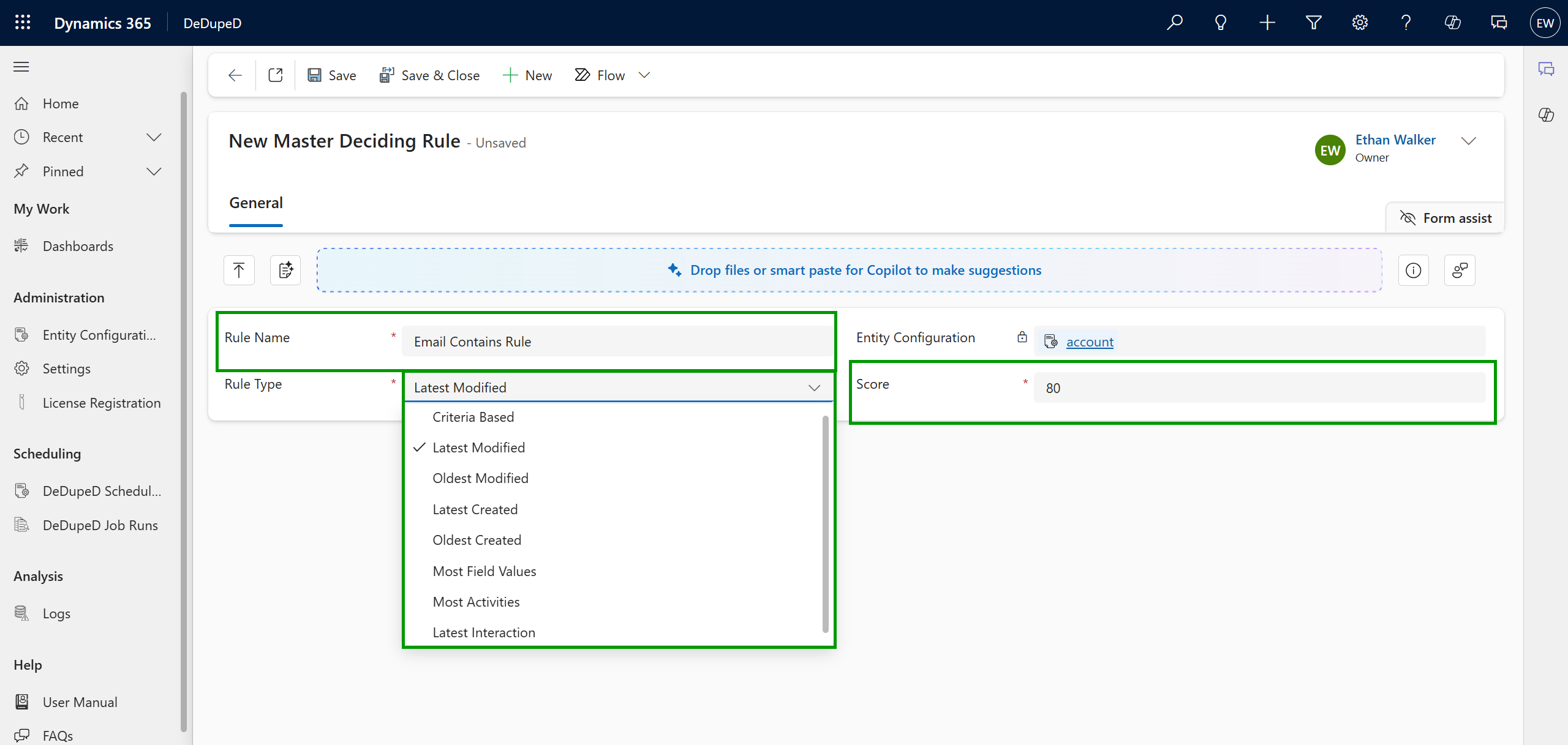
With this feature, system administrators can define intelligent rules to decide which record should stay as the master when duplicates are detected. You can:
- Create customized rules for any entity.
- Define key data fields and conditions (e.g., record with the latest created date, highest revenue, or most complete details).
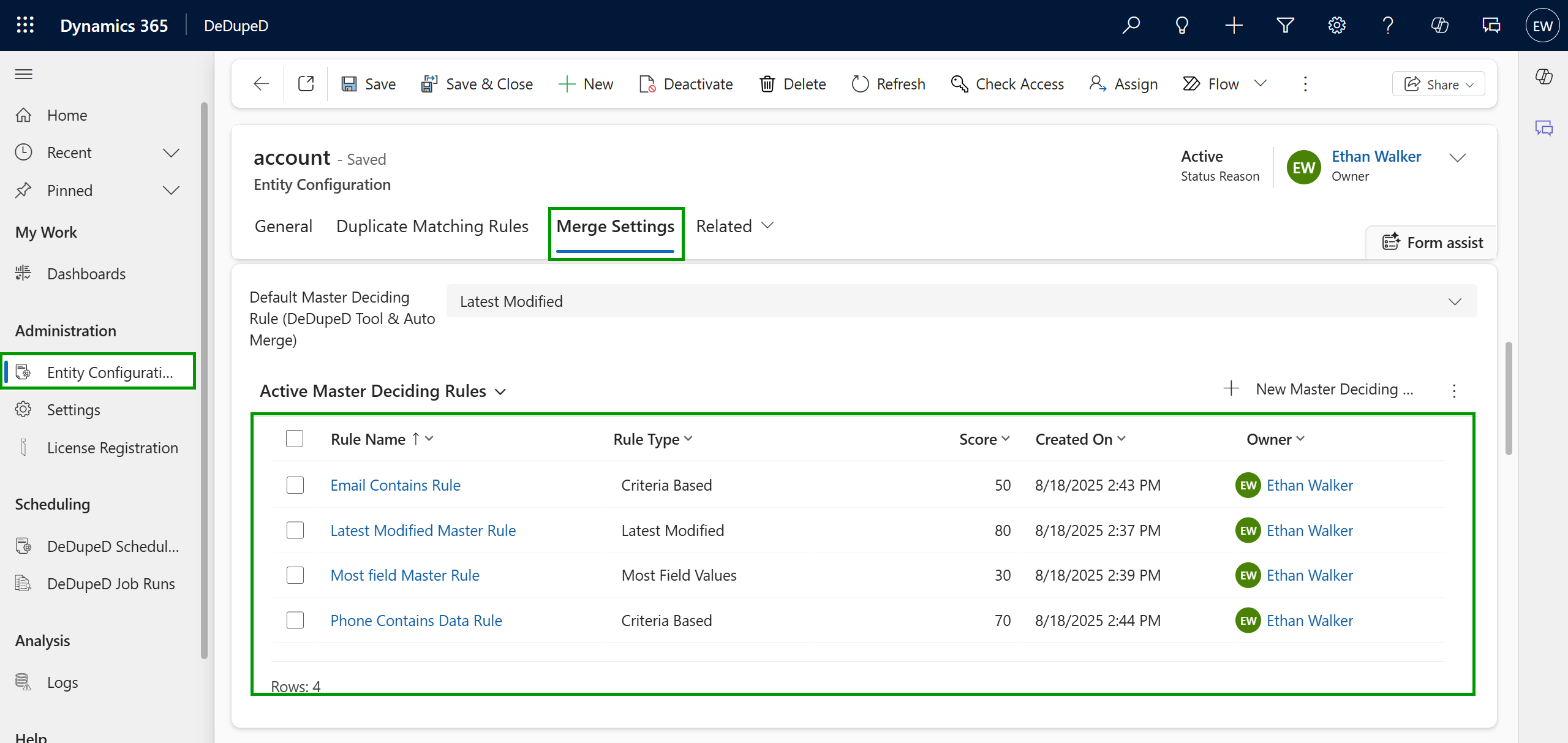
- Apply multiple rules automatically, where duplicates are scored, and the record with the highest score becomes the master.
Example: How Scores Decide the Master Record
Imagine you find two duplicate records for the same contact in Dynamics 365 CRM. You’ve set up three Master Deciding Rules:
- Latest Modified Record → 80 points
- Record with Most Fields Filled → 70 points
- Record with Email Present → 50 points
Here’s what happens:
- Record A was last modified recently and has the most fields filled → 80 + 70 = 150 points
- Record B only has an email → 50 points
Result: Record A automatically becomes the master record because it scored higher.
This way, DeDupeD ensures that the most complete and up-to-date record is kept, without you manually checking every duplicate.
Benefit for CRM users: You no longer waste time manually checking duplicates. The system ensures data accuracy, consistency, and clean record management automatically.
Merge Rule for Dynamics 365 CRM Duplicate Record: Intelligent, Rule-Based Merging with Full Control
How Does the Merge Rule Improve Duplicate Handling?
Merging records in Dynamics 365 CRM can feel like walking a tightrope. You want to merge duplicates, but only under the right conditions.
The Merge Rule in DeDupeD gives you this control.
Here’s what it lets you do:
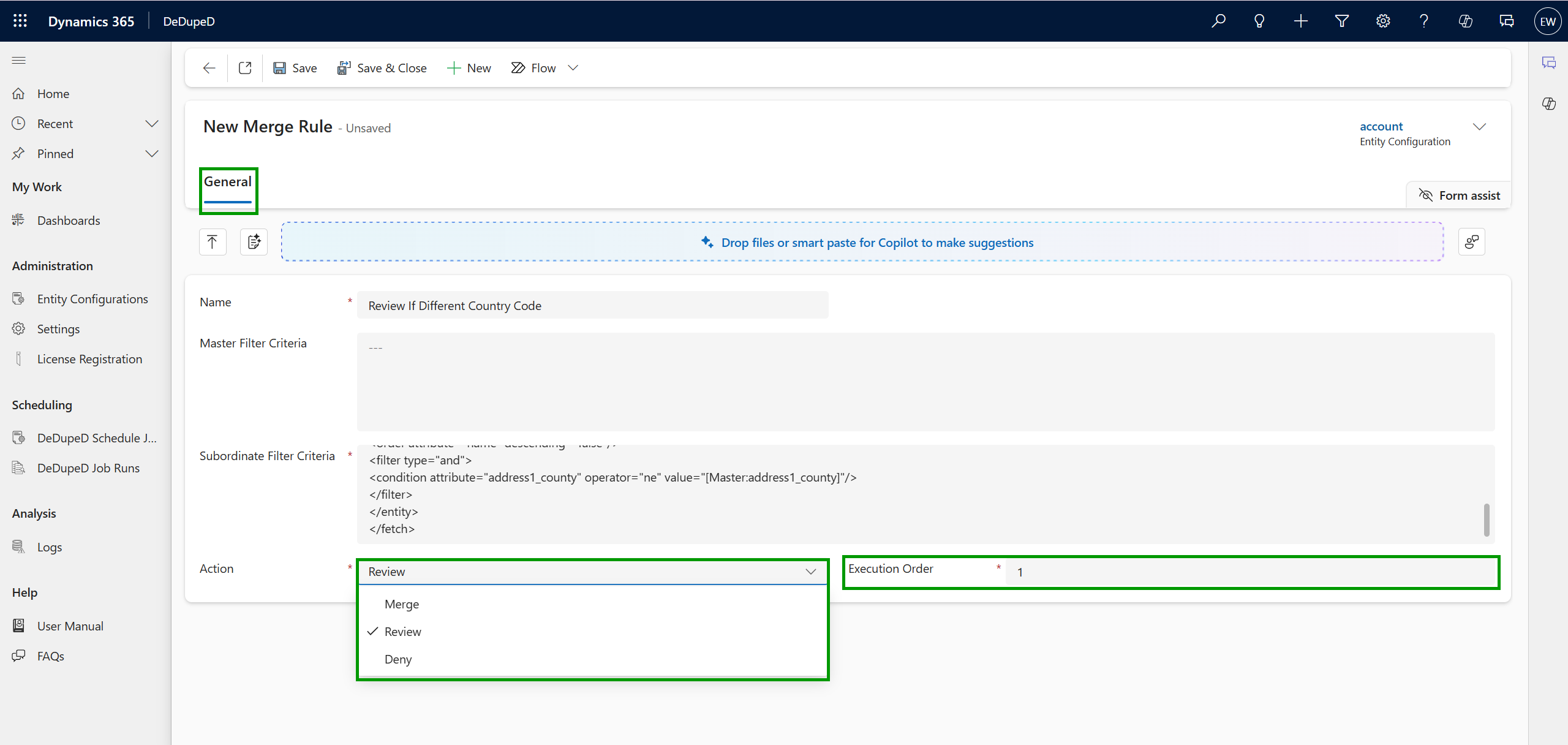
- Define custom conditional filters for both master and subordinate records.
- Use FetchXML-based business rules to decide whether records should be merged, flagged for review, or denied.
- Set a configurable fallback merge action (Merge, Review, or Deny) for cases where no rules match.
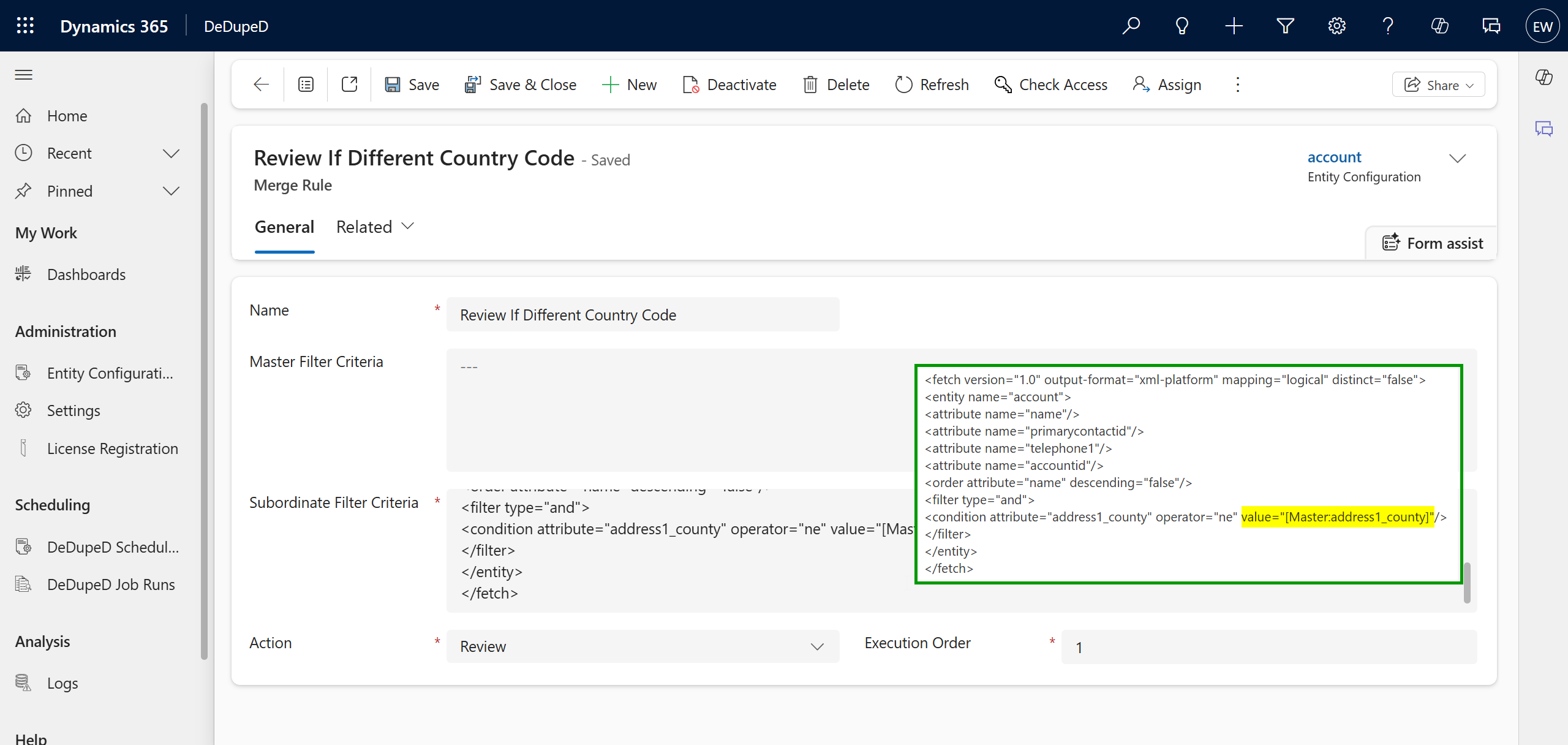
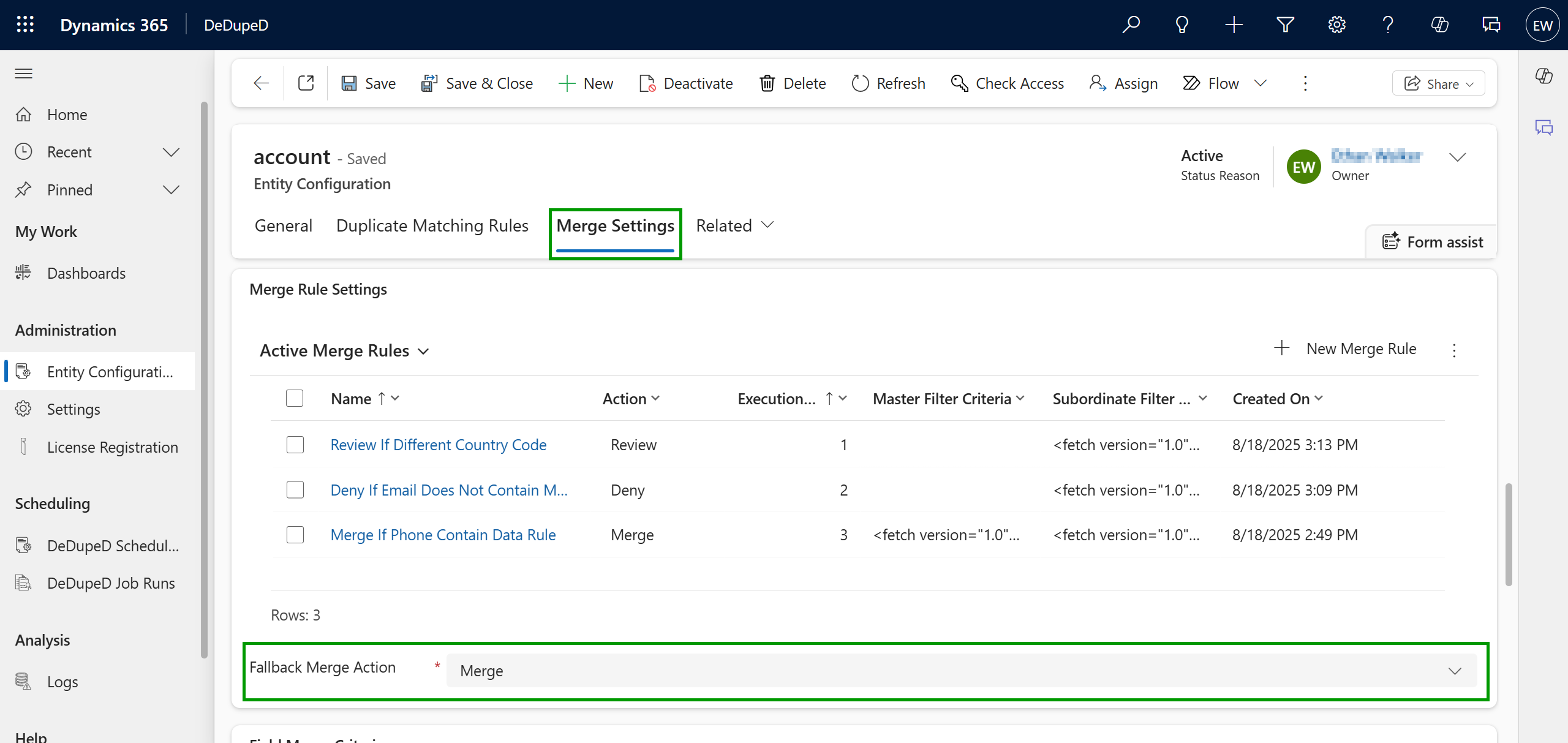
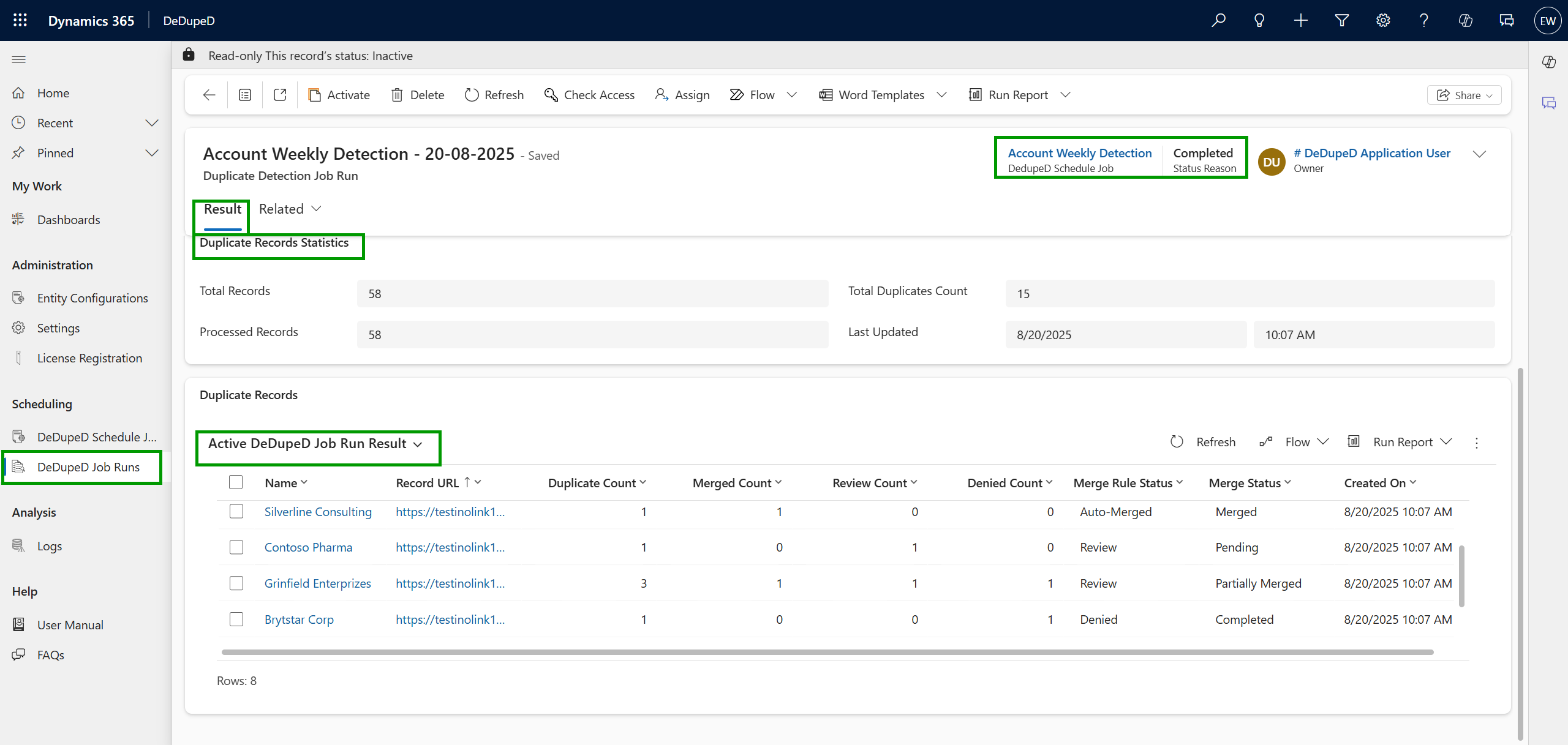
You can then monitor all merge jobs via DeDupeD Job Runs, which show detailed results like:
- Number of duplicates detected
- Number of records merged
- Records under review or denied
- Merge status (Merging, Merged, Partially Merged, Completed, Pending, Failed)
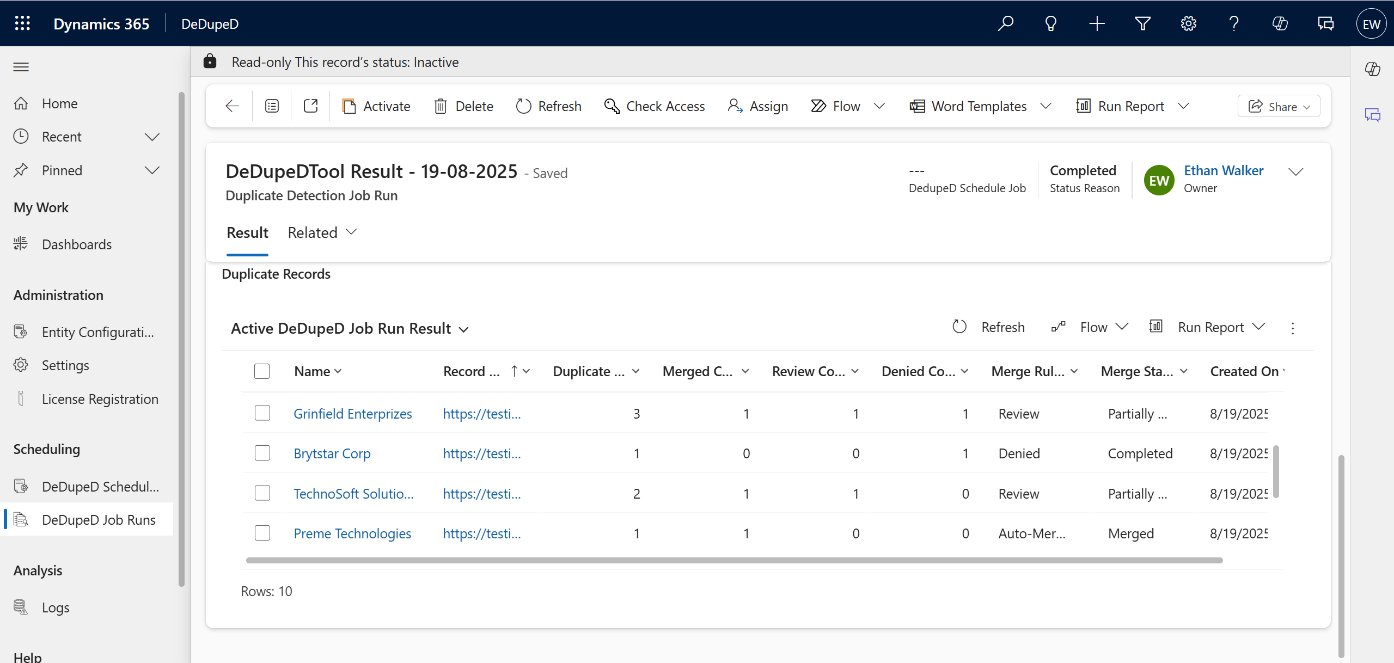
Benefit for CRM users: Instead of blindly merging, you get precise, rule-based control. You know exactly why records were merged, flagged, or denied — reducing risks of bad merges.
InoWiz: AI-Powered Field Suggestions to Merge Dynamics 365 CRM Duplicate Records Using AI
What is AI-Powered Duplicate Record Merge in Dynamics 365 CRM and How Does It Transform Data Deduplication?
Even with smart master selection and rule-based merging in place, one challenge remains: when two records are merged, which field values should survive? Getting this wrong, even once, can corrupt contact details, wipe out revenue figures, or mix up address data.
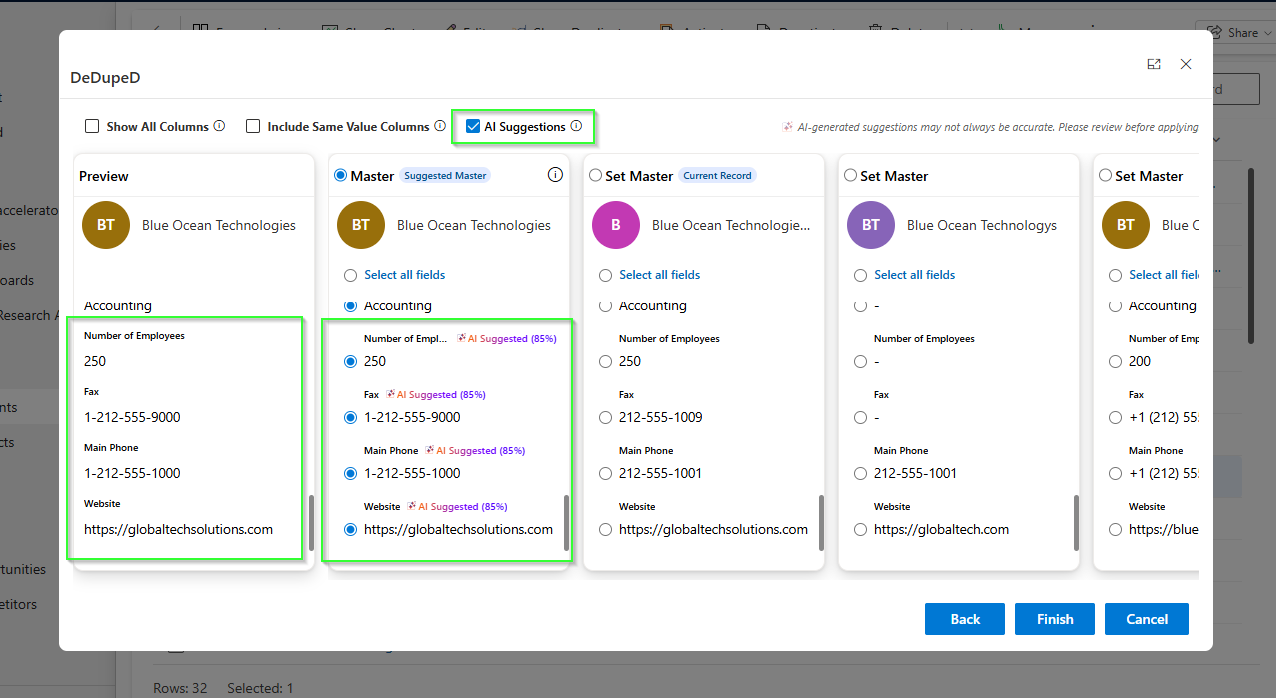
InoWiz, the AI engine embedded inside DeDupeD, solves this. It activates directly at the merge screen, the most critical decision point in any duplicate detection in Dynamics 365 workflow, and uses Azure OpenAI to evaluate every conflicting field value across all candidate records simultaneously.
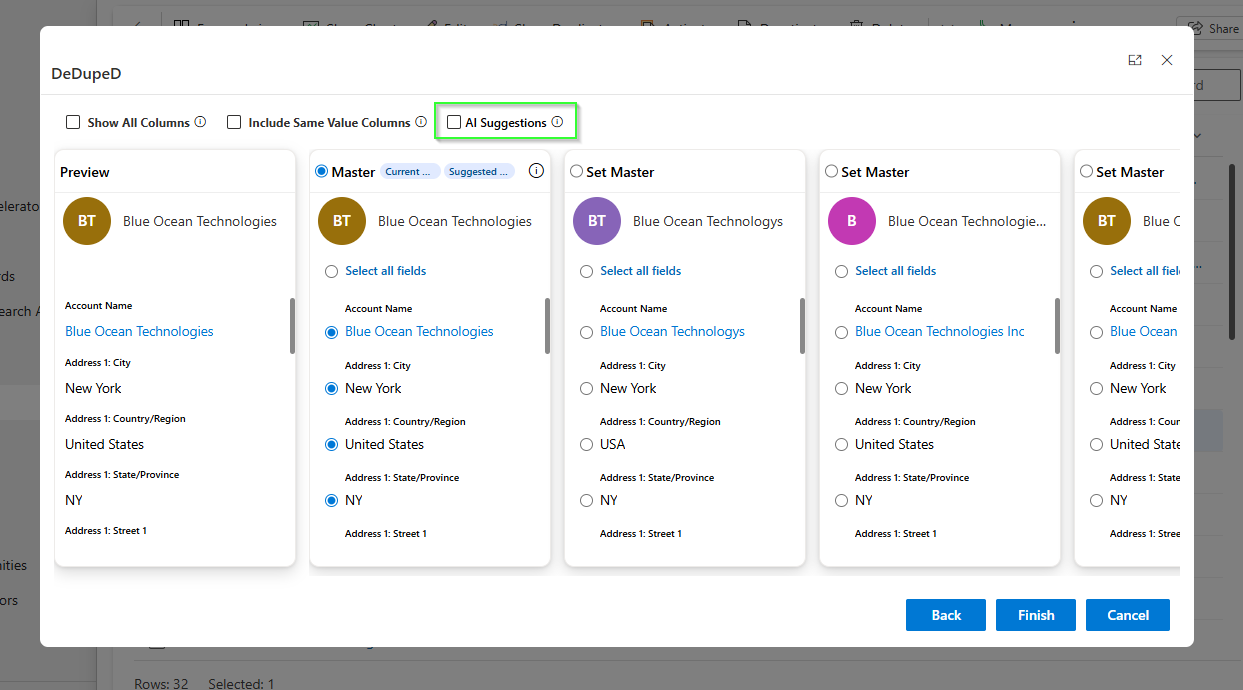
Why this matters:
A 2023 Data Quality report found that 55% of CRM users do not trust their own data enough to make confident decisions. InoWiz addresses this at the root by ensuring the highest-quality field values are retained during every merge, making Dynamics CRM data cleansing intelligent, not just automated.
How InoWiz Works Inside the Merge Screen
When a user initiates a merge of duplicate records, InoWiz:
- Calls the configured Azure OpenAI model with the entity context and all candidate field values.
- Evaluates each field for completeness, format correctness, and cross-field consistency (e.g., address components are assessed as a group, not in isolation).
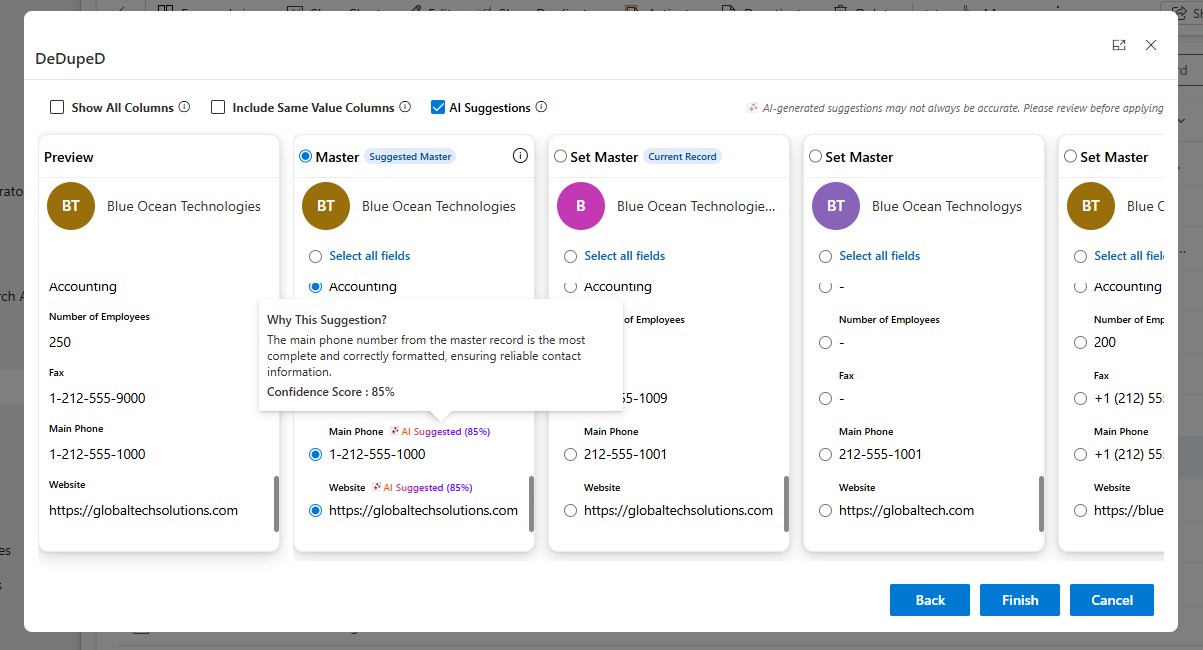
- Generates a confidence-scored recommendation (0–100%) for every conflicting field and pre-selects the best value in the Master column.
- Surfaces a “Why This Suggestion?” tooltip on every recommendation, showing a plain-language rationale so users can audit every AI decision.
For address field groups, InoWiz evaluates city, state, country, and street as a cohesive unit — eliminating the common problem of a city from one record being paired with a country from another. These grouped fields typically achieve 85–95% confidence scores when internally consistent.
Human-in-the-Loop Control
InoWiz never commits a merge automatically. All AI suggestions are advisory: users review each recommendation, override any value by selecting an alternative, and click Finish to execute. This design maintains full compliance with data governance requirements while making AI in data deduplication practical for everyday CRM teams.
For high-volume workflows, administrators can enable auto-suggestion at the entity level, so InoWiz fires the moment the merge screen loads for entities like Account, Contact, and Lead, without any extra clicks from operators.
Benefit for CRM users:
InoWiz eliminates the guesswork from duplicate merge decisions. Instead of choosing field values based on intuition, your team gets AI-recommended values with confidence scores and transparent reasoning, turning every merge into a data quality improvement step rather than a data quality risk.
Task Scheduler Job: Automated, Hands-Free Deduplication on Your Schedule
How Does the Task Scheduler Job Save Time?
Let’s be real, nobody wants to spend hours running deduplication jobs manually.
That’s where the new Task Scheduler Job comes in.
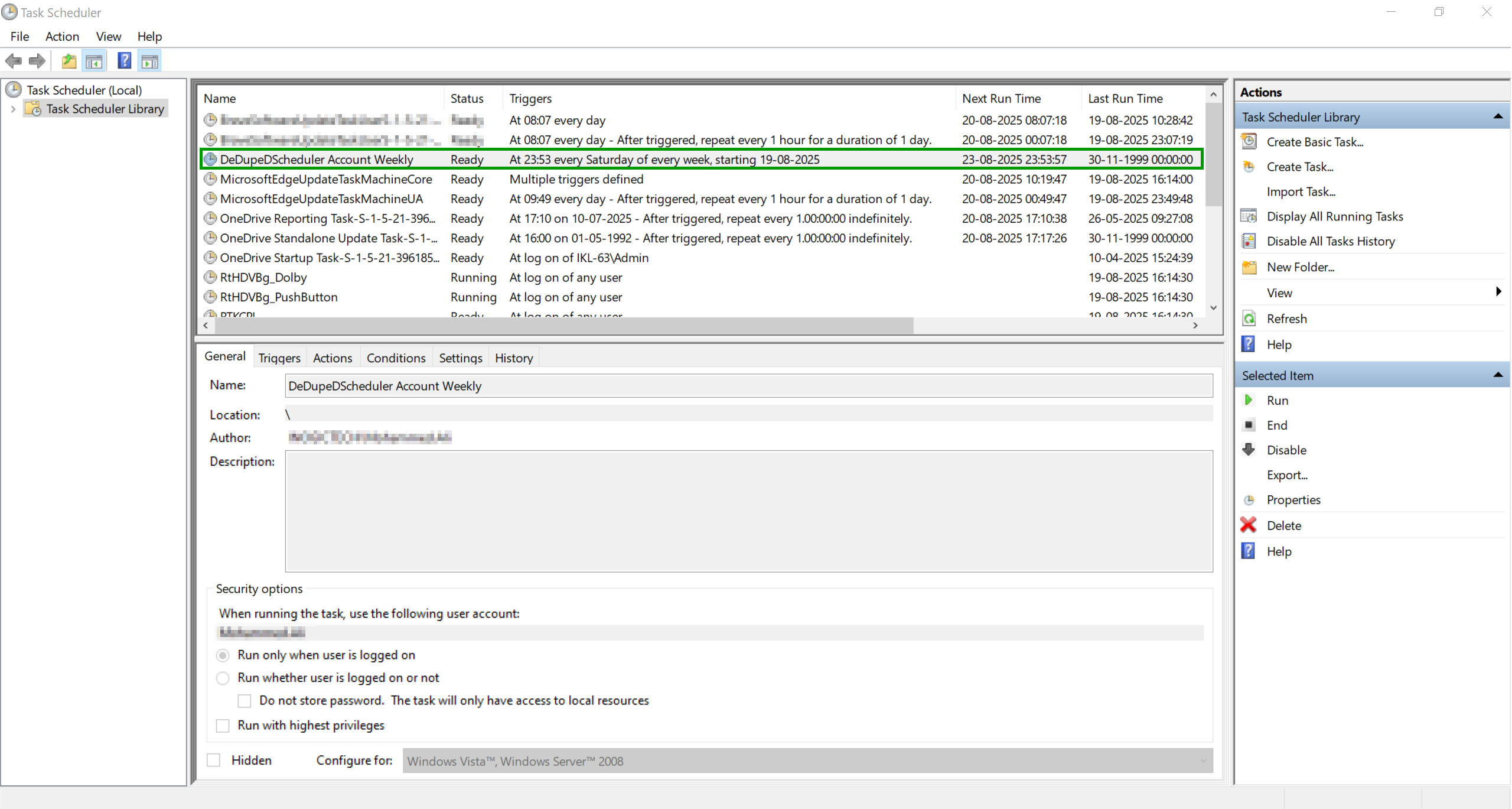
Using Windows Task Scheduler, you can configure DeDupeD to:
- Automatically run duplicate detection jobs at scheduled times.
- Create a Job Run record with detailed results stored in CRM.
- Send email notifications to configured users once the job is completed.
- Allow admins to review duplicates, assign them to users, or approve merges directly from the Job Run results.
Benefit for CRM users: Your CRM data stays clean and up to date without manual intervention. Think of it as setting your duplicate management on autopilot.
Key Benefits for Dynamics 365 CRM Users
- Always keep the best record as master
Automatically ensures the most complete and relevant record is retained as the master, reducing errors and improving data accuracy. - Safe and controlled duplicate handling
Rule-based merging delivers a reliable, error-free process for combining records, giving you full control over how duplicates are resolved. - Hands-free data cleanup
The built-in scheduler runs automatic deduplication jobs, keeping your CRM data clean and consistent—without the need for manual effort.
FAQs on DeDupeD’s New Features
Q1. Can I apply multiple rules for selecting a master record?
Yes. Each duplicate record is evaluated against your defined rules, and the record with the highest score is automatically chosen as the master.
Q2. What happens if no merge rule matches?
If no merge rule applies, DeDupeD follows your configured fallback action—Merge, Review, or Deny—ensuring no duplicate is left unresolved.
Q3. Can the scheduler run deduplication jobs daily?
Absolutely. The scheduler is fully configurable, allowing you to run deduplication jobs on your preferred frequency—daily, weekly, or monthly—to keep your Dynamics 365 CRM data consistently clean and reliable.
Q4. Does DeDupeD automatically apply AI suggestions without user input?
No. InoWiz is a human-in-the-loop system. AI suggestions are advisory and pre-selected for review, but a user must click Finish to commit any merge. Administrators can enable auto-loading of suggestions to reduce clicks, but final execution always requires human confirmation.
Q5. Which AI model does DeDupeD AI feature use?
InoWiz uses Azure OpenAI by default, configured through DeDupeD’s administration panel. Each merge inference call evaluates all selected duplicate records simultaneously — not pairwise — for a globally optimal recommendation.
Q6: Which Is the Best Tool to Merge Dynamics 365 CRM Duplicate Records?
DeDupeD by Inogic is the most comprehensive tool to merge Dynamics 365 CRM duplicate records, combining rule-based automation with AI-powered field intelligence to ensure every merge produces clean, accurate, and auditable data.
Conclusion
If you’re a Dynamics 365 CRM user frustrated with messy, duplicate-ridden data, the new DeDupeD features are built for you. With Advanced Master Deciding Rule, Merge Rule, AI-powered field merge, and Task Scheduler Job, you’ll enjoy:
- Cleaner, more reliable data
- Smarter automation that saves time
- Minimal manual effort in managing duplicates
What would your CRM look like with zero duplicate guesswork? Imagine opening a merge screen and instantly knowing — with confidence scores and clear reasoning — exactly which data to keep. That’s what InoWiz inside DeDupeD makes possible.
Ready to experience error-free duplicate management in Dynamics 365 CRM?
👉 Try the DeDupeD app today and see the difference for yourself.
- Download the 15-day free trial from Inogic Website or Microsoft Marketplace.
- Want a more guided experience? Book a personalized demo and get expert assistance by reaching us at crm@inogic.com.