


Identify Duplicate Records in CRM
Advanced Techniques for Real-time Duplicate Identification in Dynamics 365 CRM
Table of Contents
Finding duplicate records in Dynamics 365 CRM is no longer just about checking for exact matches.
Modern CRM teams deal with messy, multi-source data, entered by users, synced from integrations, imported from marketing tools, and consumed by AI and automation.
That’s why duplicate identification has evolved into identity resolution.
Today, CRM systems must recognize when records represent the same real-world customer, even when names are spelled differently, phone numbers use multiple formats, or data is incomplete. Advanced techniques like phonetic and fuzzy matching are now essential to accurately identify duplicates in real time, before they impact sales, reporting, or AI-driven insights.
This guide explains the practical, modern techniques used to identify duplicate records in Dynamics 365 CRM accurately, even when the data doesn’t look identical.
How to Stop Duplicate Records Before They Enter Your CRM
Duplicate data is no longer just a data hygiene issue;it’s a business risk.
Duplicate leads, contacts, and accounts silently:
- Reduce sales productivity
- Distort dashboards and forecasts
- Weaken customer experience
- Undermine AI, Copilot, and automation outcomes
As CRM platforms become the foundation for AI-driven decisions, preventing duplicates at the source has become more important than cleaning them up later.
Duplicate prevention in Dynamics 365 CRM focuses on stopping bad data before it is saved, during:
- User data entry
- Automated processes
- Imports and migrations
- Integrations with external systems
Rather than fixing damage after it occurs, modern CRM teams design prevention layers that protect data at every entry point.
This page provides a complete, end-to-end view of duplicate prevention in Dynamics 365 CRM, based on how modern organizations maintain clean, AI-ready CRM data.
Why Traditional Checks Are Not Enough for Duplicate Identification in Dynamics 365
Most CRM users struggle with duplicates because:
- Customer data comes from multiple sources
- Records are entered by different teams in different regions
- Names, phone numbers, and emails are rarely consistent
As a result, duplicates often stay hidden until they impact sales, marketing, reporting, or customer experience. DeDupeD solves this by offering multiple intelligent approaches to duplicate identification, each designed for a real Dynamics 365 CRM scenario.
Modern duplicate identification requires intelligent matching approaches that reflect how businesses recognize customers, not how raw data is stored. DeDupeD addresses this gap by applying multiple, business-aware techniques designed specifically for real Dynamics 365 CRM scenarios.
What is Duplicate Prevention in Dynamics 365
Duplicate prevention in Dynamics 365 CRM is the proactive validation of data at the moment it is created or updated, ensuring that identical or similar records are not saved into the system.
Unlike duplicate identification, which finds duplicates after they already exist—prevention works upstream, stopping bad data before it spreads across CRM, reporting, automation, and AI models.
By preventing duplicates at the source, organizations maintain:
- A single, trusted customer identity
- Reliable automation and workflows
- Accurate reporting and forecasting
- CRM data that AI and Copilot can safely use
The Complete Duplicate Prevention Guide for Dynamics 365 CRM
Effective duplicate prevention requires coverage across all CRM entry points, not isolated checks.
An end-to-end duplicate prevention framework includes:
- Client-side Duplicate identification detects duplicates as users create or update records, providing immediate feedback and preventing accidental duplication.
- Server-side Duplicate identification for automation, imports, and integrations to prevent data quality issues in Dynamics 365 CRM
- Consistent matching logic across all processes
- Controlled flexibility for valid business exceptions
This framework ensures duplicates are stopped regardless of how or where data enters CRM.
Techniques to Identify Duplicates in Dynamics 365 CRM
Dynamics 365 CRM uses both real-time and background duplicate identification techniques to keep customer data clean.
Client-side identification prevents duplicates as users create or update records, while server-side identification detects duplicates created through integrations, workflows, and imports.
Together, these techniques ensure duplicates are identified early, consistently, and at scale.
Client-Side Duplicate Identification in Dynamics 365 CRM
How to Identify Duplicates while Creating or Updating Records in Real Time?
Duplicate records are most commonly created at the moment of data entry. Sales reps adding leads, marketers importing contacts, or service teams updating customer profiles often unknowingly create duplicates, simply because they can’t see existing records in real time.
Client-side duplicate identification solves this exact problem.
Here is a detailed approach for how to identify duplicates while Creating Records in Dynamics 365 CRM, why it is critical for clean data, and how DeDupeD enables advanced, real-time duplicate detection directly on CRM forms, helping users quickly and easily avoid duplicates before they are saved.
Identify Duplicate Records Automatically in Dynamics 365!
What is Client-Side Duplicate Identification?
Client-side duplicate identification means detecting duplicate records directly on the CRM form, while a user is:
- Creating a new record
- Editing an existing record
- Changing key field values
Instead of discovering duplicates later through cleanup jobs or reports, users are alerted instantly, at the exact moment where duplicates are likely to be created.
This approach is especially valuable for organizations in the US, UK, Australia, and global sales teams, where multiple users enter data simultaneously.
How are Duplicate Records Identified During Record Creation in Dynamics 365 CRM?
DeDupeD allows admins to control exactly when duplicate checks should happen, ensuring flexibility without slowing users down.
1. Duplicate Identification while Creating Records
As soon as a user creates new records and enters details for a key fields (such as name, email, or phone), DeDupeD can:
- Automatically scan existing CRM records
- Identify possible duplicates in real time
This is ideal for early detection and fast feedback.
2. Duplicate Identification while Saving New Records
When a user clicks Save, DeDupeD runs a final duplicate check before the record is committed.
This ensures:
- No duplicate slips through accidentally
- Users are alerted at the most critical moment
This is one of the most effective ways to stop duplicates instantly.
3. Duplicate Identification while Editing or Accessing Existing Records
Instead of pop-ups or confusing errors, DeDupeD shows clear form-level notifications.
These notifications:
- Highlight potential duplicates
- Display relevant existing records
- Allow users to decide the next action
This keeps the experience user-friendly and non-disruptive.
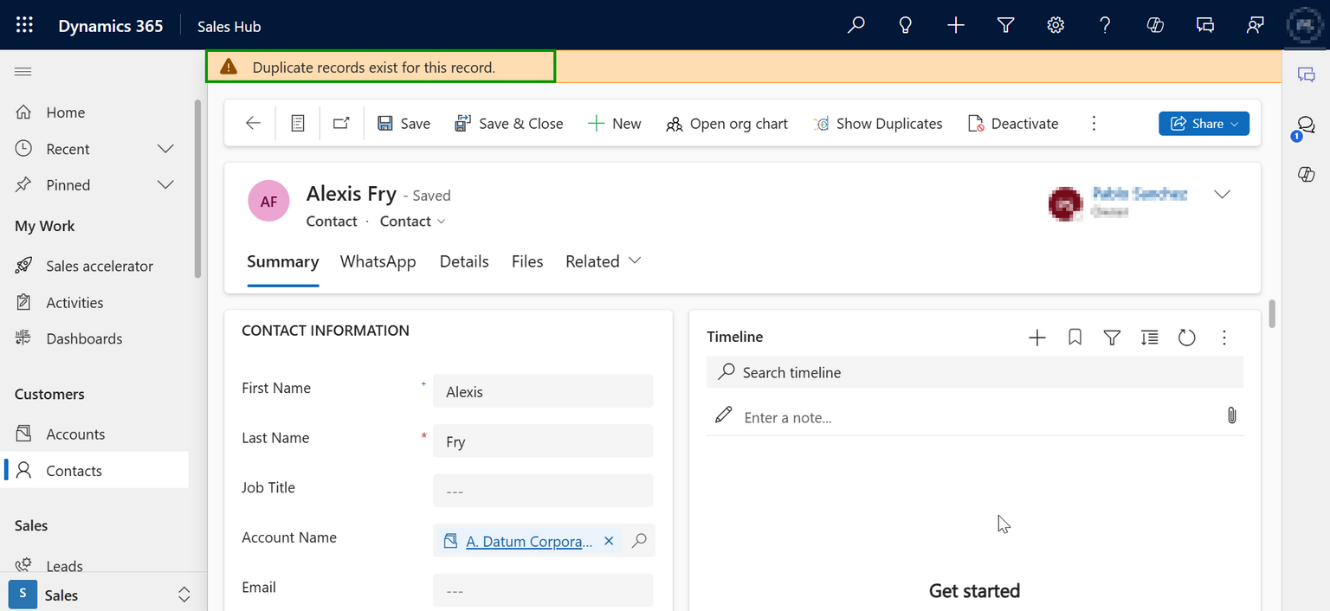
Step-by-Step: Configuring Duplicate Identification While Creating or Saving Records in Dynamics 365 CRM
Below is a clear, end-to-end walkthrough for enabling real-time duplicate detection using DeDupeD.
Identify Duplicate Records While Creating Records in Dynamics 365 CRM
Duplicate records don’t just clutter CRM; they confuse users, break reporting, and slow down sales and service teams.
The smarter approach is to identify duplicates as soon as users create or update records, not after the damage is done.
Here’s how this works in a simple way:
1. Choose Which Records Need Duplicate Checks
Not every record in CRM needs the same level of validation. Teams can decide which types of records, such as leads or contacts, should be checked for duplicates during data entry.
This ensures duplicate prevention is focused where it matters most.
2. Catch Duplicates While Users Are Typing
Instead of waiting until the record is saved, duplicate checks can happen as users enter information.
This helps users spot potential duplicates early and correct them instantly, saving time and avoiding rework.
3. Add a Final Safety Check Before Save
A final duplicate check can run when the record is saved, acting as a safety net.
This ensures that no duplicate slips through accidentally, even during fast-paced data entry.
4. Show Clear, In-Form Duplicate Notification
When a possible duplicate is found, users see clear, on-screen notifications explaining:
- What looks like a duplicate
- Why the alert appeared
- What action can they take next
This removes confusion and builds confidence in CRM data.
5. Apply Duplicate Checks Only Where Needed
Different teams use different CRM forms. Duplicate checks can be applied only to relevant forms, keeping performance fast and user experience smooth, especially in complex CRM setups.
6. Give Flexibility to the Right Users
Not all duplicate scenarios are mistakes. Some users may need to proceed despite a warning.
Admins can decide who can ignore duplicate alerts, balancing control with real-world business needs.
7. Control Who Can Merge Duplicate Records
Merging records improves data quality, but it must be handled carefully.
Only trusted roles, such as CRM admins or data owners, can be allowed to merge duplicates, protecting data integrity.
8. Reduce False Positives
Sometimes records look similar but are genuinely different.
Selected users can be allowed to exclude records from duplicate consideration, improving accuracy and user trust.
Want the Technical Setup Steps to identify duplicates while creating or updating CRM records?
This overview explains how duplicate identification works in practice.
For detailed configuration steps, screenshots, and admin-level instructions, refer to the complete technical documentation.
Real-World Example: Sales Team Using Real-Time Duplicate Detection
Imagine a sales rep in Sydney creating a new lead.
As they enter the email address, DeDupeD instantly:
- Checks existing leads and contacts
- Finds a similar record created earlier by another rep in London
- Displays a form notification showing the existing record
Instead of creating a duplicate, the rep:
- Opens the existing record
- Continues the conversation seamlessly
Result:
- No duplicate lead
- Accurate pipeline data
Common Mistakes to Avoid
❌ Enabling detection on too many fields
❌ Allowing all users to ignore duplicates
❌ Showing alerts on every form unnecessarily
✔ Best Practice:
Enable detection on high-value fields, restrict override permissions, and start with critical forms.
Server-Side Duplicate Identification in Dynamics 365 CRM
How to Identify Duplicate Records Created during 3rd Party Integrations, Workflows, Imports?
Not all duplicate records in Dynamics 365 CRM are created by users manually entering data.
A large number of duplicates originate from background processes, including workflows, 3rd party integrations (For example, CRM and ERP integration), data imports, and automated updates, which users may never interact with directly.
This is where server-side duplicate identification becomes critical.
This guide explains how to identify duplicate records created during 3rd party integrations, workflow, or data imports, why it’s essential for modern CRM environments, and how DeDupeD enables advanced, automatic duplicate detection on the server side, helping organizations quickly and easily keep CRM data clean without manual intervention
What is Server-Side Duplicate Identification in Dynamics 365 CRM?
Server-side duplicate identification detects duplicates after CRM processes run on the server, not on the user interface.
This includes records created or updated by:
- Workflows and Power Automate flows
- Integrations with ERP, marketing, or external systems
- Bulk imports from Excel or third-party tools
- Scheduled or background CRM processes
Unlike client-side detection, server-side identification works silently and continuously, protecting data quality even when no user is actively working in CRM.
How to Handle Records Created During 3rd-Party Integrations, Workflows, and Imports in Dynamics 365 CRM
DeDupeD extends Dynamics 365 CRM with advanced server-side duplicate detection, ensuring data quality is maintained across all automated processes.
It works by:
- Monitoring record creation and updates on the server
- Comparing incoming data against existing CRM records
- Applying intelligent matching logic automatically
- Preventing or flagging duplicates in real time
This makes DeDupeD especially valuable for enterprise-scale CRM environments in the US, UK, Australia, and global markets.
When Are Duplicates Identified for Records Created Through Integrations, Workflows, and Imports?
DeDupeD allows admins to control exactly when duplicate checks should occur during server operations.
1. Duplicate Detection on Record Creation
This option checks for duplicates when a new record is created, regardless of how it was created.
Ideal for:
- Data imports
- API-based integrations
- Automated record creation
2. Duplicate Detection on Record Update
This option checks for duplicates when existing records are updated.
Useful when:
- Integrations modify existing customer data
- Automated processes update contact details
Data consolidation workflows run
Step-by-Step: Identify Duplicate Records Created by Integrations, Automations, and Imports in Dynamics 365 CRM
Not all duplicate records are created by users.
In many Dynamics 365 CRM environments, duplicates quietly enter the system through:
- Third-party integrations
- Automated workflows and background processes
- Bulk data imports and migrations
Because these records are created behind the scenes, users often discover duplicates only after reports break or customer data becomes unreliable.
A server-side duplicate identification approach helps prevent this, without relying on user action.
1. Protect CRM Data Beyond the User Interface
Server-side duplicate identification works in the background.
It checks records as they are created or updated by automated processes, ensuring data quality even when no one is actively using CRM screens.
This means duplicates are identified:
- During integrations
- During background automation
- During large data imports
2. Apply Duplicate Checks Where It Matters Most
Teams can decide which CRM records should be protected, such as leads, contacts, or accounts.
This keeps duplicate prevention focused on high-impact data without slowing down the entire system.
3. Control When Duplicates Are Blocked
Every business process is different. Duplicate identification can be applied:
- When records are created
- When records are updated
- Or at both stages
This flexibility ensures data protection aligns with real business workflows.
4. Ensure Duplicate Checks Work Even in Complex Automations
Some automated processes run with limited access and can unintentionally bypass duplicate rules.
Server-side identification ensures duplicates are still detected, even when records are created by background users or system processes.
5. Balance Performance and Control
For trusted system users or specific scenarios, duplicate checks can be selectively excluded.
This prevents unnecessary processing while still maintaining overall data integrity.
6. One-Time Setup, Continuous Protection
Once enabled, server-side duplicate identification works automatically:
- No user training required
- No manual monitoring
- Continuous protection for all automated record creation
Looking for the Exact Configuration Steps to prevent duplicates created due to integration, workflow, or data imports?
This overview explains the concept and business value of server-side duplicate identification.
For detailed setup instructions, role configurations, and screenshots, refer to the technical documentation.
Real-World Example: Preventing Duplicate Imports
A growing enterprise integrates its ERP system with Dynamics 365 CRM to sync customers, invoices, and account updates in real time.
Without server-side duplicate identification
As data flows automatically from ERP to CRM:
- The same customer is created multiple times in CRM
- Sales and service teams see conflicting account records
- Financial and customer reports no longer match ERP data
- Teams lose trust in CRM as a single source of truth
With server-side duplicate identification enabled
Every record coming from the ERP system is checked before it is created or updated in CRM:
- Existing customers are identified automatically
- Duplicate accounts and contacts are prevented or clearly flagged
- ERP and CRM stay aligned without manual cleanup
Result
- Clean, reliable CRM data
- Accurate CRM–ERP reporting alignment
- Faster sales, billing, and service workflows
- No disruption to automated integrations
Server-Side vs Client-Side Duplicate Identification
Aspect | Client-Side | Server-Side |
User interaction | Required | Not required |
Works with workflows | No | Yes |
Works with imports | Limited | Yes |
Real-time UI alerts | Yes | No |
Automation-friendly | No | Yes |
👉 Best Practice: Use both together for complete duplicate protection.
Client-Side vs Server-Side Duplicate Prevention (Decision Guide)
Capability | Client-Side | Server-Side |
Prevents duplicates during user entry | Yes | No |
Protects automation & integrations | No | Yes |
Provides instant user feedback | Yes | No |
Required for imports & workflows | No | Yes |
✔ Best Practice: Start with high-risk entities like Contacts and Leads.
Duplicate Identification with Different Phone Number Format in Dynamics 365 CRM
How to Easily Identify Duplicate Records Caused by Different Phone Number Formats
Phone numbers are one of the biggest hidden causes of duplicate records in Dynamics 365 CRM.
The same customer can appear multiple times simply because their phone number is entered in different formats—local, international, spaced, dashed, or with country codes.
This page explains how phone number format duplicate detection works, why it’s essential for clean CRM data, and how DeDupeD helps users quickly and accurately identify duplicate records even when phone numbers look different.
What is Phone Number Format Duplicate Detection?
Phone number format duplicate detection is an advanced approach to identifying duplicate CRM records, even when phone numbers are stored differently.
Instead of comparing phone values exactly as entered, DeDupeD:
- Normalizes phone numbers behind the scenes
- Understands multiple regional and international formats
- Identifies records that represent the same number
- Flags or prevents duplicates accurately
This ensures a single, clean view of each customer, regardless of how their phone number was entered.
Why Phone Numbers Create So Many Duplicates in CRM
Unlike names or email addresses, phone numbers have no single universal format. The same number can be stored in many valid ways:- (415) 555-2671
- +1 415 555 2671
- 001-415-555-2671
- 4155552671
- “Why do I have duplicate contacts in CRM?”
- “How to find duplicate phone numbers in Dynamics 365 CRM?”
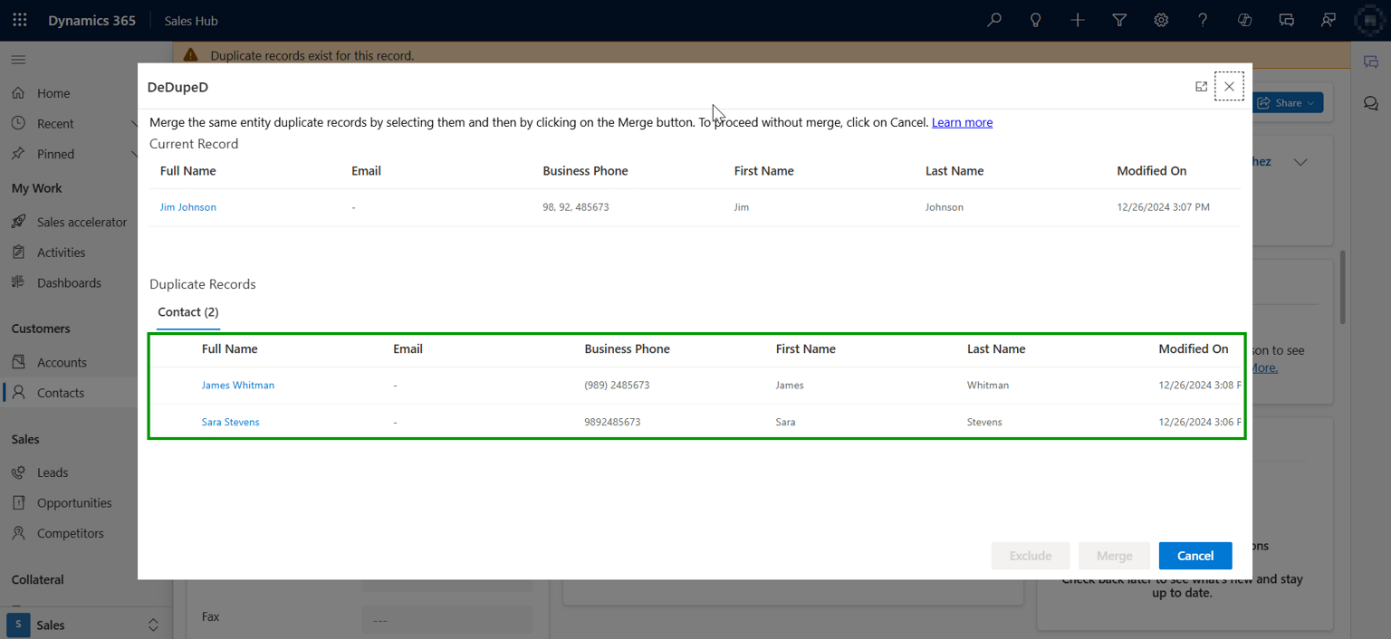
Step-by-Step: How to Configure Phone Number Format Duplicate Identification
Identify Phone Number Duplicates Even When Formats Differ
In Dynamics 365 CRM, phone numbers are one of the most common reasons duplicates slip in.
Users enter numbers in different ways, country codes, spaces, brackets, or local formats, making two identical phone numbers look completely different to the system.
Phone number format–based duplicate identification solves this by recognizing duplicates regardless of how the number is typed.
How Phone Number Duplicate Identification Works
Instead of checking for an exact match, the system:
- Understands multiple phone number formats
- Normalizes how phone numbers are interpreted
- Identifies duplicates even when formatting differs
This means:
- Fewer duplicate contacts and leads
- Cleaner CRM data
- Less manual cleanup later
What You Can Control
At a high level, CRM admins can define:
- Which records should be checked for phone number duplicates
(for example, contacts or leads) - Which phone fields matter
(business phone, mobile phone, etc.) - How phone numbers are compared
So that +91 98765 43210 and (0987) 654-3210 are treated as the same number - Which phone formats are considered valid
Supporting regional and business-specific formats - How empty phone values are handled
Avoiding unnecessary or false duplicate alerts
Once enabled, duplicate detection runs automatically in the background, helping users avoid creating duplicate records without disrupting their workflow.
Why This Matters for CRM Teams
- Sales teams avoid calling the same customer twice
- Marketing teams maintain cleaner outreach lists
- Support teams see a complete customer history
- Admins spend less time fixing data issues
Most importantly, it improves trust in CRM data across the organization.
Want the Step-by-Step Configuration for identifying duplicates created due to different phone number formats?
This overview explains what phone number duplicate identification does and why it matters.
For exact setup steps, field selection, matching rules, and format examples, refer to the detailed technical documentation.
Real-World Example: Global Sales Team
A CRM used by teams in:
- New York
- London
- Sydney
Each team enters phone numbers differently:
- US reps include +1
- UK reps use spaces
- Australian reps enter local formats
Without phone number format detection:
- The same customer exists three times
- Sales coordination breaks down
With DeDupeD:
- All formats are recognized as the same number
- Only one customer record exists
- Teams share full history seamlessly
Common Mistakes to Avoid
❌ Relying on exact phone number matches
❌ Allowing unlimited formats without review
❌ Treating blank phone fields as duplicates
✔ Best Practice:
Start with the most common regional formats and expand gradually.
FAQs
Can duplicates be detected before saving a record?
Yes. Client-side detection alerts users before the record is saved, preventing duplicates from entering the system.
Is real-time duplicate detection suitable for large CRM databases?
Yes. Advanced client-side detection is optimized to work efficiently even in large CRM environments.
How do I identify duplicate records created by workflows in CRM?
By enabling server-side duplicate identification, duplicates created by workflows and automations can be detected automatically.
Can server-side detection prevent duplicates during imports?
Yes. Server-side duplicate identification checks records during imports and prevents duplicate creation.
Is server-side duplicate detection automatic?
Yes. Once configured, it runs automatically without user involvement.
Does server-side detection impact CRM performance?
No. When configured correctly, it operates efficiently in the background.
How to identify Phone Number-Based Duplicates
DeDupeD extends Dynamics 365 CRM with format-aware phone number matching, allowing duplicate identification to work the way users expect—not the way raw data looks.
With DeDupeD, users can:
- Detect duplicates caused by different phone formats
- Compare phone numbers across records easily
- Maintain accurate contact and account data at scale
This makes phone number duplicate detection advanced, reliable, and easy to manage.
How do I identify duplicate phone numbers in Dynamics 365 CRM?
By using phone number format duplicate detection, CRM can identify duplicates even when numbers are stored in different formats.
Can CRM detect duplicates if phone numbers have different country codes?
Yes. Advanced phone number detection recognizes country codes and regional formats.
Is phone number duplicate detection important for global businesses?
Absolutely. It is essential for organizations operating across regions like the US, UK, and Australia.
Does phone format detection work during imports?
Yes. When combined with server-side detection, duplicates are identified during imports and integrations.
Why Phone Number Format Duplicate Detection Is Critical for Clean CRM Data
Phone numbers are one of the most trusted customer identifiers, yet also one of the most inconsistent.
Without format-aware detection, duplicates quietly multiply and damage CRM reliability.
By using DeDupeD’s advanced phone number format duplicate detection, organizations can quickly and easily identify duplicate records, maintain a single source of truth, and improve every customer interaction.
Reach out to us today to know more about DeDupeD!



