


Data Deduplication in CRM
Foundation for Data Quality, Identity Resolution, and AI-Ready CRM
Table of Contents
Data deduplication in Dynamics 365 CRM is no longer just about removing duplicate records.
In modern CRM environments, it is a core data quality discipline that enables a single customer view, unified customer profiles, and AI-ready CRM data.
As organizations increasingly rely on Dynamics 365 for forecasting, automation, and AI-driven insights, duplicate and fragmented records directly undermine trust in CRM. Poor data quality prevents teams from confidently using Copilot, analytics, and customer intelligence features.
This page explains:
- What data deduplication means in the context of Dynamics 365 CRM
- Why duplicate data is common in CRM systems
- How data deduplication supports Dynamics 365 data quality
- The operational, business, and governance risks of duplicate records
- Why duplication increases during CRM imports and migrations
- How modern CRM teams approach deduplication as identity resolution, not just cleanup.
It also serves as a central reference point, with deeper guidance available on duplicate identification, duplicate prevention, and duplicate record merging in Dynamics 365 CRM.
What is Data Deduplication in CRM?
Data deduplication in Dynamics 365 CRM is the process of ensuring that each real-world customer, prospect, or organization is represented by a single, unified customer profile, even when data is entered multiple times in different formats or from different sources.
In modern CRM systems, deduplication focuses on:
- Identifying when multiple records represent the same real-world entity
- Preventing new duplicates from entering CRM
- Safely consolidating existing duplicates without data loss
Importantly, deduplication is not a one-time cleanup task.
In most organizations, it is an ongoing requirement driven by continuous data entry, integrations, imports, and AI-driven usage of CRM data.
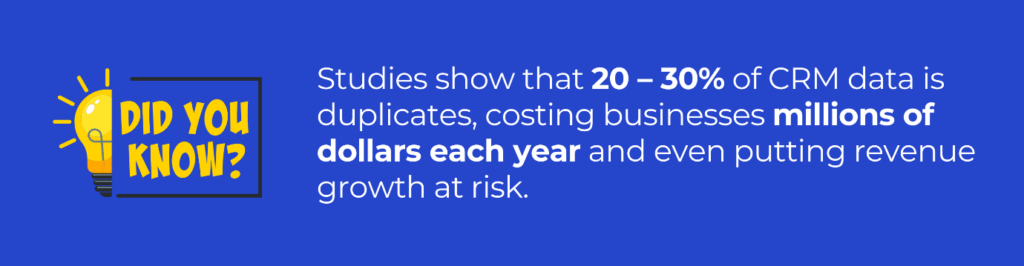
Why Duplicate Data Exists?
Duplicate data in CRM systems is usually the result of normal operational behavior, not user error. Dynamics 365 CRM is designed to accept data from multiple sources, which increases the likelihood of duplication.
Common causes for duplicate data in CRM include:
- Manual record creation by sales or support teams
- Marketing platforms creating new leads automatically
- Data imports from spreadsheets or third-party systems
- Integrations with ERP, finance, customer service tools, etc.
- Differences in data formats, spelling, or regional conventions
In global CRM deployments, such as those spanning the US, UK, Australia, or multiple regions, duplicate data is further amplified by variations in naming conventions, phone formats, and data entry practices.
Challenges Faced by CRM Users Due to Duplicate Data
Duplicate data introduces both daily operational friction and long-term structural issues in CRM usage.
1. Loss of Confidence in CRM Data
When users encounter multiple records for the same customer, they often question which record is accurate. Over time, this reduces trust in CRM as a reliable system of record.
2. Increased Manual Effort
Users spend additional time:
- Searching for the correct record
- Comparing similar records
- Avoiding updates due to uncertainty
This reduces overall productivity and CRM adoption.
3. Fragmented Customer History
Duplicate records split interactions, activities, and transactions across multiple entries. This leads to incomplete customer views and inconsistent engagement.
Struggling with Duplicate Records in Dynamics 365?
How to Handle Duplicate Records in CRM
Data deduplication in Dynamics 365 CRM is a foundational data management practice. Duplicate records affect efficiency, reporting accuracy, compliance, and user trust. By understanding why duplicates occur and the risks they introduce, organizations can approach deduplication as a continuous CRM discipline rather than a reactive cleanup task.
This page provides the conceptual foundation, with deeper, action-focused guidance available on:
Together, these resources support a sustainable CRM data quality strategy.
Effective data deduplication in Dynamics 365 CRM typically follows a three-stage lifecycle:
1. Duplicate Identification
Duplicate identification focuses on detecting existing duplicate Leads, Contacts, Accounts, or custom records in Dynamics 365 CRM using data similarity, fuzzy matching, and configurable business rules. This stage helps CRM administrators uncover hidden data quality issues that impact reporting, segmentation, and AI-driven insights.
2. Duplicate Prevention
Duplicate prevention ensures that new duplicate records are blocked or flagged at the point of data entry, imports, integrations, and automated workflows in Dynamics 365 CRM. By enforcing real-time validation rules, organizations maintain clean, trusted CRM data across users, channels, and regions.
3. Duplicate Merging
Duplicate merging enables safe consolidation of duplicate CRM records while retaining relationships, activities, ownership, and historical data. This step ensures accurate analytics, reliable sales forecasting, and consistent customer views without disrupting business processes or integrations.
Each stage supports the others, and addressing only one stage is usually insufficient for long-term data quality.
Business Impact of Duplicate Data in CRM
1. Reduced Sales and Marketing Efficiency
Duplicate leads and contacts result in:
- Multiple sales representatives contacting the same customer
- Inflated pipeline and lead metrics
- Inefficient territory and account management
Marketing campaigns may also target the same individual multiple times, increasing unsubscribe rates and lowering campaign effectiveness.
2. Reporting, Analytics, and AI Risk
Modern analytics and AI rely on accurate, unified data.
Duplicate records cause:
- Overstated customer counts
- Incorrect revenue attribution
- Misleading dashboards and forecasts
- Unreliable AI and Copilot responses
Without unified customer profiles, CRM data cannot be considered AI-ready.
3. Data Quality, Compliance, and Governance Risks
Duplicate data complicates governance and regulatory compliance.
4. Data Quality Degradation
As duplicates increase, data consistency decreases. Validation rules, automation, and workflows become less reliable.
5. Privacy and Compliance Concerns
When customer data exists in multiple records:
- Consent and preference management become inconsistent
- Data access or deletion requests are harder to fulfill
- Audit trails become fragmented
This increases regulatory risk under data protection frameworks.
6. Loss of a Single Source of Truth
Without deduplication, CRM no longer functions as a unified system of record. This affects audits, integrations, and long-term scalability.
Start a 15-Day FREE trial of your favorite Deduplication app for CRM!
CRM Migration and Data Import: Why Duplication Spikes
CRM migrations and large-scale imports are among the most common points where duplicate data increases significantly.
Why Migrations Introduce Duplicates
- Legacy systems store data differently
- Unique identifiers may not align
- Matching logic is often simplified during migration
As a result, multiple records representing the same customer are created in the target system.
Why Deduplication Must Be Planned Around Migrations
If deduplication is not addressed:
- Duplicate data is carried into the new CRM
- Cleanup becomes more complex after go-live
- User trust is impacted early in adoption
For this reason, deduplication should be treated as both a pre-migration and post-migration activity, not a final cleanup step.
Who Should Care About CRM Deduplication?
CRM deduplication is relevant to:
- Sales and marketing leaders responsible for performance metrics
- CRM administrators managing system integrity
- IT teams handling integrations and migrations
- Data governance and compliance teams
Any organization that relies on CRM data for decision-making benefits from a structured deduplication approach.
What’s the Next Step in CRM Deduplication?
Understanding duplicate data is the first step. The next step is learning how to identify, prevent, and safely merge duplicate records in Dynamics 365 CRM.
FAQs
What is data deduplication?
Data deduplication is the process of identifying, preventing, and merging duplicate records to maintain one accurate version of data in a system.
In Dynamics 365 CRM, data deduplication ensures:
- A single, trusted customer record
- Accurate sales, marketing, and service reporting
- Reliable AI insights, predictions, and Copilot responses
- Strong data governance and compliance
DeDupeD supports the complete deduplication lifecycle:
Duplicate Identification → Duplicate Prevention → Duplicate Merging
How to prevent duplicate records in CRM sync?
Duplicate records during CRM sync can be prevented by using real-time duplicate detection with advanced rule-based and fuzzy matching before records are created or updated.
DeDupeD prevents duplicates during CRM sync by:
- Running real-time client-side duplicate checks during record creation
- Applying fuzzy matching for email, phone numbers, and names
- Blocking duplicates during API syncs, integrations, and bulk imports
- Normalizing phone numbers and email formats automatically
- Enforcing server-side validation rules for background processes
This ensures that duplicate data never enters Dynamics 365 CRM, even during high-volume sync operations.
Why is duplicate data common in CRM systems?
Duplicate data occurs due to multiple data sources, manual entry, integrations, imports, and CRM migrations.
How to handle duplicate contacts in a CRM sales team?
Duplicate contacts in a CRM sales team should be handled through early identification, guided merging, and continuous prevention, without slowing sales users.
With DeDupeD, sales teams can:
- Instantly identify duplicate contacts while creating or updating records
- View side-by-side comparisons with confidence scores
- Use automated merge logic without losing activities or ownership
- Avoid duplicate follow-ups, emails, and calls
- Maintain a single source of truth for every prospect and customer
This improves sales productivity, pipeline accuracy, and customer experience.
How to merge duplicate records in CRM?
Duplicate records in CRM can be merged by selecting a master record and consolidating all related data, activities, opportunities, notes, and relationships into one accurate record.
DeDupeD simplifies CRM duplicate merging by:
- Detecting duplicates using advanced matching conditions
- Allowing single-click or bulk merging
- Create an accurate master record to merge the duplicates.
- Preserving complete data history
- Supporting accounts, contacts, leads, and custom entities
Ensuring audit-safe, irreversible data consolidation
How do you find and remove duplicate data in CRM?
Duplicate data in CRM is found using rule-based and fuzzy matching algorithms and removed through intelligent merging or controlled deletion.
DeDupeD helps you:
- Scan CRM data across accounts, contacts, leads, and custom entities
- Find exact and near-match duplicates
- Assign confidence scores to prioritize cleanup
- Merge duplicates in bulk without data loss
- Enable ongoing prevention to stop duplicates from reappearing
This turns deduplication from a one-time cleanup into a continuous data quality process.
How to handle duplicate contacts in the CRM sales team (best approach)?
The best way to handle duplicate contacts in a CRM sales team is to combine real-time identification, sales-friendly merging, and automated prevention rules.
DeDupeD enables this by:
- Alerting sales users instantly when a duplicate is detected
- Providing guided merge recommendations
- Preventing duplicates from web forms, imports, and integrations
- Respecting role-based permissions
- Tracking duplicate trends by source
This ensures sales teams trust CRM data and focus on selling—not fixing records.
Reach out to us today to know more!



