















Maximize Dynamics 365 User Adoption
Track, Analyze, Monitor, and Improve Your User Engagement with User Adoption Monitor
What's User Adoption Monitor?
User Adoption Monitor is an intelligent Microsoft Dynamics 365 CRM add-on that uses advanced user activity tracking and analytics to measure real user activity, uncover adoption gaps, and drive sustained engagement. With AI-powered dashboards, customizable usage reports, and role-based insights, it transforms raw interaction data into actionable strategies for sales, marketing, and service teams. By identifying low-usage features, inactive users, and workflow bottlenecks, organizations can proactively boost adoption rates. Industry studies show that organizations with high CRM adoption achieve up to 25% higher revenue and 21% greater customer satisfaction, making User Adoption Monitor essential for maximizing CRM benefits.
Recent Updates
Tracking Field Specific Updates to Focus on essential CRM field changes in Microsoft Dynamics 365
Track and report CRM user activities daily, weekly, or monthly to gain insights into usage patterns and system utilization.
Information Vault
Benefits of using User Adoption Monitor
Enhances team efficiency by ensuring all users effectively leverage CRM usage.
Balances workloads, enhances resource allocation, and ensures all users contribute effectively.
Enables strategic adjustments, leading to better operational efficiency.
Maximizes ROI by ensuring CRM features contribute directly to business outcomes.
Supported On
Dynamics 365 CRM
Online | On-Premises | Dataverse
Features
Here's is How it Effectively Boost User Adoption
Time & Activity Tracking in Dynamics 365 — See Where Productivity Happens
Tracking user activity in Dynamics 365 CRM gives you a clear, real-time view of time spent on key tasks and user interactions. By combining detailed usage data, you’ll quickly identify where productivity is strong, where workflows slow, and which activities need attention. This means you can streamline processes, boost adoption, and ensure your CRM is delivering measurable business results. Organizations that actively track and optimize CRM usage consistently see faster workflows, higher ROI, and stronger user adoption rates in Dynamics 365 CRM.
With User Adoption Monitor, you get a clear view of how your team uses Dynamics 365 CRM every day with activity tracking. This intelligent solution enables you to:
- Track Core Activities: Monitor user actions like logins, logouts, record creation, updates, deletions, and openings, across all CRM modules.
- Time-Based Insights: View activity trends on a daily, weekly, or monthly basis to identify engagement patterns and adoption gaps.
- Boost CRM ROI: Use actionable data to improve training, streamline workflows, and increase feature adoption.
As Dynamics 365 CRM user adoption is directly linked to higher revenue and customer satisfaction, User Adoption Monitor transforms Dynamics 365 from a passive tool into a performance engine. It’s not just about who logs in, it’s about who contributes, how often, and where improvements are needed.
With user activity tracking in Dynamics 365 CRM, you can monitor your team’s login and logout activities seamlessly. Gain clear insights into when each team member accesses the CRM and how long they stay active. With Login & Logout Tracking, you get a clear, real-time view of every user’s session history
With this tool, you can:
- Monitor Access Patterns – See exactly when each team member logs in and logs out of Microsoft Dynamics 365 CRM, giving you a clear picture of user engagement and CRM adoption rate.
- Measure Active Time – Understand how long users remain active in the system to uncover productivity trends and pinpoint areas where user adoption in Dynamics 365 CRM can improve.
- View Trends Over Time – Track login/logout activity daily, weekly, or monthly to identify patterns, address dips in usage, and keep CRM adoption on track.
By acting on these insights, organizations boost user adoption in Dynamics 365 CRM, reduce license waste, and improve productivity across sales, marketing, and service teams
With Check-In & Check-Out activity tracking in Dynamics 365 CRM, you can see every moment a user engages with specific records, giving you a clear picture of focus, productivity, and workflow efficiency.
With this tool, you can:
- Track Record Engagement – See when a user checks in to work on a record and when they check out, helping you understand time spent on tasks.
- Prioritize High-Impact Work – Identify which records and activities consume the most time so you can guide your team toward priority tasks.
- Spot Bottlenecks – Monitor interactions with CRM entities to detect delays, repetitive work, or unnecessary steps that slow progress.
- Optimize Workflows – Use time-on-record insights to streamline processes and improve turnaround times for sales, marketing, and service teams.
By acting on these insights, organizations improve CRM adoption, eliminate wasted effort, and ensure their teams are spending time where it matters most, boosting productivity, ROI, and user adoption in Dynamics 365 CRM.
User Performance Tracking & Target Management in CRM — Keep Your Teams Goal-Focused
User Performance and activity tracking in Dynamics 365 CRM & Target Management turns your CRM into a results-driven dashboard.
- Easily assign user-specific targets — from sales revenue and lead generation to service case resolutions and task completions.
- Track progress in real time, monitor trends, and instantly see who’s excelling and where extra support is needed.
With these insights, you can celebrate top performers, coach underperformers, and adjust strategies to stay aligned with business objectives. Organizations that actively set and monitor CRM-based targets see stronger CRM user adoption, higher accountability, and measurable growth in sales and customer satisfaction.
Ensure Data Completeness in Your CRM — Keep Every Record Reliable
With our Data Completeness, Dynamics 365 CRM becomes your built-in data quality checker. You can set mandatory fields for any entity, ensuring that a CRM record is marked “Complete” only when all required details are filled in, even for older, historical records.
This means your database stays accurate, reliable, and ready for AI-enabled actions. No more half-filled leads, incomplete opportunities, or customer records missing key info. With complete data, your sales, marketing, and service teams can communicate clearly, make confident decisions, and trust the insights they see.
Companies that maintain high-quality CRM data see faster decision-making, improved customer engagement, and stronger user adoption, because when your CRM is clean, your team actually wants to use it.
More Features
Flexible Tracking Control
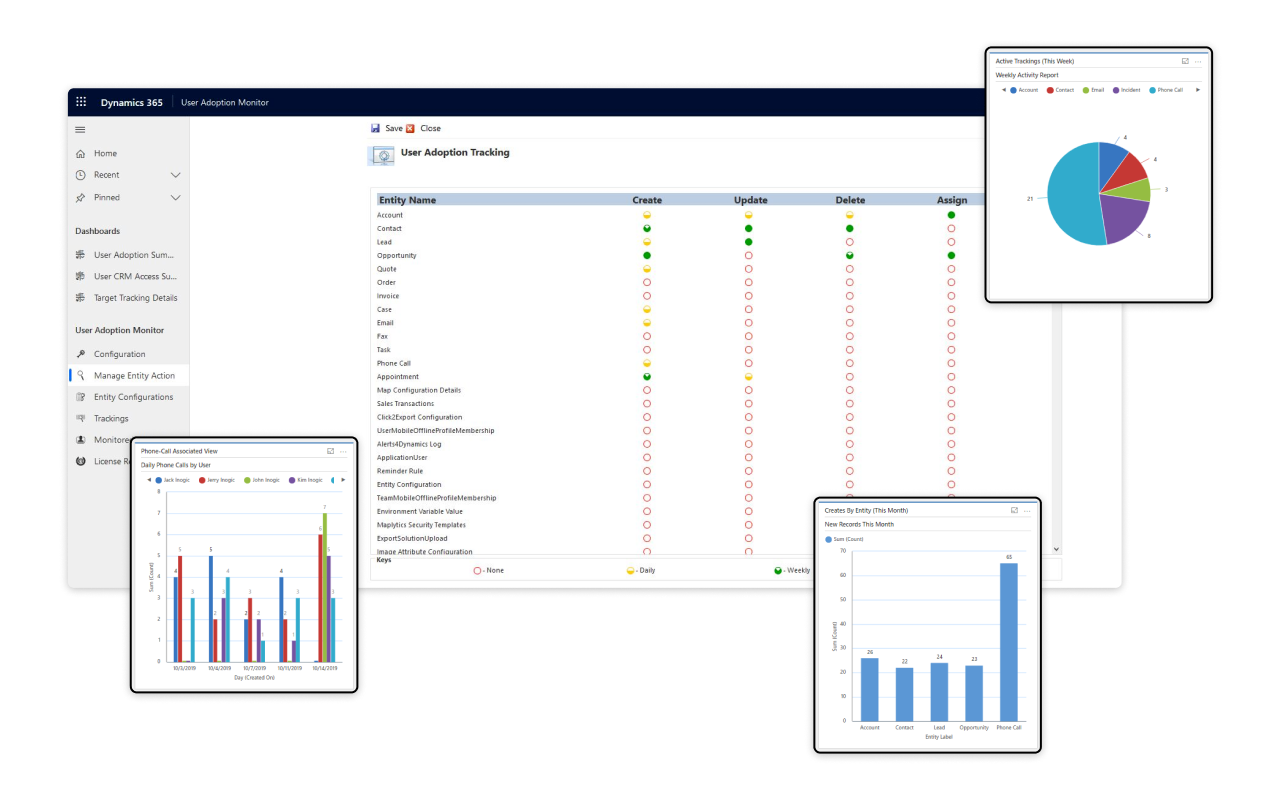
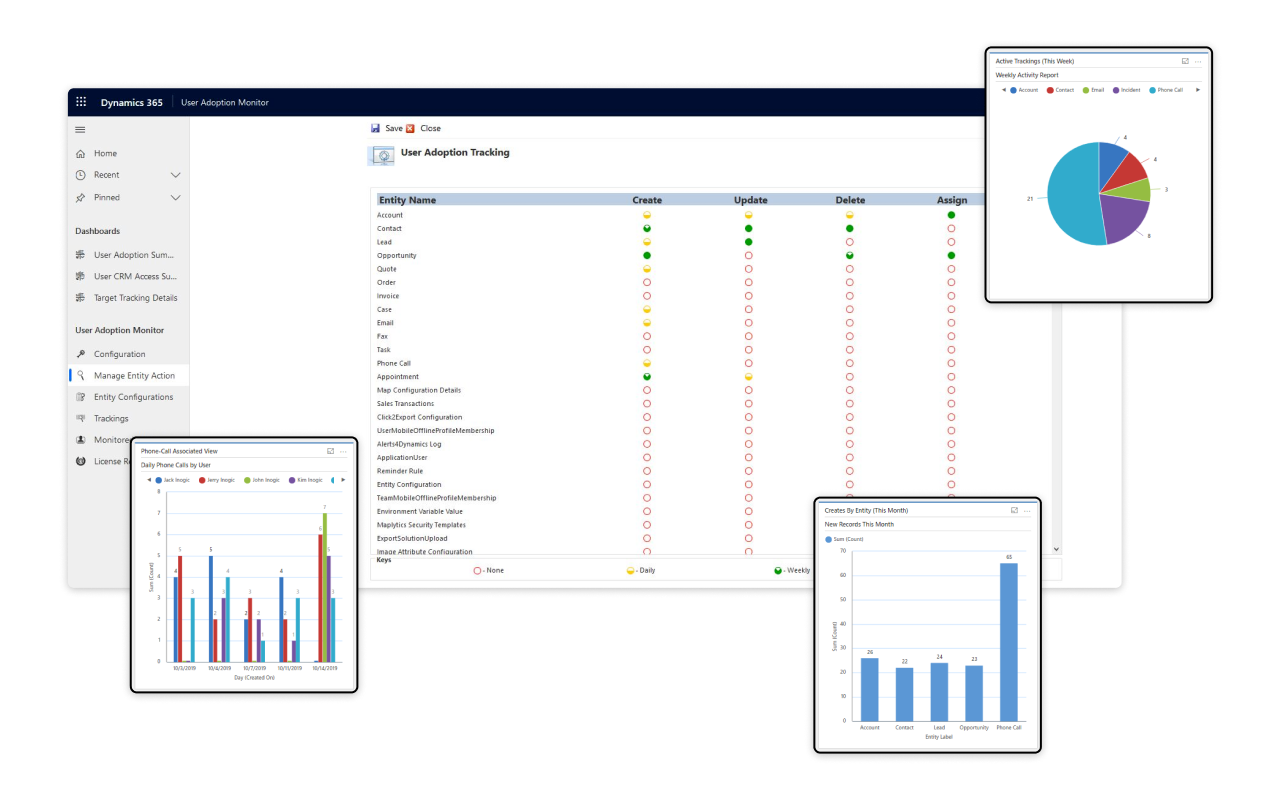
Easily enable or disable User Adoption Monitor tracking for specific users directly from the System Users form.
Informative Dashboard
Gain insights into user performance with intuitive dashboards that track engagement & adoption metrics.
Performance Analysis
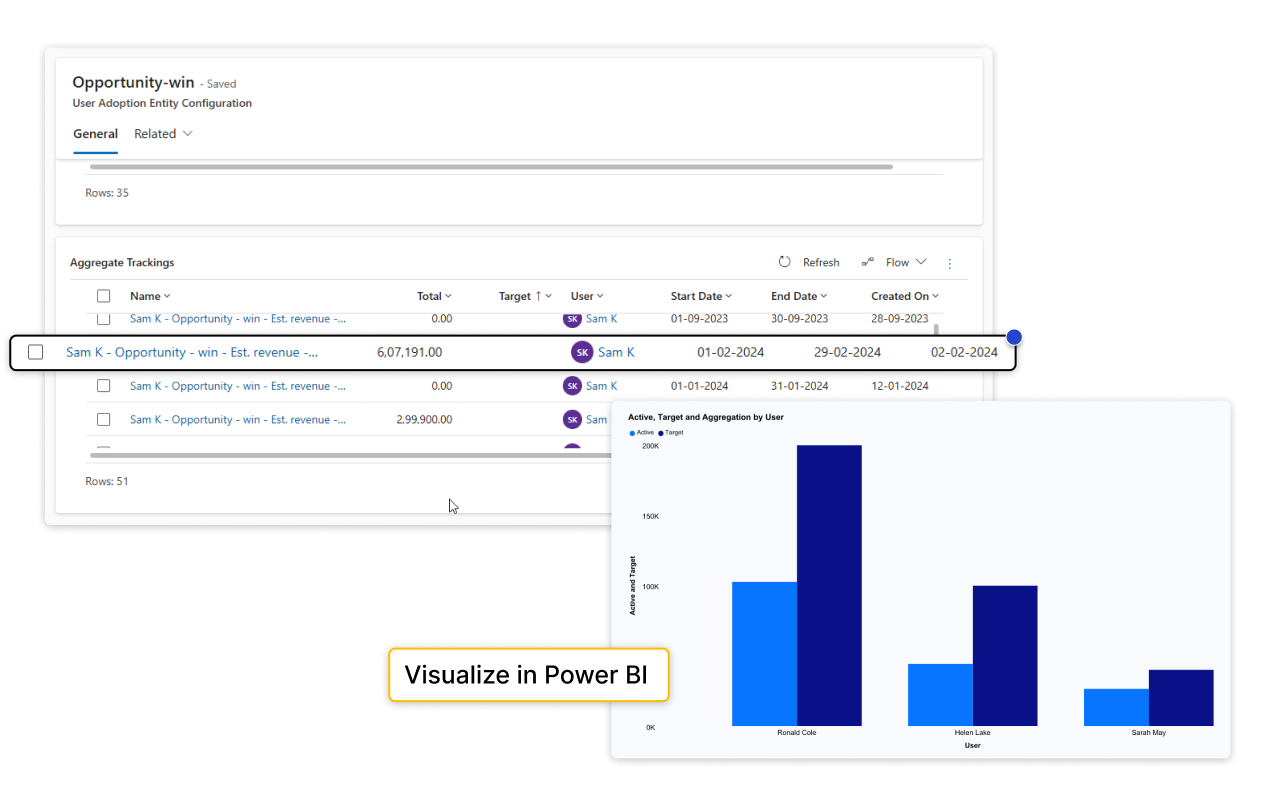
User Adoption Monitor assists in analyzing overall individual user performance in CRM with the help of leaderboards and performance dashboard.
Customized Reports
Users can generate different types of reports (SSRS, Power BI reports) to help them with further analysis of user performance.
Easy Configuration
Users are able to easily configure entities and actions to be monitored in Dynamics 365 CRM as per their requirements.
User-Level Tracking Control
Customize tracking settings for individual users, enabling or disabling tracking as needed to suit different roles and responsibilities.
A Comprehensive Guide to Getting the Most Out of Your Investment
testimonials
What Our Customers Are Saying?
Our Blogs
How to Track and Improve Dynamics 365 CRM User Adoption (Step-by-Step Guide)
In this guide, I’ll walk you step-by-step through how to configure User Adoption Monitor to track and boost CRM adoption…
How to Improve User Engagement in Microsoft Dynamics 365 CRM – The Complete Guide
User Adoption Monitor ensures your CRM is used to its full potential, turning it into a daily habit for your sales, service…
5 Best Practices to Improve Microsoft Dynamics 365 CRM User Adoption!
Microsoft Dynamics 365 CRM has revolutionized the way organizations manage customer relationships, enabling businesses…
Frequently Asked Questions
User Adoption Monitor gives provision to enable and disable tracking of user actions in Dynamics 365 CRM. Business organizations therefore, have the choice to monitor and review actions performed by all users or just few selective users.
No, there is no such limit. With User Adoption Monitor one can monitor actions of any number of users using Dynamics 365 CRM.
No, there is no such time limit. After activating license for User Adoption Monitor, user actions can be tracked on daily, weekly or monthly basis.
User Adoption Monitor tracks the user actions and generates User Adoption Monitor Tracking and User Adoption Monitor Tracking Details records. And by using these tracking records one can create their own SSRS as well as Power BI reports as per their requirements.
Reach out to us today to know more!
