


















Interactive Kanban Board
Visualize and interact with Dynamics 365 data in Kanban View for streamlined operations.
Delivered Happiness Globally!
What's Kanban Board?
Kanban Board is a powerful visualization tool for Microsoft Dynamics 365 and Dataverse (Power Apps) that transforms traditional data grids into an interactive Kanban view. With lanes and rows organizing records, users can easily track, manage, and update their data using drag-and-drop Kanban cards. Designed for enhanced agility, productivity, and user experience, Kanban Board for Dynamics 365 CRM helps teams manage opportunities, cases, and projects more efficiently within their CRM system.
Recent Updates
Easily manage workflows with Global Pins for team-wide processes and Personal Pins for individual priorities.
Prioritize tasks with customizable card colours.
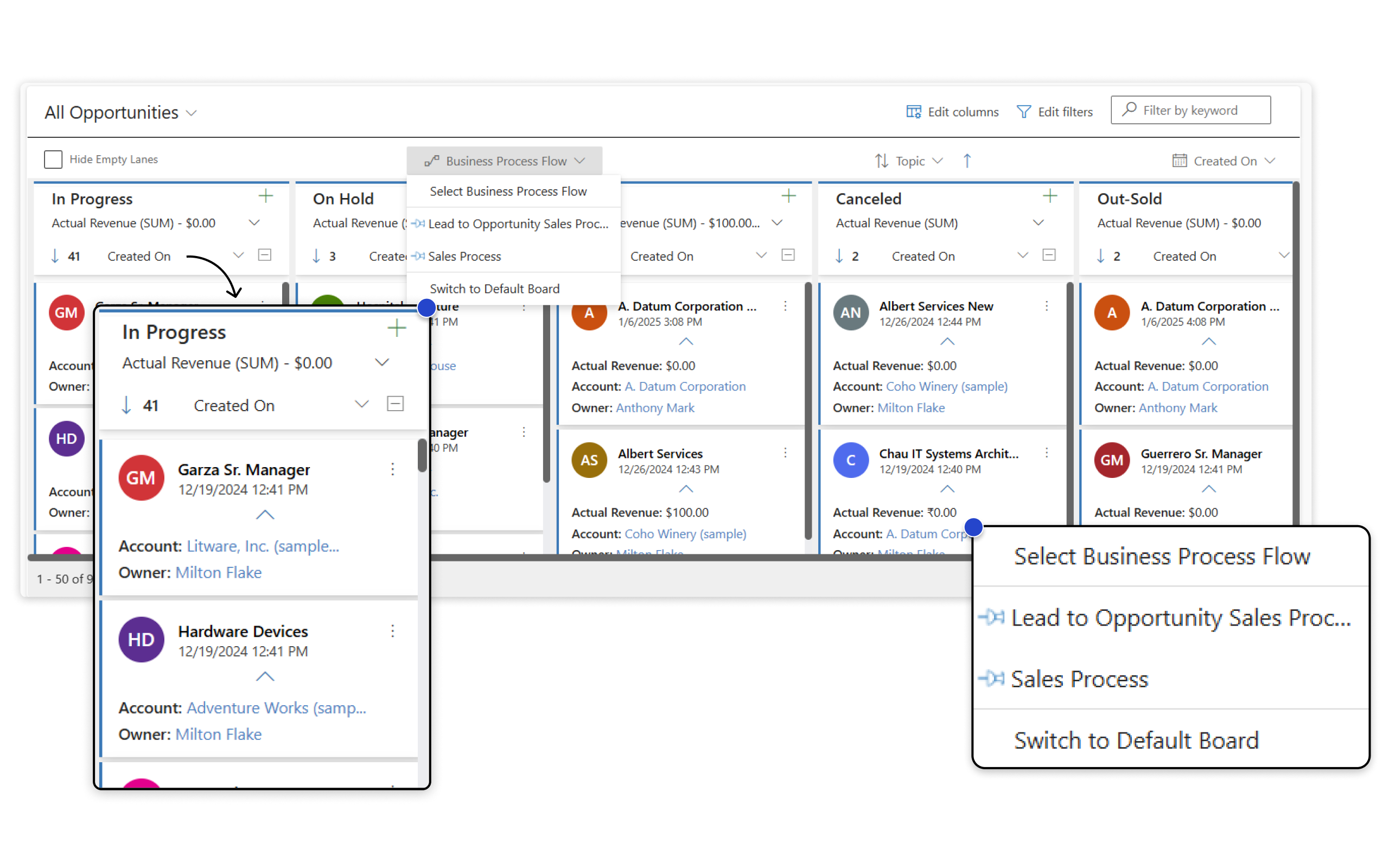
Apply Business Process Flows to multiple entities directly in the Kanban Board.
Organize lanes in ascending or descending order based on the number of cards.
Information Vault
Benefits of using Kanban Board
Visualize tasks and track the progress of projects/sales pipelines effectively to gain a clear view of performance.
Prioritize tasks based on value and effort to optimize productivity.
Ensures that team members avoid duplicate efforts and stay aligned with shared goals, boosting collaboration.
Helps identify opportunities to enhance sales processes and minimize waste.
Supported On
Dynamics 365 CRM
Online | Dataverse
Features
Here’s How It Helps You Visualize Your CRM Workflows
Business Process Flow Support
Looking to streamline your workflows? The Kanban Board supports Business Process Flows (BPFs), allowing you to organize and categorize records based on defined stages. This integration ensures that transactions are tracked through each phase, providing a clear and structured view of your processes.
Seamless Data Visualization with Kanban View
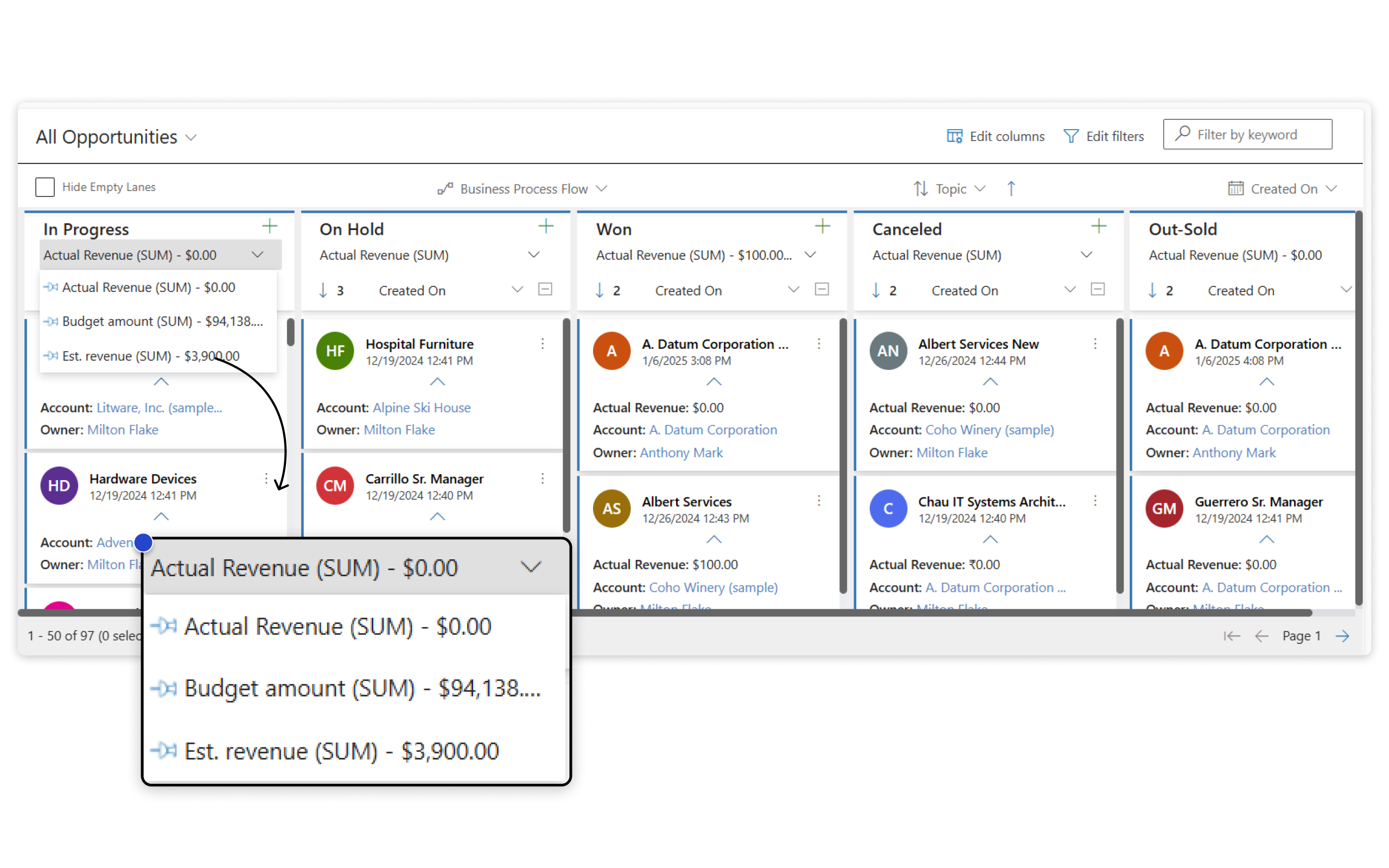
Transform any Dynamics 365 CRM view into a dynamic Kanban Board. Effortlessly organize and categorize records by entity type, customize fields, define categories, and gain quick access to track project progress and workflows. Elevate your data management with clear, visual insights into your tasks and projects.
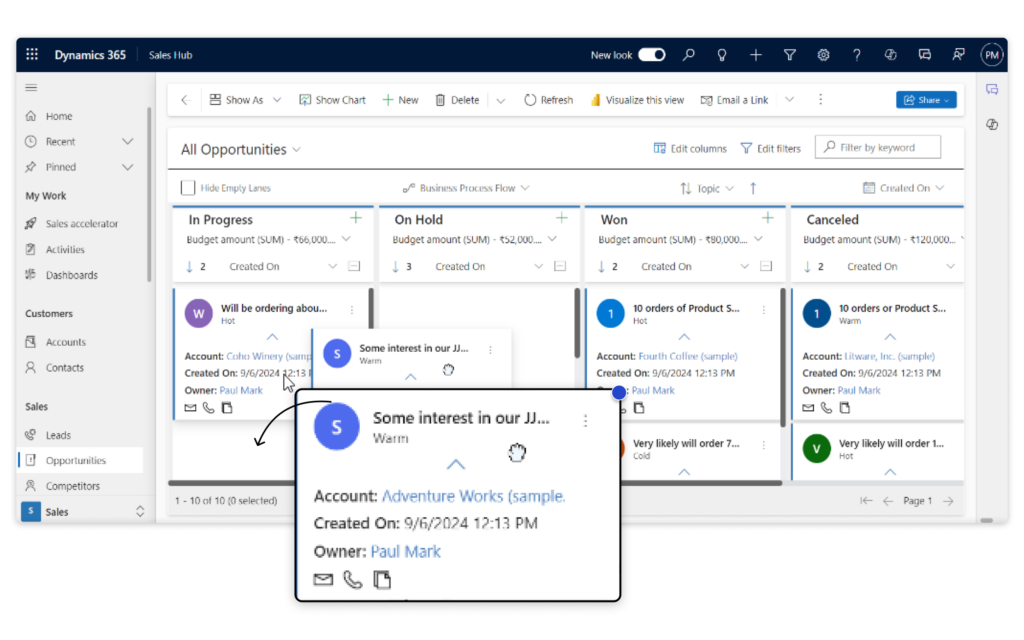
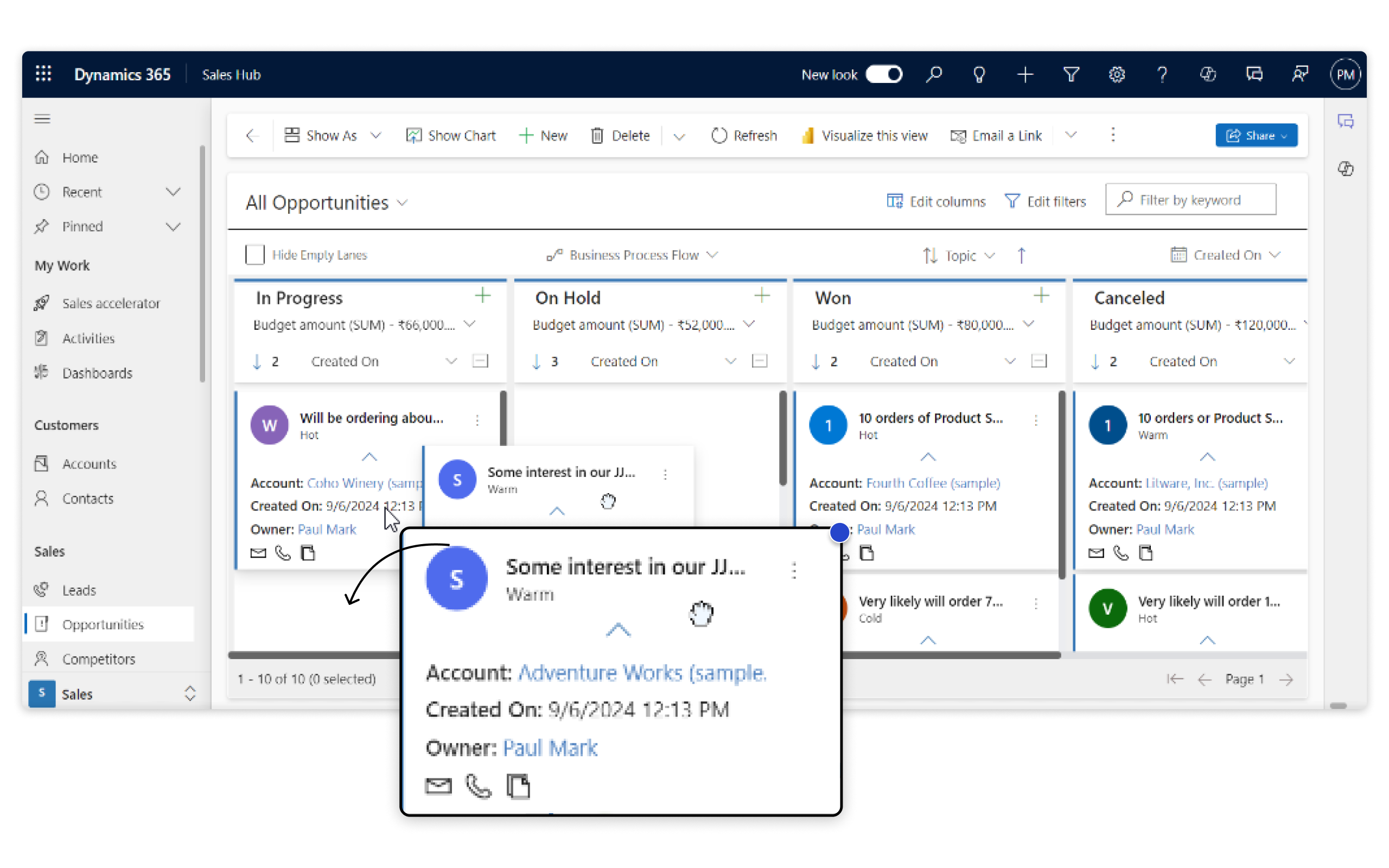
Drag & Drop Option to Maximize Efficiency and Enhance Agility
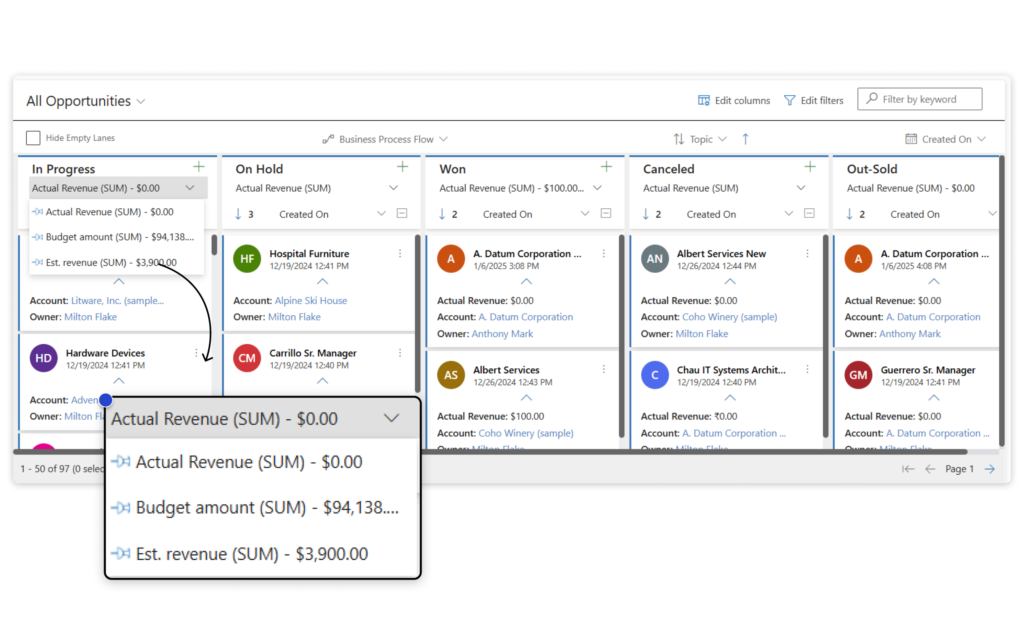
Enhance your CRM management with the Kanban Board, where you can easily drag and drop cards to update categories and stages. Get real-time visibility into totals like SUM, AVG, MAX, or MIN for numeric fields such as Budget, Estimated Revenue, or Deal Size.
More Features
Row Grouping
Effortlessly sort, filter, and group data in Kanban Board by any field value. Seamlessly drag and drop records between rows to instantly update both rows and lanes for optimal organization.
Multiple Move
Select and move multiple Kanban cards at once to a desired lane or row using the bulk move feature. Perfect for reorganizing tasks or updating statuses in just a few clicks.
Context Aware
Experience a Kanban Board that operates within your native CRM environment, fully responsive to all standard ribbon actions. As a Dataverse (Power Apps) Component, it replaces traditional views while allowing actions directly from the ribbon bar.
Quick Search
Utilize the native quick search functionality within your CRM to instantly filter results in the Kanban Board. As a Dataverse (PowerApps) Component, it seamlessly integrates with and reflects search results in your Kanban view.
Sort and Filter Records
Sort and filter records on the Kanban Board by any selected field, including the "CreatedOn" date. Enjoy flexible sorting options in ascending or descending order for optimal data organization.
Swim Lanes
Maintain a consistent board layout with equal-height rows, even when rows are empty. Collapsing or expanding a row syncs all corresponding rows for a cleaner, more structured experience.
A Comprehensive E-Book On Kanban Board To Boost Your Productivity!
testimonials
What Our Customers Are Saying?
Our Blogs
How to Prioritize Business Process Flows (BPFs) on Dynamics 365 Kanban with Global & Personal Pins
Business Process Flow (BPF) Pinning in Dynamics 365 Kanban allows users or admins to prioritize and pin a specific process so it automatically loads every time the Kanban view is opened.
How to Visualize Sales Data in Dynamics 365 CRM Using Kanban Board
In this blog, we’ll explore 5 practical ways CRM administrators use the Hierarchy Control in Dynamics 365 CRM, and how Map My Relationships takes those capabilities to the next level…
Dynamics 365 CRM Kanban View Gets an Upgrade: Prioritize with Lane Sorting!
If you’ve ever tried to answer these questions by looking at a cluttered CRM screen, you know how frustrating it can be. Managing tasks without a clear view is like trying to find your way through a maze in the dark….
Frequently Asked Questions
Kanban Board in Dynamics 365 is a visual tool that helps organize and track records in a card-based layout. It seamlessly integrates with your CRM, offering enhanced features like drag-and-drop updates, Business Process Flows, aggregate field values, and swim lanes for improved task management.
Yes, users can easily switch between Kanban view and Grid view as per their requirement. Kanban Board is a highly flexible that easily adheres to the requirement of Dynamics 365 CRM users.
Yes, user can perform all native ribbon actions on Kanban view just like it is performed on traditional CRM view.
Yes, once the user moves the cards (records) from one lane to another then the underlying field values of the records are automatically updated.
Yes, Kanban Board is a highly flexible and agile app that provides a uniform experience across Web, Mobile and Tablet for Dynamics 365 CRM users.
Reach out to us today to know more!
