
Access SharePoint Files Directly Inside Dynamics 365
Table of Contents
Access SharePoint Files Directly Inside Dynamics 365
Organizations using Microsoft Dynamics 365 rely on cloud storage platforms such as SharePoint or Azure to manage growing volumes of documents, contracts, invoices, proposals, emails, and case files.
The challenge is not where files are stored.
The challenge is how teams access them.
Decision makers commonly ask:
- Can users access cloud files directly inside Dynamics 365?
- Will this interrupt existing workflows or confuse users?
- Is access secure, governed, and scalable?
This page explains how cloud files can be accessed inside Dynamics 365, what this means from a user and business perspective, and how solutions like Attach2Dynamics enable this experience without adding technical or operational complexity.
The Core Challenge: Documents Outside CRM, Work Inside CRM
Dynamics 365 functions as the system of record for customer and operational data.
However, documents required for daily work are typically stored outside CRM.
As a result, users often:
- Switch between Dynamics 365 and cloud storage tools
- Download and re-upload documents
- Lose record-level context while accessing files
This fragmentation increases time spent searching for information and reduces overall CRM adoption.
Why Native Cloud File Access Often Falls Short
Dynamics 365 provides basic options to connect with cloud storage. While suitable for simple use cases, many organizations find these approaches insufficient for daily operations.
Common limitations include:
- Files opening in separate tools or browser tabs
- Limited visibility of documents at the record level
- Inconsistent or confusing permission management
The concern for most organizations is not technical feasibility—it is usability and adoption.
If file access feels disconnected from CRM workflows, users create workarounds or avoid the system entirely.
While native integrations support basic document linking, organizations with growing document volumes often use extensions like Attach2Dynamics to improve usability, performance, and governance.
What “In-CRM Cloud File Access” Means in Practice
In-CRM cloud file access is not about moving files into Dynamics 365.
It is about making externally stored files feel native to CRM.
From a business perspective, this means:
- Cloud files are visible directly within Dynamics 365 records
- Files can be opened, uploaded, and updated without leaving CRM
- No duplicate storage or manual synchronization
From a user perspective:
- Files appear as part of the record they are working on
- There is no need to switch systems or learn new processes
How Attach2Dynamics Cloud File Access Enables Inside Dynamics 365
Attach2Dynamics is a Dynamics 365 extension that connects CRM records with external cloud storage such as SharePoint or Azure.
User Experience Inside Dynamics 365
When users open a record in Dynamics 365:
- Related cloud files are visible within the CRM interface
- Files can be uploaded or opened as part of standard workflows
No additional tools or navigation steps are required
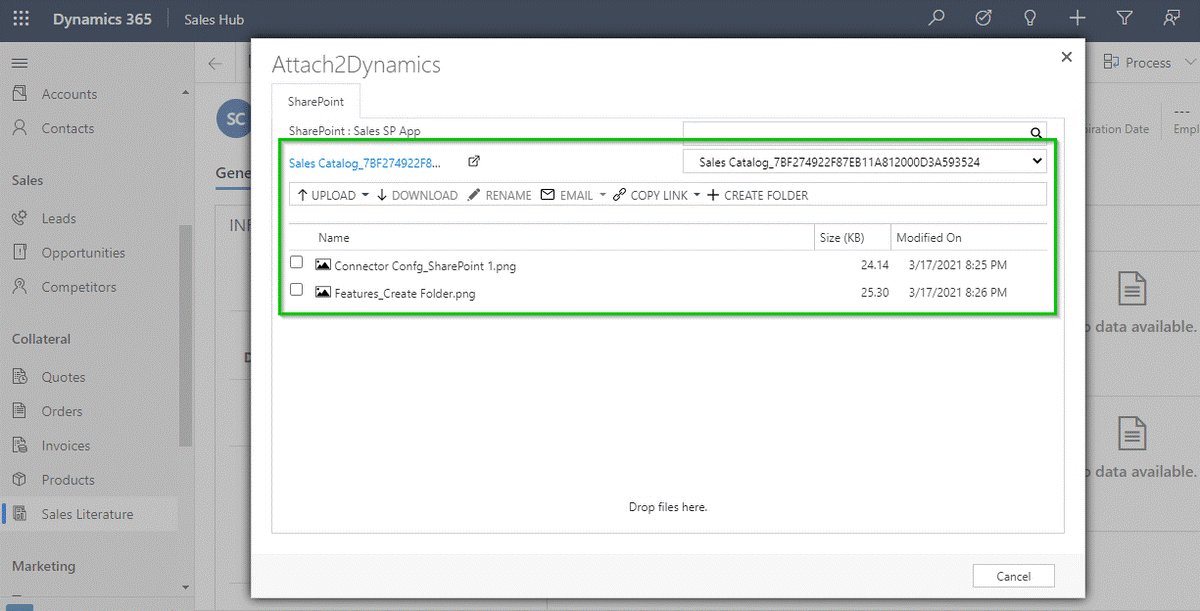
The experience remains consistent with how users already work in Dynamics 365.
How It Works (High-Level Overview)
- Files continue to reside in cloud storage
- Dynamics 365 maintains secure references to those files
- CRM context and record association are preserved
This approach avoids file duplication while maintaining performance and simplicity.
Why This Approach Improves User Adoption
CRM adoption declines when users must manage multiple systems for a single task.
Providing direct access to cloud files inside Dynamics 365 results in:
- Faster document retrieval for sales teams
- Reduced case resolution time for support teams
- Better control over financial and compliance documents
Users remain focused on their primary workspace, improving efficiency without retraining.
Key Considerations for Decision Makers
Simplicity
Users continue working inside Dynamics 365 without managing cloud storage complexity.
Security and Governance
Access follows existing Dynamics 365 roles and cloud storage permissions, ensuring compliance and control.
Scalability
As document volumes increase, Dynamics 365 performance remains stable because files are not stored inside CRM.
Common Use Cases for In-CRM Cloud File Access
Sales and Account Management
Proposals, contracts, and supporting documents remain associated with opportunity and account records.
Customer Support and Service
Case-related files, screenshots, and correspondence stay accessible without increasing CRM storage usage.
Finance and Operations
Invoices, audit documents, and compliance files remain governed while easily accessible within CRM.
FAQs
Can users access cloud files directly inside Dynamics 365?
Yes. Cloud files stored outside Dynamics 365 can be viewed and accessed directly from CRM records without switching systems.
Do users need to leave Dynamics 365 to open or upload files?
No. Files can be opened or uploaded as part of the standard Dynamics 365 workflow.
Are files stored inside Dynamics 365?
No. Files remain in cloud storage. Dynamics 365 maintains secure references to them, avoiding duplicate storage and cost.
How is security handled for external files?
File access follows existing Dynamics 365 roles and cloud storage permissions, maintaining governance and compliance.
Does this impact Dynamics 365 performance?
No. Because files are not stored inside Dynamics 365, CRM performance remains stable as document volumes grow.
Access SharePoint Files Directly Inside Dynamics 365

