


AI Sentiment Analysis: Understand Customer Emotions in Real Time
What Is AI Sentiment Analysis?
AI sentiment analysis evaluates customer messages to determine their emotional tone, typically categorised as:
- Positive
- Neutral
- Negative
It analyzes language patterns, keywords, and phrasing to understand how a customer feels, not just what they say.
To explore this further, refer to the technical guide or visit this blog.
Why Chat Sentiment Analysis is Needed in CRM
Customer emotions have a direct impact on satisfaction, loyalty, and retention. Chat Sentiment Analysis helps organisations make smarter, faster decisions by understanding emotional context at scale.
Key Reasons Businesses Need Sentiment Analysis:
- Prioritise Customer Queries
Messages with negative or urgent sentiment can be automatically identified and escalated, ensuring timely resolution. - Enhance Customer Experience
Agents can adjust their tone, offer reassurance, or apologise proactively based on detected sentiment. - Enable Data-Driven Insights
Analysing sentiment trends over time helps identify recurring product issues, service gaps, or campaign performance. - Improve Agent Efficiency
Agents no longer need to manually interpret customer tone; AI highlights it instantly.
Example Scenario:
A customer sends:
“I’ve been waiting for 5 days, and no one has responded!”
AI InoWiz detects this as Negative Sentiment and highlights the chat for immediate attention. The agent escalates the issue to a manager, preventing further dissatisfaction and potential churn.
Sentiment Analysis in WhatsApp CRM Conversations
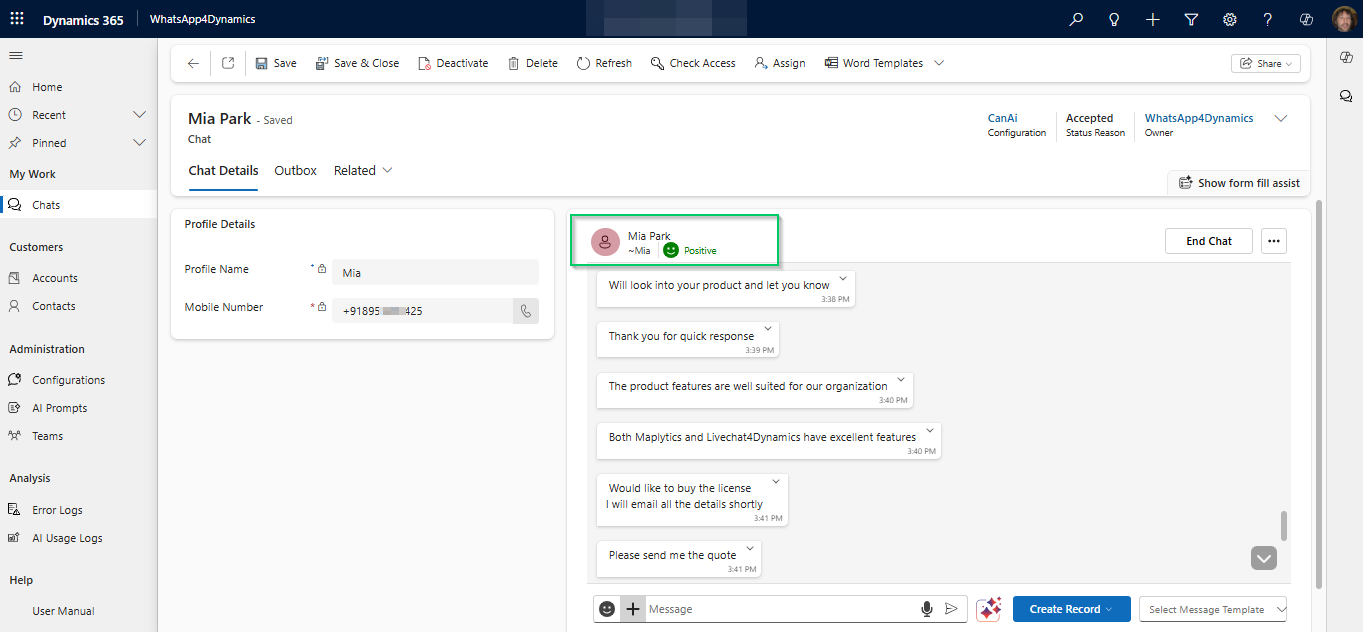
AI-enabled WhatsApp CRM solutions like WhatsApp4Dynamics with InoWiz AI, sentiment is displayed directly within the chat interface. Agents can instantly see whether a conversation is positive or negative before responding, no manual analysis required.
This real-time emotional intelligence helps teams respond with empathy and accuracy.
How Chat Sentiment Analysis Works
Chat Sentiment Analysis in WhatsApp4Dynamics follows a structured AI-driven process:
- Message Scanning
AI InoWiz scans incoming WhatsApp messages for sentiment indicators such as wording, punctuation, and emotional phrases. - Natural Language Processing (NLP)
NLP models analyse the context, intent, and tone of the message rather than relying on keywords alone. - Sentiment Classification
Each message is categorised as Positive, Neutral, or Negative. - Visual Indicators in Chat UI
Sentiment is displayed using intuitive visual cues for instant recognition.
This enables agents to adapt their responses immediately while staying focused on the conversation.
Benefits of Chat Sentiment Analysis in CRM
- Proactive Customer Service
Identify dissatisfied customers early and resolve issues before they escalate. - Improved Customer Retention
Personalised and empathetic responses increase trust and long-term loyalty. - Faster Issue Resolution
Negative sentiment conversations are prioritised, reducing response and resolution times. - Enhanced Agent Productivity
AI handles sentiment detection, allowing agents to focus on meaningful interactions. - Actionable Business Insights
Track sentiment trends across teams, products, and campaigns to drive strategic improvements.
According to industry research, organisations using AI-driven sentiment analysis can improve customer satisfaction scores by up to 20%.
Use Cases of Chat Sentiment Analysis
- Customer Support Escalation
- Scenario: A customer repeatedly reports order delays
- AI Action: Negative sentiment detected → chat flagged → escalation recommended
- Result: Faster resolution, reduced frustration, improved CSAT
- Sales and Relationship Management
- Scenario: A customer expresses excitement about a product
- AI Action: Positive sentiment detected → agent identifies upsell opportunity
- Result: Increased revenue and stronger customer relationships
- Marketing Campaign Feedback
- Scenario: A WhatsApp broadcast campaign is sent
- AI Action: AI aggregates sentiment from customer replies
- Result: Clear understanding of campaign reception and data-driven optimisation
AI Conversation Summary: Instantly Catch Up on Any Chat
What Is a Conversation Summary?
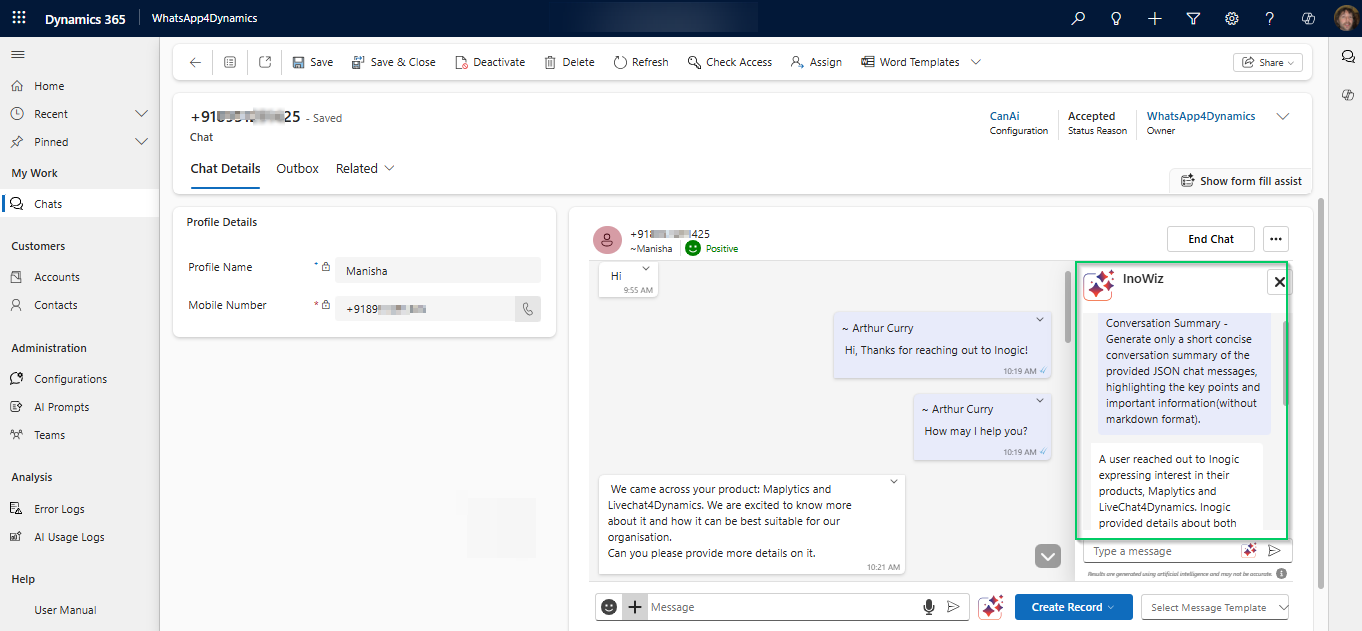
An AI conversation summary condenses long WhatsApp chats into a short, meaningful overview, highlighting:
- Key customer issues
- Important decisions
- Previous commitments or actions
Why Conversation Summaries Are Essential
- New agents can pick up chats without reading hundreds of messages
- Managers can review conversations quickly
- Reduces handling time and improves continuity
- Perfect for shift changes and chat reassignment
AI Chat Summaries in Dynamics 365
With AI conversation summaries integrated into CRM chat panels, agents can instantly understand context, even if the chat started hours or days earlier. Solutions like InoWiz AI within WhatsApp4Dynamics generate these summaries automatically, saving time and reducing errors.
Use Case Example
Shift Change Scenario
An agent starts a shift and inherits a chat with 120+ messages.
Instead of scrolling, the AI summary shows:
“Customer is asking about the delayed shipment. Order ID confirmed. Awaiting delivery date confirmation.”
The agent responds confidently within seconds.
Current Record Summary: Know Your Customer Before You Reply
What Is a Current Record Summary?
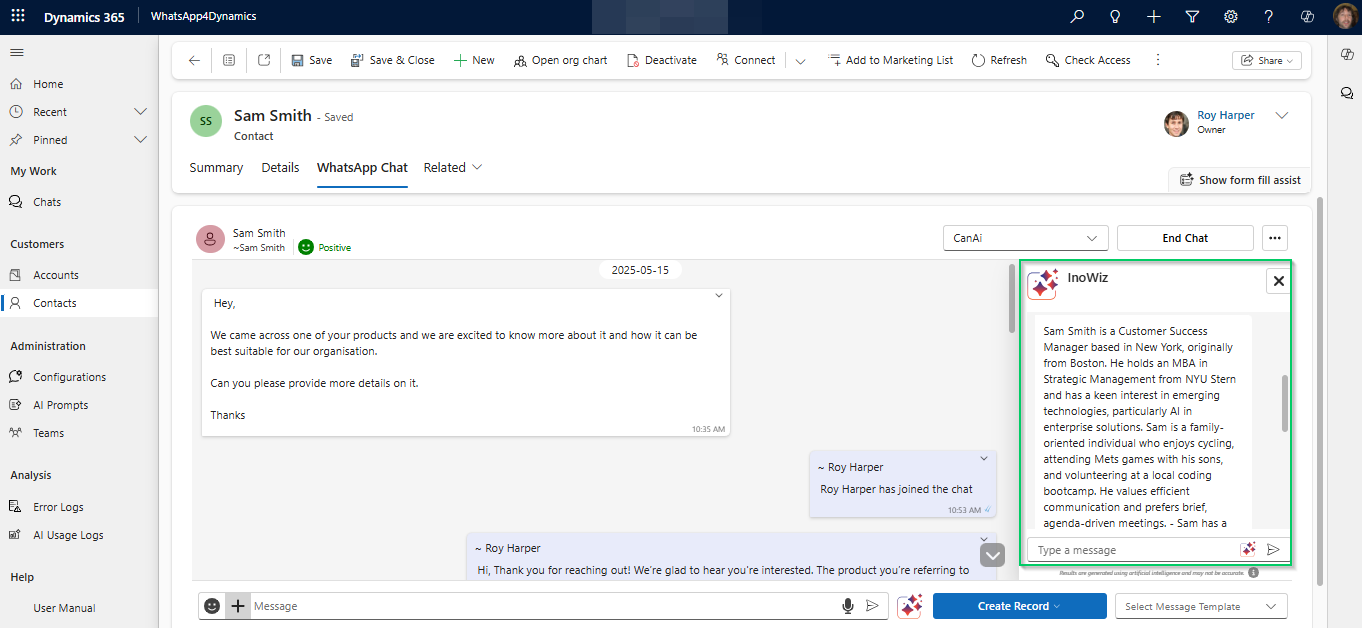
A current record summary provides an AI-generated overview of the CRM record linked to the chat, such as:
- Customer profile
- Open cases
- Past interactions
- Sales or service history
Why Record Summaries Improve Customer Experience
- Agents don’t need to open multiple tabs
- Conversations become more personalised
- Faster and more confident responses
- Better upsell and support decisions
AI-Driven CRM Context Inside WhatsApp Chats
When AI is embedded into WhatsApp-CRM workflows, agents see customer insights right next to the chat. With WhatsApp4Dynamics InoWiz AI, agents gain instant record intelligence without navigating away from the conversation.
Use Case Example
Sales Scenario
Before replying, the agent sees:
“Customer is an existing account. Two past purchases. Open opportunity for renewal.”
The agent tailors the response instead of asking basic questions.
AI Text Rephrase: Professional, Polite, and Clear Messaging Every Time
What Is AI Text Rephrasing?
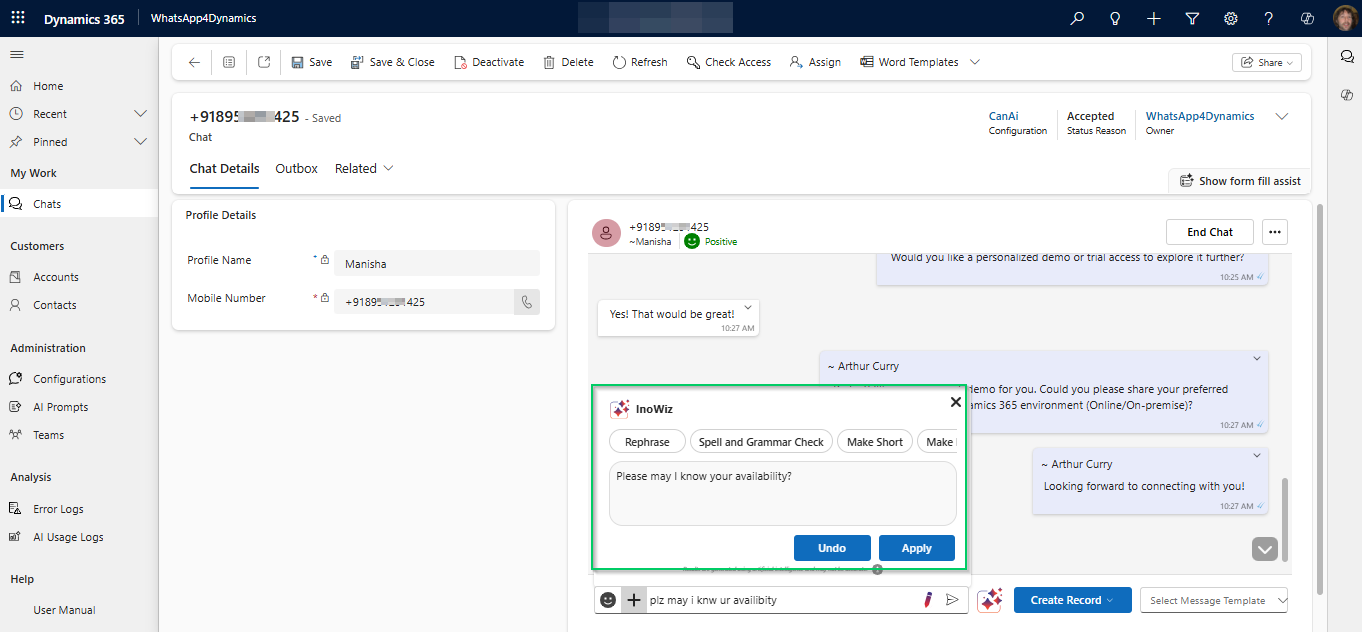
AI text rephrasing improves agent-written messages by:
- Correcting grammar and spelling
- Refining tone (formal, polite, concise)
- Improving clarity and readability
- Preserving the original intent
Example:
Original Message (Agent Draft):
“We not received payment yet pls check and update.”
AI Rephrased Versions:
- “We have not received the payment yet. Kindly check and update us.”
- “Could you please verify the payment status and let us know?”
- “We haven’t received the payment so far. Please check and confirm.”
The meaning remains the same, but the message becomes clearer, more professional, and customer-friendly.
Why AI Rephrasing Matters in Customer Communication
- Maintains brand consistency
- Reduces miscommunication
- Helps non-native speakers write confidently
- Enhances professionalism on WhatsApp
Benefits of AI Text Rephrase in CRM
- Improved Customer Experience
Customers receive clear, polite, and professional messages every time. - Higher Agent Confidence
Agents feel supported when responding to complex or sensitive messages. - Faster Response Times
Reduced drafting and editing time leads to quicker replies. - Reduced Training Dependency
New agents can communicate effectively with minimal onboarding. - Consistent Brand Voice
Ensures uniform communication across all WhatsApp interactions.
Use Cases of AI Text Rephrase
1. Customer Support Communication
- Scenario: An agent needs to explain a delay or issue.
- AI Action: Rephrases message to sound polite and empathetic.
- Result: Reduced customer frustration and better issue handling.
2. Sales Conversations
- Scenario: An agent sends pricing or proposal-related messages.
- AI Action: Refines wording to sound confident and professional.
- Result: Increased trust and higher conversion rates.
3. Handling Sensitive Situations
- Scenario: Apologising for service disruption.
- AI Action: Suggests empathetic and reassuring language.
- Result: Stronger customer relationships and damage control.
AI-Assisted Writing in WhatsApp CRM
AI text rephrase panels like those available in WhatsApp4Dynamics via InoWiz AI allow agents to refine messages before sending, ensuring every response sounds clear, respectful, and customer-friendly.
Web-Based AI Answers: Real-Time Knowledge Access
What are Web-Based AI Answers?
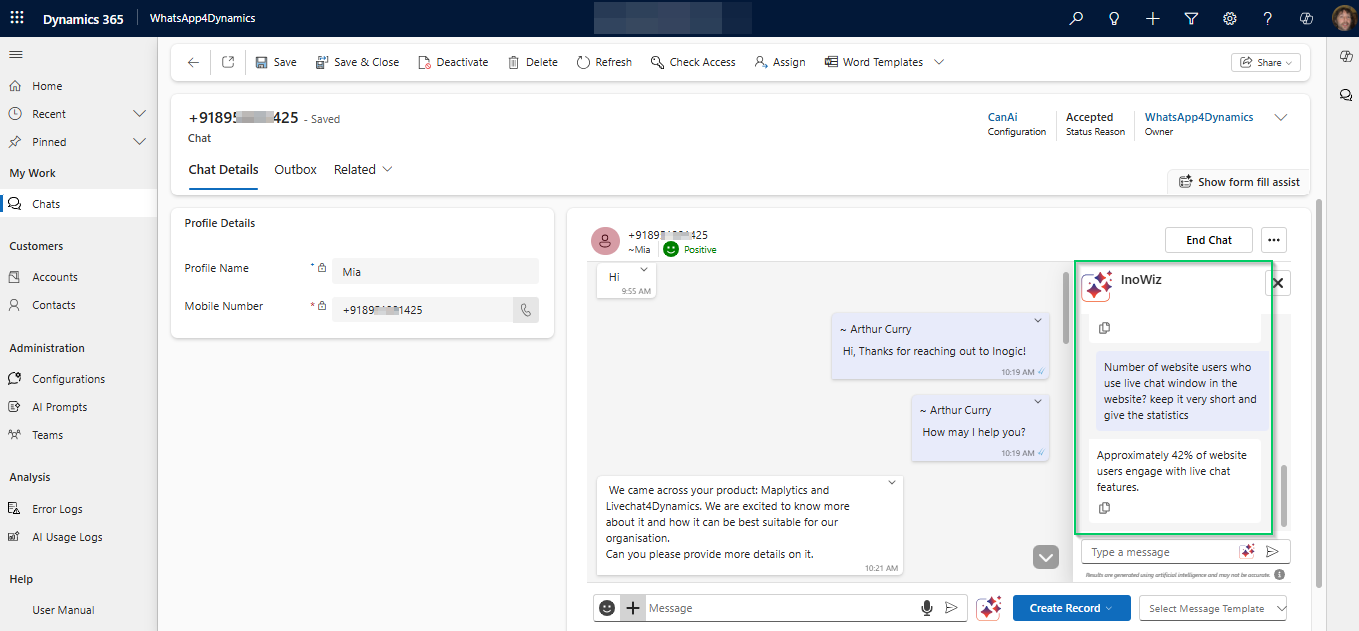
Web-based AI answers allow agents to ask general or customer-specific questions and receive AI-generated responses using online and internal knowledge.
Why This Feature Is Valuable
- Eliminates searching external websites
- Faster answers during live chats
- Reduces dependency on manuals and documents
- Improves accuracy and confidence
AI Knowledge Support Inside CRM
AI chat panels in advanced CRM integrations provide web-based answers directly inside the chat interface, helping agents respond faster while staying focused on the customer.



