
Mailchimp Customer Journeys & Marketing Activities in Dynamics 365
Table of Contents
Unified Engagement Visibility for Mailchimp and Dynamics 365 CRM integration
Modern email marketing doesn’t stop at one-off campaigns. Automated customer journeys, nurture flows, and triggered communications play a critical role in engaging prospects and customers over time.
With automated Mailchimp Customer Journey activities and engagement events, sales and service teams receive a complete, real-time view of customer interactions, synced directly into Microsoft Dynamics 365.
This page explains how customer journey and marketing activity sync work, and why it’s essential for lifecycle-based engagement and sales follow-ups.
What Are Mailchimp Customer Journeys?
Mailchimp Customer Journeys are automated workflows that trigger emails and actions based on:
- Customer behavior
- List membership
- Tags and segmentation
- Time-based rules
These journeys power:
- Welcome series
- Lead nurturing programs
- Re-engagement campaigns
- Post-purchase communications
Without CRM visibility, these automated touchpoints often remain invisible to sales teams.
Syncing Mailchimp Customer Journey Activities to Dynamics 365 CRM
Marketing4Dynamics bridges this gap by syncing Mailchimp Customer Journey activities directly into Dynamics 365 CRM.
What Gets Synced
- Automated email sends
- Engagement events triggered by journeys
- Journey-related marketing activities
- Customer-level engagement history
These activities appear in CRM as marketing activities, linked to:
- Contacts
- Leads
- Campaigns (where applicable)
This ensures automated marketing is no longer hidden from CRM users.
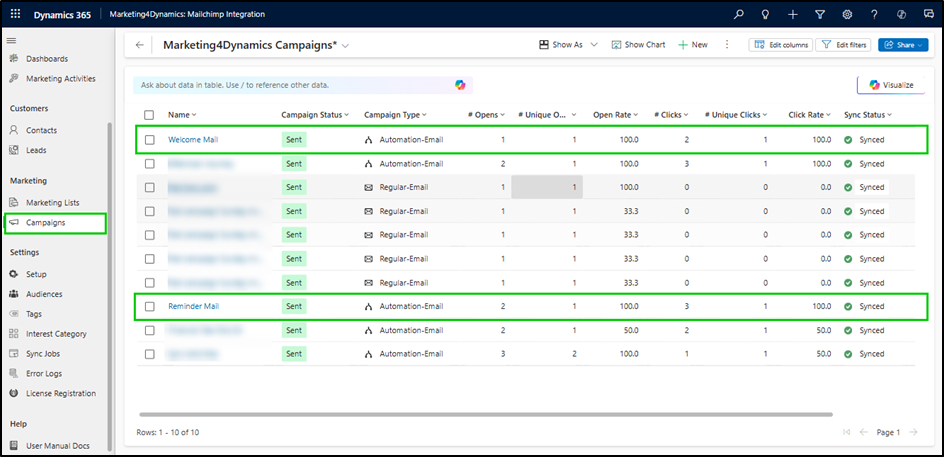
Marketing Activity of Mailchimp Tracking Inside Dynamics 365
Beyond journeys, Marketing4Dynamics syncs Mailchimp marketing engagement events into CRM.
Engagement Activities Captured
- Email sent
- Email opened
- Link clicked
Each activity is stored in CRM with relevant context, giving teams a timeline-based view of customer engagement.
Unified View of Customer Engagement Across the Lifecycle
By syncing both campaign and journey-based activities, it delivers a single, unified engagement history.
What CRM Users Can See
- Manual campaign interactions
- Automated journey touchpoints
- Engagement trends over time
- Customer responsiveness to marketing
This creates a 360-degree engagement view, essential for informed sales and service interactions.
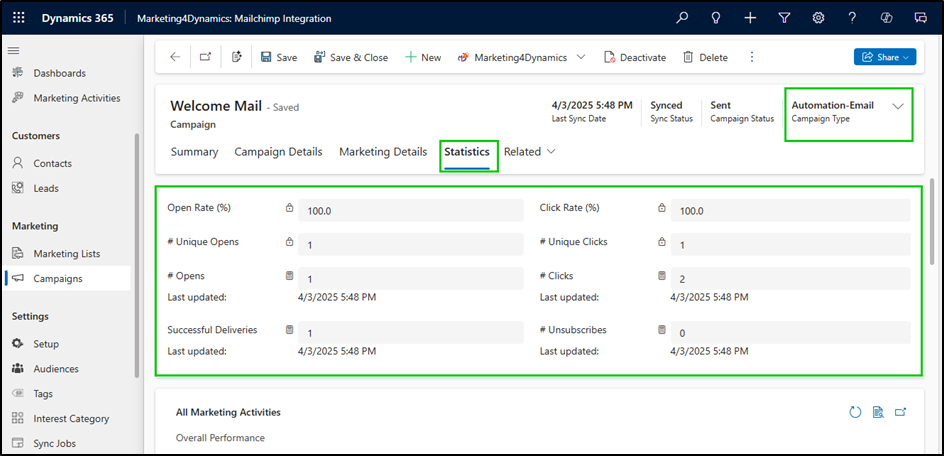
Empower Sales Teams with Journey Visibility
Customer journey visibility directly impacts sales effectiveness.
How Sales Teams Benefit
- Identify highly engaged prospects
- Time outreach based on recent interactions
- Personalize conversations using journey context
- Avoid redundant or mistimed communications
Instead of asking, “Has marketing contacted this customer?”, sales teams can see the answer instantly in CRM.
Real-World Business Use Cases
Smarter Lead Nurturing: Sales teams can track which leads are actively engaged in nurture journeys and prioritize follow-ups accordingly.
Timely Re-Engagement: Automated re-engagement journeys synced to CRM help teams reconnect with dormant prospects at the right moment.
Personalized Sales Conversations: Knowing which emails and journeys a customer has experienced enables more relevant, trust-building conversations.
How to Keep Engagement Data of CRM-MailChimp Campaign Reliable
To keep CRM–Mailchimp engagement data reliable, campaign interactions must sync automatically and map correctly to CRM records. It ensures:
- Automated sync of journey activities
- Consistent activity creation in CRM
- Reliable association with CRM records
- No manual data entry or reconciliation
This keeps engagement data accurate, timely, and actionable.
FAQs
Are Mailchimp Customer Journey activities visible in Dynamics 365?
Yes. Automated journey activities are synced into CRM as marketing activities.
Can sales users see automated email engagement?
Yes. Email sends, opens, and clicks from journeys are visible on CRM records.
Are journey activities linked to contacts and leads?
Yes. Activities are associated with corresponding Contacts or Leads in CRM.
Does this include both campaigns and journeys?
Yes. Marketing4Dynamics syncs engagement from both manual campaigns and automated journeys.
Why Marketing4Dynamics for Customer Journey Visibility?
Marketing4Dynamics ensures:
- Automated marketing is transparent to CRM users
- Sales and marketing share engagement context
- Customer lifecycle interactions are visible in one system
- CRM becomes the single source of truth for engagement data
It transforms marketing automation into sales-enabling intelligence.
Make Automated Marketing Visible to Sales Teams
Turn engagement data into actionable follow-ups


