


How to Use Metadata for Document Management in Dynamics 365 and SharePoint
Table of Contents
What Is Metadata in SharePoint Document Management?
Metadata is structured information stored alongside documents in SharePoint, such as document type, status, owner, department, or retention category. Unlike folders, metadata does not determine where a document lives; it defines what the document is.
In Dynamics 365–SharePoint integrations, metadata enables organizations to:
- Classify documents consistently
- Improve search and filtering
- Reduce reliance on deep folder hierarchies
- Support governance and compliance
Metadata turns documents into data.
How Metadata Works with Dynamics 365 and SharePoint
When Dynamics 365 is integrated with SharePoint, documents are stored in SharePoint libraries while remaining accessible from CRM records. Metadata can be applied in SharePoint to enrich these documents with business context.
Key Characteristics
- Metadata fields are defined at the library or content type level
- Values can be manually applied or system-driven
- Metadata does not affect document location
- Multiple metadata fields can coexist per document
Metadata complements CRM data by adding classification layers that are independent of folder structure.
Common Metadata Use Cases in CRM – SharePoint Environments
Metadata is especially effective when document classification needs to scale across thousands of records.
Typical Use Cases
- Document Type (Invoice, Contract, Proposal)
- Business Status (Draft, Approved, Archived)
- Department or Business Unit
- Compliance Category
- Retention Policy
These use cases help organizations:
- Filter documents without navigating folders
- Apply policies automatically
- Improve discoverability across libraries
Metadata answers “what kind of document is this?” without changing where it lives.
Metadata vs Folder Structures: Key Differences
Metadata and folder structures serve different purposes and are often misunderstood as competing approaches.
Folder Structures
- Provide visual hierarchy
- Familiar to users
- Useful for audits and reviews
Metadata
- Enables advanced filtering
- Scales better at high volumes
- Reduces duplication
- Supports automation and governance
In practice, most enterprises adopt a hybrid model:
- Folders for high-level structure
- Metadata for classification and filtering
Here is a complete guide for understanding SharePoint folder structures for CRM.
Benefits of Using Metadata at Scale
When implemented correctly, metadata delivers long-term operational value.
Key Benefits
- Faster document retrieval
- Reduced folder sprawl
- Consistent classification across records
- Improved compliance and audit readiness
- Better search relevance in SharePoint and Microsoft 365
Metadata also reduces user dependency by shifting organizational logic from individuals to systems.
Designing a Metadata Model for CRM Documents
A metadata model defines which fields exist, how they’re populated, and how they’re governed.
Best Practices
- Limit metadata fields to what’s truly useful
- Use controlled values where possible
- Align fields with business processes
- Avoid free-text fields for critical classification
A strong metadata model is:
- Simple enough for users
- Structured enough for automation
- Flexible enough to evolve
Applying Metadata Automatically Using CRM Context
Manual metadata assignment does not scale in enterprise CRM environments. Automation is essential to ensure consistency and governance.
Metadata can be applied automatically based on:
- CRM entity type
- Record status or category
- Business rules
- Document source or lifecycle stage
This approach ensures:
- Consistent metadata across documents
- Reduced user effort
- Better compliance enforcement
How Metadata Automation Is Typically Implemented
In practice, organizations rely on CRM-aware solutions that understand Dynamics 365 records, security, and SharePoint libraries. Tools such as SharePoint Security Sync allow metadata to be mapped and applied automatically based on CRM context, ensuring documents inherit the correct classification without requiring manual input from users.
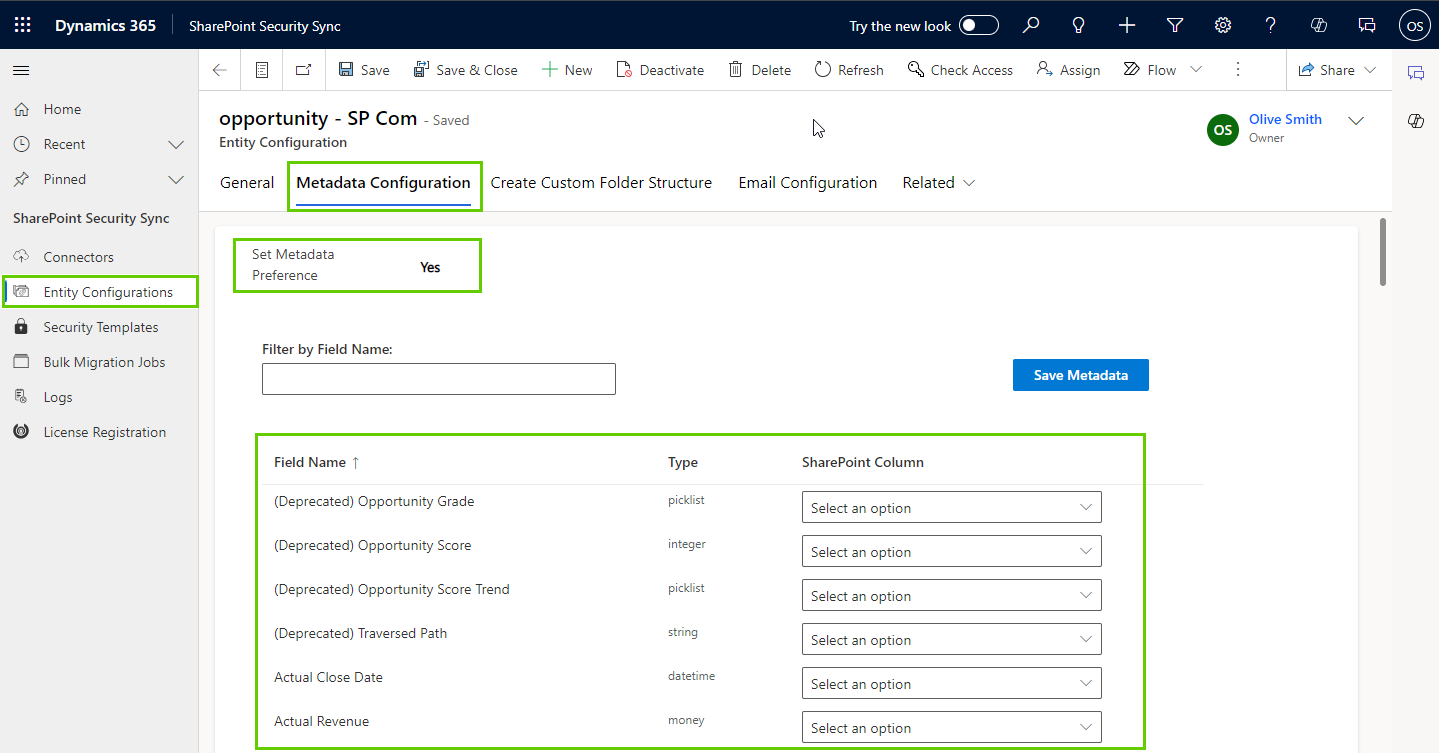
Metadata and Governance Considerations
Metadata plays a critical role in document governance, particularly in regulated or audit-heavy environments.
Governance Benefits
- Enables retention and disposal policies
- Supports compliance classifications
- Improves audit traceability
- Reduces risk of misfiled documents
When metadata enforcement is automated through CRM-aware tools like SharePoint Security Sync, governance policies can be applied consistently and audited reliably across large document volumes.
Without metadata, governance relies heavily on user behavior, which is difficult to control at scale.
Limitations of Metadata - Only Approaches
While metadata is powerful, relying on metadata alone can create challenges.
Common Limitations
- Users may struggle without a visual hierarchy
- Audits often require folder-based navigation
- Some compliance scenarios require structured layouts
- Overloading metadata fields reduces adoption
Metadata delivers the most value when paired with intentional structure rather than used in isolation.
When to Combine Metadata with Folder Structures
The most effective document management strategies combine metadata and folders.
Hybrid Approach Benefits
- Clear navigation for everyday users
- Advanced filtering for power users
- Better scalability as document volume grows
- Stronger alignment with governance and security models
This approach balances usability with long-term maintainability.
FAQs
Is metadata mandatory in SharePoint?
No, but it is strongly recommended for scalable document management, governance, and search optimization.
Can metadata be synced from Dynamics 365 to SharePoint?
Yes. Metadata values can be mapped and applied automatically based on CRM context using automation.
Does metadata replace folders in SharePoint?
No. Metadata complements folders rather than replacing them entirely.
Does metadata affect SharePoint security?
Metadata does not control security directly, but it supports governance, retention, and policy enforcement.
How can metadata be applied automatically in Dynamics 365–SharePoint integrations?
Metadata can be applied automatically using tools that evaluate Dynamics 365 record context and map values to SharePoint libraries. Solutions like SharePoint Security Sync help enforce consistent metadata application without manual effort.
Improve document visibility across Dynamics 365 and SharePoint!



