How to Integrate Dynamics 365 CRM with Mailchimp

How to Integrate Dynamics 365 CRM with Mailchimp

Table of Contents

Step-by-Step Integration Guide Using Marketing4Dynamics

Integrating Microsoft Dynamics 365 with Mailchimp allows businesses to align marketing and sales, eliminate data silos, and act on real customer engagement.

Marketing4Dynamics by Inogic provides a native, two-way integration that synchronizes CRM data, campaigns, customer journeys, and engagement metrics—without manual imports or complex middleware.

This guide explains exactly how to integrate Dynamics 365 CRM with Mailchimp, step by step

What Does Dynamics 365–Mailchimp Integration Mean?

When Dynamics 365 and Mailchimp are integrated using Marketing4Dynamics, businesses can:

  • Sync Contacts and Leads from CRM to Mailchimp
  • Sync Mailchimp Audiences, Members, and Tags to CRM
  • Run Mailchimp campaigns directly from Dynamics 365
  • Track email opens, clicks, and journeys inside CRM
  • Enable sales teams with real-time marketing visibility

In short, CRM becomes the central system for both marketing execution and engagement tracking.

Prerequisites Before You Start Dynamics 365–Mailchimp Integration

Before setting up the integration, ensure the following are ready:

Required Access

  • Active Dynamics 365 CRM instance
  • Active Mailchimp account
  • Admin or equivalent privileges in Dynamics 365
  • API access enabled in Mailchimp

Supported Scenario

  • Marketing4Dynamics supports two-way data synchronization
  • Works with Contacts, Leads, Campaigns, Activities, Audiences, and Tags

Step 1: Install Marketing4Dynamics in Dynamics 365

The integration starts with installing Marketing4Dynamics in your CRM environment.

What Happens in This Step

  • Marketing4Dynamics is added as a Dynamics 365 solution
  • Required entities, processes, and sync components are installed

CRM becomes integration-ready

Step 2: Connect Dynamics 365 CRM with Mailchimp

Once installed, you authenticate and connect your Mailchimp account.

What This Step Does

  • Establishes a secure API connection
  • Authorizes CRM to access Mailchimp data
  • Enables two-way communication

This connection is the foundation for all future sync operations.
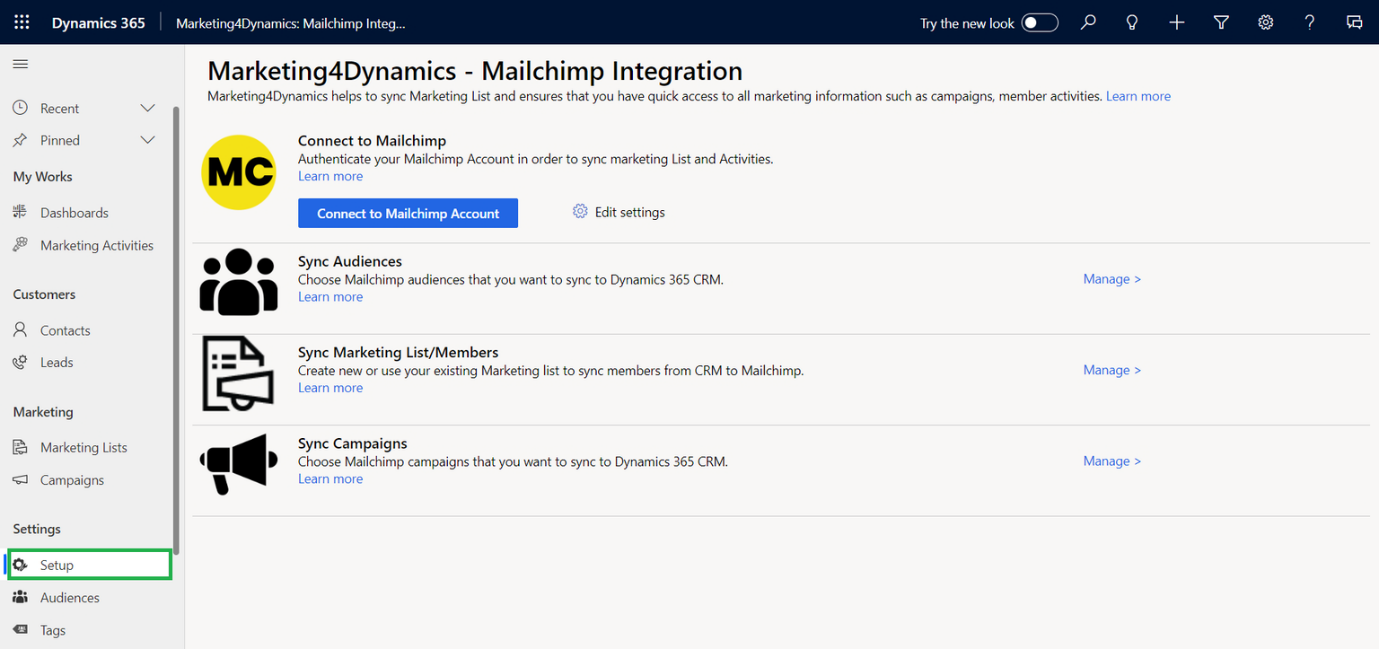
Connect Dynamics 365 CRM with Mailchimp


Step 3: Configure Data Sync Between CRM and Mailchimp

This is where you define what data moves between systems.

CRM → Mailchimp

  • Contacts
  • Leads

Mailchimp → CRM

  • Audiences
  • Members
  • Tags
  • Campaigns
  • Marketing activities
  • Customer journey activities

Sync Behavior

  • Two-way synchronization
  • Scheduled and on-demand sync
  • Incremental updates

Data Sync Between CRM and Mailchimp

Step 4: Configure Sync Jobs & Schedules

Marketing4Dynamics utilizes background sync jobs to maintain data alignment.

What Sync Jobs Handle

  • Automated data updates
  • Performance-safe background processing
  • Retry logic and consistency

You can configure:

  • Sync frequency
  • Execution timing

Manual sync when required
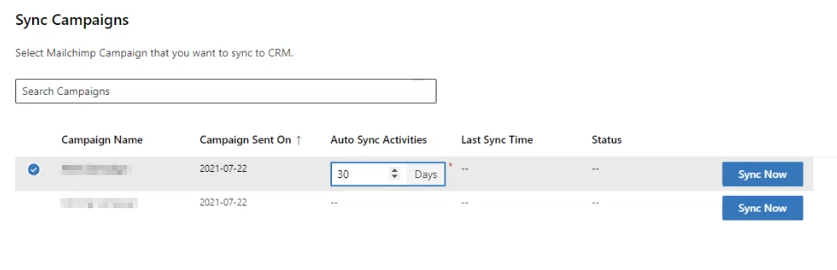
Configure Sync Jobs

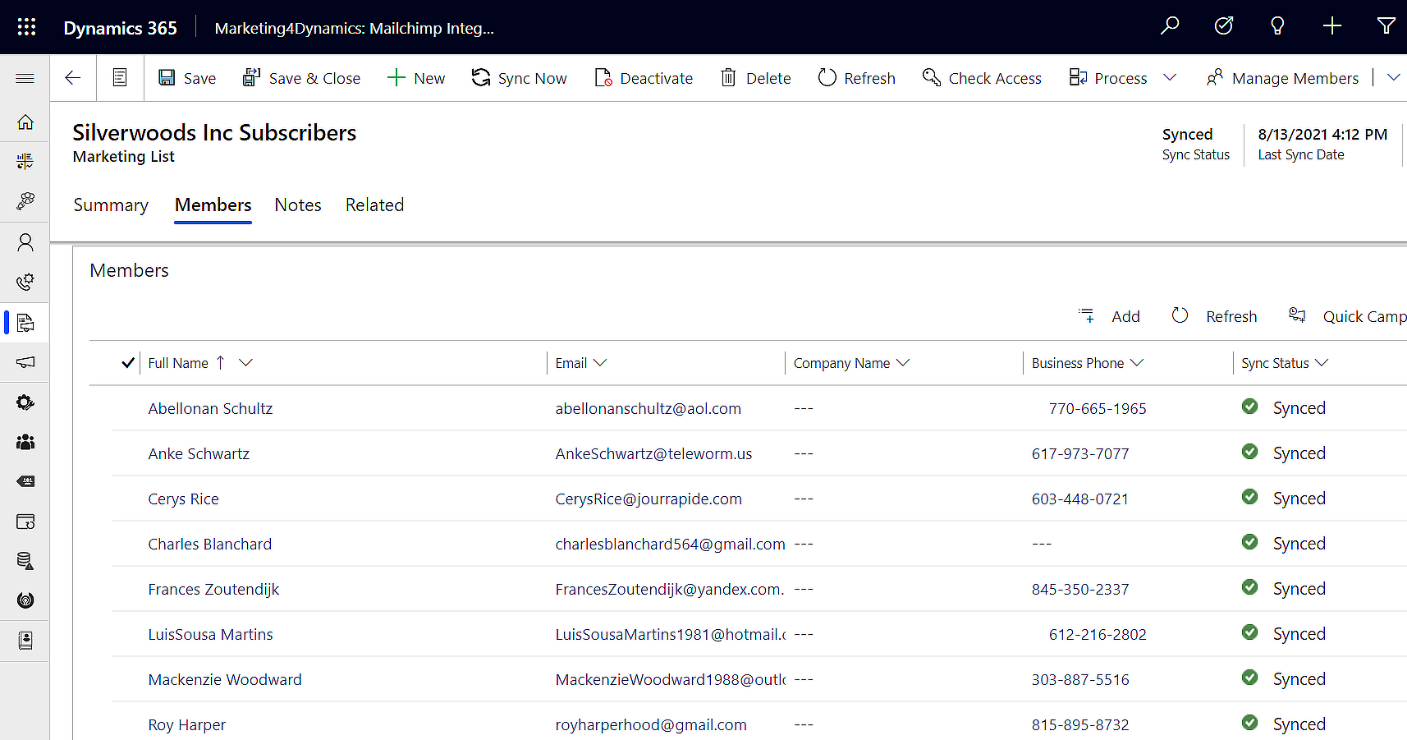
Step 5: Sync Contacts & Leads from Dynamics 365 to Mailchimp

With sync enabled, CRM becomes the source of truth for marketing where contact & leads are synced with Mailchimp.

Benefits

  • Target accurate audiences
  • Use CRM segmentation for campaigns
  • Avoid duplicate or outdated data

Sync Contacts

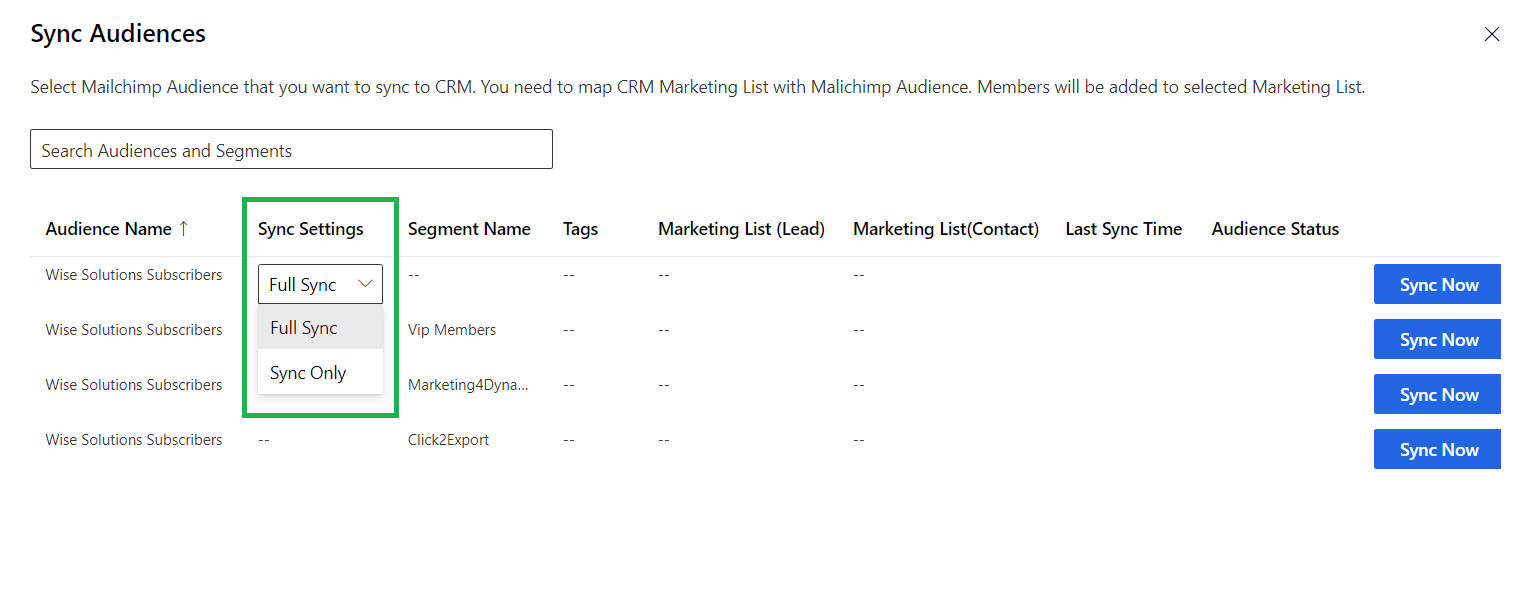
Step 6: Sync Mailchimp Audiences, Tags & Members to CRM

Mailchimp segmentation logic is brought into CRM.

What You Gain

  • Visibility into audiences and tags
  • CRM-level segmentation
  • Sales access to marketing classifications
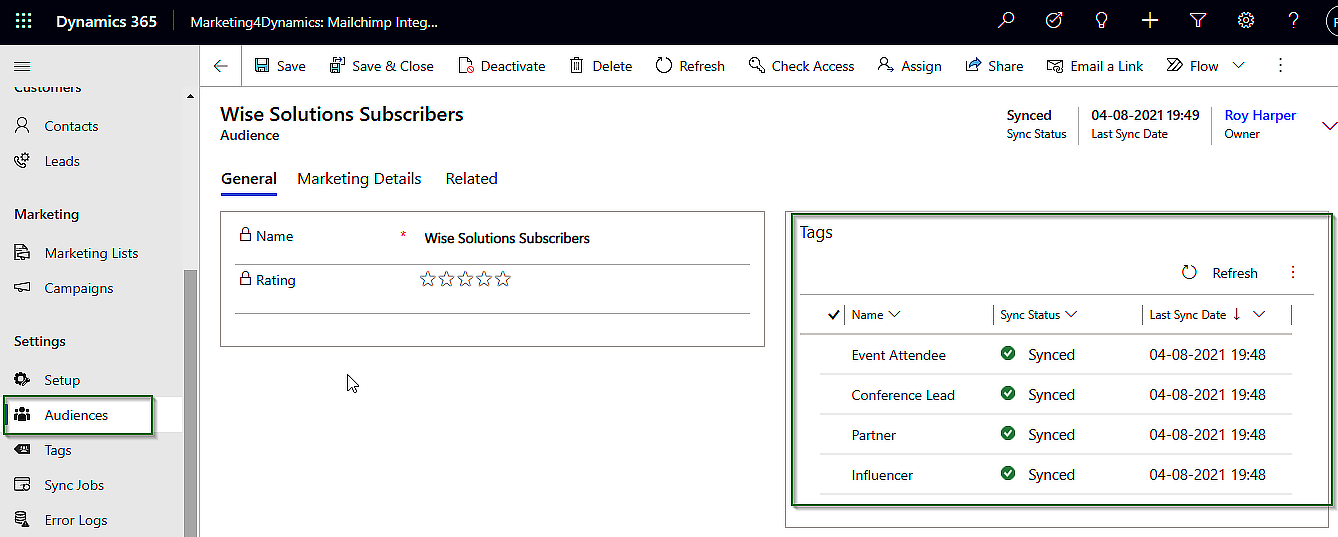
Sync Mailchimp Audiences

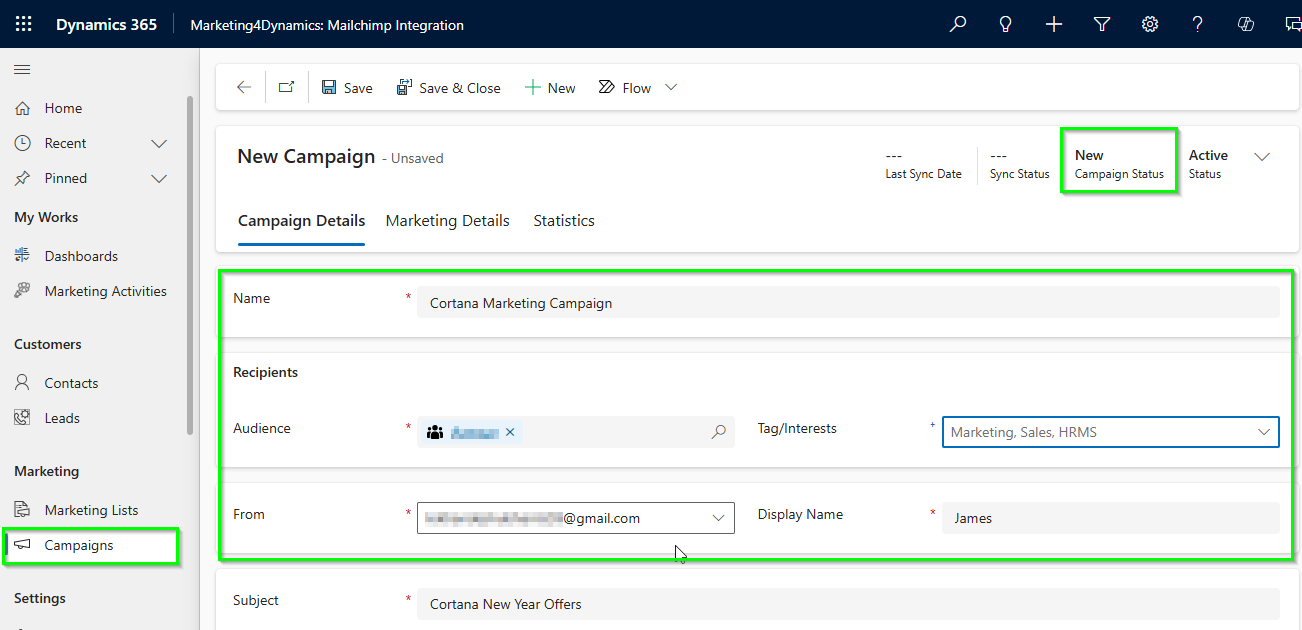
Step 7: Send Mailchimp Campaigns from Dynamics 365

Marketing4Dynamics allows users to design, sync, and send Mailchimp campaigns directly from CRM.

What This Enables

  • No tool switching
  • CRM-driven targeting
  • Faster campaign execution

Send Mailchimp Campaigns

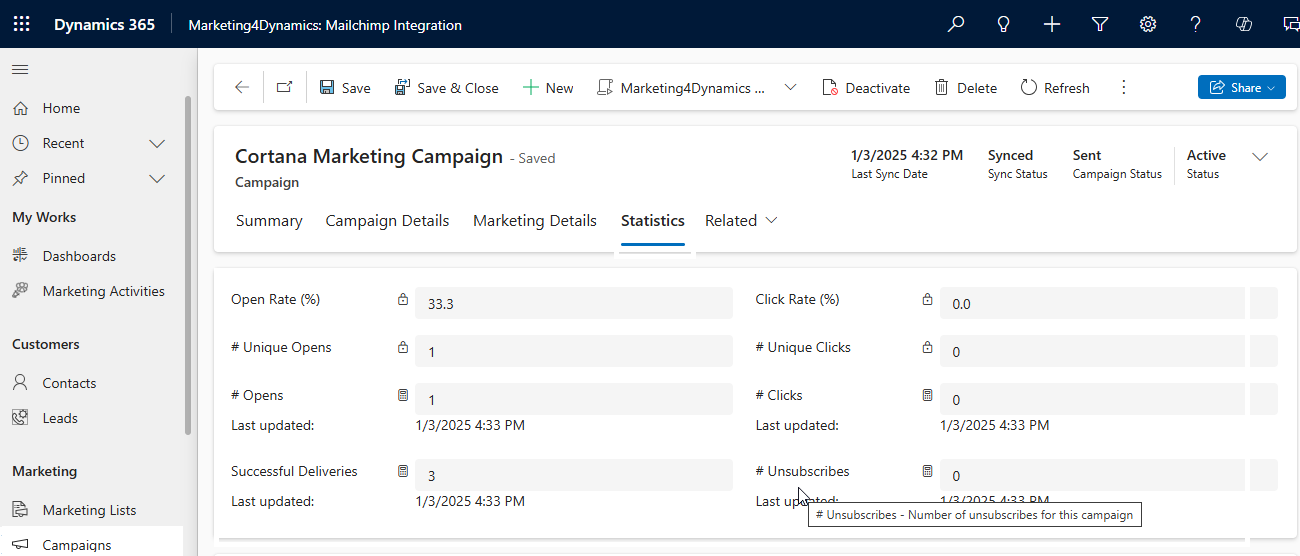
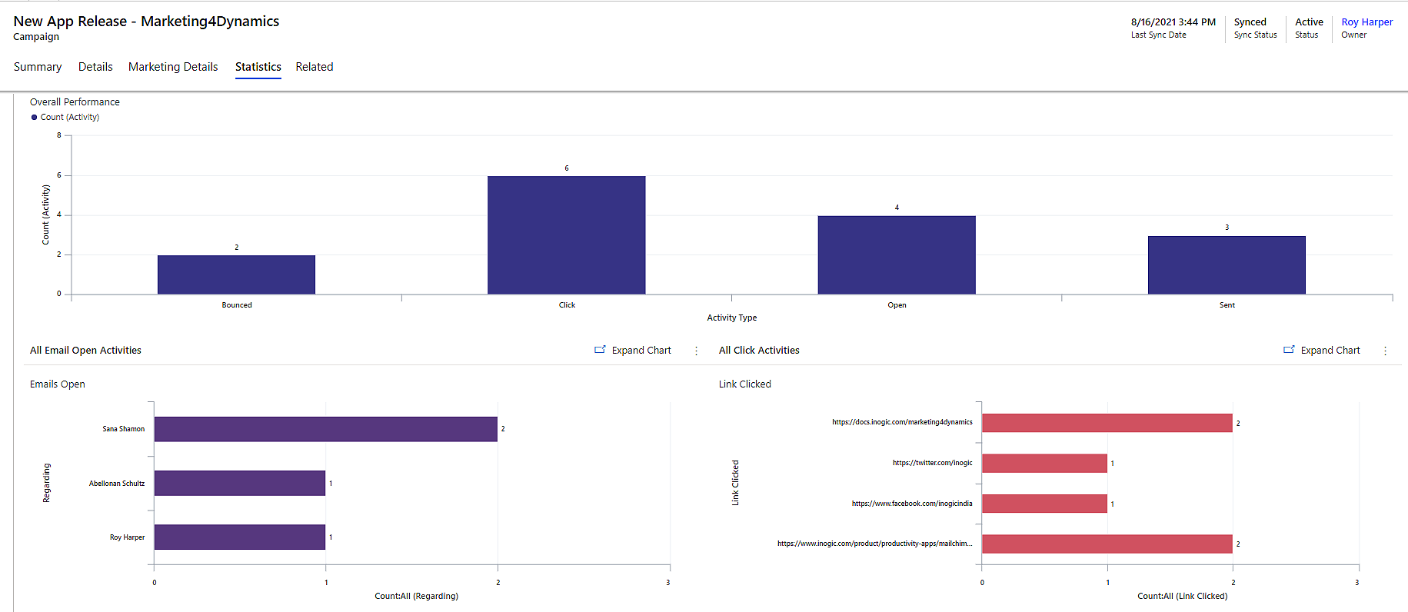
Step 8: Track Campaign, Journey & Engagement Data in CRM from Dynamics 365

After campaigns and journeys run, engagement data flows back into CRM.

Engagement Tracked

  • Email sent
  • Opened
  • Clicked
  • Customer journey touchpoints

This data appears as marketing activities, enabling:

  • Sales follow-ups
  • Engagement-based prioritization
  • Full lifecycle visibility

Track Campaign

Step 9: View Dashboards & Reports in Dynamics 365

Finally, teams can analyze performance inside CRM.

Reporting Capabilities

  • Campaign engagement dashboards
  • Contact and lead interaction views
  • Sales-focused engagement insights
  • ROI tracking

Key Benefits of Integrating Dynamics 365 CRM with Mailchimp

  • Unified Customer Intelligence Across Teams
    You get a single, reliable view of contacts, leads, campaigns, and engagement data inside Dynamics 365—ensuring leadership, sales, and marketing all work from the same source of truth.
  • Faster, More Relevant Sales Engagement
    Sales teams can see real-time email opens, clicks, and journey activity in CRM, helping them prioritize high-intent prospects and follow up at the right moment.
  • Data-Driven Marketing Without Manual Effort
    Marketing teams can run Mailchimp campaigns using CRM data, sync audiences and tags automatically, and track engagement without exports, imports, or reconciliation.
  • Measurable ROI and Better Decision-Making
    Leadership gains clear visibility into campaign performance, engagement trends, and revenue impact through CRM dashboards—enabling confident, data-backed decisions.
  • Scalable, No-Code Integration Built for Growth
    With secure two-way sync, background jobs, and governance-ready controls, the integration scales as your business grows—without adding tools, middleware, or technical complexity.

FAQs

Can I integrate Dynamics 365 and Mailchimp without needing to code?

Yes. Marketing4Dynamics provides a no-code, configuration-driven integration.

Is the integration two-way?

Yes. Data sync works in both directions between Mailchimp and Dynamics 365.

Can sales teams see Mailchimp engagement in CRM?

Yes. Campaign and journey engagement appear as CRM marketing activities.

Does this work for automated journeys?

Yes. Mailchimp Customer Journey activities are synced into CRM.

Why Use Marketing4Dynamics for Mailchimp–Dynamics Integration?

Marketing4Dynamics is built specifically for Dynamics 365 users who need:

  • Deep, reliable two-way sync
  • CRM-based campaign execution
  • Sales visibility into marketing engagement
  • Enterprise-ready performance and governance

It turns integration into a business enabler, not just a technical connection.

Connect Mailchimp & Dynamics 365 with Marketing4Dynamics

Start syncing CRM and marketing data without manual effort

Contact Us