
Duplicate Records Prevention in CRM
Table of Contents
How to Stop Duplicate Records Before They Enter Your CRM
Duplicate data is one of the most common and costly challenges in Dynamics 365 CRM. Duplicate leads, contacts, and accounts silently reduce sales productivity, distort reporting, weaken customer experience, and undermine AI-driven insights.
Duplicate prevention in CRM focuses on stopping duplicate records before they are created, during user entry, automation, imports, and integrations—rather than fixing data after damage is done.
This page provides a complete, end-to-end explanation of duplicate prevention in Dynamics 365 CRM, covering every entry point and prevention layer used by modern CRM teams.
What is Duplicate Prevention in Dynamics 365 CRM?
Duplicate prevention in Dynamics 365 CRM is the process of validating data at the time of creation or update to ensure that identical or similar records are not saved into the system.
Unlike duplicate identification (which finds duplicates later), prevention works proactively, stopping bad data at the source and ensuring only clean, unique records enter CRM.
Why Duplicate Prevention in CRM is Critical
Duplicate records are not just a data quality issue; they directly affect business outcomes.
Duplicate data impacts:
- Sales productivity and lead ownership
- Marketing segmentation and campaign accuracy
- Customer experience and trust
- Forecasting, dashboards, and reporting
- AI predictions, Copilot responses, and analytics
When duplicates are prevented early:
- CRM becomes a single source of truth
- Reports and dashboards become reliable
- AI insights are consistent and explainable
- Cleanup effort and admin workload drop significantly
How Do Duplicate Records Enter Dynamics 365 CRM?
Duplicate records rarely come from one source. They typically enter CRM through multiple channels.
Common duplicate entry points:
- Manual data entry on CRM forms
- Power Automate flows and background workflows
- Data imports and migrations
- Third-party integrations and APIs
- Marketing automation and lead synchronization
This is why duplicate prevention must work across both the user interface and backend processes.
The Complete Duplicate Prevention Guide for Dynamics 365 CRM
Effective duplicate prevention requires coverage across all CRM entry points, not isolated checks.
An end-to-end duplicate prevention framework includes:
- Client-side prevention for user-driven data entry
- Server-side prevention for automation, imports, and integrations
- Consistent matching logic across all processes
- Controlled flexibility for valid business exceptions
This framework ensures duplicates are stopped regardless of how or where data enters CRM.
Looking to implement end-to-end duplicate prevention in Dynamics 365 CRM?
How Do You Prevent Duplicate Records in Dynamics 365 CRM?
Duplicate records are prevented by validating data at every entry point, during user entry, record save, automation, imports, and integrations, using a combination of client-side and server-side duplicate prevention techniques before records are stored.
Client-Side Duplicate Prevention in Dynamics 365 CRM
What is Client-Side Duplicate Prevention?
Client-side duplicate prevention prevents duplicate records while users enter data on CRM forms, before the record is saved.
It validates input in real time and prevents users from unknowingly creating duplicates.
What Client-Side Prevention Does?
- Checks values as users type
- Warns users immediately when a match is found
- Blocks record save when duplicates are confirmed
How Client-Side Duplicate Prevention Works
Client-side prevention typically operates at two stages:
1. Prevention During Field Entry (Real Time)
As users enter values such as name, email, or phone:
- Existing CRM records are checked instantly
- A warning appears before the record is completed
- Users can review existing records or proceed intentionally
As users type into a form (e.g., First Name, Email), the system checks existing CRM records instantly.
If a similar record already exists, a popup alert appears, preventing duplicate creation before it happens.
If a potential duplicate is detected:
- A non-intrusive warning pop-up appears instantly
- Users are alerted before completing the record
- Accidental duplicates are avoided at the earliest stage
What makes this powerful?
- No save attempt required
- No page refresh
- No backend delay
- Saves time and frustration
- Works naturally within the CRM form experience
Example: Preventing Duplicates While Entering Data
Scenario:
A sales executive is creating a new Contact record.
- The user clicks New Contact in the Sales Hub.
- As soon as a value is entered in a key field (like First Name, Email, or Phone),
- DeDupeD checks existing CRM records in real time.
- If a similar record already exists, a pop-up warns the user immediately.
Result:
The user can:
- Stop and review the existing record
- Or intentionally continue if it’s a valid business case
This ensures control without disruption.
2. Prevention at Record Save
Before saving:
- A final validation is performed
- CRM blocks the save if a duplicate is detected
- Users receive a clear explanation
This approach prevents duplicates from ever existing in the CRM.
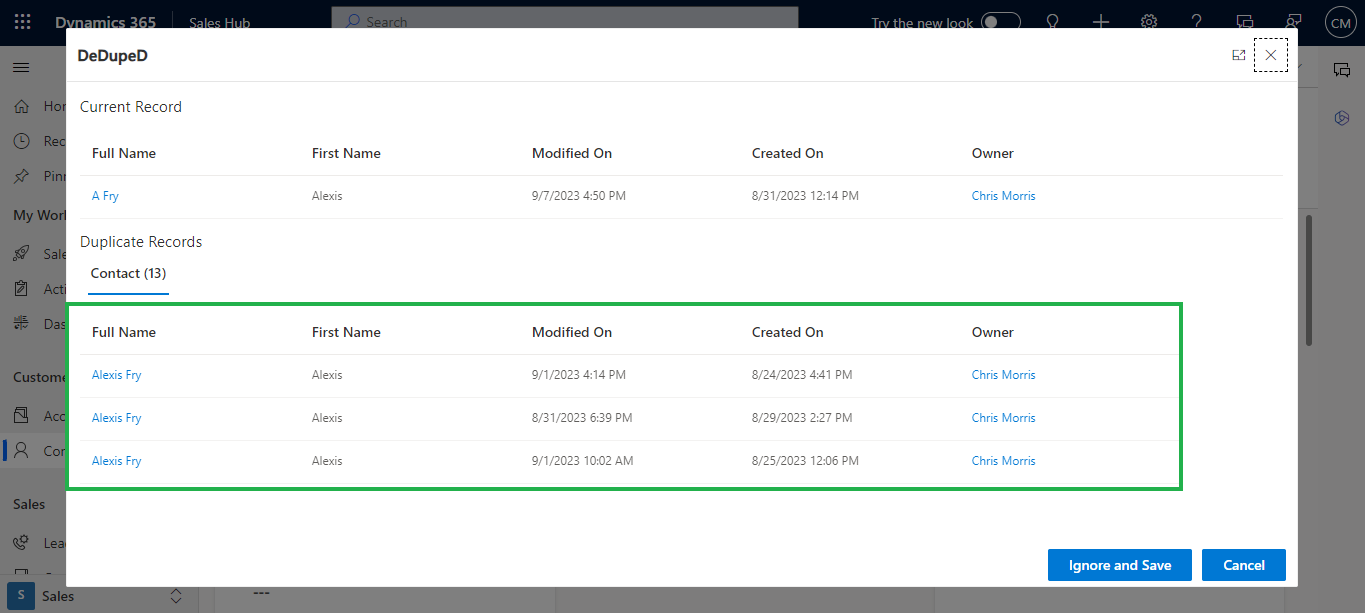
In some cases, users may complete the entire form and attempt to save.
DeDupeD performs a final client-side validation at the moment of save.
If a duplicate is found:
- CRM blocks the save action
- A clear pop-up explains why the record is flagged
- Users can make an informed decision instantly
This ensures zero duplicate entries unless intentionally allowed.
Example: Preventing Duplicates on Save
Scenario:
A user fills in all details for a Lead and clicks Save.
- DeDupeD compares entered details with existing CRM data.
- A duplicate is found.
- The system shows a warning before saving.
User Options:
- Cancel and update the existing record
- Or select Ignore and Save (if business logic requires it)
Outcome:
Duplicate prevention happens without breaking user flow.
Server-Side Duplicate Prevention in Dynamics 365 CRM
What is Server-Side Duplicate Prevention?
Server-side duplicate prevention validates records inside the CRM backend, protecting data created without user interaction.
It applies to records created through:
- Power Automate flows
- Background workflows
- SDK or custom code
- Data imports and migrations
External systems and integrations
How Server-Side Duplicate Prevention Works in Dynamics 365 CRM
Server-side duplicate prevention works by analyzing incoming data from backend sources — rather than the form UI, and validating whether an equivalent record already exists before inserting or updating it.
You can enable server-side prevention through:
- Power Automate flows that check for duplicates before creating records
- Workflows that validate records during automated processes
- Backend logic or services that enforce duplicate checks
- Preprocessing or integration layers that call duplicate detection APIs
With tools like DeDupeD, you can apply server-side prevention consistently across all these scenarios without extensive custom code.
How to Implement Server-Side Duplicate Prevention
You don’t need deep technical expertise to add server-side duplicate prevention to your CRM workflows. The general implementation involves:
- Define What Constitutes a Duplicate
Decide which fields or combinations (e.g., email + phone, name + account number) should be considered duplicates for your business logic.
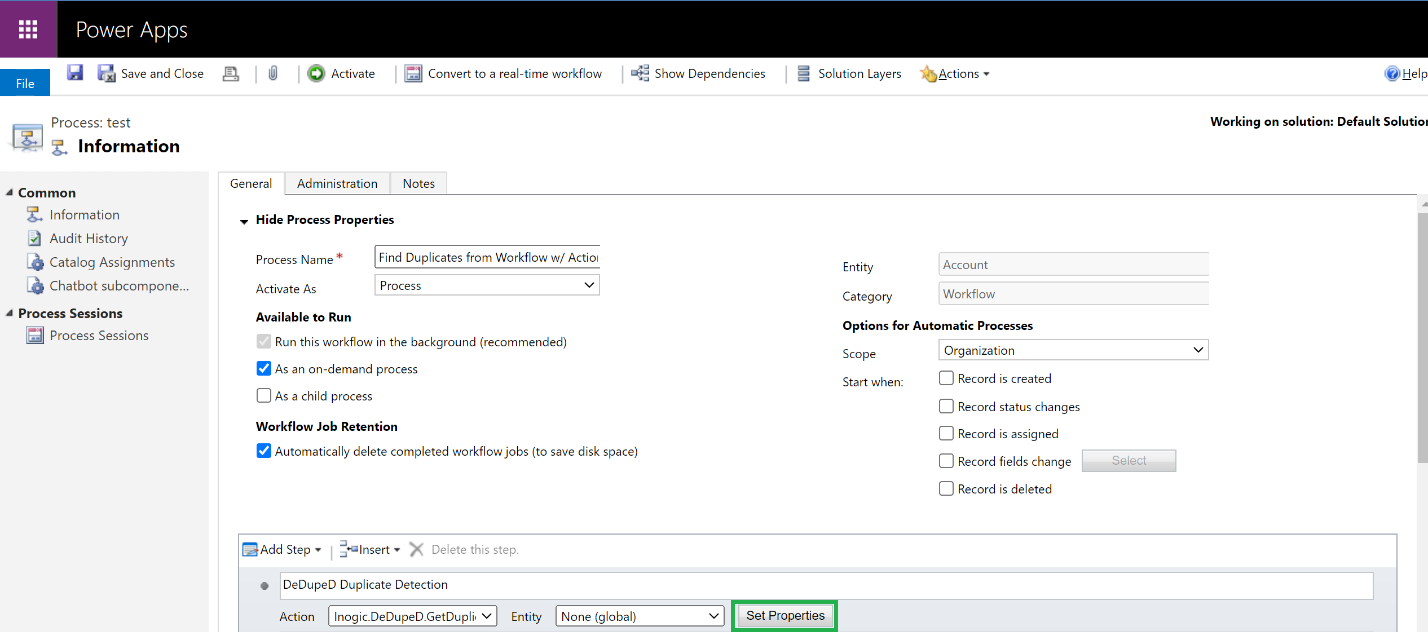
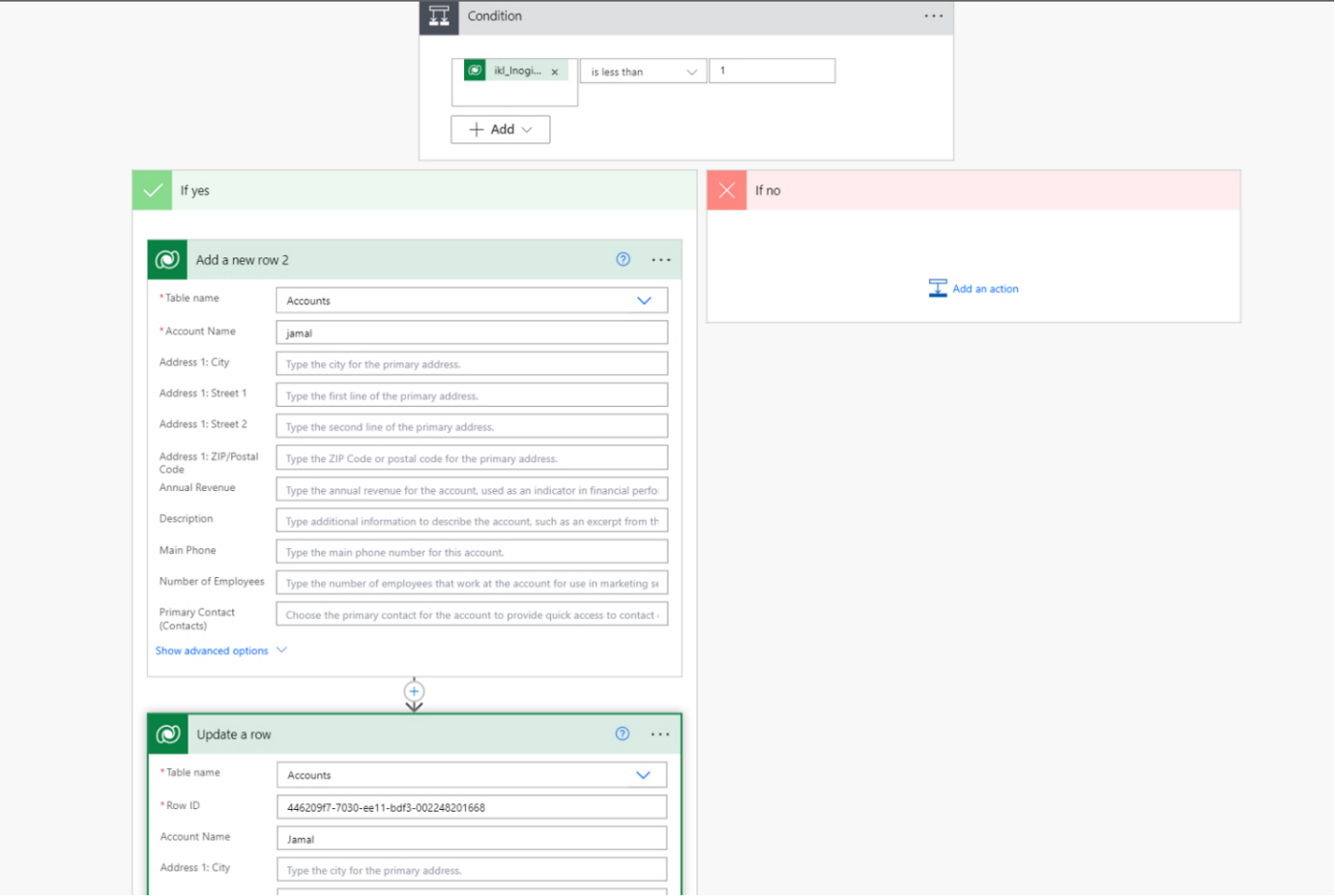
- Integrate Duplicate Checks into Automation
Whether it’s a Power Automate flow, workflow process, or integration service:
- Include steps that count or check for existing matching records
- Only proceed to create a new record if the count is zero
- Apply Rules During Bulk Imports
When importing data from files or other systems:
- Add duplicate detection actions before the import step
- Cancel or flag duplicates before they enter CRM
- Decide on Business Actions
When a duplicate is detected, choose whether to:
- Block creation
- Alert the process owner
- Merge duplicates
- Log or route for review
This framework ensures backend processes respect the same logic your users follow in client-side prevention.
Client-Side vs Server-Side Duplicate Prevention (Decision Guide)
Capability | Client-Side | Server-Side |
Prevents duplicates during user entry | Yes | No |
Protects automation & integrations | No | Yes |
Provides instant user feedback | Yes | No |
Required for imports & workflows | No | Yes |
Best practice: Use both together for complete duplicate prevention.
When Duplicate Prevention in Dynamics 365 CRM Fails (and Why)
Duplicate prevention often fails when organizations rely only on native or partial controls.
Common failure reasons:
- Native duplicate rules are bypassed by automation
- Imports do not enforce UI-based checks
- Exact-match logic misses near-duplicates
- Inconsistent rules across processes
This is why modern CRM environments require unified, end-to-end duplicate prevention, not isolated checks.
Best Practices for End-to-End Duplicate Prevention
- Apply the same matching logic across users and automation
- Validate data before imports and migrations
- Monitor duplicate warnings to identify trends
- Treat duplicate prevention as a governance strategy, not a cleanup task
How Duplicate Prevention Makes Your CRM AI-Ready
AI and Copilot features depend on clean, unique, and trustworthy data.
When duplicates exist:
- AI predictions become unreliable
- Copilot responses surface conflicting records
- Analytics and forecasts lose credibility
Preventing duplicates ensures:
- One customer equals one record
- AI insights are consistent and explainable
- CRM becomes a reliable foundation for AI-driven decisions
Modern duplicate prevention in Dynamics 365 CRM requires consistent enforcement across user actions, automation, imports, and integrations.
Solutions such as DeDupeD extend native CRM capabilities by enabling intelligent, real-time duplicate prevention across all CRM entry points—helping organizations maintain clean, trusted, and AI-ready CRM data without disrupting business workflows.
FAQs
What is duplicate prevention in CRM?
Duplicate prevention in CRM is a proactive data validation approach that blocks or warns against duplicate records during data entry, automation, imports, and integrations before records are saved.
Does Dynamics 365 CRM prevent duplicates automatically?
Dynamics 365 includes basic duplicate detection, but it is limited and often bypassed by automation, imports, and integrations. Advanced duplicate prevention requires additional validation layers.
Do I need both client-side and server-side duplicate prevention?
Yes. Client-side prevention stops duplicates during user entry, while server-side prevention protects automation, imports, and integrations. Together they provide complete coverage.
Can duplicate records be prevented during imports and workflows?
Yes. With proper server-side duplicate prevention, records can be validated before creation during imports, workflows, and automated processes.
Does duplicate prevention impact CRM performance?
No. Modern duplicate prevention uses optimized validation logic designed to run efficiently without affecting CRM user experience or system performance.
What is client-side duplicate prevention in CRM?
Client-side duplicate prevention validates data in real time on CRM forms and prevents duplicate records from being saved during user entry.
What is server-side duplicate detection in CRM?
Server-side duplicate detection prevents duplicate records created by backend processes such as automation, workflows, imports, and integrations before they are saved in CRM.
Reach out to us today to know more!



