















Sync Dynamics 365 Privileges to SharePoint Permissions

Sync Dynamics 365 Security Roles with SharePoint Permissions Automatically

Delivered Happiness Globally!

What's SharePoint Security Sync?

SharePoint Security Sync is an enterprise-grade, Microsoft Certified app purpose-built to replicate the Dynamics 365 security model in SharePoint. When you integrate Dynamics 365 CRM with SharePoint for document and storage management, SharePoint cannot inherit the exact security permissions from Dynamics 365 CRM, leaving a critical access-control gap. SharePoint Security Sync closes that gap by automatically syncing the Dynamics 365 security model with SharePoint, including users, teams, roles, and privileges, ensuring that document access is always aligned with CRM record-level permissions. When you sync Dynamics 365 attachments to SharePoint, the permissions travel with the files, meaning users see only what their CRM role permits.

By removing manual permission management, SharePoint Security Sync reduces the risk of unauthorized access, supports governance and compliance initiatives, and allows IT teams to maintain centralized security control without increasing administrative effort.

Recent Updates

New in 2026: Smarter Dynamics 365 SharePoint Integration & Security Enhancements

Create custom SharePoint folder structures based on year, month, customer, case, project, or any Dynamics 365 CRM field to organize documents in a way that matches your business processes while keeping SharePoint permissions aligned with Dynamics 365 security roles

Automatically sync Dynamics 365 CRM fields with SharePoint metadata columns to improve document search, filtering, categorization, and visibility across SharePoint document libraries

Keep Dynamics 365 and SharePoint permissions synchronized in real time so users, teams, business units, security roles, and record-level access remain consistent without manual updates.

Apply standardized security templates across departments and teams to simplify document access management and strengthen SharePoint governance within Dynamics 365 environments.

Benefits of using SharePoint Security Sync

Overcome SharePoint’s 50,000 unique permissions limit by creating structured folder hierarchies while maintaining secure, organized, and governed document storage aligned with Dynamics 365.

Reduce security risk by auto-synching access rights from Dynamics 365 CRM to SharePoint, ensuring permissions remain accurate without manual intervention.

SSS

Automated document library creation prevents unique permission limits in SharePoint, enabling storage growth without disrupting security or operations.

Securely back up emails and attachments to SharePoint, reducing the risk of data loss while improving visibility and control over CRM communications.

Start Your FREE Trial - Download the App Now!

Bulk Synchronization Tool
EULA

Supported On

Dynamics 365 CRM
Online | On-Premises
Supported

Just looking for ways to optimize your storage space in Dynamics 365 CRM? Check out our Attach2Dynamics that helps you save storage costs by enabling integration with multiple cloud storage like Azure Blob Storage, Dropbox and SharePoint

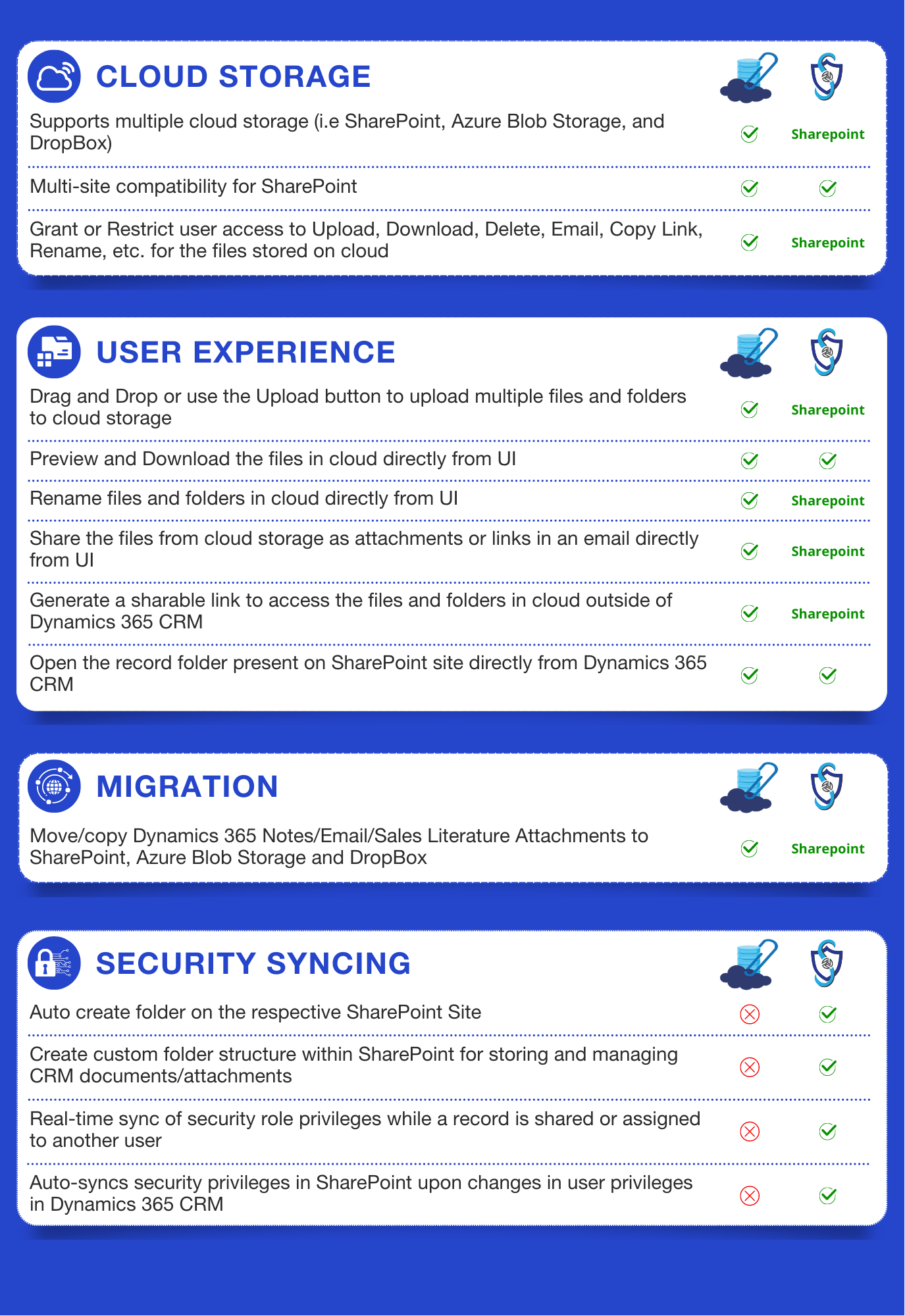
Comparison between Attach2Dynamics and SharePoint Security Sync

Attach2Dynamics-and-SharePoint-Security-Sync-Comparison

Features

Here’s How It Enhances the Security of SharePoint Document Management

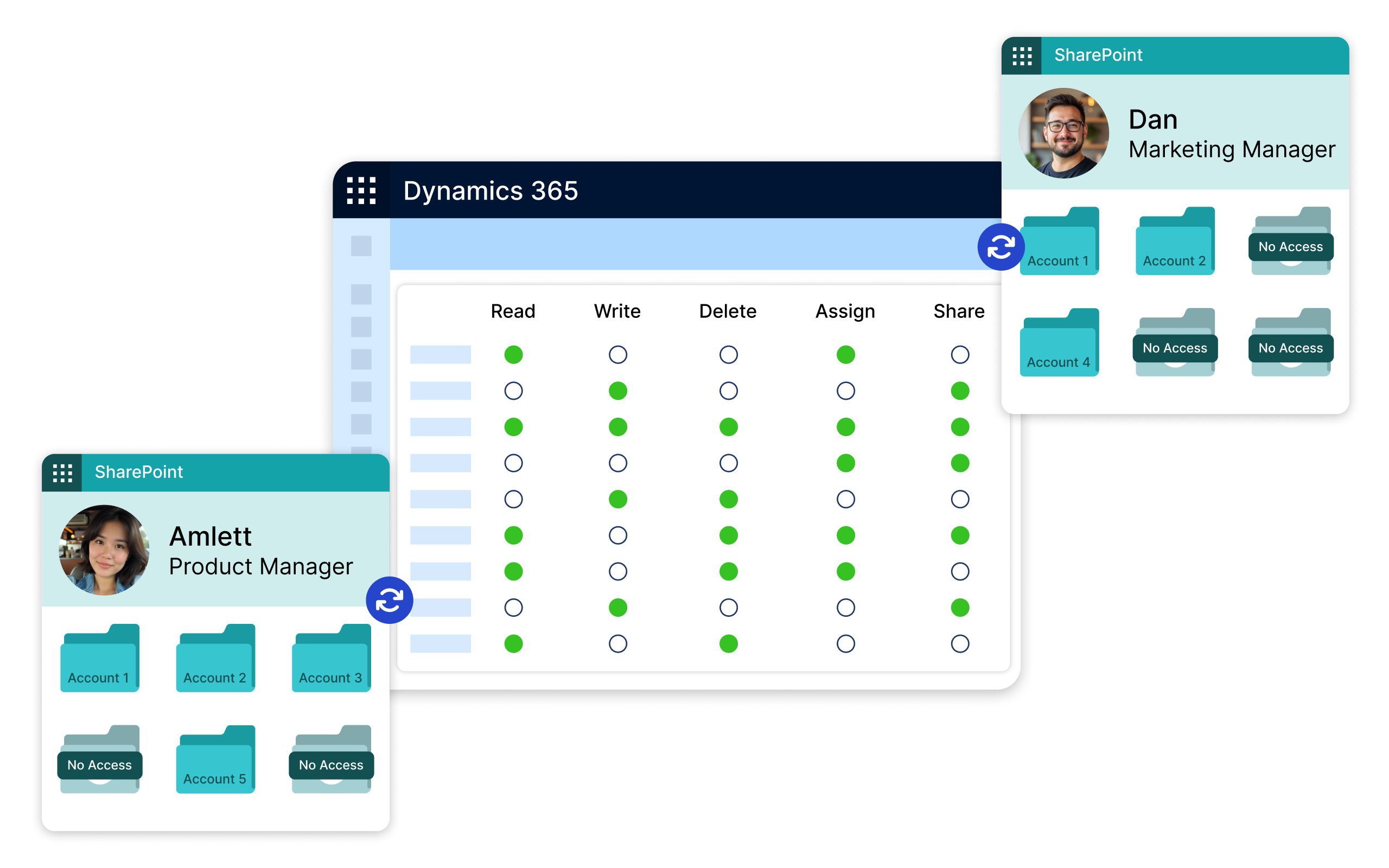
SharePoint Security Sync strengthens Dynamics 365 SharePoint integration by ensuring any change made to users, teams, ownership, or security roles in Dynamics 365 CRM is automatically reflected in SharePoint. This helps maintain consistent document-level security across your Dynamics CRM SharePoint integration, eliminates manual permission updates, and reduces the risk of unauthorized document access.

Automatically synchronize security privileges between Dynamics 365 and SharePoint, even in complex enterprise environments. Any updates to CRM users, teams, ownership, or security roles are instantly reflected in SharePoint, helping maintain consistent Dynamics 365 SharePoint security across both systems while reducing manual permission management

Easily manage and update Dynamics 365 security roles based on changing business requirements, with real-time synchronization to SharePoint. As records are assigned, shared, or updated, document access permissions automatically adjust to maintain secure role-based access without additional effort.

Create Custom SharePoint Folder Structures for Organized Document Storage

Create scalable and business-friendly folder hierarchies that organize documents by customer, project, department, date, or any CRM field. This improves document accessibility helps overcome SharePoint’s 5,000-item threshold, and supports secure Dynamics CRM SharePoint integration for enterprise document management.

Sync Dynamics 365 CRM Data with SharePoint Metadata Columns

Manage SharePoint documents directly from Dynamics 365 CRM using metadata-driven organization and advanced document categorization. Automatically map CRM fields to SharePoint metadata columns, upload multiple files through drag-and-drop, and maintain synchronized Dynamics 365 SharePoint security without leaving CRM.

More Features

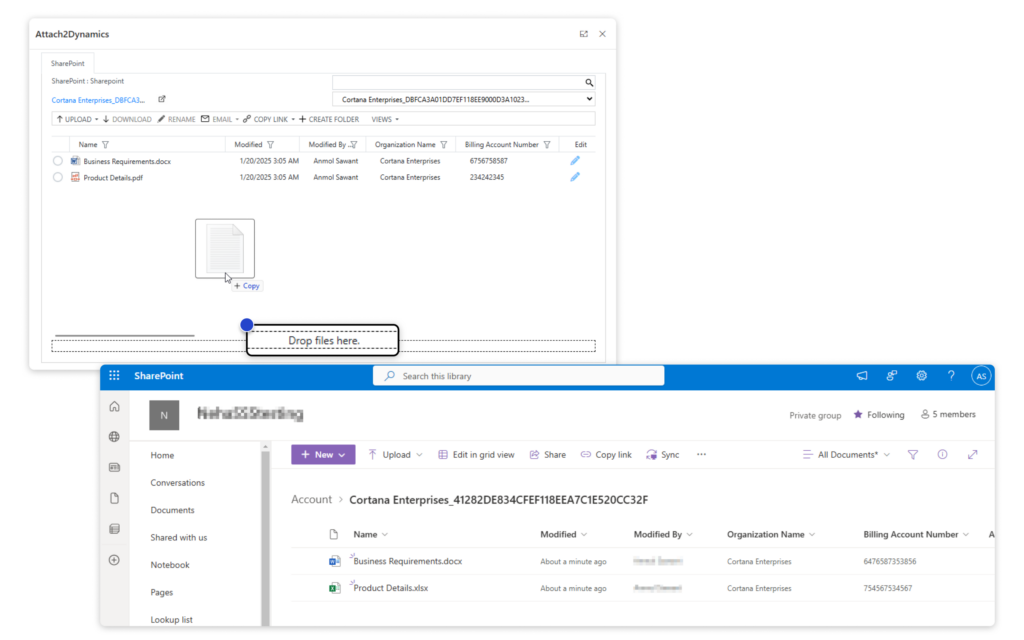
Drag and Drop

Drag and drop multiple files and folders from CRM to SharePoint, allowing you to move/upload folders easily.

Bulk Migration Job

Sync previous CRM records in bulk with SharePoint. Retry failed syncs with one click.

The Security Templates

It allows you to control users to perform actions like Upload, Download, Email, Copy Link, and Rename in SharePoint, Dropbox, and Azure Blob Storage.

Override Files

Choose whether to replace existing files or save them as new versions during migration.

DocuSign Integration

Users can electronically sign documents stored in SharePoint using DocuSign.

Configure Email Description

Customize the default link text in emails for better personalization when sending attachments through CRM.

Send Documents through Email from CRM

Share documents via email as links or attachments, offering flexibility for easy access or direct download by recipients.

Retry Failed Sync Jobs

Using the SharePoint Security Sync Tool Sync previous records in bulk and easily manage security privileges. Retry failed syncs with one click.

Email Body Content Migration

Migrate email content, including messages, images, and attachments, from CRM to SharePoint, preserving key details for organized records.

The comprehensive Guide to Microsoft Dynamics 365 CRM and SharePoint Security models!

Attach2Dynamics ebook
testimonials

What Our Customers Are Saying?

The product itself is great if it is configured correctly. We started use this product because the previous MS partner brought this over with little knowledge transfer. Inogic helped us to bring it to a working state. Great customer service from the team, quick response too.
Gongbo Sun
SharePoint Security Sync proved to be a great tool for permission synchronization, combining ease of configuration and usability. The fast-responding support helped us when the issue occurred.
Sergiy Demchuk
The installation and configuration of the product is very simple and self-explanatory. In addition, Inogic is one of the only companies to offer a product that does not depend on additional services but can be installed as a solution directly in Dynamics 365 CRM.
Fabian Muff

Our Blogs

SharePoint Metadata

SharePoint Metadata – Enhance document searchability in Dynamics 365 CRM integration!

Organizations today face the challenge of managing vast amounts of information..

Read More

Control Acccess to CRM Data

Restrict Unauthorized Users to Access CRM Data in SharePoint

In Dynamics 365 CRM, managing access to records is essential for maintaining security and protecting…

Read More

How the New Power Pages Security Workspace Enhances Site Protection

The synergy of Microsoft Dynamics 365 CRM and SharePoint is undeniable…

Read More

Frequently Asked Questions

Which types of SharePoint sites does SharePoint Security Sync supports?

SharePoint Security Sync supports SharePoint Communication Sites, Team Sites, and SharePoint Subsites. This helps organizations to maintain secure Dynamics 365 SharePoint integration across different SharePoint environments while keeping document permissions synchronized with Dynamics 365 CRM security roles and access controls.

Is there a limit to storing files in SharePoint using SharePoint Security Sync?

SharePoint Security Sync itself does not impose any storage limitations. However, SharePoint has a security scope limit of 50,000 uniquely permissioned items per list or library. To help organizations overcome this limitation, SharePoint Security Sync supports Custom Folder Structures that organize documents efficiently while maintaining synchronized SharePoint permissions across Dynamics 365 environments.

Can users directly access SharePoint files and folders from within Dynamics 365 CRM?

Yes, users can directly access SharePoint files and folders from within Dynamics 365 CRM using the ‘Open Folder’ feature. This allows users to open SharePoint record folders directly from CRM, improving document accessibility and streamlining Dynamics 365 SharePoint integration workflows.

Is SharePoint included in Dynamics 365?

SharePoint is not included as part of Dynamics 365 licenses, but organizations with eligible Microsoft 365 subscriptions can integrate SharePoint with Dynamics 365 CRM for document management and collaboration.

How do I integrate Dynamics 365 CRM with SharePoint?

SharePoint Security Sync helps organizations integrate Dynamics 365 CRM with SharePoint while automatically synchronizing CRM security roles and SharePoint permissions. This enables secure document management, prevents unauthorized document access, and improves Dynamics 365 SharePoint security across both platforms.

 For step by step guide, watch our demo video: https://youtu.be/pZzZjULKGcs

Automate role-based security between Dynamics 365 CRM and SharePoint for secure document access

Contact Us

Dynamics 365 v9.x / Dataverse

Get a Demo

Presentation

whitepaper

Bulk Synchronization Tool

Download eBook
