











Enterprise Data Backup & Disaster Recovery for Dynamics 365 CRM

Go Beyond Native Backup: Automated Backup, Granular Data Restore & Disaster Recovery for Dynamics 365 CRM and Dataverse.

Backup4Dynamics

Delivered Happiness Globally!

Coming soon

What's Backup4Dynamics?

Backup4Dynamics is an automated data backup and recovery solution for Microsoft Dynamics 365 CRM and Dataverse that protects your business-critical data around the clock. Configure your backup schedule once, and Backup4Dynamics takes care of the rest by automatically backing up your data. Need an immediate backup? Run one anytime, or use incremental backups to capture only new and updated data. With Bring Your Own Storage (BYOS), your backup data remains securely stored in your own Azure storage account, giving you complete ownership and control. It also offers long-term retention, including lifetime retention based on your retention policy, along with granular restore and point-in-time recovery to help you quickly recover from accidental deletions, failed imports, third-party integration issues, data corruption, and other unexpected incidents while minimizing business disruption.

Launch Highlights

Introduces automated scheduled and on-demand data backups, ensuring your Microsoft Dynamics 365 CRM data stays protected with minimal manual effort.

Adds granular and point-in-time recovery, allowing you to restore specific record’s data to quickly recover from accidental loss or changes.

Introduces customer-owned storage (Bring Your Own Storage), enabling you to securely store backup data in your own Azure storage account for greater control and data security.

Supports long-term data retention, including lifetime retention based on your retention policy, helping meet business continuity and compliance requirements.

Get Insider Access to Backup4Dynamics

Become the first to experience Backup4Dynamics! Get exclusive previews, early access opportunities, and more by joining our Insider Program. You will be among the first to experience Backup4Dynamics’ exciting features and advancements, as well as have the opportunity to provide feedback and shape its development.

Benefits of using Backup4Dynamics

Protects your Microsoft Dynamics 365 CRM and Dataverse data from accidental deletion, failed imports, data corruption, and unexpected data loss.

Automates scheduled data backups and supports on-demand backups to keep your CRM data continuously protected.

Backup4Dynamics

Recovers specific record data with granular and point-in-time recovery, reducing downtime and business disruption.

Stores your backup data securely in your own Azure storage account with Bring Your Own Storage (BYOS), giving you complete ownership and control.

Supported On

Dynamics 365 CRM
Online
Features

Here’s How Backup4Dynamics helps protect and recover your CRM data

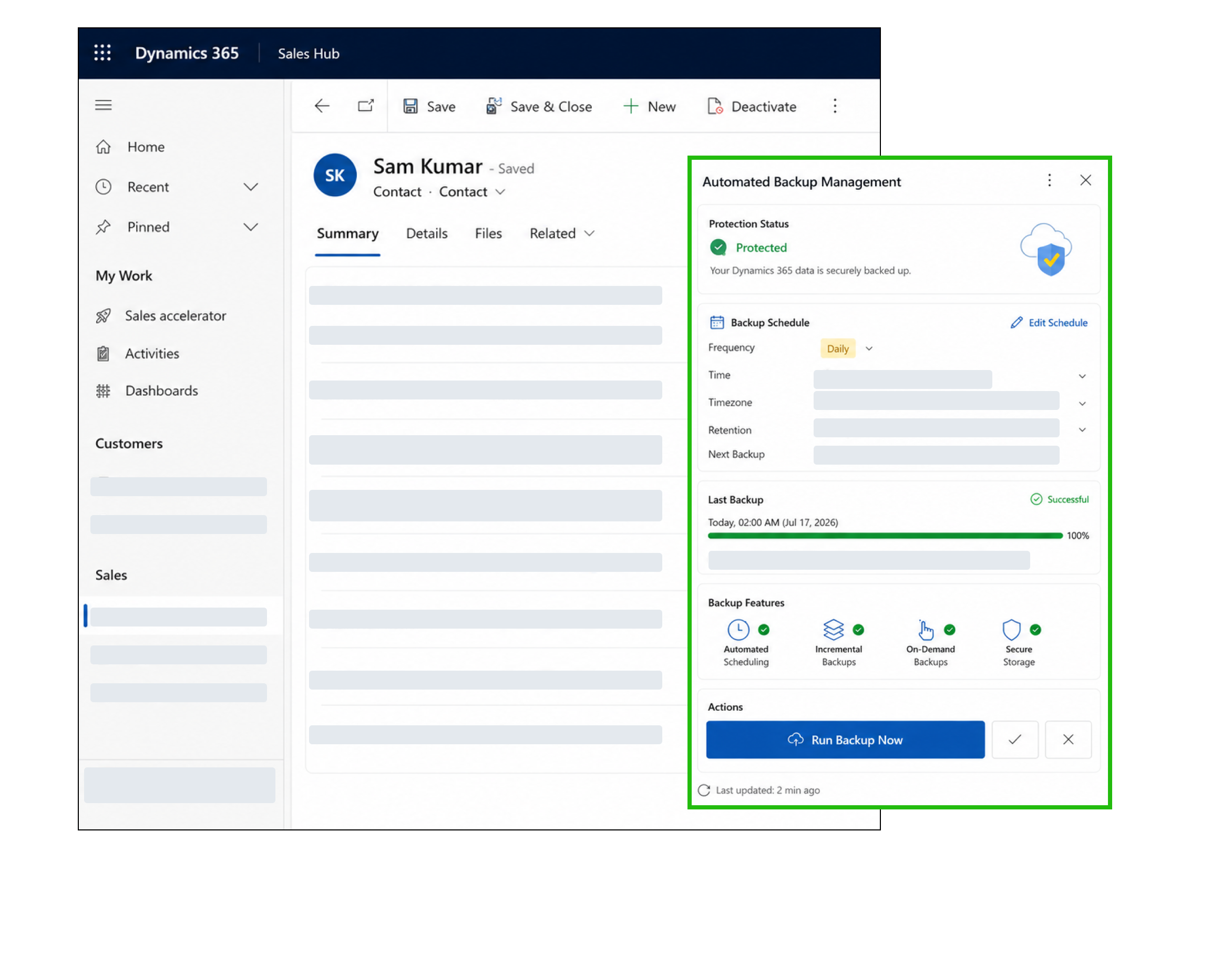
Automated Backup Management

Protect your Microsoft Dynamics 365 CRM with automated scheduled backups that run daily, weekly, monthly, or whenever you need them. Backup4Dynamics also supports on-demand and incremental backups, reducing manual effort while ensuring your latest business data is securely backed up and always available for recovery.

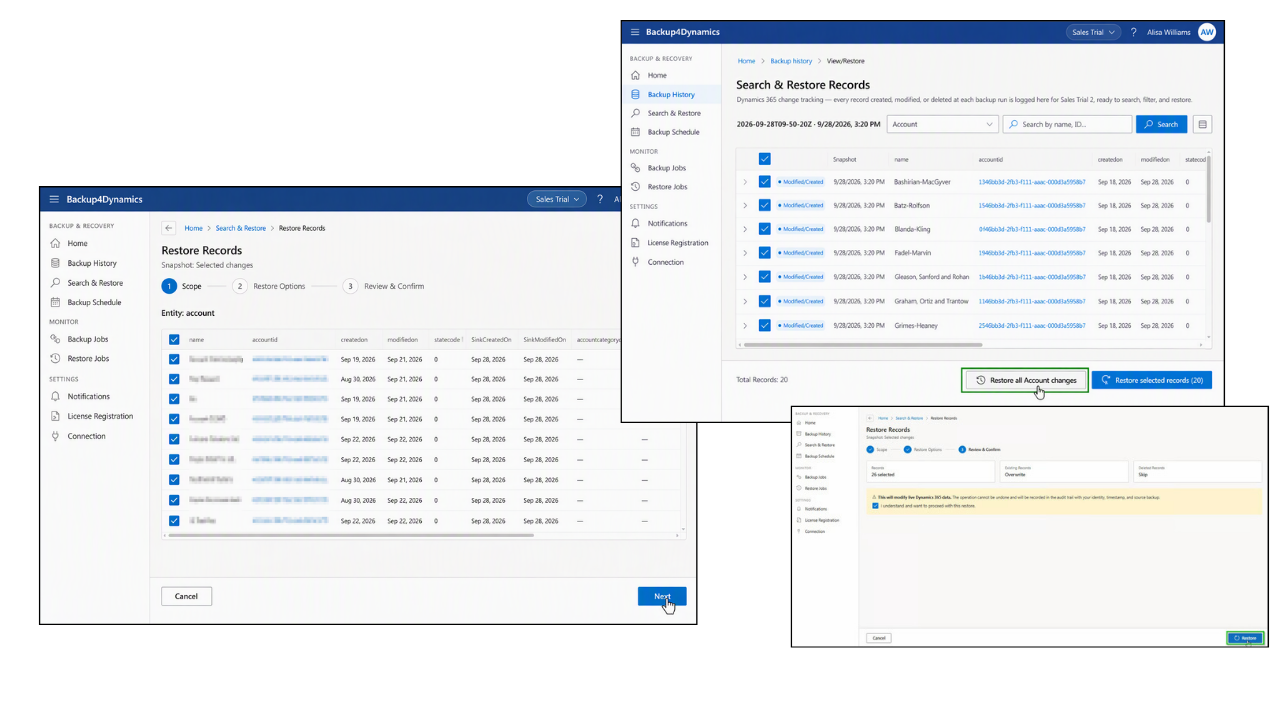
Granular & Point-in-Time Recovery

Recover exactly what you need without restoring your entire CRM environment. Backup4Dynamics lets you restore individual records or recover your data from a specific point in time. This helps you quickly reverse accidental deletions, failed imports, integration errors, and other unexpected data loss.

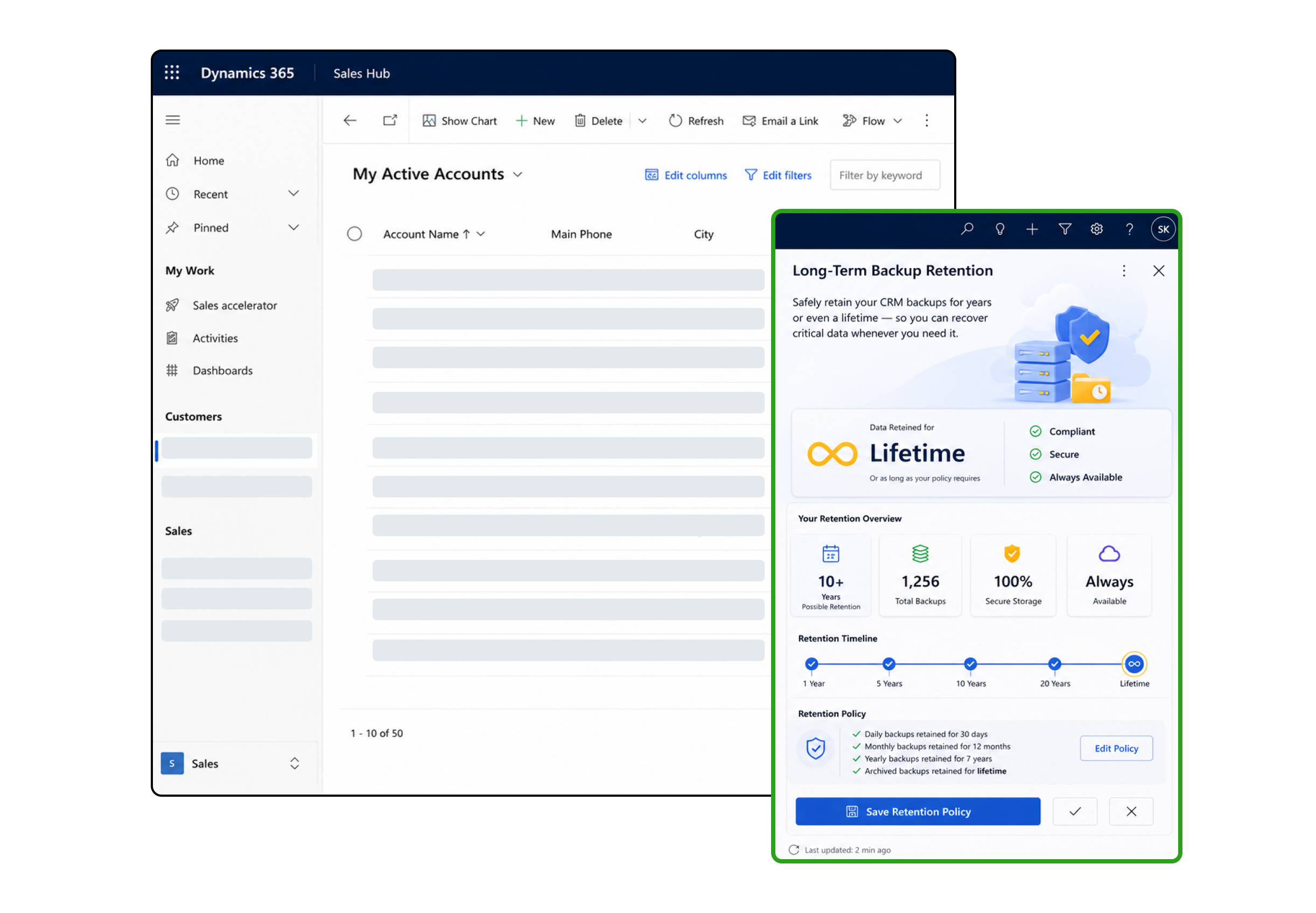
Long-Term Backup Retention

Keep your CRM data protected for as long as your business requires. Backup4Dynamics securely stores backups for years or even a lifetime based on your retention policy, helping you meet compliance requirements, preserve historical data, and recover critical information whenever it is needed.

More Features

CRM Data Backup

Back up data of records, attachments, and notes to ensure complete protection and reliable recovery of your Dynamics 365 CRM data.

Backup Monitoring Dashboard

Monitor backup and restore activities from a centralized dashboard with backup history, job status, failure alerts, and restore activity logs.

Incremental Backups

Back up only changed data since the previous backup to reduce storage usage, improve performance, and speed up backup operations.

Customer-Owned Storage (BYOS)

Store your backup data securely in your own Azure storage account with Bring Your Own Storage (BYOS), giving you complete ownership and control.

Flexible Backup Scheduling

Configure daily, weekly, or monthly backup schedules based on your business requirements, with the flexibility to initiate on-demand backups whenever required.

Business Continuity

Reduce operational disruption with reliable data protection and fast recovery capabilities that help keep your Dynamics 365 CRM available when unexpected data loss occurs.

Frequently Asked Questions

What data does Backup4Dynamics back up?

Backup4Dynamics protects your Microsoft Dynamics 365 CRM and Dataverse environment by backing up records, attachments, and notes. This helps ensure your business-critical CRM data can be recovered whenever needed.

How is Backup4Dynamics different from Microsoft Dynamics 365 native backups?

Microsoft’s native backups typically retain data for only 7–28 days and restore the entire environment. Backup4Dynamics offers automated backups, long-term retention, granular restore for data in records, and point-in-time recovery, giving you greater control over your CRM data.

Can I restore a single record instead of the entire CRM environment?

Yes. Backup4Dynamics supports granular restore, allowing you to recover data in records without restoring the complete CRM environment. This helps minimize downtime and reduces the impact on business operations.

How long are backups retained?

Backup4Dynamics supports flexible backup retention policies, allowing you to retain backups for years or even a lifetime based on the retention policy you configure in your Azure storage account. This gives you greater control over your backup data while supporting long-term business and compliance requirements.

Can I create backups manually whenever required?

Yes. In addition to automated scheduled backups, Backup4Dynamics allows administrators to create on-demand backups before deployments, data imports, system updates, or any other critical changes.

How are data backup and restore operations managed in Backup4Dynamics?

Backup4Dynamics provides administrators with the tools to schedule automated data backups, perform on-demand backups, and restore records whenever required, ensuring reliable data protection and recovery.

Can Backup4Dynamics help recover data after accidental deletion or data corruption?

Yes. Whether data is lost due to accidental deletion, failed imports, integration issues, or unexpected data corruption, Backup4Dynamics enables you to quickly recover the required data using granular restore or point-in-time recovery, helping reduce downtime and maintain business continuity.

Secure your Dynamics 365 CRM with reliable backups, granular recovery, and long-term retention.

Contact Us

Get Insider Access - Backup4Dynamics