



Cost-Effective Dynamics 365 Backup and Disaster Recovery Solution
Back up, restore, and recover Dynamics 365 for just $2,400 a year
Dynamics 365 Data Loss is a Compliance Risk: Is Your Disaster Recovery Plan Ready?
Ask yourself three questions about your Dynamics 365 CRM backup and recovery:
- 1. Can you restore Dynamics 365 data deleted last month without rolling back everyone's work?
- 2. If your CRM data vanished overnight, would your Dynamics 365 disaster recovery have you running again by morning?
- 3. Can you prove your Dynamics 365 data backup hasn't been altered since it was stored?
If you’re unsure about any of these, your Dynamics 365 disaster recovery plan may have gaps. Microsoft Dynamics 365 backup may not cover every long-term retention, targeted recovery, and data integrity requirement. For $2,400 a year, Backup4Dynamics adds comprehensive Dynamics CRM backup under your control, long-term data archival and retention in your own Azure, and record-level Dynamics 365 CRM recovery.
Why Teams Choose Backup4Dynamics as Their Dynamics 365 Backup Solution
Cost-Effective Protection
Dynamics 365 backup and disaster recovery for $2,400 a year, the lowest among competing solutions.
Private Storage
Your backups live in your own Azure tenant, with no vendor in the data path and no third-party risk.
Precise Restore
Built only for Dynamics 365 and Dataverse, not a broad multi-workload platform, so restore is record-level, relationship-aware, and non-destructive.
Hourly Backups
Automated hourly Dynamics 365 backups limit data loss to one hour, while competitors typically back up every 6 to 24 hours.
Easy Reporting
The same backup data works with Power BI, Fabric, and Synapse, so it serves analytics as well as recovery.
Locked Backups
Enable immutability in your own Azure storage so backups can't be altered or deleted during retention, blocking ransomware and insider threats.
$2400
/ Year
10X
less downtime
1
click to restore
Backup4Dynamics vs. Other Dynamics 365 Backup Options
Find out how fast you could recover!
Discover a smarter way to back up, restore, and retain your critical CRM data with Backup4Dynamics.
Built on Restore Expertise
Extra Protection for Your Dynamics 365 CRM
Built on years of Dynamics 365 restore experience with Undo2Restore, Backup4Dynamics brings Microsoft Dynamics 365 disaster recovery, compliance, audit logs, and immutable storage together in one comprehensive solution you control.
Bounce Back From Any Disaster
Dynamics 365 CRM disaster recovery built on years of Undo2Restore experience. Scheduled recovery points restore a single record or an exact point in time, without a full rollback.
Stay Compliant for Years
Meet Dynamics 365 data retention requirements in healthcare, insurance, banking, and government. Keep backup data for 7 years, 10 years, or for life, in storage you own.
Keep a Record of Every Change
Track changes to your Dynamics 365 data over time. Keep historical records outside Dataverse so you can answer questions about past changes without filling up Dataverse storage.
Records Nobody Can Change
Write backups to your own Azure Data Lake Storage Gen2 with immutable (WORM) storage. Records can be read, searched, and restored, but never edited or deleted before retention ends.
Backups That Respect Your Data Modeling
Backups map your entities, attributes, keys and table relationships (1:1, 1:M and M:N), so data is extracted, stored, indexed and restored accurately, with its integrity and every relationship preserved.
Keep Audit Logs for Years
Audit Hub keeps audit logs for the long term outside Dataverse, so who changed what and when stays on record while your Dataverse storage stays lean.
Features
How Backup4Dynamics Protects Your CRM
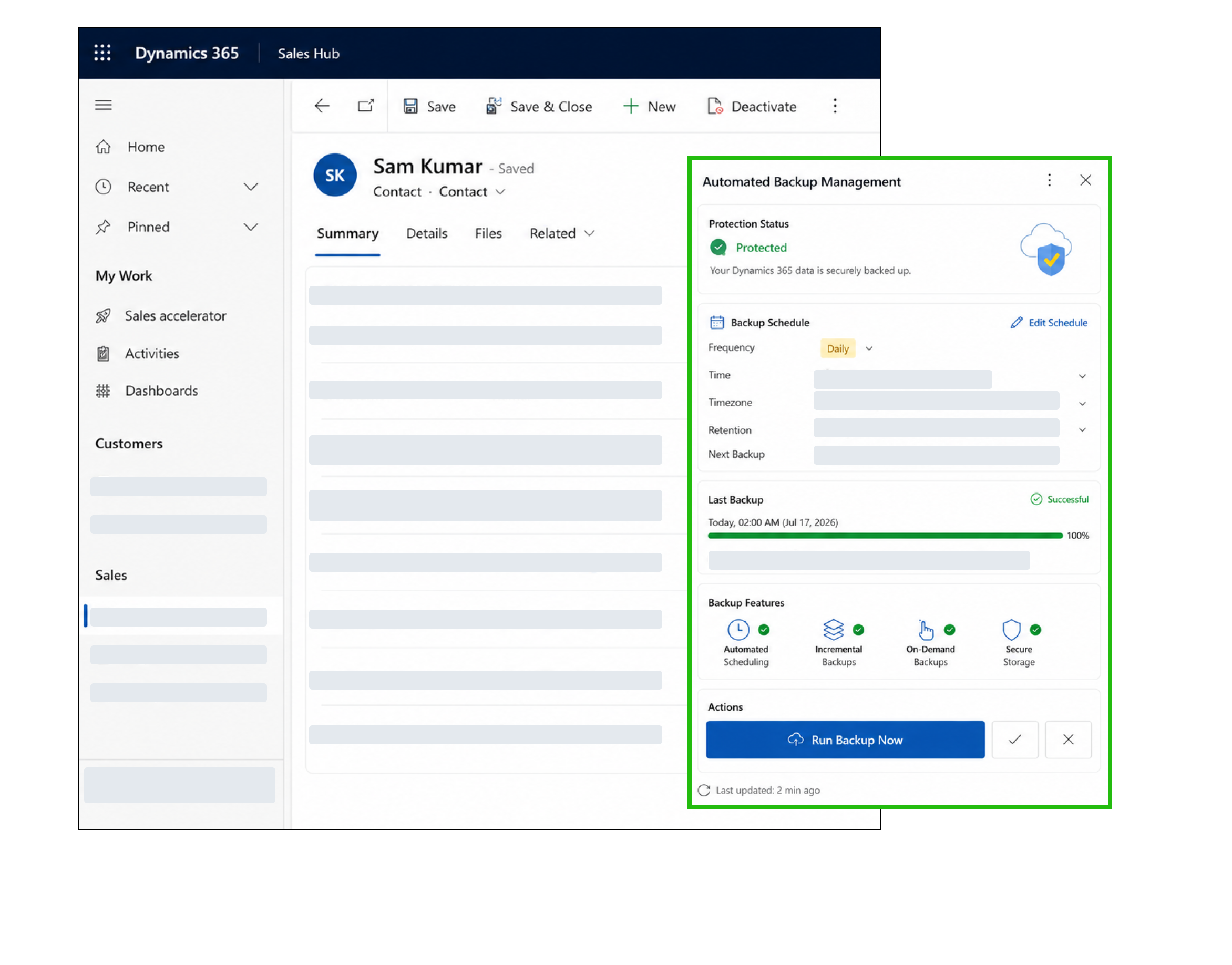
Automated Dynamics 365 Backup Scheduling
Set it once. Your Dynamics CRM online backup runs on schedule, and you can trigger one before any import or deployment.
- Schedule Dynamics 365 backups daily.
- On-demand backups before imports, upgrades, and deployments
- Incremental runs capture only what changed, so jobs stay fast and storage stays low
- Status, failure alerts, and logs in one dashboard, so you know every backup ran
Granular Dynamics 365 Restore: Record-Level and Point-in-Time
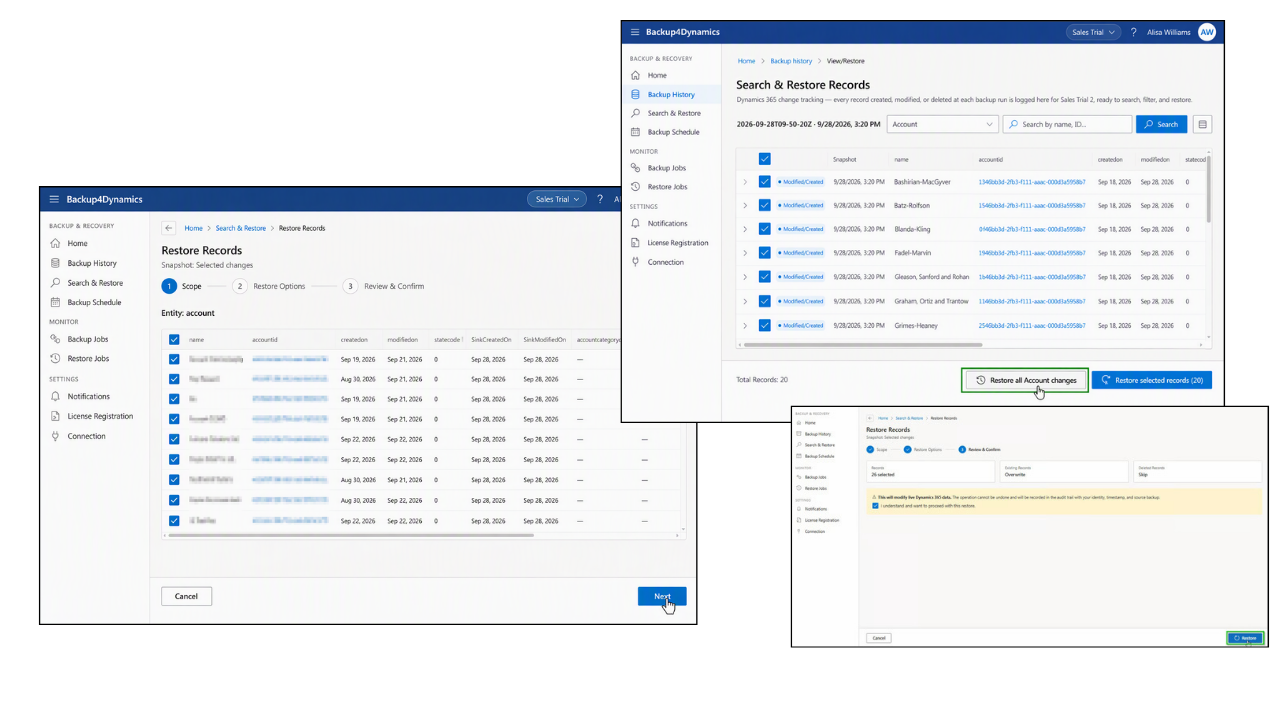
Deleted records, failed imports, integration errors, corruption: restore Dynamics 365 data record by record or to an exact point in time. It is the recovery know-how behind Undo2Restore, now backed by a full backup history.
- Search backed-up records by date range and entity, narrow by created, modified or deleted, or find a record by name or ID
- Choose how existing records restore: overwrite live data, fill blanks only, keep current values or skip
- Recreate deleted records and include their related records (1:N and N:N relationships)
- Bypass plugins, workflows and Power Automate flows so a restore does not trigger them
Long-Term Dynamics 365 Backup Retention and Archiving
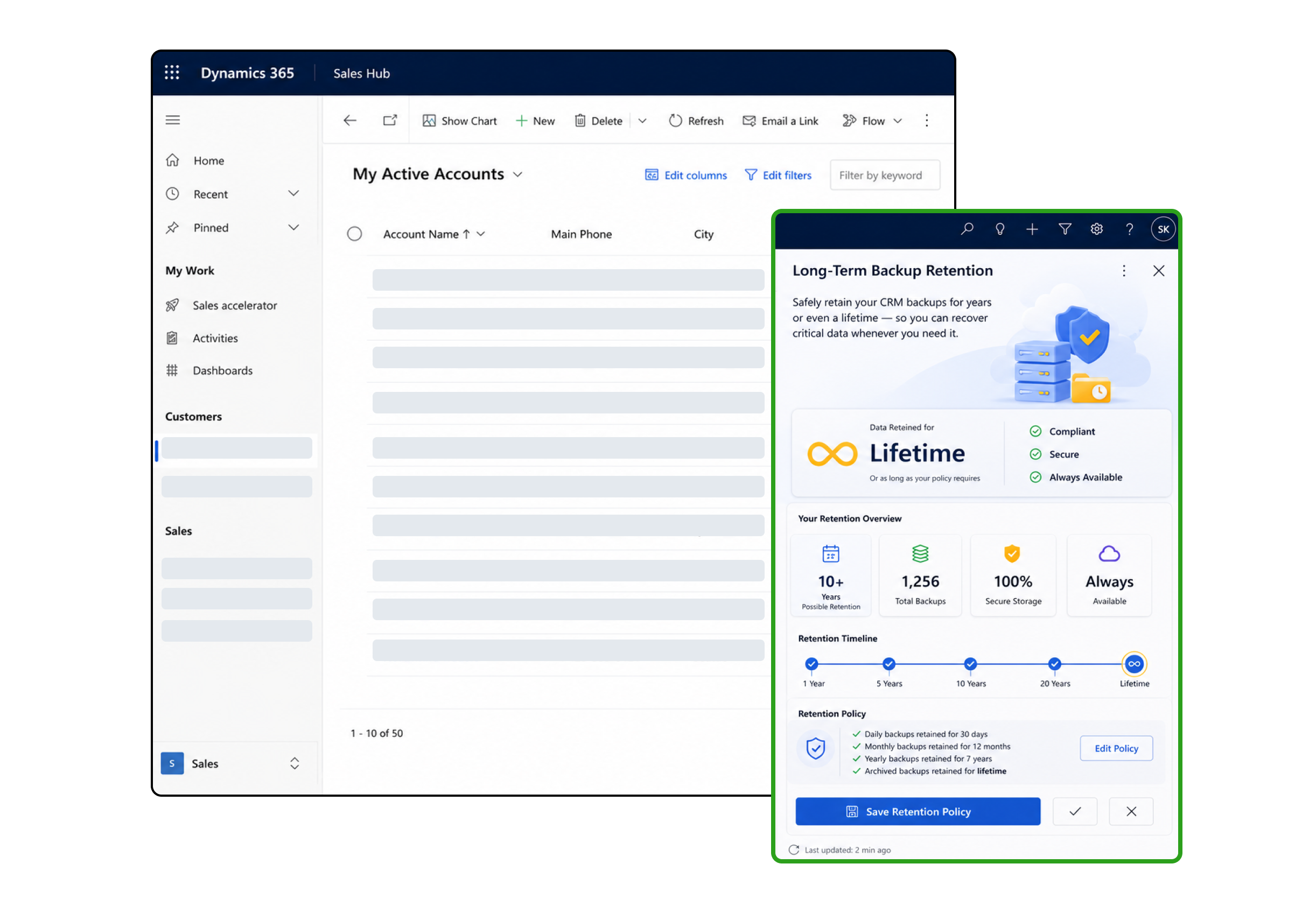
For Microsoft Dynamics CRM backup and archive, store records, attachments and audit logs in low-cost storage you own. Retrieve and restore them whenever an auditor, insurer or legal team asks. Archived history stays answerable, including who changed what and when.
- Keep backups for years or for life, in your own Azure, with retention you set
- Archive records, attachments and audit logs to low-cost storage instead of paying Dataverse prices
- Lock backups with immutable (WORM) storage, so records cannot be edited or deleted before retention ends
More Features
Notes, Attachments, and Audit Logs Included.
Records, notes, and attachments, fully backed up for a complete Dynamics 365 backup.
Monitor Every Backup and Restore.
One dashboard for backup history, job status, failure alerts and restore logs.
Back Up Only Changes.
Incremental backups mean faster jobs and lower storage costs, a storage reduction that adds up over years.
Your Data Stays in Your Azure.
Store and process CRM data within your tenant boundary or Azure subscription, with data residency and access policies in your hands.
Backups on Your Terms.
Schedule or run Dynamics CRM backups on demand, set your own retention, and decide when to restore.
Keep Your CRM Running.
Business continuity: your team keeps working while only what was lost is restored.
Information Vault
Frequently Asked Questions
Here is how to back up Dynamics 365: use a dedicated Dynamics 365 backup solution like Backup4Dynamics to schedule automated, incremental backups to your own Azure storage, then restore at record level or to a point in time. Native backups are short-lived and restore the whole environment.
No. Native system backups can’t be downloaded, so you can’t keep your own copy. Backup4Dynamics stores your backups in your own Azure subscription, where you control access and retention.
Dynamics 365 CRM backup covers records, attachments, and notes, including Dataverse data.
Microsoft keeps system backups for 7 days by default (up to 28 for managed production environments) and doesn’t let you download a copy. Dataverse can also restore recently deleted records when enabled. Backup4Dynamics adds long-term retention, point-in-time restore, and storage in your own Azure.
For most organizations, no. Backup4Dynamics adds an additional protection layer: long-term retention, operational recovery, and storage inside your tenant boundary.
Microsoft keeps system backups for 7 days by default, and up to 28 days for managed production environments. Backup4Dynamics lets you keep backups for years or for life in your own Azure storage.
For Dynamics 365 data retention, you choose any period from years to lifetime in your own Azure storage, so records, attachments, and history stay preserved and restorable, with activity logged on a central dashboard. Confirm your specific obligations with your compliance team.
It archives older data to low-cost Azure storage you own and uses incremental backups that store only what changed.
Yes. Recover what you need with granular restore or point-in-time recovery.
Audit logs are managed through Microsoft’s auditing capabilities and are subject to its retention limits. Backup4Dynamics backs up audit logs and keeps them outside Dataverse for the long term.
A backup is a saved copy of your CRM data at a point in time. A restore brings that data back into your environment. Backup4Dynamics restores individual records or an exact point in time, including related records, without rolling back the whole environment.
Hourly, so data loss is limited to one hour. You can also run on-demand backups before imports, upgrades and deployments.
Protect What Powers Your Business
Dynamics 365 backup, disaster recovery, compliance, and storage savings, all in your control.