













Visualize Dynamics 365 Relationships as Interactive Mind Maps

Dynamics 365 CRM Relationship Mapping across Mind Map, Tree View & Hierarchy Control

Delivered Happiness Globally!

What's Map My Relationships?

Map My Relationships is a Dynamics 365 relationship mapping and CRM data visualization app that transforms disconnected records into interactive relationship maps directly inside Dynamics 365. It provides a unified visual relationship view across Accounts, Contacts, Opportunities, and custom entities using Mind Map, Tree View, and Hierarchy Control layouts.

The app helps teams explore account hierarchies, identify stakeholders, understand organizational structures, and uncover hidden business relationships at a glance. Users can also take action directly from the relationship map by creating connections, linking records, triggering activities, and running workflows without switching between screens.

Built for modern relationship intelligence in Dynamics 365 CRM, Map My Relationships replaces fragmented record navigation and manual data exploration with a single interactive workspace that helps teams better understand and manage customer relationships.

Recent Updates

New in 2026: Visualize Dynamics 365 CRM Data and Relationships More Clearly

Explore unlimited levels of CRM connections from any record using an interactive radial Mind Map View. Instantly uncover stakeholders, influence paths, account relationships, and connected records in a single drill-down workspace.

Relationship mapping in Dynamics CRM is now more customizable than ever. Use color-coded relationship paths, personalized labels, and filtered relationship views to quickly identify important business connections and focus on the relationships that matter most.

The new Hierarchy Control View for Dynamics 365 CRM displays self-referential relationships, such as Account-to-Account and Contact-to-Contact connections, in a structured top-down hierarchy. Create child records, trigger activities, and run on-demand workflows directly from the hierarchy panel with real-time CRM synchronization.

Visualize and manage parent–child using a clean, collapsible Tree View designed for navigating complex account hierarchies, project structures, and case escalations in Dynamics 365 CRM. The synchronized navigation panel helps users maintain context while exploring large relationship structures.

Benefits of using Map My Relationships

Reduce time spent navigating between CRM records by managing emails, tasks, calls, and relationships from a single visual workspace in Dynamics 365 CRM.

Visualize Dynamics 365 CRM relationships in real time to identify key stakeholders, influence paths, and account connections before every engagement.

Map My Relationships

Replace repetitive record searches and disconnected CRM navigation with an interactive Dynamics 365 relationship map.

Visual account relationship mapping in Dynamics 365 CRM helps sales teams understand organizational structures faster, prioritize opportunities, and close deals

Start Your FREE Trial - Download the App Now!

Map My Relationships
EULA

Supported On

Dynamics 365 CRM
Online | Dataverse
Supported
Features

Here’s How Map My Relationships Helps You Visualize and Manage CRM Relationships

Map and Manage Relationships and Connections​

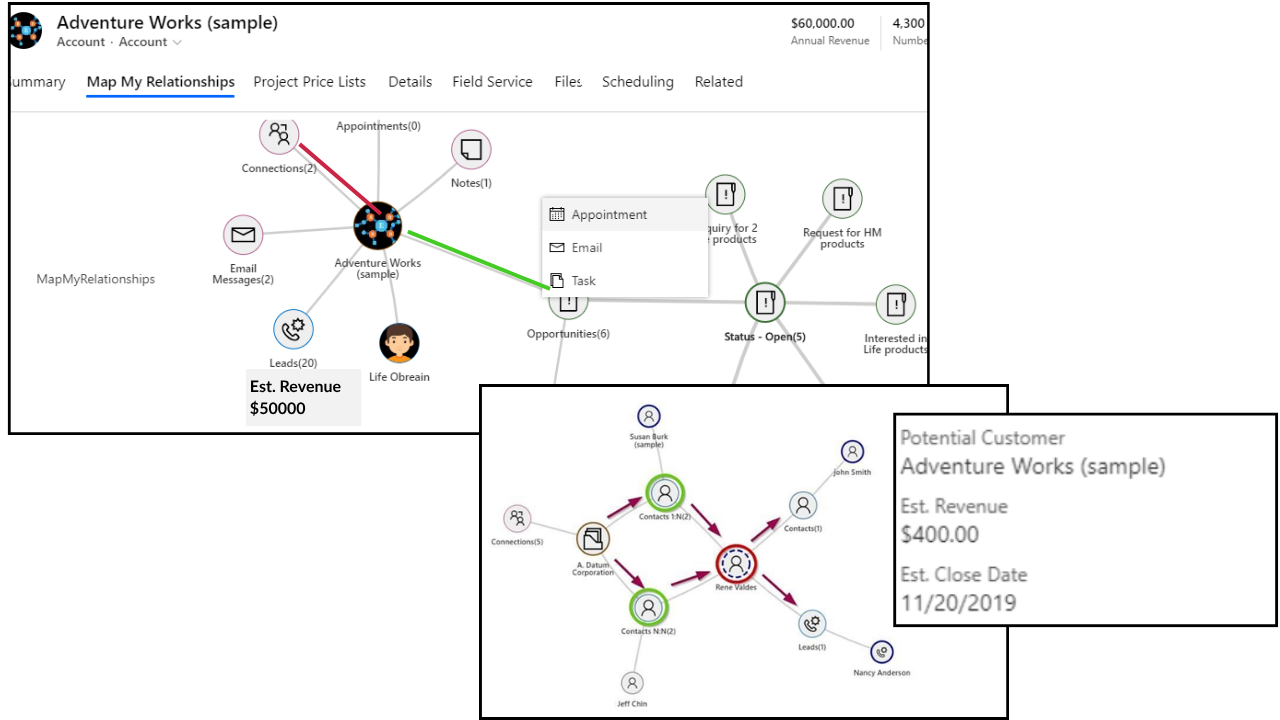
Mind Map View in Dynamics 365 - Visualize Every Relationship Instantly

How do you explore N-level CRM relationships without switching screens?

Map My Relationships brings a 360° Mind Map View to Dynamics 365 CRM, transforming complex CRM data into an interactive relationship mapping experience. Teams can visualize relationships across Accounts, Contacts, Opportunities, and custom entities from a single workspace while exploring stakeholders, influence paths, and connected records in real time.

Built for relationship intelligence in Dynamics 365 CRM, the Mind Map View enables users to drill into relationships, manage connections, trigger actions, and navigate complex account structures without leaving the visual map.

Map and Manage Relationships and Connections​
  • 360° relationship explorer: Navigate through unlimited relationship levels across Accounts, Contacts, Opportunities, and custom entities within a single Dynamics 365 CRM relationship view
  • Take Action Directly from the Map: Create activities, associate records, and trigger workflows directly from any relationship node without switching tabs or screens
  • Color-Coded Relationship Mapping: Instantly identify relationship types, stakeholder roles, and influence paths in Dynamics 365 CRM using visual legends and color-coded connections
  • Spider View and Full-Screen Relationship Mapping: Group complex connections into a clean spider view or expand into a full-screen Dynamics 365 relationship map for easier navigation and analysis

Hierarchy Control in Dynamics 365 — Navigate Parent-Child Relationships with Clarity

How do you manage hierarchies across multiple levels in Dynamics 365?

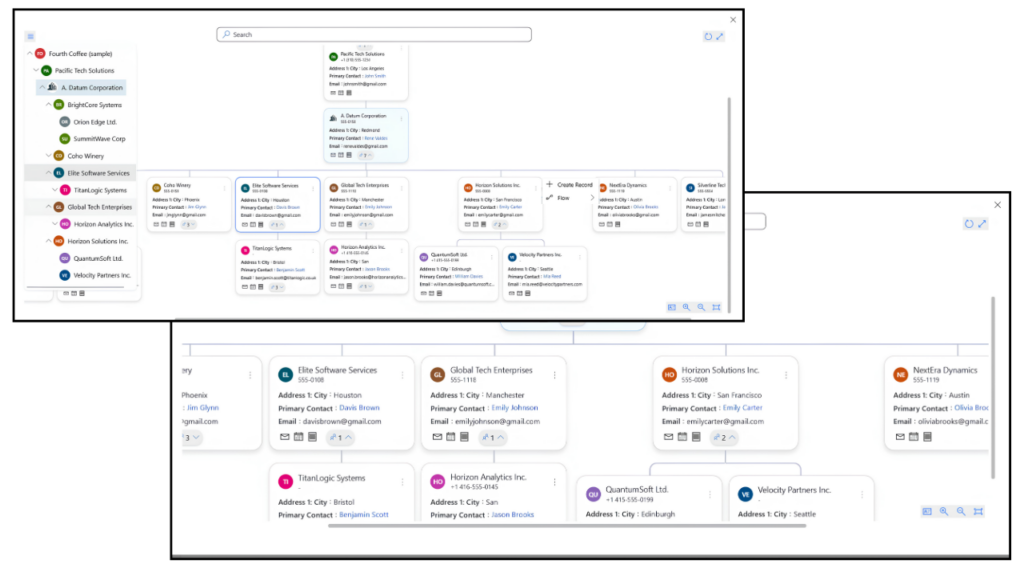
Map My Relationships provides an interactive Hierarchy Control View in Dynamics 365 CRM that displays self-referential parent-child relationships, such as Account-to-Account and Contact-to-Contact connections, in a structured visual hierarchy. It gives teams a clear account hierarchy view without manual record navigation or constant screen switching.

Acting like a live org chart for Dynamics 365 CRM, the hierarchy view stays continuously synchronized with CRM data, helping teams understand organizational structures, relationship paths, and connected records more efficiently.

hierarchy view control in dynamics 365
  • Visual Org Chart for Dynamics 365 CRM: View complete account hierarchies and relationship structures in a top-down visual format without manually navigating between records.
  • Instant Child Record Creation: Create and automatically link child records directly within the hierarchy view without manual association steps.
  • Take Action from the Hierarchy Panel: Trigger tasks, emails, activities, and on-demand workflows directly from the Dynamics 365 CRM hierarchy control panel.
  • Unlimited Hierarchy Navigation: Drill up or down across multiple hierarchy levels with a single click to explore complex CRM relationship structures more efficiently.

Tree View Visualization in Dynamics 365 — Map Account Relationships from Top to Bottom

How do you visualize complex Dynamics 365 parent-child relationship structures in a single view?

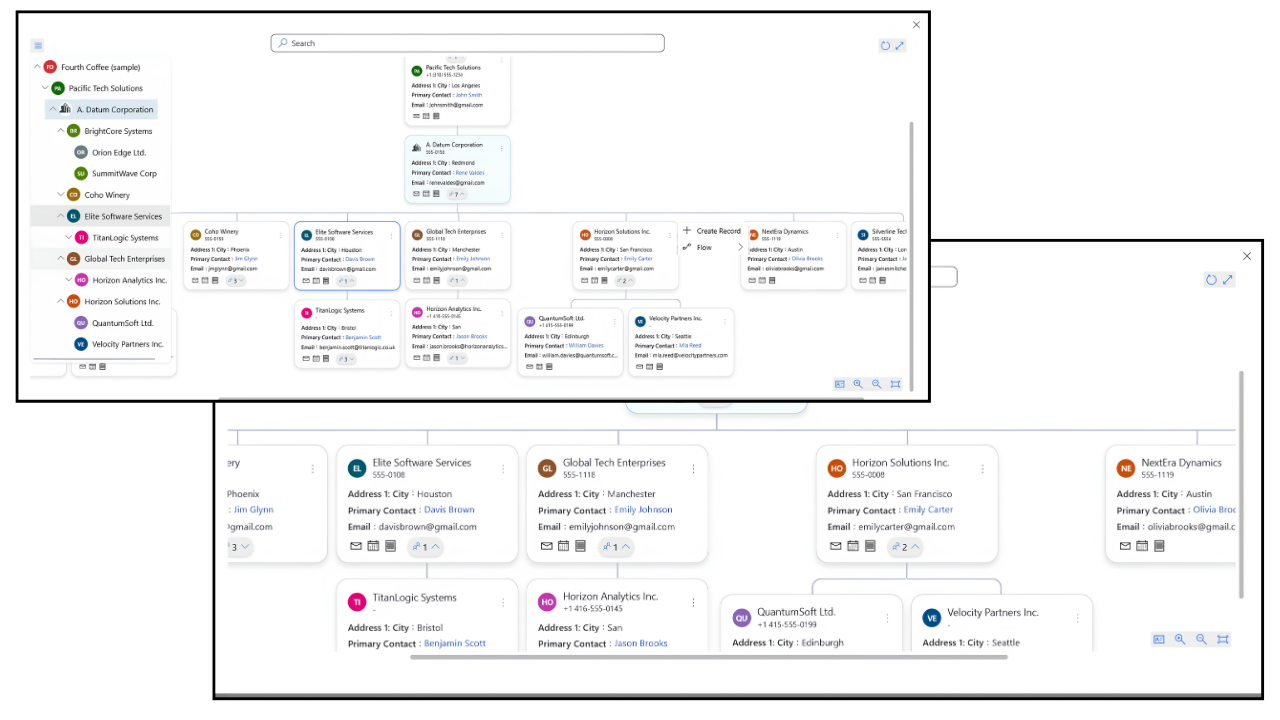
Tree View delivers structured relationship mapping in Dynamics 365 CRM through an interactive top-to-bottom layout with a synchronized navigation panel that displays the complete parent-child hierarchy at every level. It helps teams easily navigate complex account hierarchies, project structures, case escalations, and connected CRM relationships from a single screen.

With built-in Dynamics 365 CRM data visualization capabilities, users can explore relationship structures, group records, apply filters, and take action directly from the Tree View without switching between records or screens.

Customized Visualization and Record Linking​
  • Structured Top-to-Bottom Relationship Mapping: Visualize complete account relationship structures and parent-child hierarchies in Dynamics 365 CRM using a clean, easy-to-navigate tree layout.
  • Interactive Tree Navigation Panel: Use a collapsible side panel that mirrors the full hierarchy structure for faster and more context-aware navigation.
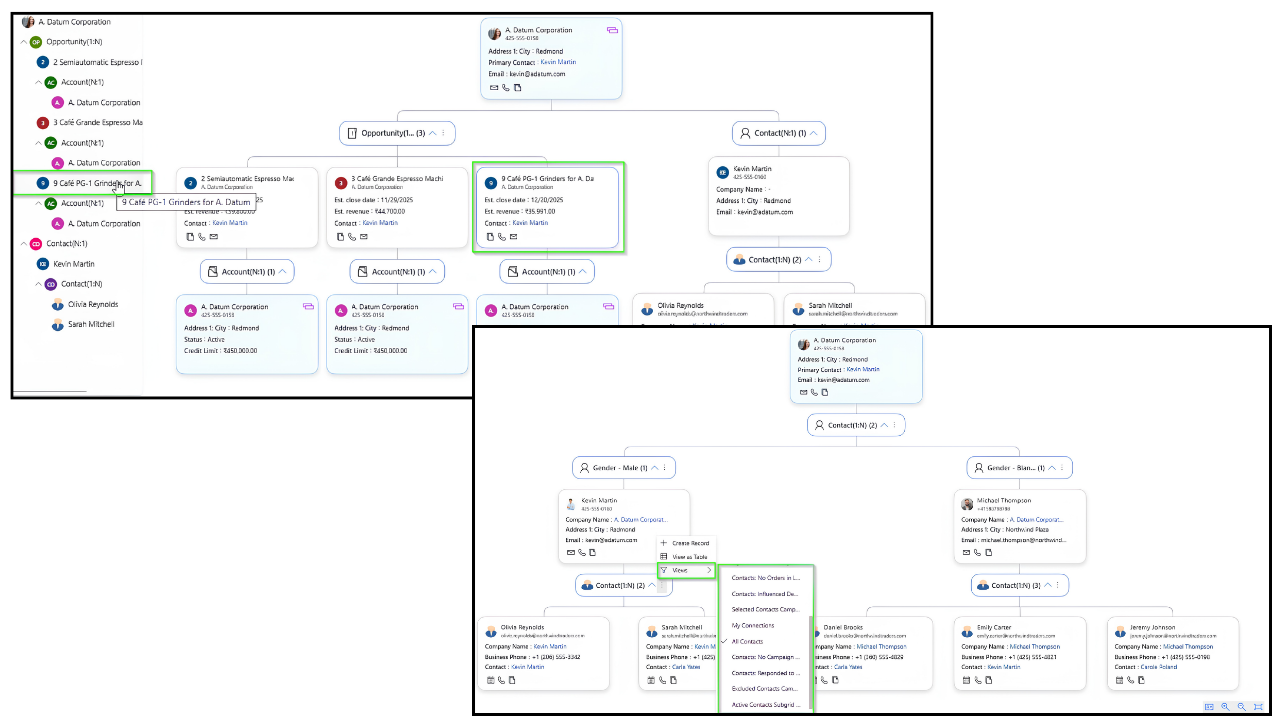
  • Grouping and Aggregated Data Insights: Analyze grouped CRM records and aggregated values directly within the Dynamics 365 CRM relationship visualization view.
  • Take Action Without Leaving the View: Create records, perform quick actions, apply filters, and manage relationships directly from the Tree View interface.

More Features

Effortless CRM Data Filtering

Quickly analyze Dynamics 365 CRM records using aggregated values, customizable node layouts, and personalized filters for faster insights and more efficient decision-making

Download Relationship Map as Image

Export and download Dynamics 365 relationship maps as images with a single click, making it easy to share relationship insights and CRM data visualizations across teams.

Auto Expand Relationship Nodes

Automatically expand hierarchy levels when loading the relationship map to simplify navigation through complex parent-child CRM relationships.

Hover to View Record Details

Instantly preview important CRM record information by hovering over relationship nodes without opening additional screens or records.

Create Associated Records Directly from the Map

Create and associate new Dynamics 365 CRM records directly from the relationship view for faster relationship management and streamlined workflows.

Connect and Link Related Records

Establish connections by drilling down through N-levels of records and linking any record back to the main primary record, creating a cohesive data network.

Spider View for Complex Relationship Mapping

Provides a visual map of entity connections, grouping multiple relationships to a single node for a clearer, clutter-free view of complex connections.

Full-Screen Custom Page View

Expands Hierarchy and Mind Map views onto a full page, offering an immersive, intuitive, and clutter-free way to explore complex relationships directly from a record.

Interactive Tree Navigation Panel

Offers a collapsible side panel displaying the full parent-child hierarchy of a record up to N levels, mirroring the visual hierarchy layout for easy navigation.

Map Your Way to Success: A Guide to Using Mind Maps to Unlock the Power of Dynamics 365 CRM Connections

testimonials

What Our Customers Are Saying?

Testimonial Map My Relationship1
Working in a charity with numerous and complex relationships, this tool is able to meet our needs to display multiple relationships in a user friendly manner(....). Would recommend for organizations where having a visualization of all relationships to a service user, and the ability to create and review related records from one place is desirable.
Christina Jewell
PMV
We are actively using the Map My Relationships App in our CRM to visualize usefull information in one comprehensive visual. It allows our users to easily get a first impression about our the relationship that we have with a specific Company or Contact. Features were consistently analysed and implemented by Inogic. Always an excellent and swift job by Inogic!
Anton Debraekeleer
Testimonial Map My Relationship
Installed this tool recently to be able to give users a graphical display of relationships between various entities. The setup process was relatively easy. I reached out to Inogic with some questions and they were quick to respond and assist me in areas where I needed guidance.
Jay Jandrey

Our Blogs

How to Configure CRM Relationships for a Mind-Map View in Dynamics 365

In this blog, we’ll walk through how to configure CRM records and relationships to visualize them in a Mind Map View within Dynamics 365 CRM.

Read More

Dynamics 365 CRM Hierarchy Control: 5 Benefits Every CRM Admin Should Know

In the world of CRM, data visibility, navigation, and relationship mapping are critical for smooth operations. Yet many Dynamics 365 CRM…

Read More

Relationship Mapping

Relationship Mapping and Data Visualization in Dynamics 365 CRM: A Complete Guide

In modern B2B selling, revenue rarely depends on one contact. It depends on networksinfluencers, decision-makers, sponsors, blockers, subsidiaries…

Read More

Frequently Asked Questions

What is Dynamics 365 CRM relationship mapping?

Dynamics 365 CRM relationship mapping helps organizations visualize how Accounts, Contacts, Opportunities, Cases, and other records connect across the CRM. It provides an interactive relationship view that helps teams identify stakeholders, account hierarchies, influence paths, and connected business relationships from a single workspace.

Map My Relationships transforms disconnected Dynamics 365 CRM records into interactive mind maps, hierarchy views, and relationship charts directly inside Dynamics 365 CRM. It helps users explore relationships across standard and custom entities, navigate complex account structures, and take actions such as creating activities or linking records from a single visual workspace.

How Can I View Dynamics 365 CRM Data as a Mind Map?

Map My Relationships transforms Dynamics 365 CRM records into interactive mind maps directly inside Dynamics 365 CRM. Accounts, Contacts, Opportunities, and custom entities can all be visualized in a spider-style relationship layout that displays connected records level by level from a central node.


Users can drill into relationship nodes to expand additional connections, explore stakeholders, create activities such as emails and calls, and edit records directly from the mind map view without switching screens. Every interaction stays synchronized with Dynamics 365 CRM in real time, ensuring the relationship map always reflects live CRM data instead of a static visualization.

How Do I Visualize Account Hierarchies in Dynamics 365 CRM?

Map My Relationships helps users visualize Dynamics 365 CRM account hierarchies through interactive Tree View and Hierarchy Control layouts. Teams can explore parent-child account structures, account structures and organizational hierarchies from a single visual workspace without navigating multiple CRM records or screens.

With multi-level drill-down, color-coded relationship paths, and real-time CRM synchronization, users can easily understand complex account structures and stakeholder relationships directly inside Dynamics 365 CRM.

How Do I Visualize Multiple Entity Relationships in Dynamics 365 CRM?

Map My Relationships allows users to visualize relationships across both standard and custom entities in Dynamics 365 CRM through interactive Mind Map, Tree View, and Hierarchy layouts. Users can explore connected records, parent-child relationships, and cross-entity connections directly from a single visual workspace inside Dynamics 365 CRM.

Administrators can configure which custom entities and relationship types appear in the relationship map, making it easier to understand complex business processes and connected CRM data without navigating multiple forms or subgrids.

Yes. Map My Relationships allows users to create activities such as tasks, emails, and phone calls directly from the Dynamics 365 CRM relationship map without switching screens. Users can also create and associate related records within Mind Map, Tree View, and Hierarchy layouts, with new records automatically linked to the correct parent relationship.

This helps teams manage CRM relationships, activities, and connected records faster from a single interactive workspace.

What Are the Best Relationship Mapping Tools for Dynamics 365 CRM?

Map My Relationships is a relationship mapping and visualization tool built specifically for Dynamics 365 CRM. It creates interactive relationship charts directly from live CRM data using Mind Map, Tree View, and Hierarchy layouts, without requiring external diagramming software.


Users can also create records, log activities, send emails, and manage relationships directly from the visual relationship map, helping teams reduce CRM navigation time and work more efficiently.

Gain visibility into customer relationships and accelerate your sales pipeline with the right connections!

Contact Us

Dynamics 365 v9.x / Dataverse

Get a Demo

Presentation

whitepaper

Download eBook