Hide the Get Started Pane from the home page
We always see Get started pane above each view as shown below.

If user wishes to disable/hide this pane by default then it can be done, follow below steps.
Click on options as shown below

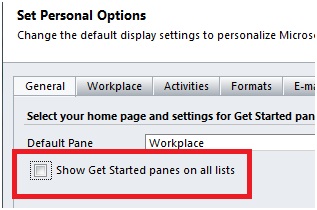
Under General Tab, uncheck the option “show Get started panes on all lists” as shown below
Go to Settings — Administration — System Settings

Under General tab, set the “Show Get started pane on all lists for all users” option to NO as shown below. After this you can see all the views without Get Started pane for all users

In order to collapse the Ribbon bar in CRM follow the outlined steps below:


Reduce the width of the CRM Wonderbar
Reducing the width of the sitemap area in CRM is also very simple so you have more space for your CRM page

Click on that resize option and resize sitemap as per your needs, you can drag it to left or right side
After resizing the sitemap you can see it as shown in below image

If you want to increase the size of sitemap again drag the resize option as shown below
