 It is 7:30 AM, and the day has already started.
As the Medical Admin Manager responsible for five hospitals across the city, there is never really a “typical” day. There are staff schedules to review, suppliers to coordinate, maintenance requests to resolve, ambulances to monitor, and the occasional emergency that demands an immediate response.
The challenge isn’t a lack of information. The hospital group has plenty of it in Dynamics 365.
The challenge is knowing where everything is, what is happening right now, and what needs attention next. This is where Maplytics, integrated into Dynamics 365, Power Pages, Power Apps, and Dataverse, becomes part of the manager’s daily workflow.
Key Takeaways
|
7:30 AM: Starting the Day with a Map instead of a Spreadsheet
The first thing the manager opens is his customized Dynamics 365 dashboard.
Instead of going through separate spreadsheets, emails, and lists, he has a geographic view of his five hospitals and the resources associated with them.
Today’s appointments, staff schedules, hospital locations, and other relevant CRM information can be visualized on the map. The Appointment Planner helps visualize appointments and add them to routes, while Auto Scheduling can create optimized schedules for multiple users based on defined preferences.
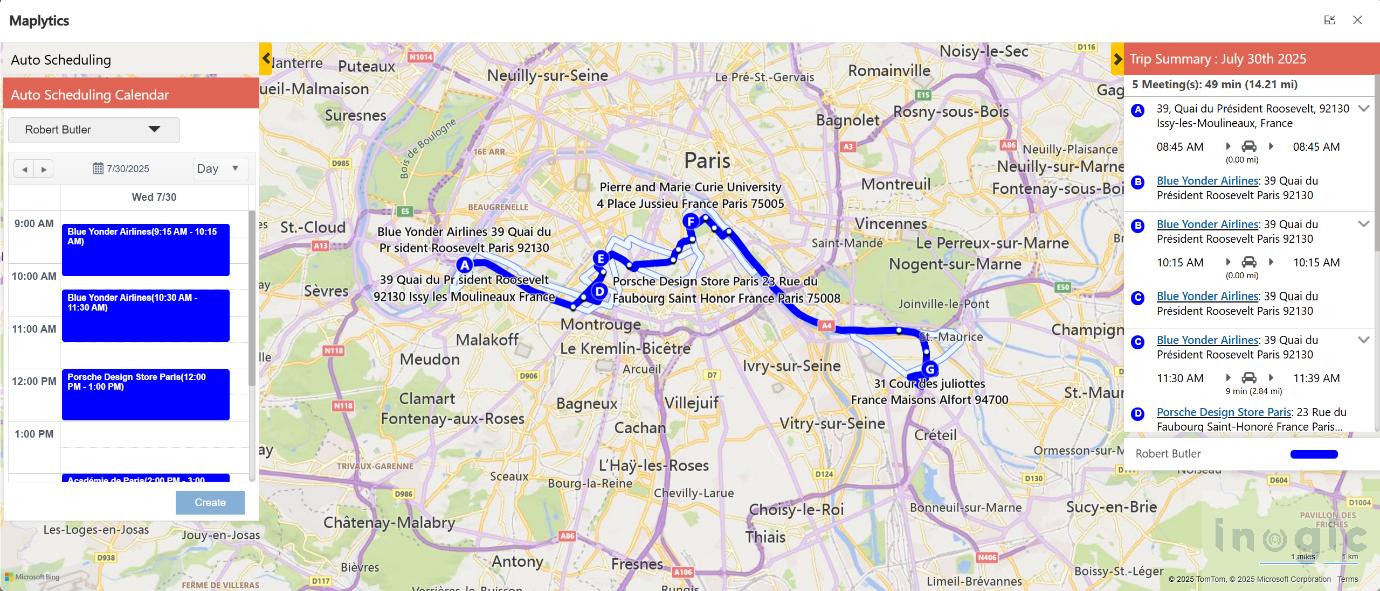
He quickly checks the day’s doctor, nurse, and support staff schedules, and then looks ahead at the coming weeks.
A staffing gap at one hospital becomes immediately noticeable. A few appointments need to be rearranged. Instead of manually working through locations and timings, he can use the geographic view to understand how resources are distributed across the hospital network.
The day is already looking more manageable.
9:00 AM: Where to find the Ambulances?
An ambulance has been dispatched from one of the hospitals.
Rather than calling the driver for an update, the manager opens Real-Time Tracking.
Maplytics allows resources and field representatives to be tracked on the map in real time, while Today’s Plan can show the assigned route and the route actually being travelled.
The manager can see where the ambulance is and understand its progress.
For a hospital administrator, this isn’t simply about tracking a vehicle. It is about having situational awareness when every minute matters.
10:15 AM: How to find Blood Banks in case of Emergencies
A hospital needs additional blood urgently.
The manager needs to know which blood banks are nearby.
Instead of searching the internet, calling multiple facilities, or relying on someone’s memory, he uses Proximity Search to identify relevant locations around the hospital. Radius Search can identify nearby records based on distance or travel time, while Point of Interest search can locate places such as hospitals, ATMs, restaurants, and other nearby facilities.
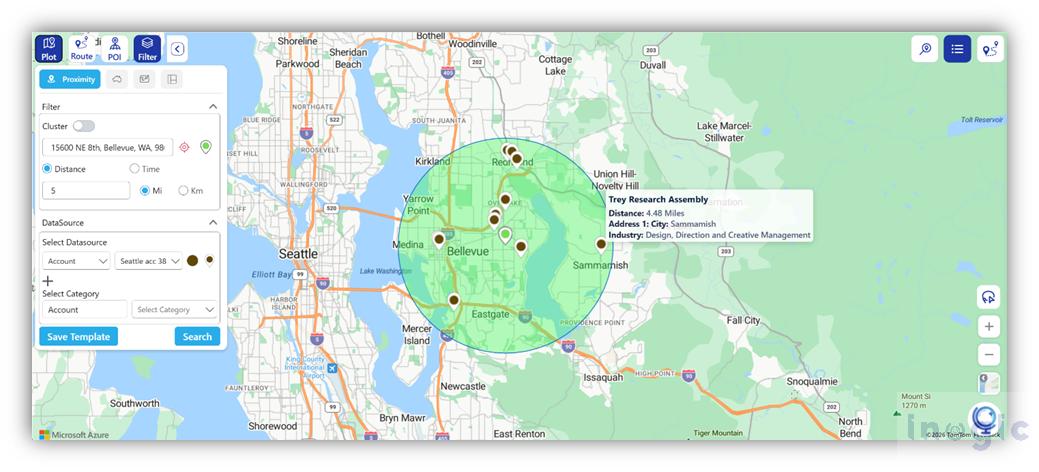
The result is a geographic answer to an operational question:
What is closest, and how quickly can we get there?
He can then plan the most appropriate route and share navigation directions with the person making the trip.
11:30 AM: The Maintenance Call
The plumbing issue at another hospital couldn’t have come at a worse time.
Instead of searching through an old vendor list, the manager uses the map to identify nearby service providers. The same approach can be used to locate other operational resources, such as maintenance vendors or nearby facilities.
The value here isn’t simply finding a provider.
It’s finding the right provider in the right location at the right time.
That geographic context can turn what would have been a long chain of calls into a much faster operational decision.
1:30 PM: Planning the Afternoon Routes
The afternoon involves several trips: a supplier visit, a pharmacy-related visit, and an ambulance movement between locations.
The manager doesn’t want every driver or staff member choosing routes independently.
Using Route Optimization, he can build optimized routes with multiple waypoints, save or share them, and redirect users to navigation applications for turn-by-turn directions. The platform also supports searching for CRM records located along a planned route.
This means a journey between two planned destinations can become more productive.
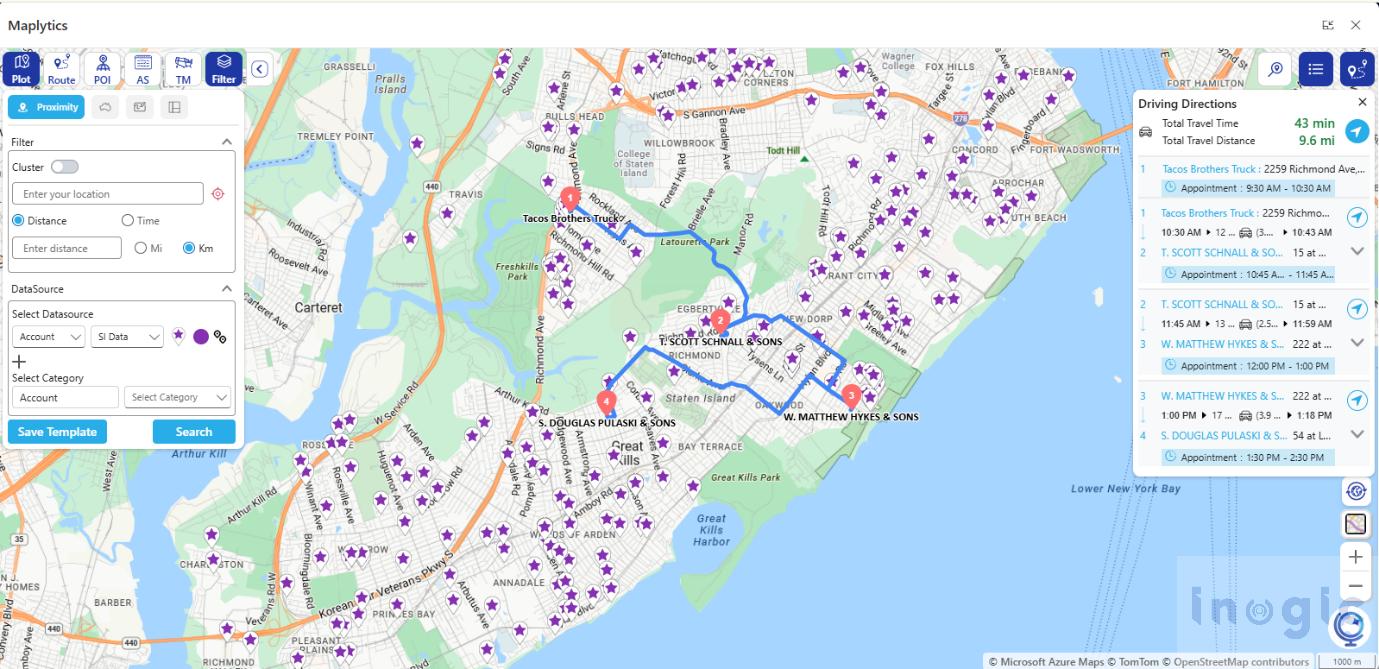
If another relevant supplier, facility, or location lies along the route, it can be identified rather than overlooked.
3:30 PM: Looking Beyond Today
The immediate problems are under control, so the manager turns his attention to the coming weeks.
Which hospitals have the highest concentration of appointments?
Where are resources being stretched?
Are staff, service providers, and operational activities distributed efficiently across the five locations?
Maplytics can visualize CRM data geographically through categorized maps, dashboards, proximity searches, territories, and other analytical views.
The map starts becoming more than a navigation tool.
It becomes a management tool.
5:30 PM: One Last Check
Before leaving for the day, the manager checks the ambulance locations once more, reviews tomorrow’s schedule, and looks at the routes planned for the next morning.
Nothing about his job has become less important.
But the way he manages it has changed.
Instead of asking, “Where is the information?” he can ask more useful questions:
Where is the nearest resource?
What is happening right now?
What is the fastest route?
Which hospital needs attention?
What is happening around each location?
That is the real value of bringing location intelligence into Dynamics 365.
For a medical administration manager responsible for five hospitals, Maplytics isn’t just a map sitting inside the CRM. It can become a geographic layer over everyday operations, helping connect people, vehicles, appointments, suppliers, facilities, and decisions through the one thing they all have in common: Location!
When location becomes part of the decision-making process, managing five hospitals can become less about chasing information and more about acting on it.
Some popular FAQs
Q1: What is Maplytics and how does it work with Dynamics 365?
Maplytics is a geo-mapping and location intelligence app that integrates with Dynamics 365, Power Apps, Power Pages, and Dataverse. It visualizes CRM data, like appointments, staff, and resources, directly on a map, turning location data into actionable insights.
Q2: Can Maplytics track ambulances or field staff in real time?
Yes. Maplytics’ Real-Time Tracking feature shows the live location of resources and field representatives on the map, while Today’s Plan compares the assigned route against the route actually being travelled. Thus, the ambulance pilots can be tracked easily.
Q3: How can Maplytics help find nearby resources during an emergency?
Using Radius Search and Point of Interest Search, users can instantly locate nearby facilities, such as blood banks, hospitals, or vendors, based on distance or travel time, without manual searching or phone calls.
Q4: Does Maplytics help with planning routes for multiple stops in a day?
Yes. Route Optimization allows users to build routes with multiple waypoints, share them with field staff, and get turn-by-turn navigation. It can also surface relevant CRM records located along the planned route.
Q5: Is Maplytics useful only for daily operations, or also for long-term planning?
Both. Beyond daily tasks like tracking and routing, Maplytics supports long-term planning through geographic dashboards, territory views, and proximity analysis, helping identify where resources are stretched or underutilized across locations.
What’s More?
If you wish to combine maps, routes, schedules, and real-time updates to make a difference, Maplytics with MapCopilot, its AI assistant, is available immediately for Dynamics 365, Power Apps, Power Pages, and Dataverse. Organizations interested in adoption, 15-day free trials, or personalized demos are encouraged to contact Maplytics’ sales team at crm@inogic.com
For more information, visit our website or Microsoft Marketplace. One can hop onto the detailed Blogs, Client Testimonials, Success Stories, Industry Applications, and Video Library for quick query resolution. Technical docs for the working of Maplytics are also available for reference.
Please leave us a review or share your experience on the Microsoft Marketplace or the G2 Website.