Every marketer knows the tension: the most relevant audiences are often built on the most sensitive data. Income bands, account balances, health indicators, and similar attributes can make a campaign far more effective, yet they are exactly the kind of data organizations lock down with Dataverse field-level security.
Until now, that lock has also meant these protected columns were off limits when building real-time segments in Dynamics 365 Customer Insights – Journeys. The Use protected fields in segments feature gives administrators a deliberate way to change that, letting marketers target on protected attributes without ever seeing the underlying values.
It is a powerful option, and one that comes with real privacy trade-offs. In this post, we’ll look at what the feature does, walk through a practical example, show how to enable it, and cover what to review before you turn it on.
You can refer to Microsoft doc
The Challenge: Protected Data in Segment Criteria
Dataverse field-level security helps control who can read sensitive column values. For example, an organization may protect salary, account balance, or another confidential attribute so that only approved users can view it.
In Customer Insights – Journeys, protected columns are not available as segment conditions by default. This helps prevent marketing users from using sensitive information to build audiences without the appropriate safeguards.
At the same time, businesses may have legitimate targeting requirements. A campaign might need to reach customers whose account balance falls within a particular range, while marketers should not be able to open or view each customer’s actual balance.
1. Introducing Use Protected Fields in Segments
The Use protected fields in segments feature allows an administrator to override the default restriction and make protected fields available as query conditions in segment building.
With this setting enabled, marketing contributors can define audience criteria using protected attributes. The feature is intended to support audience selection based on sensitive information while keeping the underlying column values from being directly displayed to those users.
For example, a business could define a segment for customers whose protected account-balance field meets a specified range. The segment identifies qualifying customers, but the marketer does not necessarily see the balance value on each customer record.
2. Example Scenario
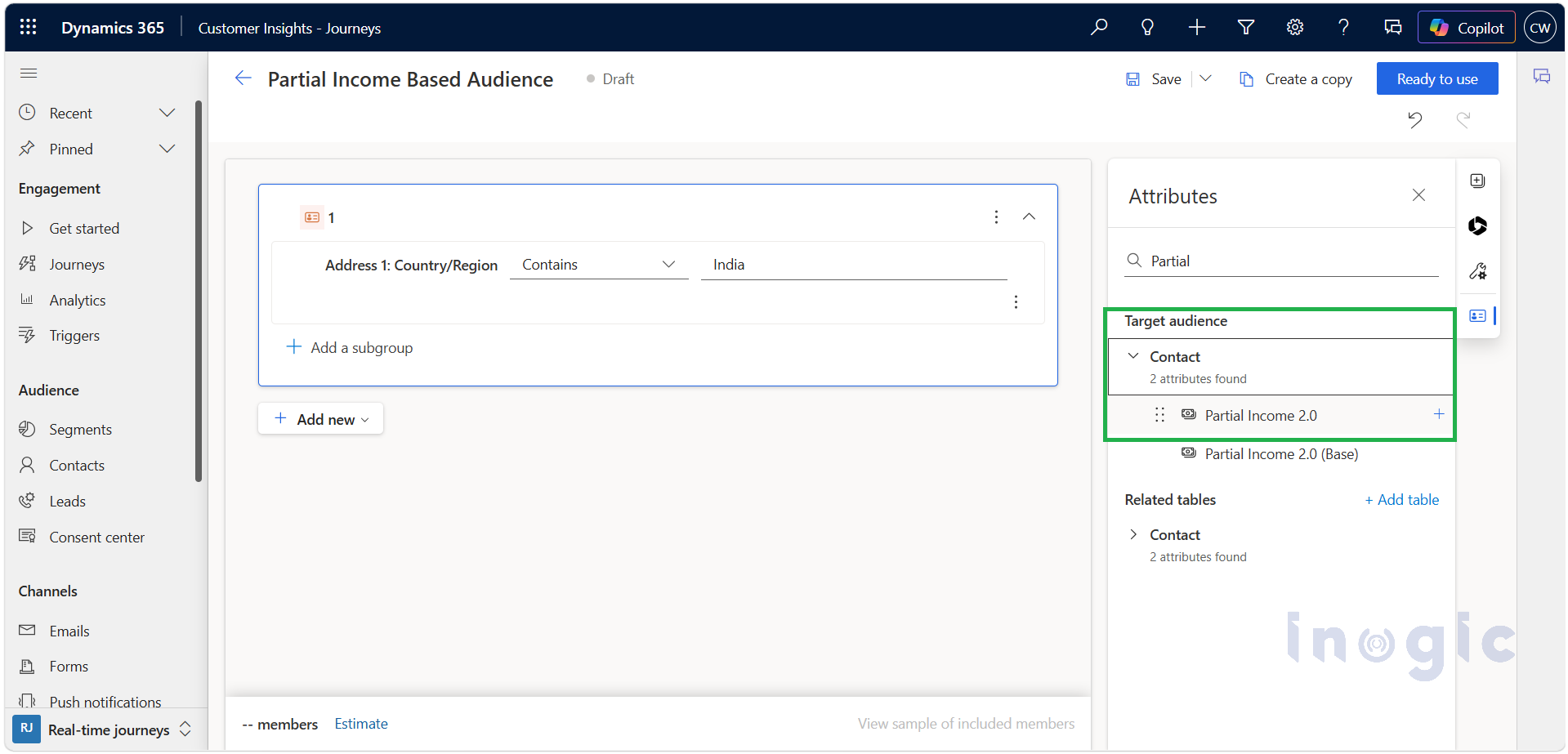
Consider an organization that wants to send a tailored communication to customers based on their Partial Income. The Partial Income field is protected in Dataverse, and marketing users do not have permission to view its actual values.
Without the feature enabled, the protected Partial Income field cannot be used in the segment condition. After an administrator enables the feature, a segment creator can use this field as a criterion to define the audience.
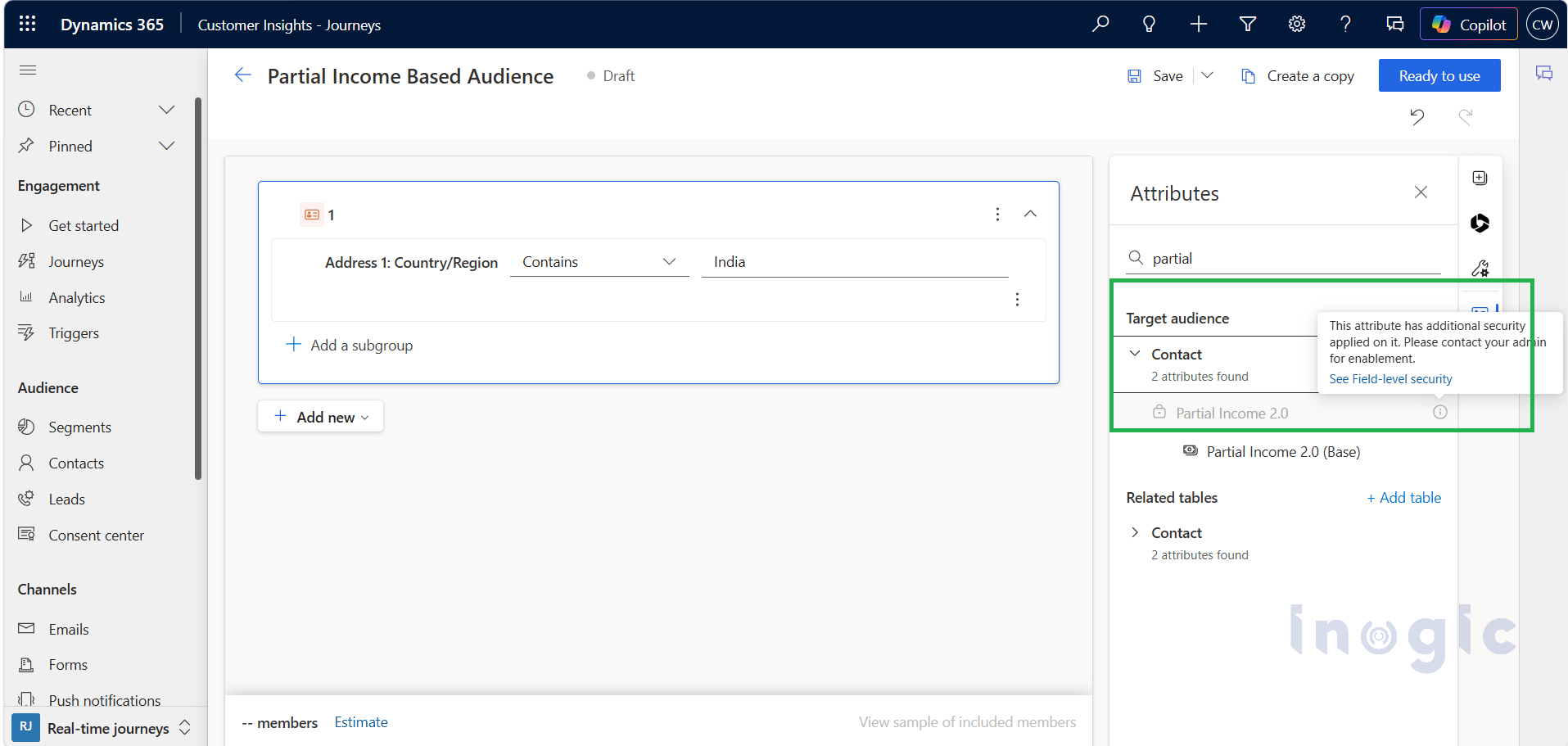
This makes it possible to select the right audience based on Partial Income without giving marketing contributors direct access to the actual values. However, segment membership itself may reveal information about a customer’s income, so the criteria and resulting audience must be carefully controlled.
3. Enable the Feature
An administrator can enable the setting from the Customer Insights – Journeys feature switches page:
- Open Customer Insights – Journeys.
- Go to Settings > Overview > Feature switches.
- Find the Segmentation section.
- Turn on Use protected fields in segments.
- Select Save in the upper-right corner.
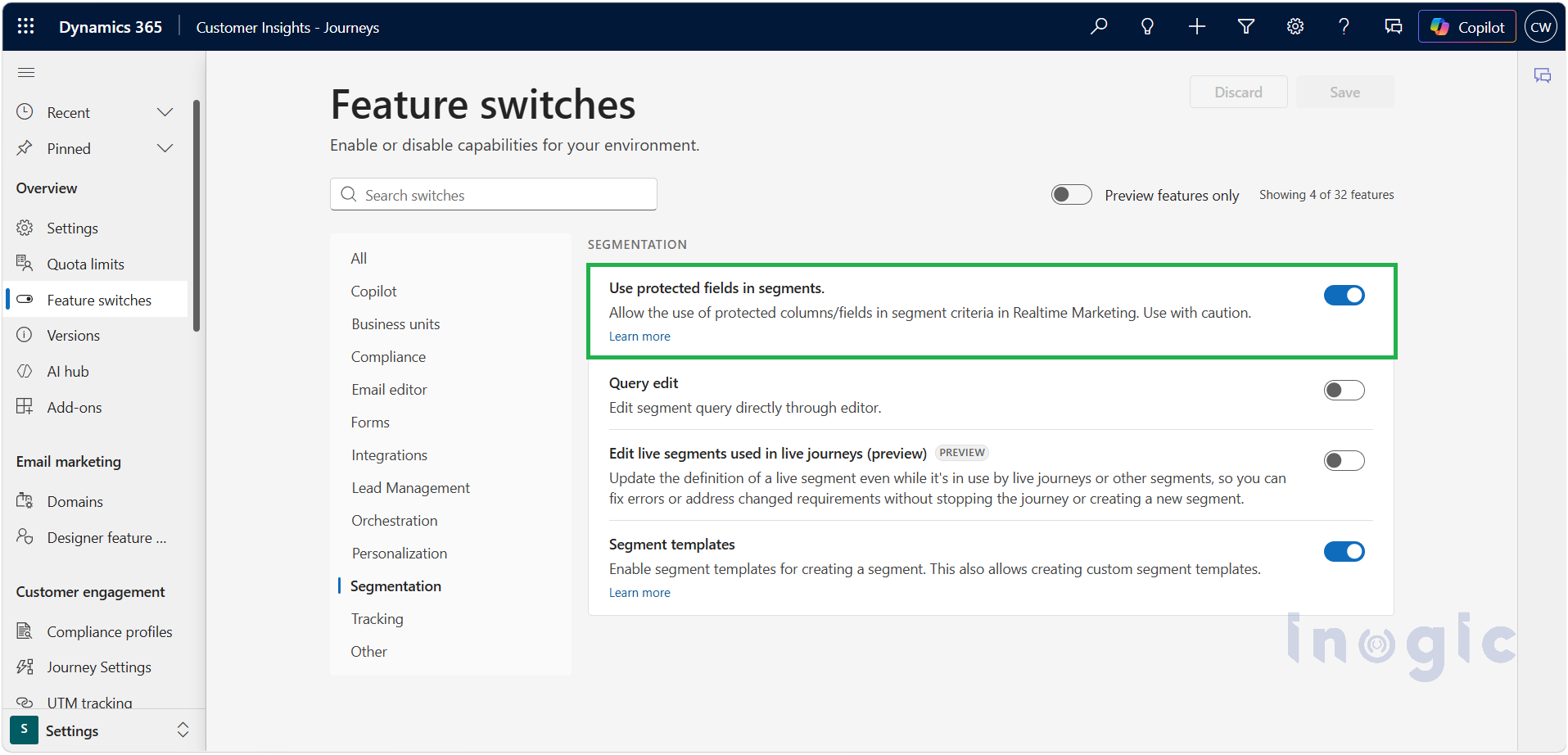
After the setting is saved, protected fields can be used as conditions in segment criteria, subject to the feature’s behavior and the organization’s security and privacy policies.
4. Important Security and Privacy Considerations
Enabling this setting expands what marketing contributors can use when defining audiences. Even when a protected column is not displayed directly, a user may be able to infer its value from who is included in or excluded from a segment.
For example, if a protected field represents gender, a contributor could create a segment that filters for a particular value. The resulting audience could reveal the attribute of its members even though the column itself remains hidden.
Before enabling the feature, administrators should:
- Confirm that the business requirement justifies using protected attributes in segmentation.
- Review who can create, edit, and use segments.
- Consider whether segment names, criteria, membership, or audience exports could reveal sensitive information.
- Obtain approval from the appropriate privacy, compliance, or security stakeholders.
- Review the setting periodically and disable it if the requirement no longer exists.
The feature should not be treated as a replacement for Dataverse field-level security. It is an explicit override for using protected fields as query conditions in segmentation, and it carries a risk of indirect disclosure.
Key Benefits
- Supports audience targeting based on protected attributes when there is an approved business need.
- Allows segment criteria to use sensitive fields without making their raw values directly visible to marketing contributors.
- Can help organizations create more relevant campaigns while retaining existing protection on sensitive columns.
Conclusion
Protected data doesn’t have to be unusable data. With Use protected fields in segments, administrators can let marketing teams build precise, relevant audiences from sensitive attributes while keeping the raw values hidden behind field-level security.
That flexibility is not free. Segment membership can reveal what the hidden column is meant to protect, so this setting is an exception to your security model, not an extension of it. Enable it only when there is a clear, approved business need. Involve your privacy, compliance, and security stakeholders early. Keep a close eye on who can create and edit segments, and revisit the decision regularly.
Handled with that discipline, the feature lets you balance personalization with protection, so your campaigns get smarter without your customers’ sensitive information becoming easier to expose.