Microsoft Dataverse provides several ways to retrieve data, including OData and FetchXML. While these approaches are well suited to Dataverse, developers coming from a relational database background may naturally think in terms of SQL.
In this article, we will look at how Dataverse data querying traditionally works, what SQL querying through the Web API introduces, how it changes the developer experience, and where this approach can be useful.
Previously: Querying Dataverse Data
Below are the examples of the how developers are retrieving the data from the Dataverse using the OData Query and FetchXML
OData Query:
GET /api/data/v9.2/accounts?$select=name, telephone1&$filter=statecode eq 0
FetchXML:
<fetch>

<entity name="account">

<attribute name="name" />

<attribute name="telephone1" />

<filter>

<condition attribute="statecode"

operator="eq"

value="0" />

</filter>

</entity>

</fetch>
Now: SQL Querying Through the Dataverse Web API
With SQL querying through the Dataverse Web API, developers can pass supported SQL SELECT statements through the sql query option of a Dataverse Web API entity set. Dataverse processes the supported SQL syntax and returns the results as JSON.
For example, an Account query can be written using familiar SQL syntax:
SELECT name, telephone1, websiteurl
FROM account
The query can then be sent through the Dataverse Web API:
GET https://<organization>.crm.dynamics.com/api/data/v9.2/accounts?sql=<encoded SQL query>
Here, you can think how to encode the SQL query, but not to worry when the query sent through the Dataverse Web API then SQL query is automatically encoded, check the below image.

Hands-On Demonstration
In this section, we will demonstrate how supported SQL queries can be executed against Microsoft Dataverse through the Web API. The perquisite is you should be login to your environment, and you require any OOB / Custom entities for executing your SQL queries for retrieving the data.
But before writing the SQL queries you should check the below mentioned table.
Note: Dataverse Support Only Below listed SQL Features.
| Feature | Supported syntax |
| Select | SELECT, SELECT DISTINCT, SELECT TOP N (0–5000) |
| Joins | INNER JOIN, LEFT JOIN (multi-table) |
| Filtering | WHERE with =, !=, >, <, >=, <=, LIKE, IN, NOT IN, IS NULL, IS NOT NULL, BETWEEN, AND, OR, nested parentheses |
| Grouping and aggregation | GROUP BY, COUNT(*), SUM(), AVG(), MIN(), MAX() |
| Sorting and paging | ORDER BY [ASC\|DESC], OFFSET n ROWS FETCH NEXT m ROWS ONLY |
Table: Supported SQL Feature
For the demonstration of the writing of the SQL queries we are directly writing the SQL queries in the sql query parameter in the URL, which is provided by the Dataverse Web Api. Below is the Example.
 Basic Select Query Retrieve selected columns from the Dataverse Account table using SQL through the Web API. Sql Query / Request: SELECT name, telephone1, websiteurl FROM account
 Output / Response:
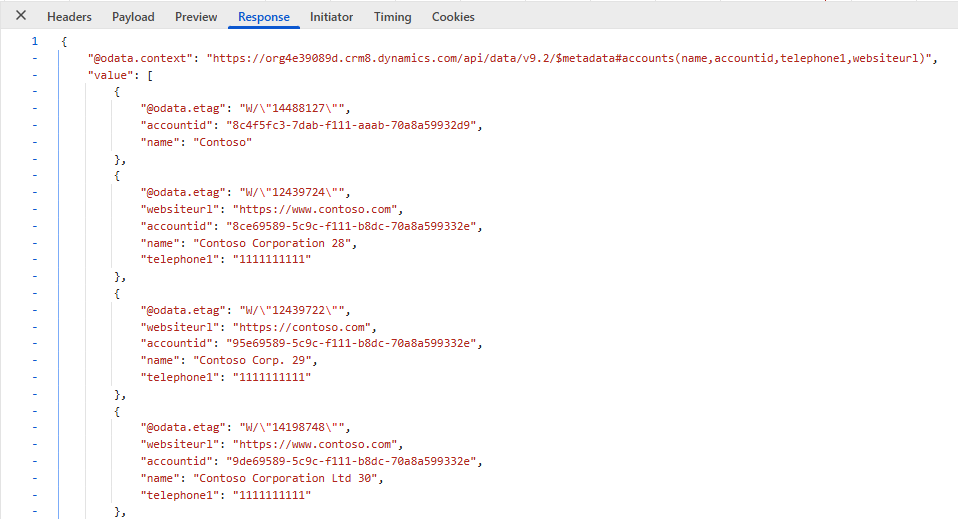 Figure : Retrieving selected Account columns using SQL through the Dataverse Web API.
INNER JOIN – Account + Contact
Retrieve Account information together with its related Contacts.
Sql Query / Request:
SELECT

a.name AS account_name,

c.fullname AS contact_name,

c.emailaddress1

FROM account AS a

INNER JOIN contact AS c

ON a.accountid = c.parentcustomerid

 Output / Respone:
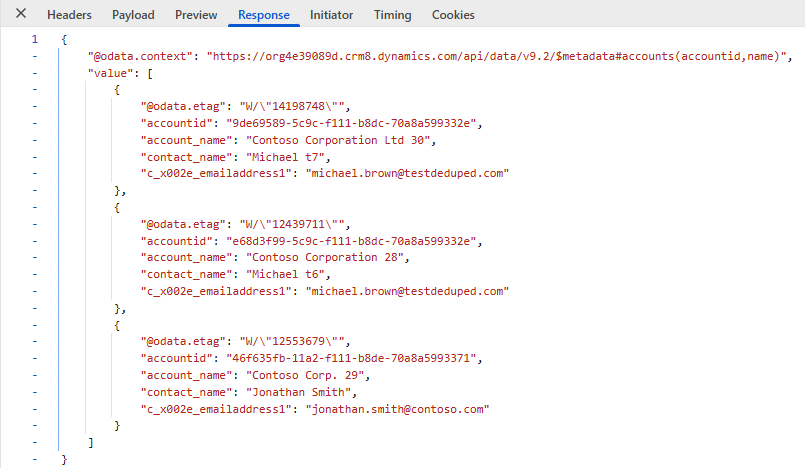
Figure : Retrieving Account Information Together with its related contacts.
GROUP BY + COUNT
Determine how many Contacts are associated with each Account.
Sql Query / Request:
SELECT

a.name,

COUNT(*) AS contact_count

FROM account AS a

INNER JOIN contact AS c

ON a.accountid = c.parentcustomerid

GROUP BY a.name

ORDER BY a.name

 Output / Respone: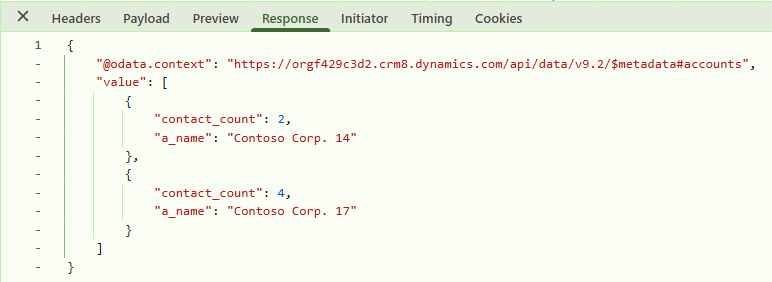
Figure : Determine how many Contacts are associated with each Account.
ORDER BY – Sorting Results

Here we demonstrate sorting by name on the account entity.

Sql Query / Request:

SELECT

name,

telephone1

FROM account

ORDER BY name ASC

 Output / Respone:
 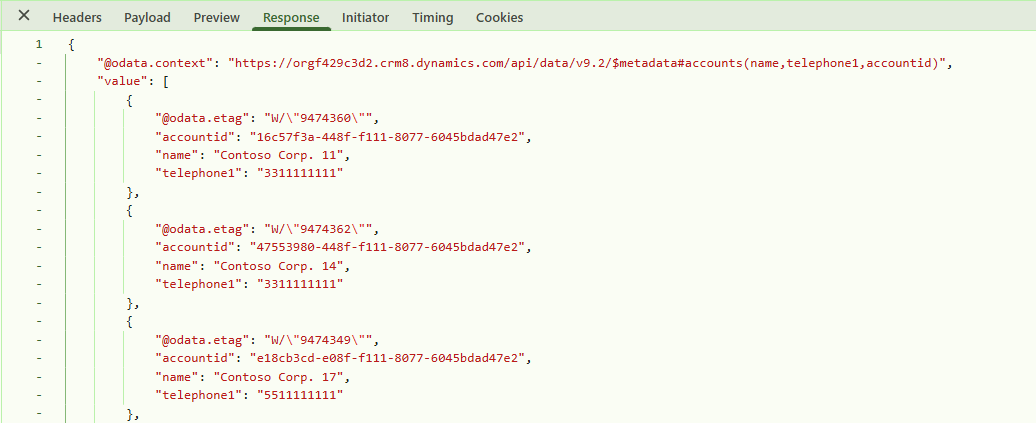 Figure : Sorting Account records using ORDER BY.
Limitation / Unsupported SQL Features
| Unsupported Feature | Example | Alternative / Recommendation |
| SELECT * | SELECT * FROM account | Explicitly specify the columns you need |
| Subqueries | WHERE accountid IN (SELECT …) | Use supported JOIN operations or separate queries |
| CTEs | WITH Accounts AS (…) | Rewrite using supported SELECT and JOIN syntax |
| HAVING | HAVING COUNT(*) > 5 | Apply filtering using WHERE before aggregation |
| UNION | SELECT … UNION SELECT … | Execute separate supported queries |
| RIGHT JOIN | RIGHT JOIN contact … | Use LEFT JOIN by changing the query direction where appropriate |
| FULL JOIN | FULL JOIN … | Use separate queries or supported joins |
| CROSS JOIN | CROSS JOIN … | Redesign the query using supported relationships |
| CASE | CASE WHEN … END | Handle conditional presentation logic in the application layer |
| COALESCE | COALESCE(name, ‘Unknown’) | Handle null values in application code |
| Window functions | ROW_NUMBER(), RANK() | Process the result in the application layer |
| Non-SELECT statements | INSERT, UPDATE, DELETE, ALTER TABLE | Use Dataverse Web API CRUD operations |
| Unsupported functions | Unsupported string/date/math functions | Use only functions documented as supported |
Table : Unsupported SQL Featuers
Although SQL querying through the Dataverse Web API provides a familiar SQL-based syntax, it is not a full SQL Server implementation. Dataverse supports a defined subset of SQL primarily for querying data. Developers should therefore validate the supported syntax before converting an existing SQL Server query. Features such as subqueries, CTEs, HAVING, UNION, unsupported joins, window functions, and non-SELECT statements are not supported.
Conclusion
Microsoft Dataverse provides developers with multiple ways to retrieve data through the Web API. SQL querying adds another option by allowing developers to express supported queries using familiar SQL syntax. This can be particularly useful when working with multiple related tables, filtering data, and performing aggregation-based queries.
FAQs
What is SQL querying in Microsoft Dataverse?
SQL querying in Microsoft Dataverse allows developers to retrieve data using supported SQL syntax through the Dataverse Web API.
How can SQL be used with the Dataverse Web API?
Developers can pass supported SQL queries through the sql query option of a Dataverse Web API entity set to retrieve Dataverse data.
What SQL features are supported by Dataverse?
Dataverse supports several SQL features, including SELECT, JOIN, WHERE, GROUP BY, aggregation, ORDER BY, and paging.
Is SQL fully supported in the Dataverse Web API?
No. The Dataverse Web API supports a defined subset of SQL for querying data and does not provide full SQL Server functionality.
When can SQL querying be useful in Dataverse?
SQL querying can be useful when developers want to retrieve and work with Dataverse data using familiar SQL syntax, particularly for related data, filtering, and aggregation.