Recently, while working with a virtual Power Apps Component Framework (PCF) control in a model-driven app, you may encounter a situation where your PCF control does not load the bound field data on the first load of the form.
Let’s have a look at the issue first. As seen in the below screenshot, you have added your custom PCF control to the First Name field of a Contact record. Kindly refer to this blog to have a look at it as well. Here you can see that the contact does have a First Name value, but your PCF control is not rendering the existing value during the initial form load.

This happens, because as per my observation the PCF controls end up loading first before the full form is loaded which causes an issue while loading the default values. So to overcome this, I will use a property that is passed through context known as isPropertyLoading.
As per my observation, isPropertyLoading will return true until the form is completely loaded and the context can get actual field values instead of null.
So I will add a conditional rendering based on the isPropertyLoading property. Where I will render our component only when isPropertyLoading is false. Below is how I will implement this –
/**

* It is called when some value in the property bag has been changed. This includes field values, data sets, global values such as the container height and width, offline status, and control metadata values such as label, visible, and more.

* @param context The entire property bag is available to control via Context Object; It contains values as set up by the customizer mapped to names defined in the manifest, as well as utility functions

* @returns ReactElement root react element for the control

*/

public updateView(context: ComponentFramework.Context<IInputs>): React.ReactElement {

//@ts-ignore

let isPropertyLoading:boolean = context.parameters.textField.isPropertyLoading;

if(!isPropertyLoading){

const props: IStringChekerProps = {

defaultValue: context.parameters.textField.raw!,

onInputChanged: (event: React.FormEvent<HTMLInputElement | HTMLTextAreaElement>, newValue?: string | undefined) => {

this.currentFieldValue = newValue!;

this.isValidString = this.validateStringField(this.currentFieldValue);

this.notifyOutputChanged();

}

}

return React.createElement(

StringCheker, props

);

}

else {

return React.createElement("div");

}

}
What I’ve done is we are returning the empty element by return React.createElement(“div”); when isPropertyLoading is true and return the actual component only when the isPropertyLoading is false. After this change, the control will load normally like the below –
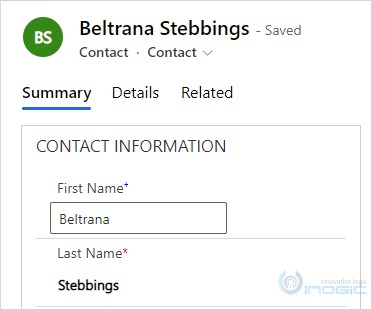
This is how we can use isPropertyLoading to prevent displaying empty PCF values even though data exists.
FAQs
- What is isPropertyLoading in PCF?
isPropertyLoading is a property available inside context.parameters.<fieldName> in a Power Apps PCF control.
It indicates whether the field data in the property bag is still loading.
- Returns true → Field data is still being initialized
- Returns false → Field data is available
You can use this property to handle PCF lifecycle timing issues and prevent null rendering.
- Why does context.parameters.raw return null in PCF?
If context.parameters.<field>.raw returns null, it usually means the form has not completed loading the field data yet.
This is a common issue in model-driven app PCF controls, especially during the first execution of updateView().
Using isPropertyLoading ensures you access raw only after the property bag is fully initialized.
- How do you fix PCF default value not rendering?
If your PCF default value is not rendering, you can:
- Check parameters.<field>.isPropertyLoading
- Render your React component only when it is false
- Return an empty container while it is true
This prevents the control from rendering before the field value becomes available.