During an online conference with Power Platform experts, a technical enthusiast asked an important question:
“What options do we have for emailing using templates on specific events or actions in Dynamics CRM?”
A panelist responded that traditionally this was achieved using:
- Classic workflows with Send Email and Use Template actions, or
- Plugins using InstantiateTemplate and SendEmail requests
Today, you can achieve the same functionality using Power Automate, with greater flexibility and no-code/low-code implementation.
In this article, you will learn how to create a Power Automate Flow that sends an email using a Dynamics 365 Email Template when a Lead is created.
Business Scenario: Automatically Email New Leads Using Power Automate
Imagine you are working for a company called Larence and Co. Your website has an inquiry form, and every submission creates a new Lead record in Dynamics 365.
Your requirement is simple:
Whenever a new Lead is created, you want to automatically send a “Thank You” email using a predefined Email Template.
This is exactly what you will implement using Power Automate.
Step 1: Configure the Power Automate Trigger for Lead Creation
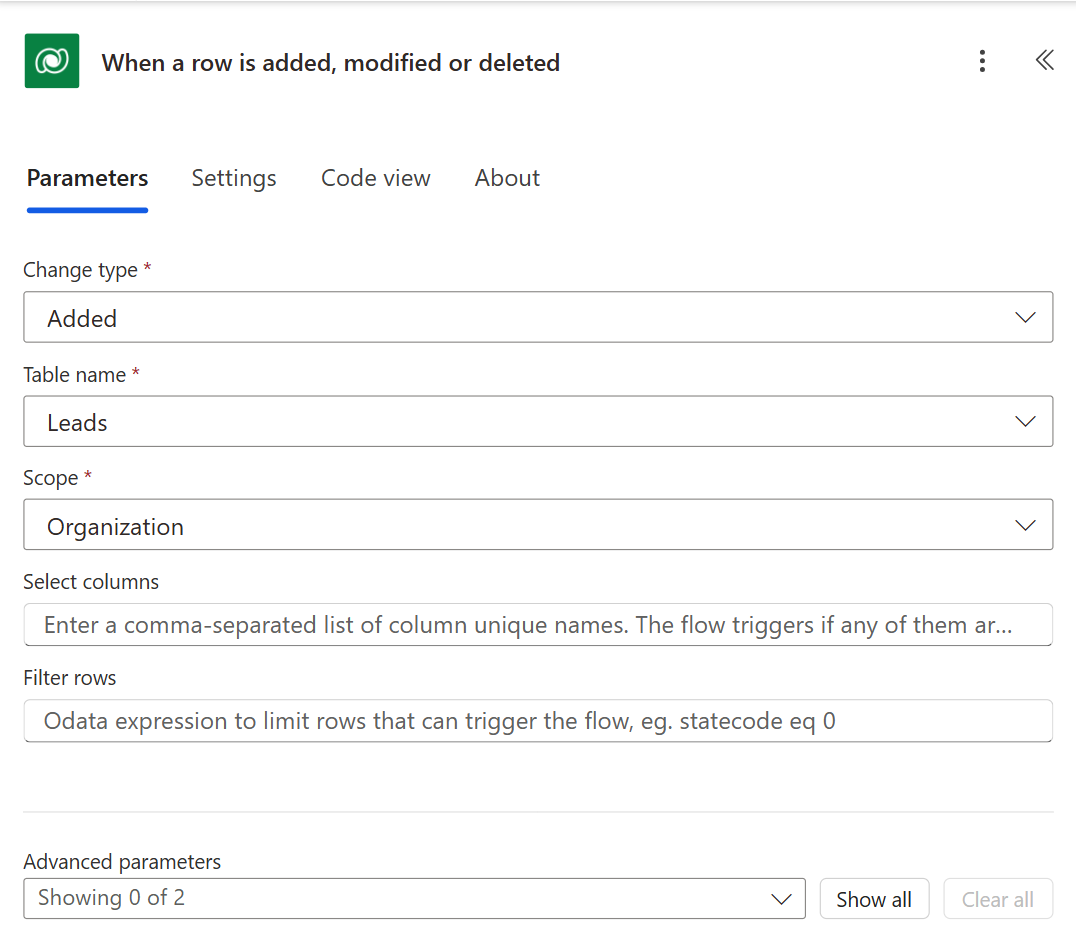
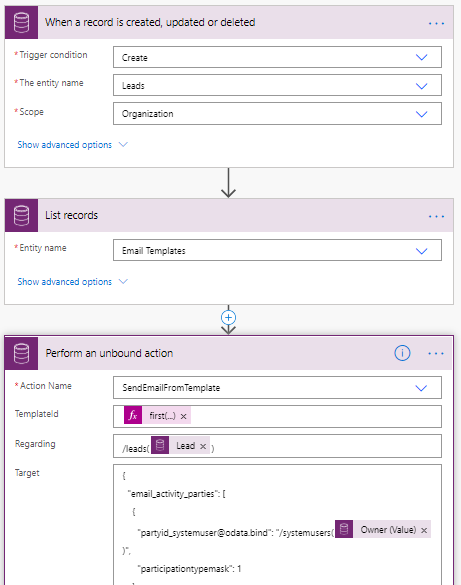
We will create a Power Automate Flow that will get triggered on the creation of the Leads record. For this, we will select the ‘When a record is created, updated, or deleted’ trigger and will select ‘Create’ as the trigger condition. If you want to learn more about scope, refer to this blog to know how to use Scope with Common Data Service in Microsoft Flow.
Step 2: Retrieve the Dynamics 365 Email Template
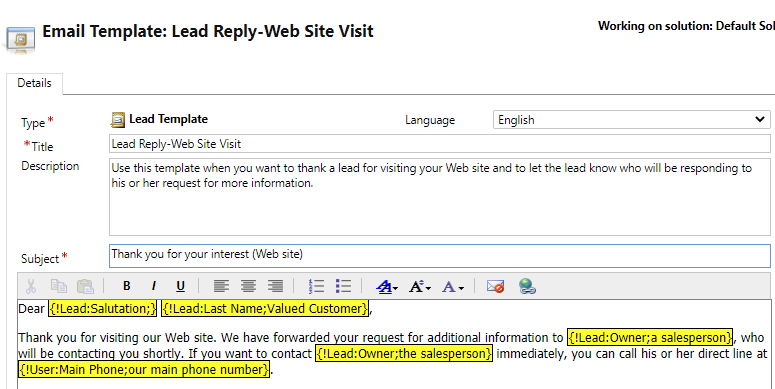
We will add the ‘List Records’ step to retrieve the Email Template by its name (Title). Let us suppose we are retrieving the template below.
Add a filter query to retrieve template by the title as shown below
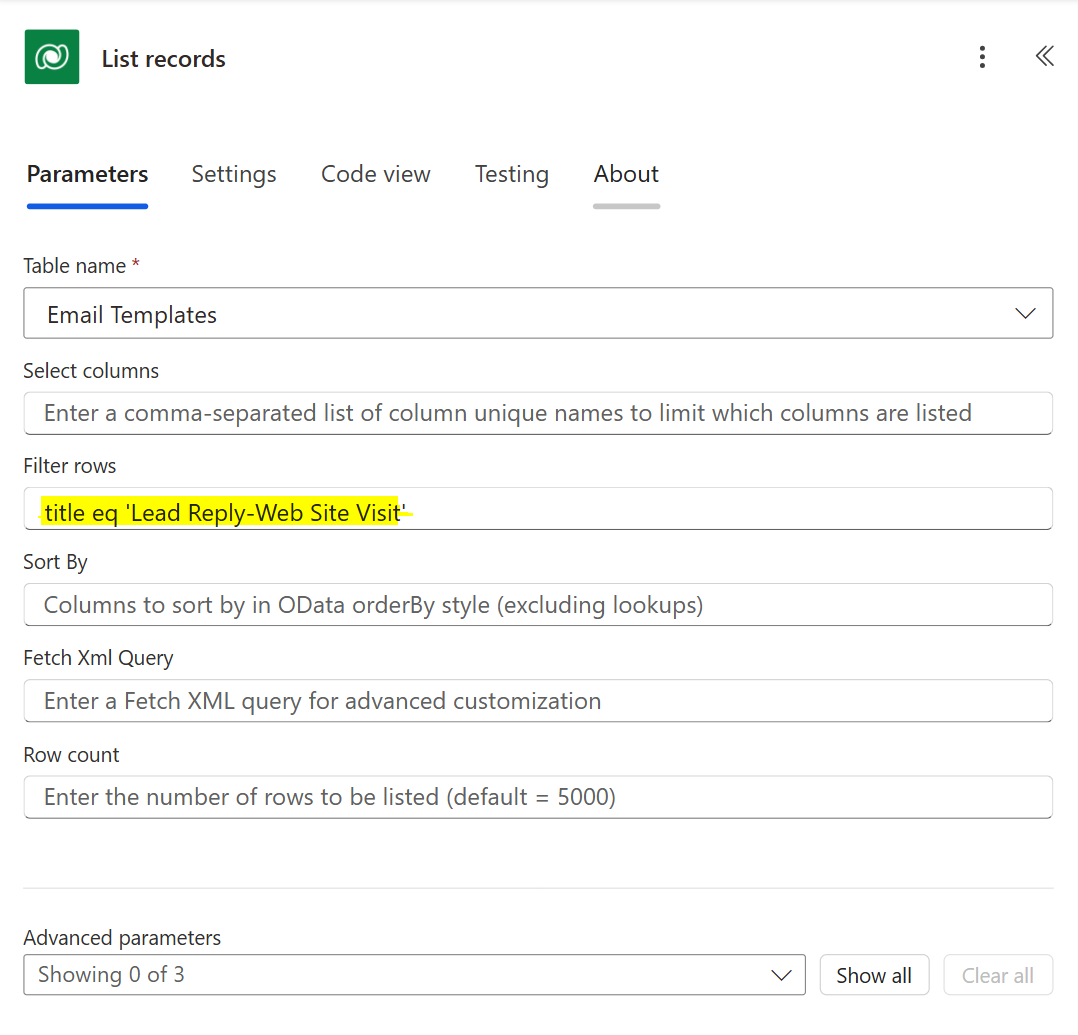
This step will return the ‘Lead Reply-Web Site Visit’ template. We will use the GUID of this template in the next step.
Step 3: Use ‘SendEmailFromTemplate’ action
This action is used to send an email using the Email Template. To execute this in Power Automate we need to add the ‘Perform an unbound action’ step.
For this step/action, we need to pass the below parameters,
Action Name: Select ‘SendEmailFromTemplate’ from the list of actions.
TemplateId: GUID of the Email Template. In the second step, we retrieved the email template, we can use the following expression to get the GUID of the template.
first(body(‘List_records’)?[‘value’])?[‘templateid’]
Regarding: This is the Record to be set as the regarding of the email. Here we will pass the newly created Lead as the regarding. Pass the record as the following
/leads(triggerOutputs()?[body/leadid])
Target: This is the parameter that we need to pass to the sender and recipients of the email in JSON format. Below is the JSON structure
{
“email_activity_parties”: [
{
“partyid_<entitylogicalname>@odata.bind”: “/<entitysetname>(<guid of the record>)”,
“participationtypemask”: 1
},
{
“partyid_<entitylogicalname>@odata.bind”: “/<entitysetname>(<guid of the record>)”,
“participationtypemask”: 2
}
],
“@@odata.type”: “Microsoft.Dynamics.CRM.email”}
It is important to understand the Target parameter’s JSON structure because this is the place where we set TO, CC, BCC, and FROM for the email.
In the above JSON, I have used ‘participationtypemask’ as 1 and 2. Use 1 to set FROM and use 2 to set ‘To’.
If you want to set CC and BCC then use 3 and 4 as ‘participationtypemask’ respectively.

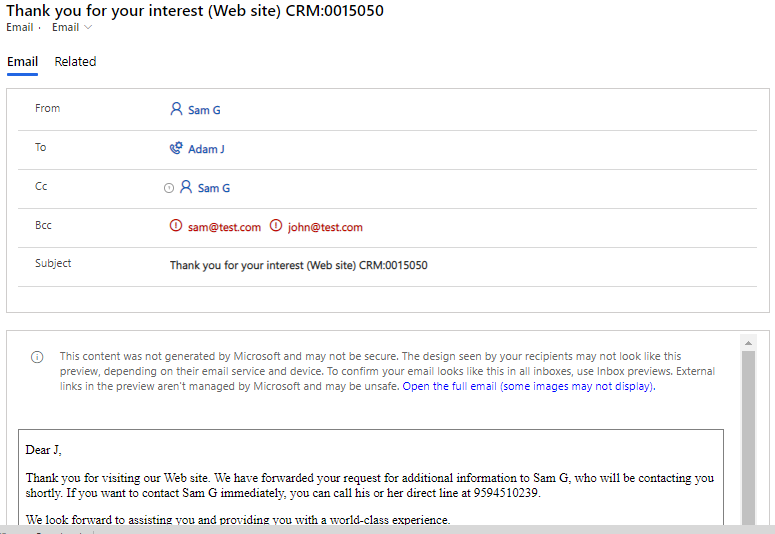
This way ‘SendEmailFromTemplate’ action will allow you to send an email using the Email Template. The subject and email body will come from the email template and Sender, Recipients (To, CC, BCC) will be set based on the Target Parameter.
Below is an example of “Perform an unbound action” and its JSON
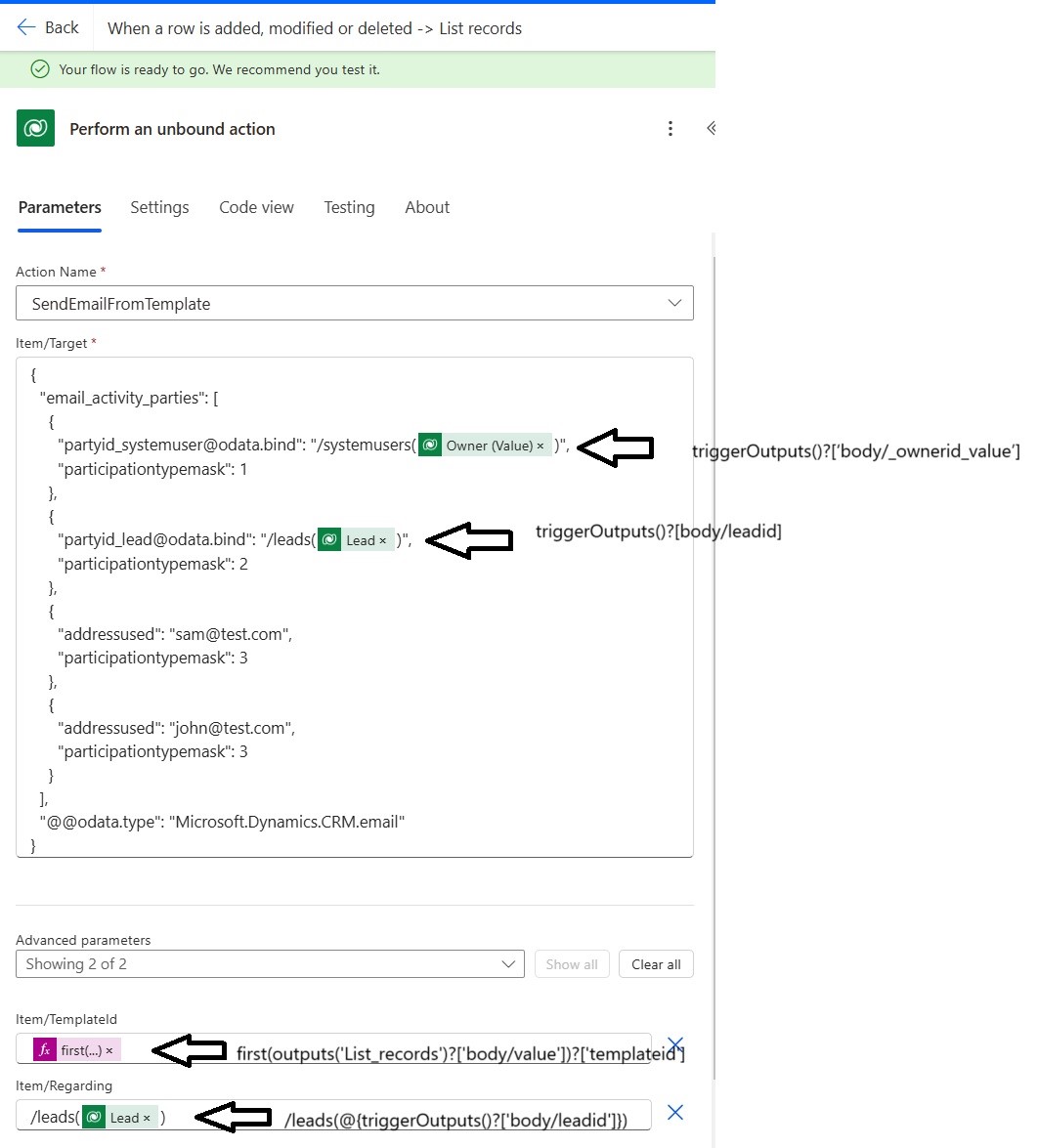
TemplateId is the GUID of the template retrieved from the second ‘List Records’ step, ‘Regarding’ is the entity object of the lead that is being created and in the Target parameter, ‘FROM’ is being set to the Owner of the lead and ‘To’ is set to the lead entity object.
{
“email_activity_parties”: [
{
“partyid_systemuser@odata.bind”: “/systemusers()”,
“participationtypemask”: 1
},
{
“partyid_lead@odata.bind”: “/leads()”,
“participationtypemask”: 2
},
{
“addressused”: “sam@test.com”,
“participationtypemask”: 3
},
{
“addressused”: “john@test.com”,
“participationtypemask”: 3
}
],
“@@odata.type”: “Microsoft.Dynamics.CRM.email”
}
Sometimes, you may want to send an email to the email address which doesn’t exist in your system. In that case, we can use the ‘addressused’ parameter. In the above code snippet, you can see set sam@test.com for BCC being used
In addition, you may want to send more than one recipient in either TO, CC, or in BCC. It is possible to set multiple objects in TO, CC, and BCC by adding multiple entries in the ‘email_activity_parties’.
Below is how the final working Power Automate Flow looks like
Below is the screenshot of the newly generated mail using the Email Template
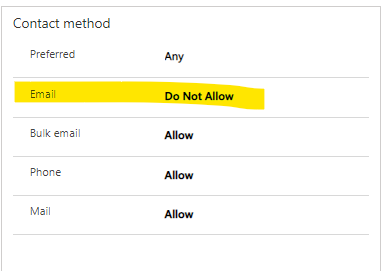
Note: If any of organization’s recipients is either a contact, lead or account and is marked as do not allow for Email then the flow will fail with an error saying, “Recipient of type ‘Lead’ with ID ‘xxxxxxxx-xxxx-xxxx-xxxx-xxxxxxxxxxxx’ is marked as non-Emailable”
Wrapping Up
We can now consider Power Automate Flow to send automated emails using the Email Template using the “SendEmailFromTemplate” action. In the net part of the article, we shall see how to send bulk email messages using Power Automate.
FAQs
How do I send an email using an email template in Power Automate?
You can send an email using an email template in Power Automate by using the Perform an unbound action step and selecting the SendEmailFromTemplate Dataverse action. This allows you to reuse existing Dynamics 365 Email Templates and dynamically set recipients and sender details.
Can Power Automate send emails using Dynamics 365 email templates?
Yes, Power Automate can send emails using Dynamics 365 email templates by leveraging the SendEmailFromTemplate unbound action available in Dataverse.
What is SendEmailFromTemplate in Power Automate?
SendEmailFromTemplate is a Dataverse unbound action that generates and sends an email based on a predefined Dynamics 365 Email Template, while allowing you to set To, CC, BCC, and From dynamically.
How do I set To, CC, and BCC in Power Automate email templates?
To set To, CC, and BCC in Power Automate email templates, you must configure the Target parameter using the email_activity_parties JSON array and assign the correct participationtypemask values:
- 2 for To
- 3 for CC
- 4 for BCC
How do I send an email to an external email address in Power Automate?
You can send an email to an external email address in Power Automate by using the addressused property in the Target parameter, even if the email address does not exist as a record in Dataverse.
Why is Power Automate failing with “Recipient is marked as non-Emailable”?
Power Automate fails with this error when the Contact, Lead, or Account is marked as Do Not Allow Email in Dynamics 365. Dataverse enforces this restriction automatically.
Can I send emails automatically when a lead is created in Dynamics 365?
Yes, you can automatically send emails when a lead is created in Dynamics 365 by creating a Power Automate flow triggered on lead creation and using the SendEmailFromTemplate action.
Hi Roohi, we want our email to be Set Regarding an entity different from the recipient of the email. The email template is for a Contact, but we want to set regarding a related custom entity created earlier in the Flow. The Flow fails with the message ‘Template type is incorrect for given objectType 10224 != 2 template.templatetypecode’ (10224 being the objecttypecode for our custom entity, confirmed by webAPI; 2 is Contact).
Have you come across this? And can you think of any way around it? Incidentally the unbound action SendTemplate (bulk email) equivalent to this does allow you to Set Regarding this custom entity while still sending To the Contact – tried and tested.
Thank you!
Hi,
Yes, the Flow will throw an error if your Email template is for contact and trying to set regarding as a different entity. You can use unbound SendTemplate action but it will send emails only if the “Bulk Email” is set to allow on the contact record. If this is not going to work in your case then you would need to programmatically send the email. You would need to retrieve the template created in CRM and create and send an Email entity record by replacing the placeholder added in the Email template with the data from the recipient/Contact. Also, you need to set the regarding as the custom entity record.
Hope this helps!
Thanks
Thank you for your quick and helpful response! I tried (and failed…) in what seemed to be an alternative workaround of getting the sent email message in a subsequent step and updating the Regarding from there, however the value of ‘message correlated activityid’ (as offered by add Dynamic Content) turns out to not be a guid, and when I tried by writing my own expression to wire the Get Record to the activityid (as correctly identified in the output of the unbound action step) it errored too, saying it couldn’t find the recordid.
Does this sound right to you that this is a dead end – you can’t subsequently ‘get’ the email created by ‘sendEmailFromTemplate’? Hope that makes sense.
You cannot update the sent email message. You must update the email before it is getting sent. You can try first by executing InstantiateTemplateRequest. Pass your global template ID to this request. This request will return a response that will contain the Subject, email body, etc. After this request, create an email record and set Regarding and replace the placeholders from the email body.
Hope this provides some clarity.
Ahh that didn’t work for me – in the InstantiateTemplate along with the template I put ObjectType as contact and ObjectID as dynamic Contact guid, not sure where an array would come into it. (I tried both with original templatewhich was a Contact template, and also a test global one in case that mattered).
ResponseSwaggerSchemaValidationFailure. The API ‘commondataserviceforapps’ returned an invalid response for workflow operation ‘Perform_an_unbound_action_InstantiateTemplate’ of type ‘OpenApiConnection’. Error details: ‘The API operation ‘PerformUnboundAction’ requires the property ‘body’ to be of type ‘Array’ but is of type ‘Object’.’
Thanks for your help. It is annoying as we wanted to use Flow (over workflow) but they want easy access from UI to edit the D365 template themselves, and we need it to send independent of the allowbulkemail field on Contact.
how to send email to multiple recipient
Hi Nilesh,
To send email to multiple recipients, you need to add multiple email activity parties of ‘participationtypemask’ as 2 in the Target,@odata.bind”: “/()”,@odata.bind”: “/()”,
{
“email_activity_parties”: [
{
“partyid_
“participationtypemask”: 1
},
{
“partyid_
“participationtypemask”: 2
},
{@odata.bind”: “/()”,
“partyid_
“participationtypemask”: 2
},
{@odata.bind”: “/()”,
“partyid_
“participationtypemask”: 2
}
],
“@@odata.type”: “Microsoft.Dynamics.CRM.email”
}
Here participationtypemask 2 is the To recipient.
Hope this helps,
Thanks!
Great post!! Thank you. I am hoping you can provide a little help with an error I’m getting in the final perform an unbound action step of SendEmailFromTemplate.
My data: (a string, complied earlier in the flow)
TemplateID: 8c182596-c481-eb11-a812-001dd80496bc
Regarding: xxx_myentitynames(c327dx32-aa85-eb11-8ced-00155da14786
Target:
{“email_activity_parties”: [
{“partyid_systemuser@odata.bind”: “/systemusers(9a268c41-d936-eb11-a813-001dd8309f30)”,”participationtypemask”: 1},
{“partyid_systemusers@odata.bind”: “/systemusers(bb763206-5cf4-ea11-a816-001dd83098a0)”,”participationtypemask”: 2},
{“partyid_systemusers@odata.bind”: “/systemusers(425884a6-56f4-ea11-a816-001dd83098a0)”,”participationtypemask”: 2},
{“partyid_systemusers@odata.bind”: “/systemusers(bb763206-5cf4-ea11-a816-001dd83098a0)”,”participationtypemask”: 2},
{“partyid_systemusers@odata.bind”: “/systemusers(c4761aba-58f4-ea11-a816-001dd83098a0)”,”participationtypemask”: 2}],
“@@odata.type”: “Microsoft.Dynamics.CRM.email”}
The Error:
An error occurred while validating input parameters: Microsoft.OData.ODataException: Bad Request – Error in query syntax.\r\n at Microsoft.OData.UriParser.ODataPathParser.ExtractSegmentIdentifierAndParenthesisExpression(String segmentText, String& identifier, String& parenthesisExpression)\r\n at Microsoft.OData.UriParser.ODataPathParser.CreateFirstSegment(String segmentText)\r\n at Microsoft.OData.UriParser.ODataPathParser.ParsePath(ICollection`1 segments)\r\n at Microsoft.OData.UriParser.ODataPathFactory.BindPath(ICollection`1 segments, ODataUriParserConfiguration configuration)\r\n at Microsoft.OData.UriParser.ODataUriParser.Initialize()\r\n at Microsoft.Crm.Extensibility.OData.CrmEdmEntityReference.CreateCrmEdmEntityReference(Uri link, IEdmModel edmModel, CrmODataExecutionContext context, EntitySetSegment& entitySetSegment)\r\n at Microsoft.Crm.Extensibility.ODataV4.ODataParameterReaderExtensions.TryReadFlowPrimitiveData(ODataParameterReader oDataParameterReader, ODataDeserializerContext readContext, CrmEdmEntityObject& result)\r\n at Microsoft.Crm.Extensibility.ODataV4.ODataParameterReaderExtensions.TryReadFlowPrimitive(ODataParameterReader oDataParameterReader, ODataDeserializerContext readContext, CrmEdmEntityObject& result)\r\n at Microsoft.Crm.Extensibility.ODataV4.CrmODataActionPayloadDeserializer.Read(ODataMessageReader messageReader, Type type, ODataDeserializerContext readContext)\r\n at System.Web.OData.Formatter.ODataMediaTypeFormatter.ReadFromStream(Type type, Stream readStream, HttpContent content, IFormatterLogger formatterLogger)
Hi Christopher,
The syntax seems correct. But I see the problem with the double quotes used in the expression. Copy your data in notepad and replace all the double quotes again.
Hope that helps!
Thanks.
Hello! Your post was so helpful for me! However, I want to include a feature that doesn’t seem to be here. I want to make the email templates that I sent from Power Automate with this unbound action Non Visible in the Portal. Make this from CRM Process is as simple as disabling it by a radio control, but from Power Automate seems to be more complicated, maybe introducing a new JSON variable? I will really appreciate help for this question.
Thanks in advance!
Which portal you are referring to? The Power Apps Portal?
I am not if I have understood your requirement correctly. But you cannot show hide something from Power Automate. Please elaborate your scenario more in detail.
Thanks!
Hi Inogic,
what if we have to dynamically send multiple users like array of users in either to or cc recipients
Yes, you can add multiple users in To or in CC recipients. You need add those many parties with their participationtypemask(2=To, 3=CC) in the email_activity_parties array. See below example where 2 users have been added in To and 3 users added in CC.
{
“email_activity_parties”: [
{
“partyid_systemuser@odata.bind”: “/systemusers(@{triggerOutputs()?[‘body/_ownerid_value’]})”,
“participationtypemask”: 1
},
{
“partyid_lead@odata.bind”: “/leads(@{triggerOutputs()?[‘body/leadid’]})”,
“participationtypemask”: 2
},
{
“partyid_systemuser@odata.bind”: “/systemusers(c308eef1-1de7-ea11-a817-000d3a0a82a6)”,
“participationtypemask”: 2
},
{
“partyid_systemuser@odata.bind”: “/systemusers(c308eef1-1de7-ea11-a817-000d3a0a82a7)”,
“participationtypemask”: 3
},
{
“partyid_systemuser@odata.bind”: “/systemusers(c308eef1-1de7-ea11-a817-000d3a0a82a8)”,
“participationtypemask”: 3
},
{
“partyid_systemuser@odata.bind”: “/systemusers(c308eef1-1de7-ea11-a817-000d3a0a82a9)”,
“participationtypemask”: 3
},
],
“@@odata.type”: “Microsoft.Dynamics.CRM.email”
}
Hope this helps!
Thanks!