 If your business is still waiting on manual approvals, forwarded emails, or spreadsheet updates after every meeting, there is a cost to that delay – not just in lost hours, but in slower decisions and missed opportunities. Power Automate agent flows are changing that dynamic for businesses across industries. The companies paying attention are building operations that run faster, with fewer errors and far less manual effort.
What Are Agent Flows, and Why Should You Care?
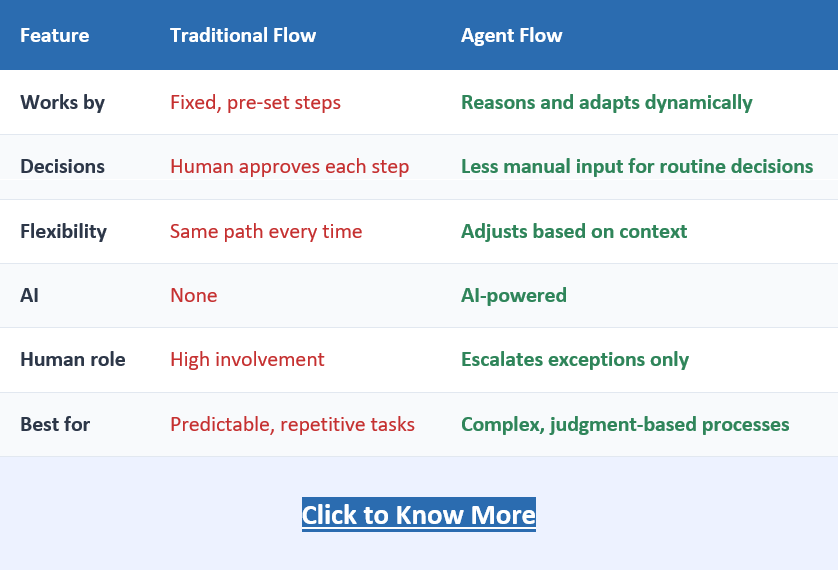
Agent flows are the newest evolution of Microsoft Power Automate workflow automation. Unlike traditional flows that follow a fixed sequence of steps, agent flows can reason through a situation, adapt based on context, and act without waiting for a human to intervene at every stage.
Think of it this way. A traditional approval workflow asks a manager to click “Approve” or “Reject.” An agent flow, powered by Copilot in Power Automate, can review the request, check it against your company’s policies, flag anything unusual, and in straightforward cases, complete the approval automatically.
Power Automate Traditional Flow vs. Power Automate Agent Flow
This is not automation replacing judgment. It is automation handling the routine, so your team can focus on the exceptions.
Where Businesses Are Seeing Real Results
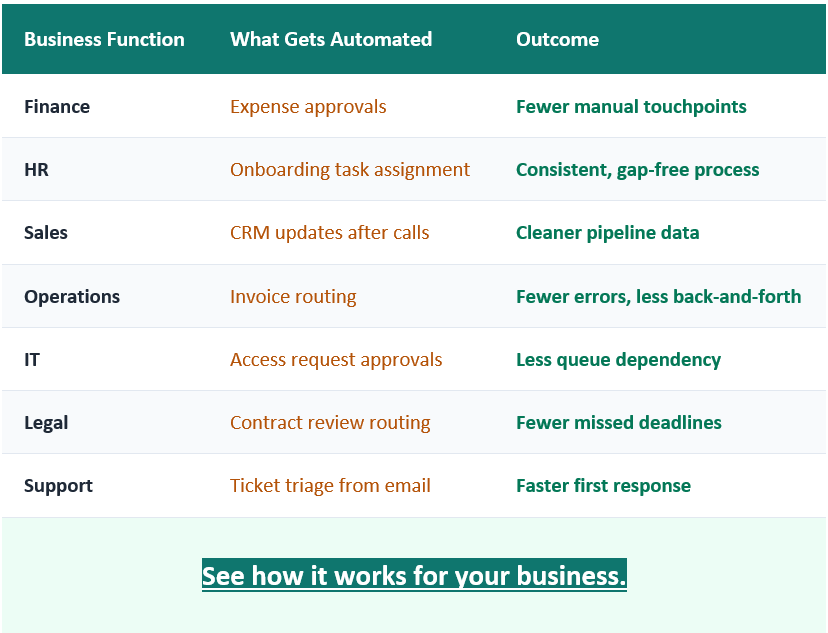
Here is a snapshot of where Power Automate business automation with agent flows is delivering measurable value right now:
The Copilot Advantage Inside Power Automate
Getting the Most Out of Power Automate Requires the Right Setup
Building a basic flow is straightforward. Building flows that scale across departments, connect to your existing systems, and perform reliably over time is a different challenge.
This is where the right implementation partner makes all the difference. Inogic, a certified Microsoft Solutions Partner, works with businesses to go beyond standard templates and build Power Automate Solutions that reflect how operations actually run. From mapping existing processes to identifying the highest-value automation opportunities, the focus is always on what works in the real world, not just what looks good in a demo.
For businesses evaluating where to start or looking to scale what they have already built, that kind of process-first expertise tends to make a meaningful difference in outcomes.
How to Start Using Agent Flows in Your Business
through agent flows is not a future capability. It is live, available, and being used by businesses to reclaim hours every week across teams that had no automation at all six months ago.
The practical starting point for most businesses looks like this:
- Identify one process where delays are costing the team time every week
- Map how decisions in that process are currently made
- Build a Power Automate automated approval workflow around the routine cases
- Let Copilot handle the logic, and escalate the exceptions to a human
Frequently Asked Questions
Do agent flows require developer skills to build?
No. With Copilot in Power Automate, business users can describe a process in plain English and get a working flow suggested automatically. Customization may need some guidance, but the barrier is much lower than it was even a year ago.
How is an agent flow different from a regular Power Automate flow?
A regular flow follows a fixed sequence. An agent flow can evaluate context, apply reasoning, and adapt its path based on what it finds, making it better suited for decisions that are not always black and white.
Is Power Automate included with Microsoft 365?
Standard cloud flows are included with most Microsoft 365 business subscriptions. Premium connectors and advanced agent capabilities may require a Power Automate premium plan, but entry-level automation is available without additional licensing for most teams.
Can Power Automate agent flows make decisions automatically?
Yes. Agent flows can evaluate rules, context, and data inputs to automate routine decisions while escalating exceptions to humans.