Skip to content
Microsoft Dynamics 365 CRM Tips and Tricks
By Inogic
  • Blogs
  • D365 Apps
  • Inogic
  • D365 / Power Platform Services
  • Maplytics Docs
  • D365 Apps Docs
    • Omnichannel Apps
      • WhatsApp4Dynamics
      • TextSMS4Dynamics
      • LiveChat4Dynamics
    • File and Storage Managment
      • Attach2Dynamics
      • SharePoint Security Sync
    • AI/Copilot Apps
      • SharePoint Knowledge AI Search
      • Predict4Dynamics
    • Visualization Apps
      • Map My Relationships
      • Kanban Board
      • Business Process Checklist
    • Productivity Apps
      • Click2Clone
      • Click2Export
      • Undo2Restore
      • Lead Assignment and Distribution Automation
      • Alerts4Dynamics
      • Translate4Dynamics
      • Subscription Recurring Billing Management
    • User Adoption Apps
      • DeDupeD
      • User Adoption Monitor
      • Gamifics365
    • Integration Apps
      • Marketing4Dynamics
      • InoLink

Sign in required (A silent sign-in request was sent but no user is signed in) message keeps on showing

By Inogic | March 3, 2021
0 Comment

Introduction

Recently, we were facing an issue in Google Chrome Incognito Window while consuming an API in which authentication was required. After doing some research, we finally found the issue. It was due to the Chrome browser setting which was set to disable third-party cookies in the Incognito mode.
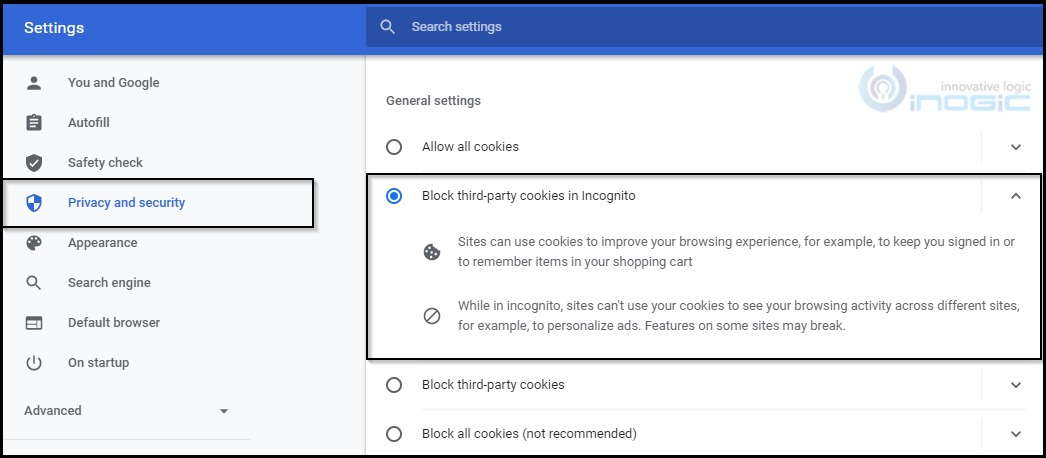
Sign in required message keeps on showing

After changing the Chrome setting to Allow Cookies, we were finally able to consume the API and getting the expected response.

A similar issue occurs when you try to visit http://admin.powerplatform.microsoft.com/.  Even though you are signed into your Dynamics CRM account, the error keeps popping up when visiting the aforementioned URL.
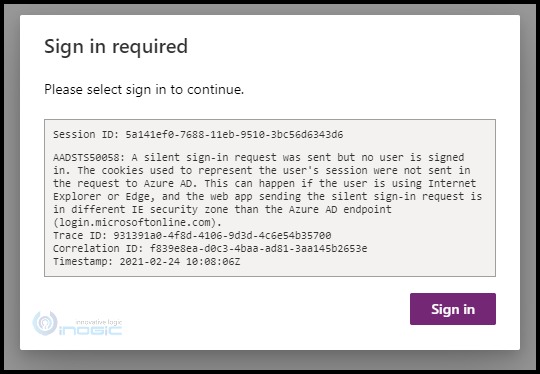
Sign in required message keeps on showing

So, I tried the same browser setting to Allow third-party cookies and after changing the setting to Allow cookies, you would be able to successfully log in to your account.
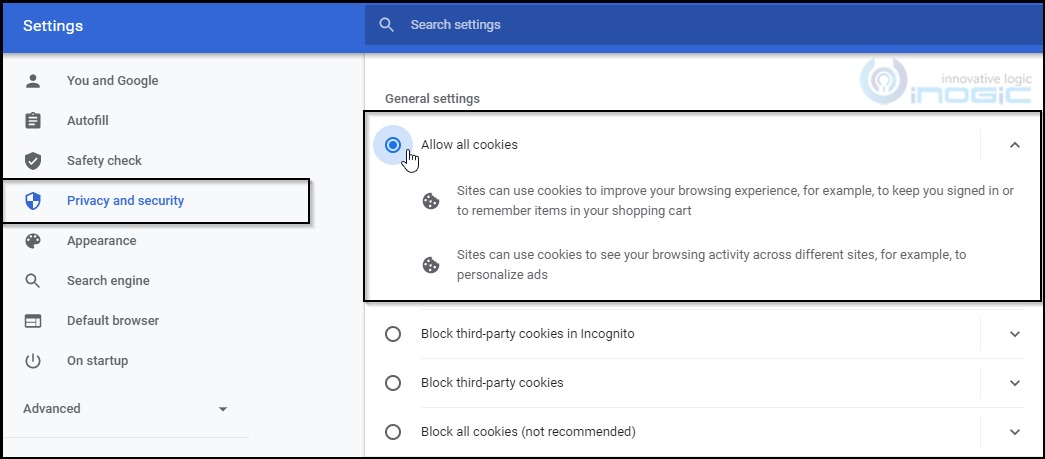
Sign in required message keeps on showing

As stated in the Google Chrome official document, the cookies are used to keep you Signed In.

You might also face the same issue in other browsers. To resolve the issue, you will need to perform the same operation to enable the cookies.

Conclusion

By following these steps, you will be able to resolve the issue.

Hope you find this blog helpful!

click2clone

Category: Security Tags: Google Chrome Incognito Window, issue, Sign in required
Post navigation
← Send Email with Dynamics 365 CRM record link using Compose action in Power Automate Flow Track specific column update of SharePoint List Item when using Power Automate Cloud Flows →

Follow Us!

Follow Us on FacebookFollow Us on TwitterFollow Us on LinkedInFollow Us on YouTubeFollow Us on InstagramFollow Us on E-mailFollow Us on Docs

Blog Series

  • Power Apps – Model Driven Apps
  • Power Apps – Canvas App
  • Power Pages
  • Power Automate
  • Power BI
  • AI Builder
  • Copilot
  • Azure OpenAI
  • Microsoft Teams
  • Dynamics 365 for Field Service

Recent Innovations

Fix SharePoint’s 5000-Item Limit in Dynamics 365 (2026 Guide)

What Is the Best Way to Manage Files and Attachments in CRM?

How to Identify Duplicates in Dynamics 365 CRM (Step-by-Step Guide 2026)

AI-Powered WhatsApp Sentiment Analysis for Smarter Customer Support in Dynamics 365

The Ultimate Guide to AI Semantic Search in SharePoint with Microsoft Copilot

The Complete Guide to Dynamics 365 CRM + Mailchimp Integration (2026)

Top Reasons your Dynamics 365 CRM Needs a Translation App today!

Guide to Branding Your Dynamics 365 Live Chat Integration App!

Recent Posts

  • An Ideal Field Sales Routine for Insurance Teams Using Smart Mapping
  • Step-by-Step Guide to Build a Reusable Component Collection in Microsoft Copilot Studio
  • Why Dynamics 365 CRM Needs Accounting System Integration: A Complete Guide
  • Mastering Dynamics 365 UI Automation with Playwright
  • CRM Data Deduplication: A 2026 FAQ Guide to Clean, Unified, AI-Ready CRM Data

Archives

SiteLock
Copyright © 2026 Inogic. All Rights Reserved
Iconic One Theme | Powered by Wordpress