 If you’ve ever lost a deal because two reps were chasing the same lead, or sent conflicting emails to the same customer, you already know the damage dirty data causes. And yet, most CRM users still rely on manual processes to fix it.
Here’s what the numbers say:
- $12.9 million – the average annual cost businesses lose due to poor data quality, according to research.
- 22% of CRM data degrades every year, creating duplicate contacts, accounts, and leads that silently erode pipeline accuracy
- 27% of sales reps cite inaccurate or duplicate data as their biggest CRM-related frustration
- Organizations spend an average of 1 in 5 working hours, a full day each week, correcting data quality issues rather than selling
Duplicate detection in Dynamics 365 CRM has long been a manual, time-consuming task. Deciding which record to keep as the master, the one that survives the merge, requires judgment calls about data completeness, reliability, and business relevance. Until now, that judgment has been entirely human.
That changes today.
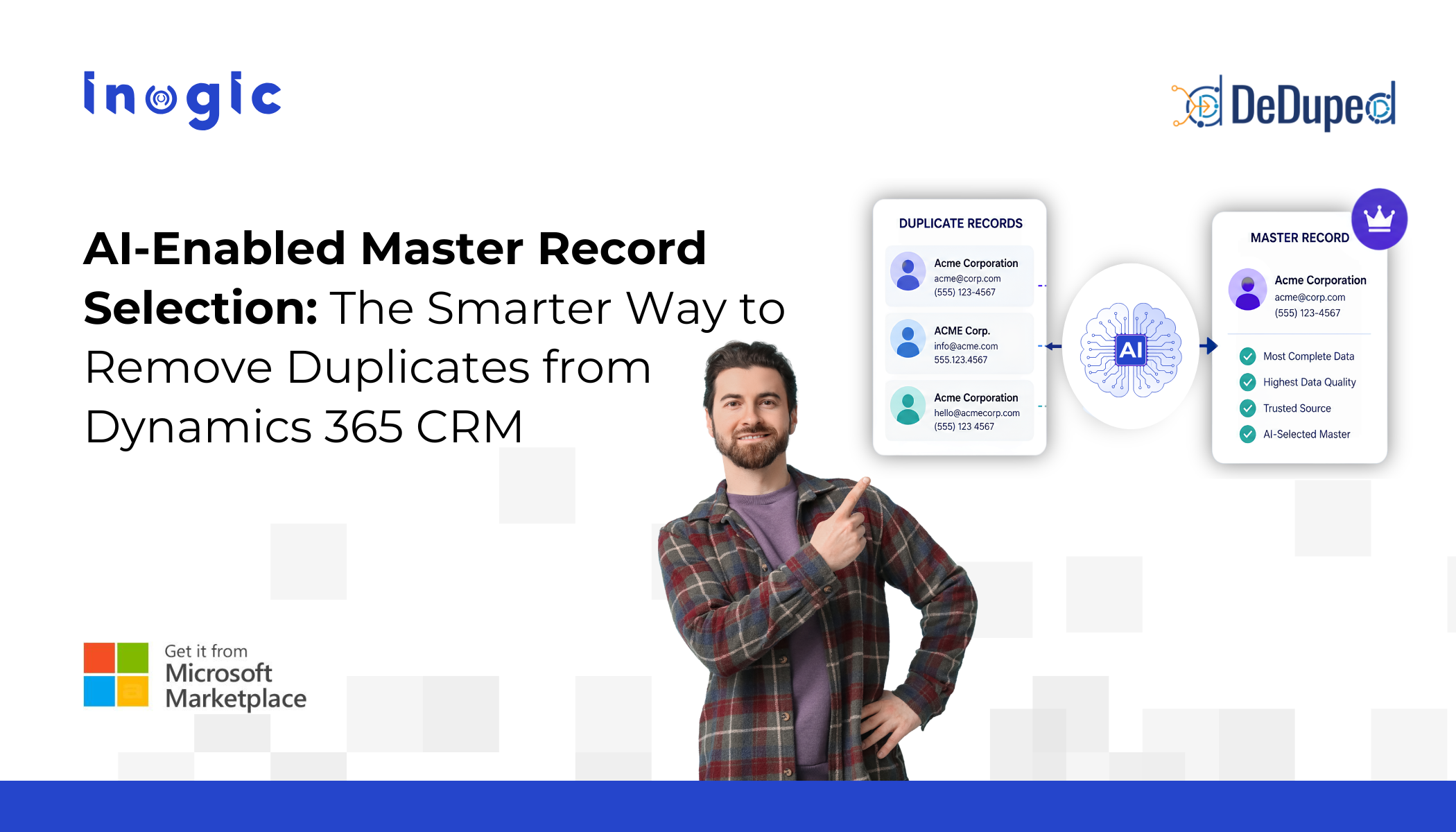
Inogic’s DeDupeD has launched a powerful new capability: AI-Enabled Master Record Selection, making AI-powered duplicate merge in Dynamics 365 CRM a reality.
Key Takeaways
- AI-enabled data deduplication in Dynamics 365 CRM is no longer a roadmap item — it’s live and configurable today with DeDupeD.
- The feature uses AI to evaluate data completeness, consistency, and business relevance to recommend the optimal master record, with a confidence score and plain-language reasoning.
- Human-in-the-loop governance means AI assists, never overrides, your team’s final judgment.
- Every AI decision is stored in a complete audit trail, supporting data governance and compliance requirements.
- The feature is available for key Dynamics 365 entities, including Accounts, Contacts, Leads, and Opportunities.
- Configuration takes fewer than 5 clicks, no custom code, no developer involvement.
What Is AI-Enabled Master Record Selection?
AI-enabled master record selection is a new feature in DeDupeD that uses artificial intelligence to automatically analyze duplicate records and recommend the optimal “master”, the record that should survive when duplicates are merged.
Instead of requiring users to compare every field across multiple duplicate records manually, the AI evaluates all candidates simultaneously and delivers a confident, reasoned recommendation in seconds.
The AI recommendation includes four key outputs:
- Suggested Master Record — the record the AI believes is most complete and reliable
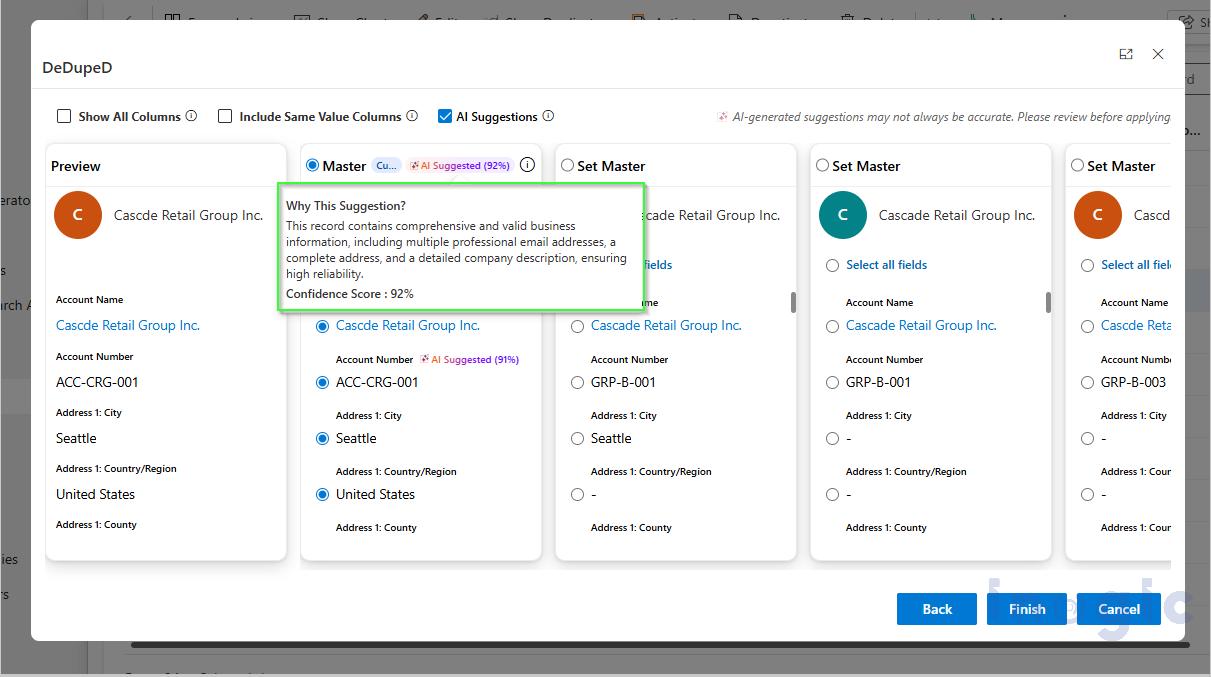
- Confidence Score — a percentage (e.g., 92%) indicating how certain the AI is
- Selection Reasoning — a plain-language explanation of why this record was chosen
- Complete Audit Trail — every AI decision is logged for transparency and compliance
Critically, users remain in full control. The AI recommendation is advisory — you can override it at any time before completing the merge. This human-in-the-loop governance ensures AI assists rather than replaces human judgment.
How the AI Evaluates Duplicate Records
When duplicates are selected for merge in DeDupeD, the AI model analyzes each record across multiple dimensions:
- Data completeness — how many fields are populated?
- Address information quality — is the address full and consistent?
- Contact information availability — phone, email, and other reach data
- Business identifiers — company name, tax IDs, or other unique markers
- Data consistency — do values across fields align logically?
- Record reliability — which record has a more trustworthy provenance?
- Overall information richness — which record gives the fullest picture?
Based on this multi-factor analysis, the AI assigns a confidence score using a tiered framework:
| Confidence Range | Interpretation |
| 90–100% | High Confidence — strong recommendation |
| 75–89% | Moderate Confidence — review advised |
| Below 75% | Lower Confidence — manual review recommended |
A Step-by-Step Look at the Feature in Action
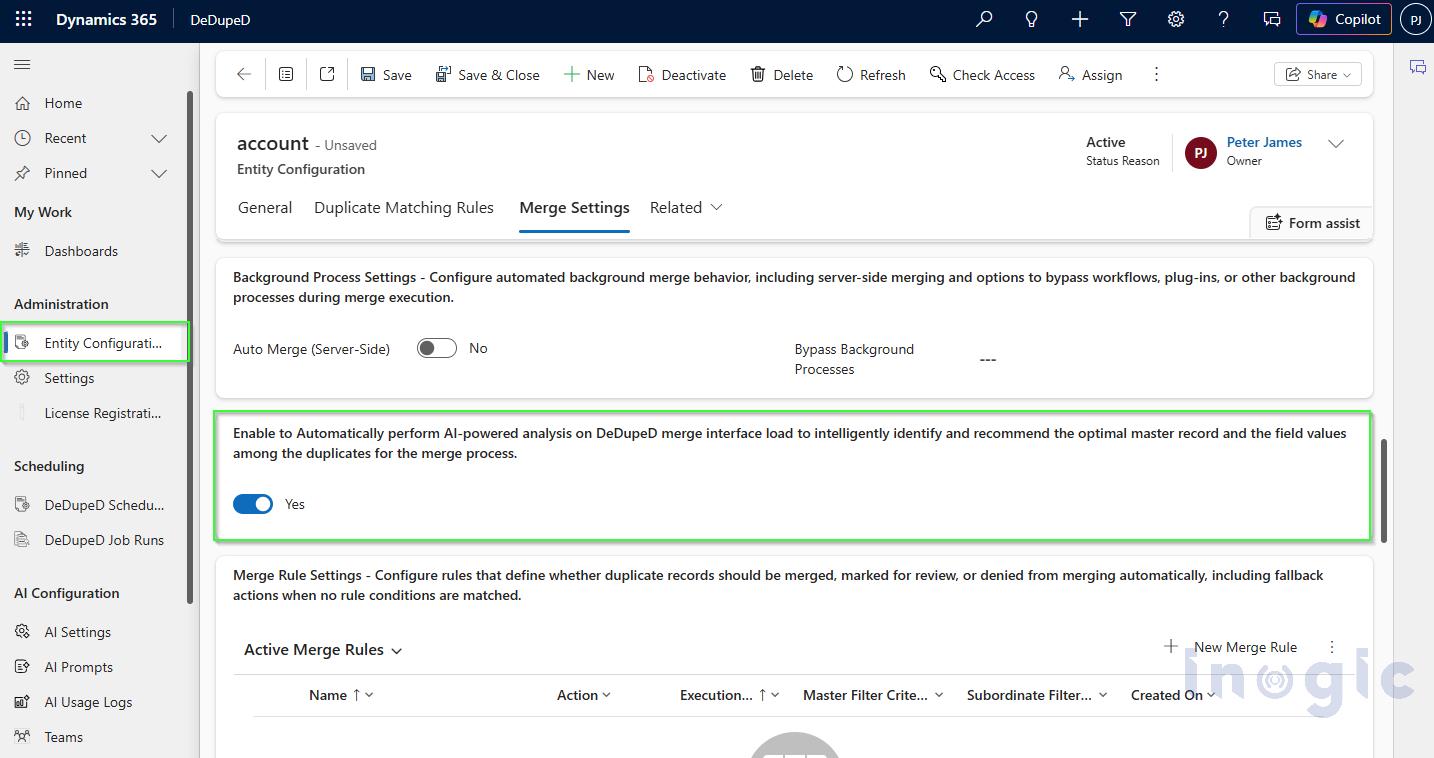
Step 1 — Enable It: Administrators navigate to Administration → Entity Configuration, open the desired entity (Account, Contact, Lead, Opportunity), select the Merge Settings tab, and toggle AI Master Selection to Yes. Done.
Step 2 — Select Duplicates for Merge: Users identify duplicates via DeDupeD and click Merge. The merge wizard opens and, if AI auto-analysis is enabled, immediately begins evaluation, displaying a “Getting AI suggestions…” indicator.
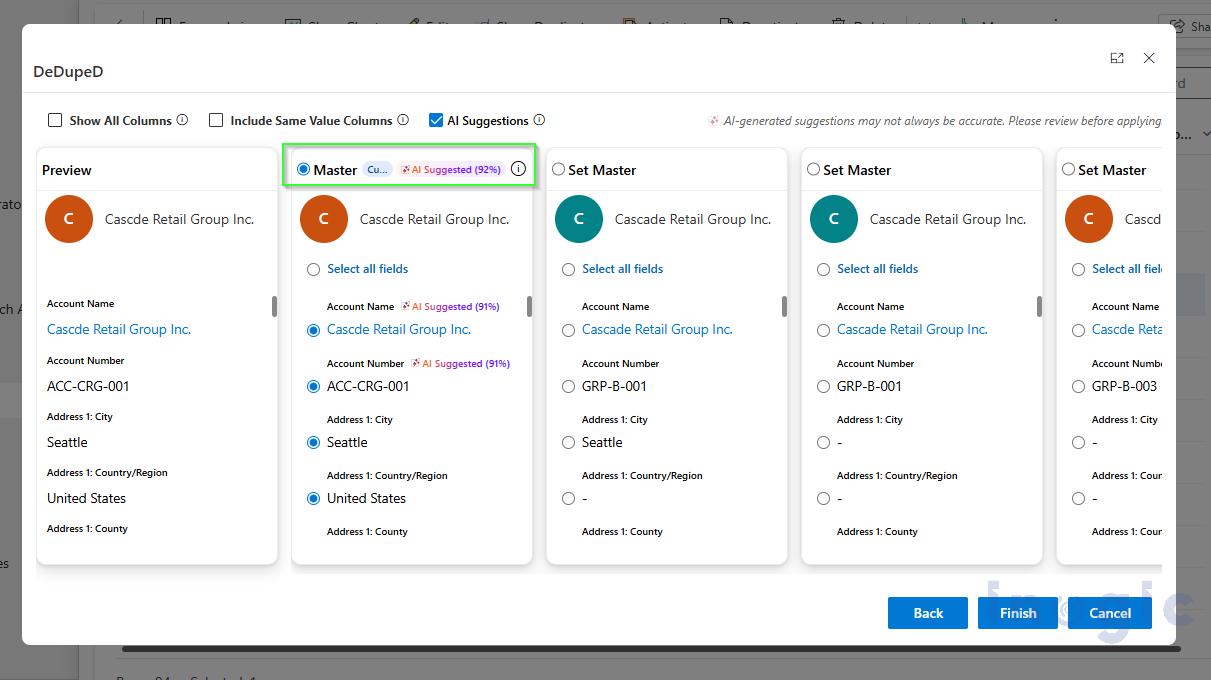
Step 3 — Review the Recommendation: The AI highlights the recommended master record with an AI Suggested (XX%) badge directly on the merge interface. No separate screen. No context-switching.
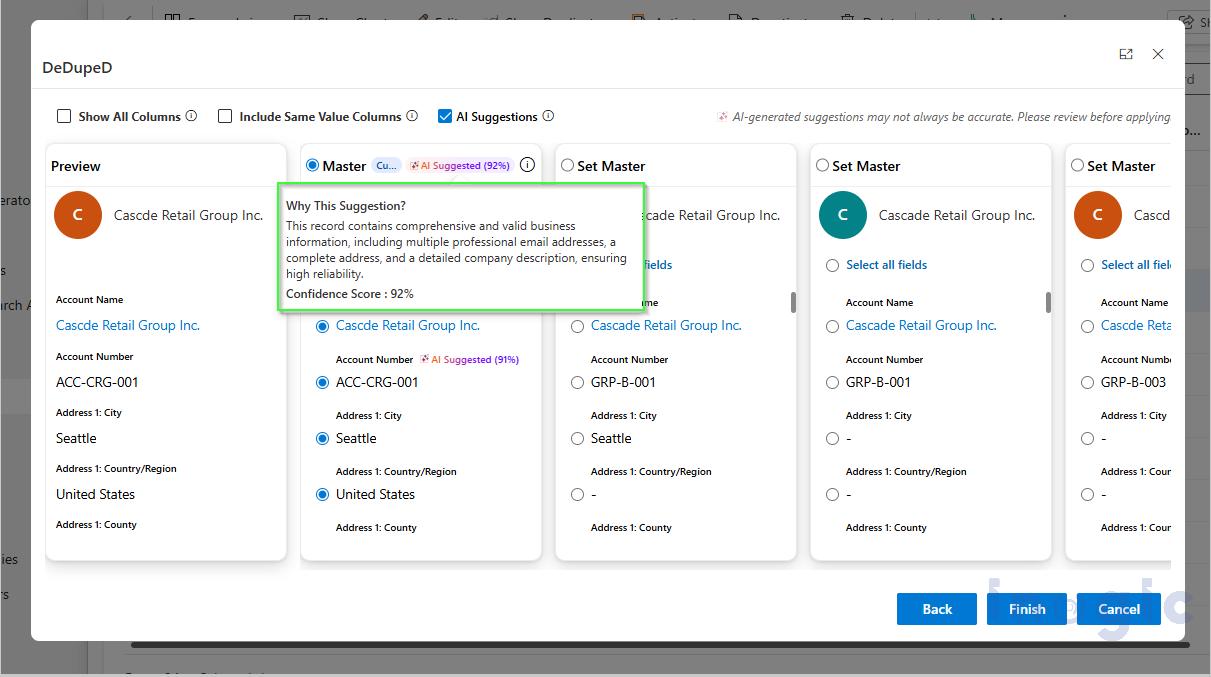
Step 4 — Understand the Why: Users click the information icon to open the “Why This Suggestion?” panel. The AI delivers a plain-language explanation such as: “This record contains comprehensive and valid business information, including multiple professional email addresses, a complete address, and a detailed company description, ensuring high reliability.”
Step 5 — Override If Needed: Not happy with the suggestion? Simply select a different record and click Set Master. The AI recommendation remains visible for reference, but your choice takes precedence.
Step 6 — Finish and Audit: After clicking Finish, DeDupeD merges the records, retains the master, deactivates subordinates, and preserves all related data associations. Every AI decision — confidence score, reasoning, and selection method — is stored in a full audit trail accessible from DeDupeD → Job Runs.
Why This Matters: The Business Case for AI-Powered Deduplication
Faster Merge Decisions: Manually comparing five duplicate account records with 40+ fields each takes 10–15 minutes per merge job. AI analysis completes in seconds, cutting decision time by over 90% for complex duplicates.
Higher Data Accuracy: Human fatigue and bias affect manual master selection, especially when dealing with hundreds of duplicates in bulk jobs. AI applies the same consistent logic every single time, reducing selection errors and the risk of choosing an incomplete record as the master.
Compliance-Ready Audit Trails: Regulated industries need to demonstrate why a data decision was made. The complete AI audit trail, logging the selection method, confidence score, and reasoning, satisfies data governance requirements without additional documentation effort.
Scalability: AI-enabled data deduplication scales in a way manual processes never can. Whether you’re merging 10 records or 10,000, the quality of the master selection decision remains consistent.
Frequently Asked Questions
Q: What is AI-enabled master record selection in Dynamics 365 CRM?
A: It is a feature within DeDupeD that uses artificial intelligence to analyze duplicate CRM records and recommend which record should be designated the master, the surviving record, when duplicates are merged. The AI evaluates data completeness, consistency, and reliability to make its recommendation.
Q: Can I override the AI’s recommendation?
A: Yes, always. The AI recommendation is advisory. At any point before completing the merge, you can select a different record as the master. The AI suggestion remains visible for reference, but the final decision belongs to you.
Q: Which Dynamics 365 entities support AI-enabled master selection?
A: The feature can be configured for any entity in DeDupeD, including Accounts, Contacts, Leads, and Opportunities, via the Entity Configuration settings.
Q: What does the confidence score in AI-based master record selection mean in Dynamics 365 CRM?
A: The confidence score is a percentage that indicates how strongly the AI believes a particular record should be the master. Scores of 90–100% represent high confidence; 75–89% is moderate confidence; below 75% signals that manual review is recommended.
Q: Is there an audit trail for AI decisions?
A: Yes. Every AI master selection decision, including the confidence score, reasoning, and selection method, is stored and accessible from DeDupeD → Job Runs → Master Details. This supports data governance and compliance requirements.
Q: How long does the AI analysis take?
A: Most analyses complete within a few seconds. Processing time depends on the number of duplicate records, the number of populated fields, and the AI model’s response time.
Get Started Today
AI-powered duplicate merge in Dynamics 365 CRM is here, and it’s simpler to enable than you might expect. If you’re already using DeDupeD, head to your Entity Configuration settings and turn it on. If you’re new to DeDupeD, now is the perfect time to explore what AI-enabled data deduplication can do for your Dynamics 365 CRM data quality.
Want to see how it works in your system? Start your 15-day free trial from Inogic Website or Microsoft Marketplace.
Need strategies for a product walkthrough aligned with your Dynamics 365 CRM data, reach us at crm@inogic.com.
For configuration support or licensing queries, reach out to the Inogic team at crm@inogic.com.