 Microsoft Dataverse is widely used for storing and managing business data in Power Platform applications. In many real-world scenarios, developers need to integrate external applications, automate processes, or perform bulk data operations using Python.
In this blog, we will learn how to connect Python with Microsoft Dataverse using Azure App Registration and perform CRUD (Create, Retrieve, Update, Delete) operations through the Dataverse Web API using Python libraries like msal and requests.
Please find below steps to perform CRUD operation:
Step 1: Create App Registration on Azure Portal
Please find the link to create Azure app from Azure Portal.
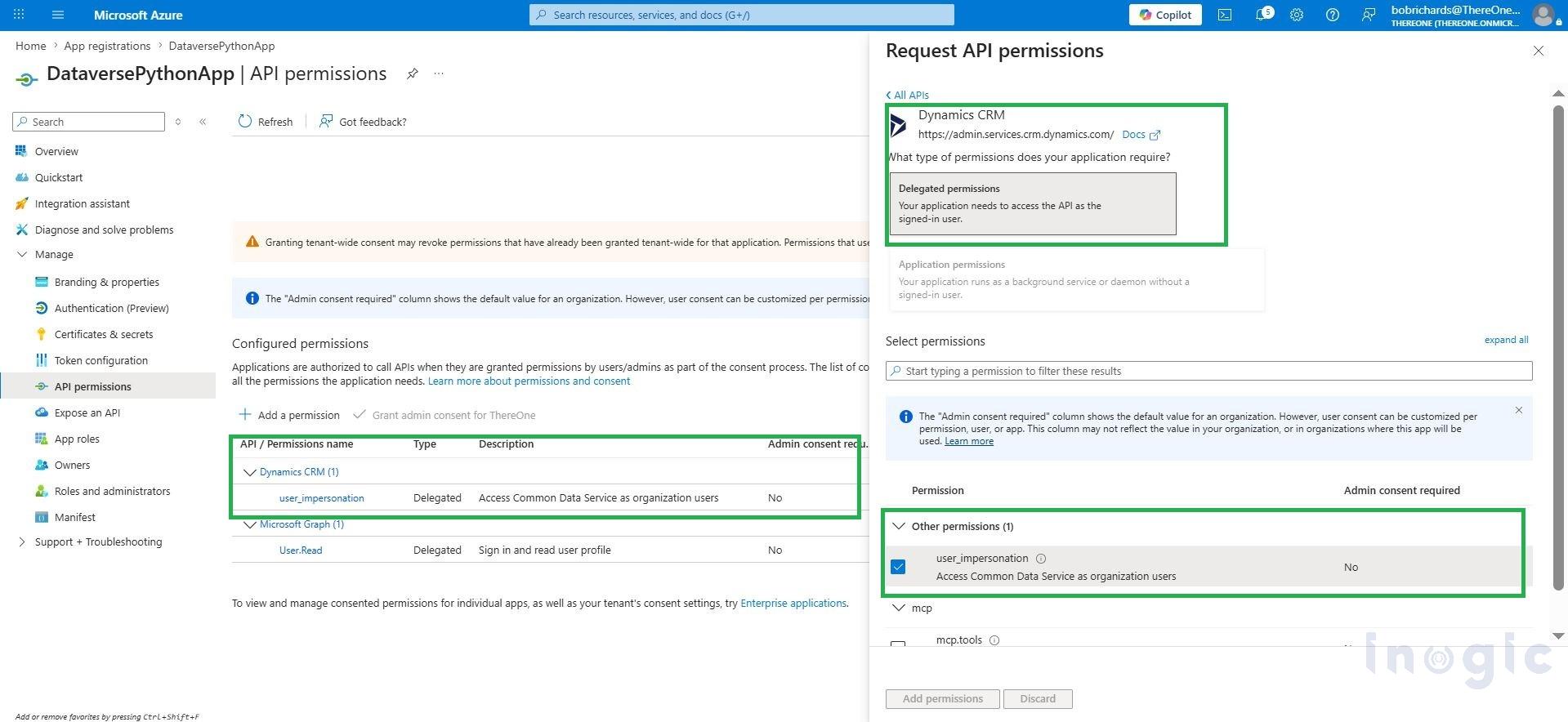
Step 2: Configure API Permissions to created Azure app
- Navigate to API Permissions > Add Permission > Apis my organization uses tab
- Add permission: Dynamics CRM
- Select: user impersonation
- Grant admin consent
This allows the application to securely access Dataverse data.
Step 3: Install Necessary Libraries and Connect CRM to Local Python
Install required libraries: pip install requests msal certifi
Python Code:
import os
import certifi

import requests

import msal

# SSL Fix

os.environ["SSL_CERT_FILE"] = certifi.where()

# Azure App Details

CLIENT_ID = "YOUR_CLIENT_ID"

TENANT_ID = "YOUR_TENANT_ID"

# Dataverse URL

BASE_URL = "https://yourorg.crm.dynamics.com"

# Dataverse Table

EMPLOYEE_TABLE = "ale_employeerecordses"

# Authentication

AUTHORITY = f"https://login.microsoftonline.com/{TENANT_ID}"

SCOPE = [f"{BASE_URL}/.default"]

app = msal.PublicClientApplication(

    CLIENT_ID,

    authority=AUTHORITY

)

result = app.acquire_token_interactive(scopes=SCOPE)

access_token = result["access_token"]

headers = {

    "Authorization": f"Bearer {access_token}",

    "Accept": "application/json",

    "Content-Type": "application/json",

    "OData-MaxVersion": "4.0",

    "OData-Version": "4.0"

}

print("Connection Successful")
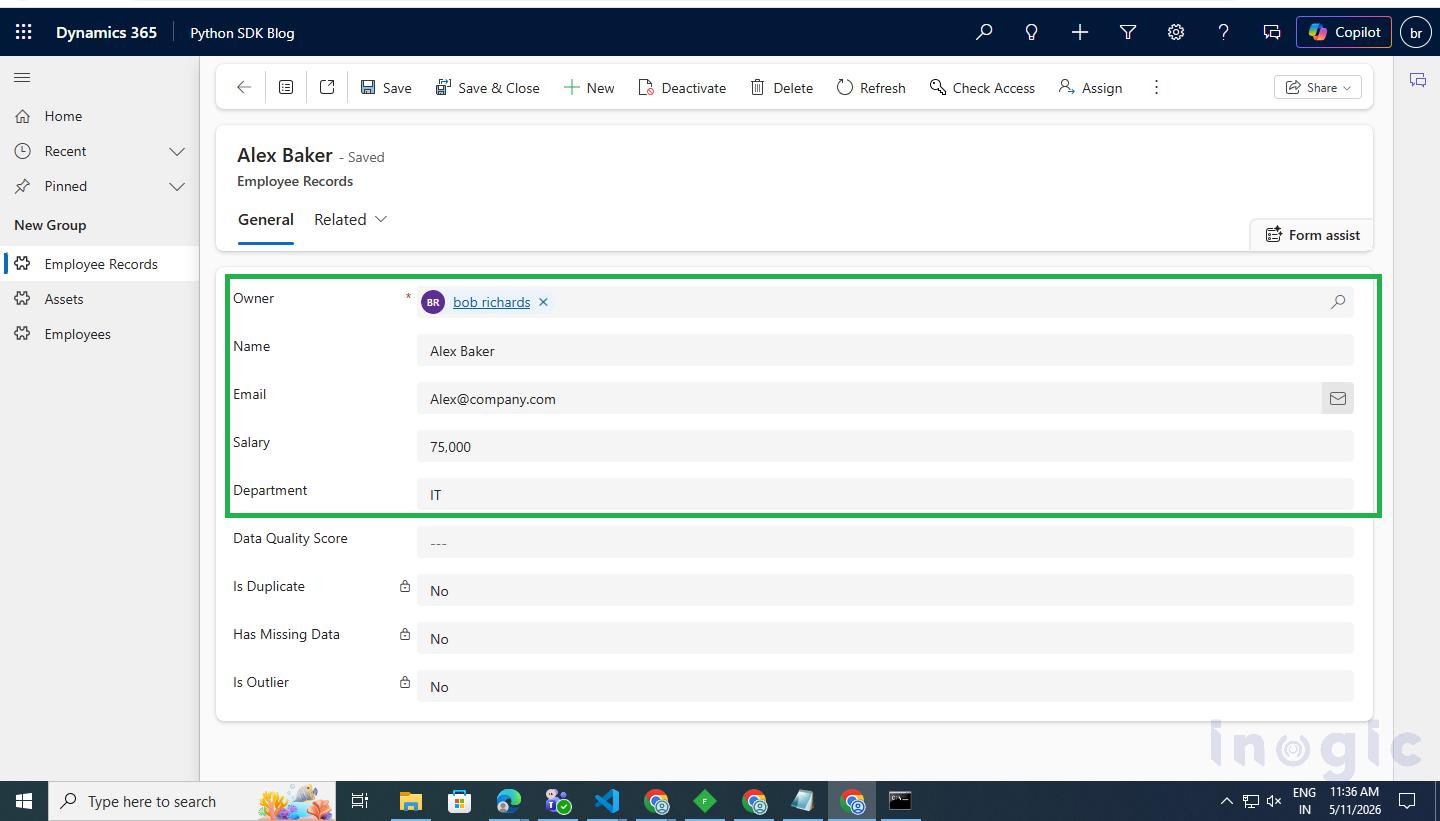
Step 4: Perform Record Create Operation
Code for record creation:
def create_employee():

    url = f"{BASE_URL}/api/data/v9.2/{EMPLOYEE_TABLE}"

    payload = {

        "ale_name": "Alex Baker",

        "ale_email": "alex@company.com",

        "ale_department": "IT",

        "ale_salary": 75000

    }

    response = requests.post(url, headers=headers, json=payload)

    if response.status_code in [200, 201, 204]:

        print("Employee Created Successfully")

    else:

        print("Employee Creation Failed")

        print(response.text)

create_employee()
Step 5: Perform Record Update Operation and Output
Below Code to Update Record:
def update_employee(employee_guid):

url = f"{BASE_URL}/api/data/v9.2/{EMPLOYEE_TABLE}({employee_guid})"

payload = {

"ale_salary": 90000,

"ale_department": "Engineering"

}

response = requests.patch(url, headers=headers, json=payload)

if response.status_code in [200, 204]:

print("Employee Updated Successfully")

else:

print("Employee Update Failed")

print(response.text)
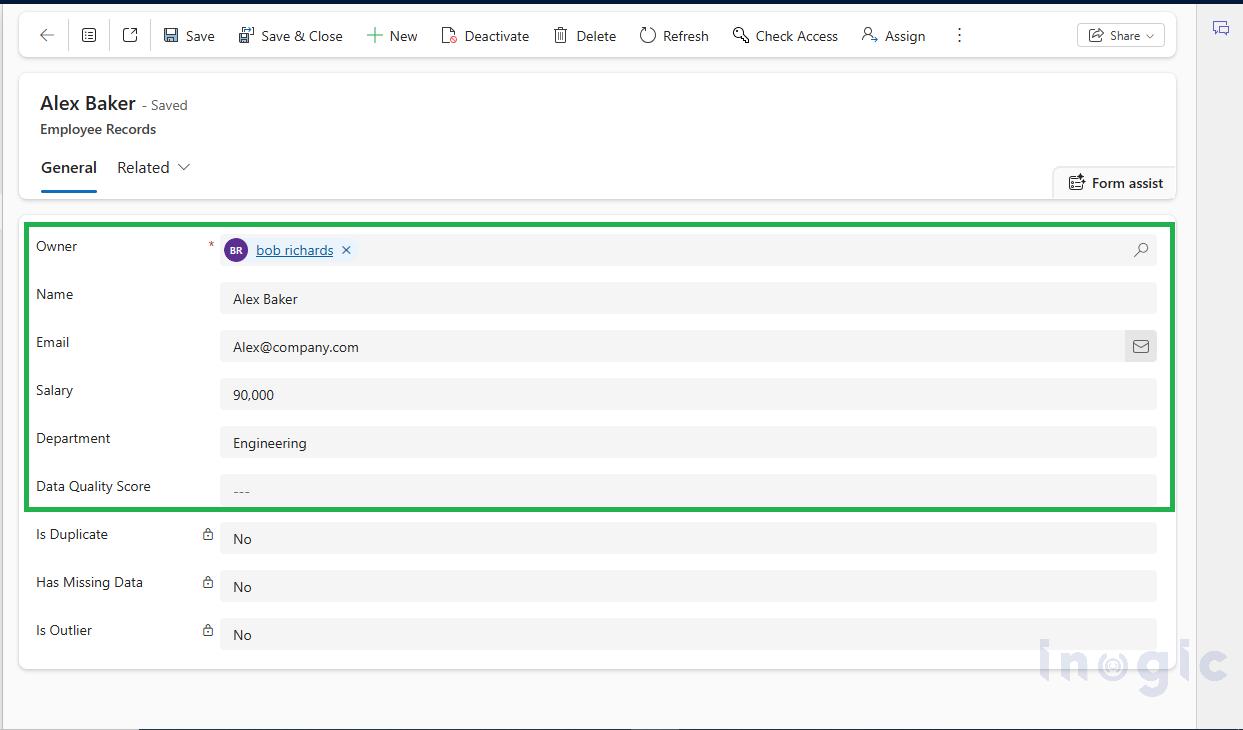
Record Department field updated Engineering from IT
Step 6: Perform record retrieve operation
def get_employees():

    print("\n Fetching Employees...")

    url = f"{BASE_URL}/api/data/v9.2/{EMPLOYEE_TABLE}"

    response = requests.get(url, headers=headers)

    if response.status_code != 200:

        print(" Failed to Fetch Employees")

        print(response.text)

        return

    data = response.json()

    print("\n Employees Retrieved\n")

    for emp in data["value"]:

        print("Name       :", emp.get("ale_name"))

        print("Email      :", emp.get("ale_email"))

        print("Department :", emp.get("ale_department"))

        print("Salary     :", emp.get("ale_salary"))

        print("GUID       :", emp.get("ale_employeerecordsid"))

        print("-----------------------------------")
Step 7: Perform delete operation
def delete_employee(employee_guid):

    print("\n Deleting Employee...")

    url = f"{BASE_URL}/api/data/v9.2/{EMPLOYEE_TABLE}({employee_guid})"

    response = requests.delete(url, headers=headers)

    if response.status_code in [200, 204]:

        print(" Employee Deleted Successfully")

    else:

        print(" Employee Delete Failed")

        print(response.text)
Conclusion:
Python provides a simple and powerful way to integrate with Microsoft Dataverse using Web API. By using Azure App Registration and MSAL authentication, we can securely connect external applications with Dataverse and perform CRUD operations.
FAQs
1. What is Microsoft Dataverse in Python integration?
Microsoft Dataverse integration with Python allows developers to connect external Python applications with Dataverse using the Dataverse Web API. It helps automate CRUD operations, data migration, reporting, AI processing, and backend integrations.
2. How do I connect Python to Microsoft Dataverse?
You can connect Python to Microsoft Dataverse by:
- Creating an Azure App Registration
- Granting Dynamics CRM API permissions
- Using MSAL authentication
- Calling Dataverse Web API endpoints with Python requests library
3. Which Python libraries are required for Dataverse integration?
The commonly used Python libraries for Dataverse integration are:
- requests
- msal
- certifi
Install them using:
pip install requests msal certifi
4. How does authentication work in Dataverse Python integration?
Authentication is performed using Azure Active Directory (Azure AD) with MSAL (Microsoft Authentication Library). The application acquires an OAuth access token, which is used to securely access Dataverse APIs.