“64% of organizations feel they are either ineffective or only somewhat effective at territory design.”
Managing sales territories effectively is one of the biggest challenges organizations face. Unclear boundaries, uneven distribution of workload, and a lack of visibility into performance can all limit growth. With Dynamics 365 CRM, territory management gets smarter when combined with Maplytics, a certified geo-analytics solution that helps businesses design, assign, and monitor territories directly on an interactive map.
In this guide, we’ll walk through some of the most common questions businesses ask about territory management and how Maplytics within Dynamics 365 provides the answers.
Why is territory management so important in Dynamics 365 CRM?
Territory management isn’t just about drawing lines on a map. It’s about ensuring fair distribution of opportunities, balancing workload among teams, and ultimately driving revenue growth. If territories aren’t aligned properly, some representatives are overburdened while others don’t have enough accounts to handle, leading to inefficiency and missed opportunities.
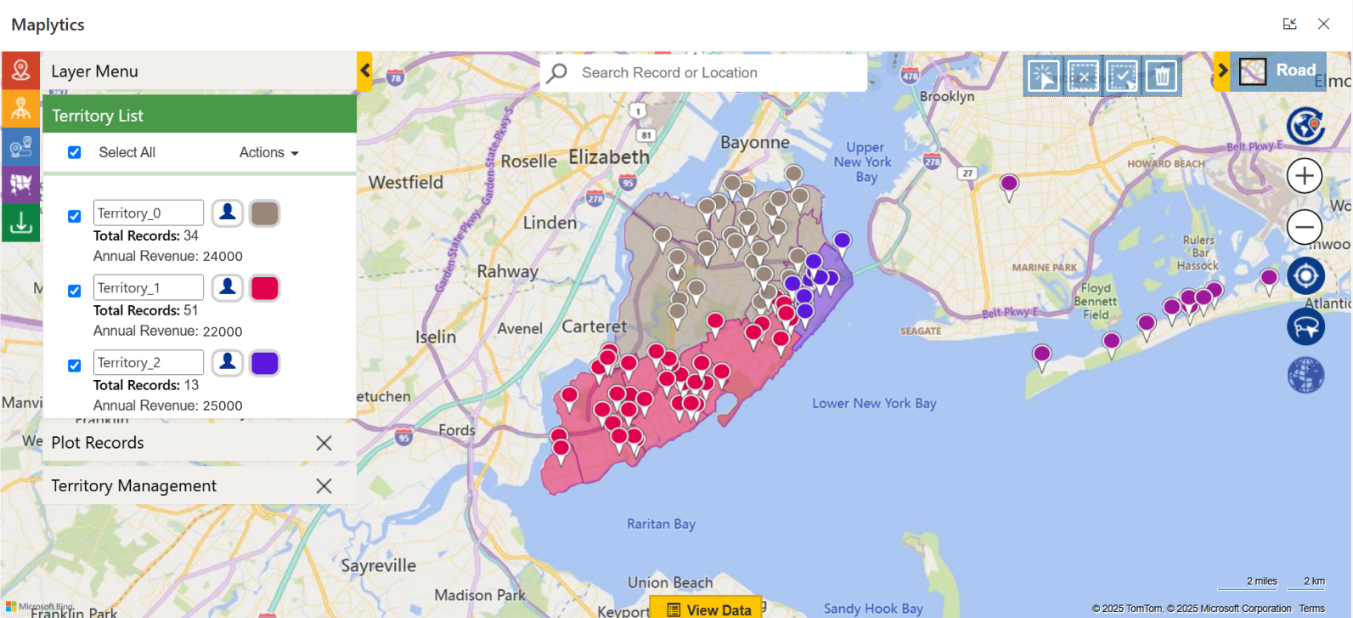
With Maplytics, territories can be visualized geographically and managed intelligently. That means you can align accounts, leads, or opportunities with reps based not only on geography but also on business logic, such as revenue potential, number of accounts, or industry.
How does auto-alignment of territories work?
One of the biggest pain points in territory management is manual alignment. Managers often spend hours assigning records one by one to territories.
Maplytics solves this with Auto-Alignment. Simply define the rules, such as balancing accounts equally among reps or aligning them by postal code, city, or region, and Maplytics automatically distributes records across territories. This ensures fairness, saves time, and eliminates human bias.
Can we test territories before finalizing them?
Yes! Maplytics allows you to create Draft Territories before committing to a final structure. Think of it as a sandbox where managers can design boundaries, run what-if analyses, and check how accounts will be distributed.
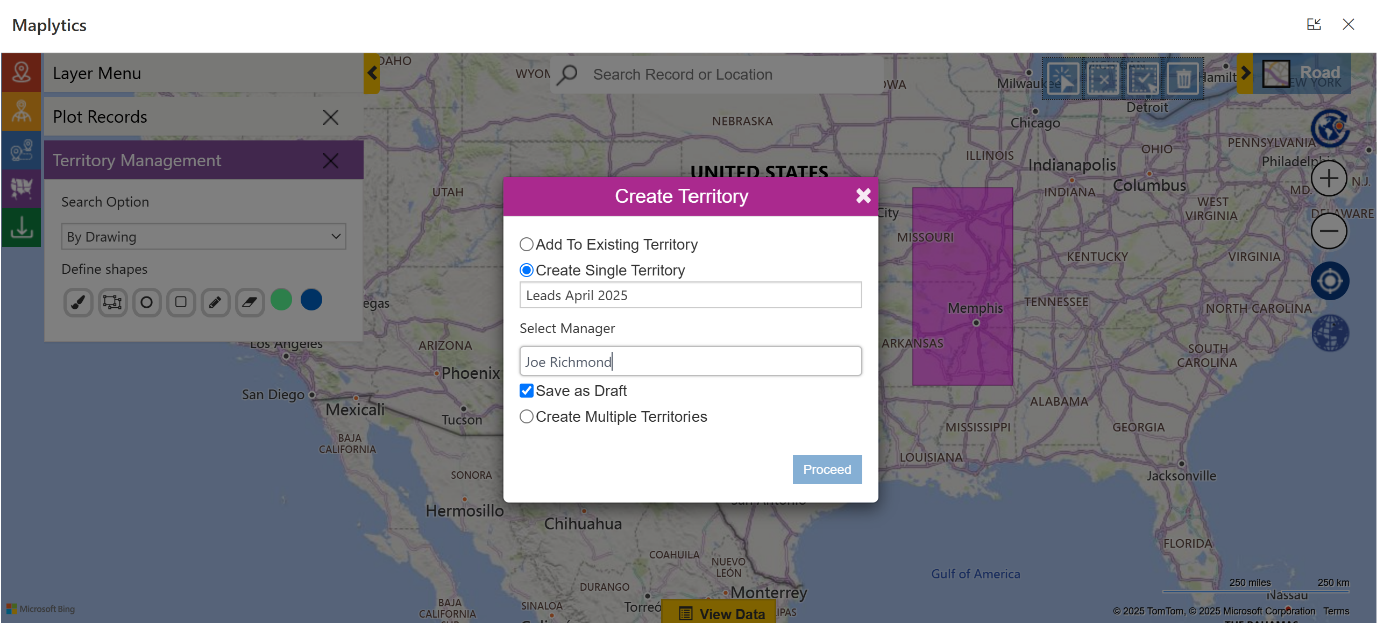
For example, you can compare how territories would look if divided by postal codes vs. custom-drawn shapes. Once satisfied, you can publish them directly in Dynamics 365, making transitions smooth without disrupting active sales operations.
What if we need non-standard territories, not just postal codes or city boundaries?
This is where Shape-Based Territories come in. Instead of being limited to predefined borders, Maplytics lets you draw custom polygons or freehand shapes on a map to create territories.
This flexibility is especially valuable for industries where standard borders don’t apply, for instance, logistics companies covering delivery zones, or healthcare reps working across hospital clusters. Shape-based territories allow complete customization tailored to business needs.
How can managers use data insights to refine territories?
Territory management isn’t just about geography but also about performance. Maplytics provides Geo-Analytics that let managers visualize data on maps in colored pushpins, customer density with Census Data Mapping, revenue hotspots using Heat Maps, or underperforming areas using ESRI’s ArcGIS Feature Layers.
For example, heat maps can show where sales are strong and where opportunities are being missed. With these insights, managers can adjust territories to ensure better coverage, reduce overlaps, and maximize market potential.
What about assigning teams instead of individuals?
Not all territories are managed by a single rep. Sometimes businesses need to assign multiple reps, service teams, or even partner networks to a territory.
With Maplytics, Team Assignments make this possible. Managers can link entire teams to a territory, ensuring collective responsibility. This is particularly useful for service-based industries where multiple roles, sales, support, and field reps, work together to serve customers in a defined area.
How does all this fit into daily sales operations?
The beauty of Maplytics is that territories aren’t static boundaries; they integrate seamlessly into daily CRM workflows. Sales reps can:
- View their assigned territories on a map inside Dynamics 365.
- Plan routes for customer visits within their territory.
- Search for new prospects nearby using radius or proximity searches.
- Use appointment scheduling to maximize productivity within their assigned zones.
For managers, it means having full control and visibility, knowing which rep covers which territory, how balanced workloads are, and whether sales goals are being achieved.
What’s the long-term benefit of using Maplytics for territory management?
The long-term payoff is growth with clarity. By streamlining territory design, balancing workloads, and enabling smarter decision-making with geo-analytics, businesses see measurable improvements in sales coverage, customer satisfaction, and operational efficiency.
Instead of firefighting territory disputes or misaligned sales strategies, managers can focus on growth opportunities. And reps, with well-defined areas and powerful mapping tools, can focus on what they do best, building relationships and closing deals.
To sum up
Territory management in Dynamics 365 CRM doesn’t have to be complicated. From auto-alignment and draft territories to shape-based customization and team assignments, Maplytics equips businesses with everything they need to make territory management both scientific and flexible.
When your teams know exactly where to focus, your sales strategy becomes sharper—and your results, stronger.
What’s More?
Maplytics is like water that can be moulded into any shape. It makes Bing Maps and Azure Maps integration within Dynamics 365 look seamless. Radius Search, Route Mapping, and more have become super easy to use. To get more acquainted and experience it first-hand, one can write to crm@inogic.com. To investigate the product further with a personalized demo within Microsoft Dynamics 365 CRM / Dataverse, get in touch with the team. For applied knowledge, visit our Website or Microsoft AppSource. One can hop onto the detailed Blogs, Client Testimonials, Success Stories, Industry Applications, and Video Library for quick query resolution. You can check out our technical tutorial video series #KnowYourMaplytics here, and for fun Tips & Tricks about Maplytics, have a look at our series #ProAtMaplytics here. Technical docs for the working of Maplytics are also available for reference.
You can also leave us a review or write about your experience on AppSource or the G2 Website.