Microsoft Dynamics 365 CRM plays a central role in managing customer records, sales activities, service requests, and business communication. As organizations continue to generate contracts, proposals, invoices, case documents, and email attachments, many businesses rely on Dynamics 365 SharePoint integration to store and manage these files efficiently outside CRM storage.
However, while Microsoft offers native document management integration between Dynamics 365 CRM and SharePoint, one major limitation still remains. The native Dynamics 365 & SharePoint security model does not automatically replicate CRM record permissions to SharePoint folders and documents. This means users who may not have access to a record inside CRM can still gain visibility to related files in SharePoint if permissions are not synchronized correctly.
Inogic’s SharePoint Security Sync is a powerful Microsoft AppSource Preferred app that replicates Microsoft Dynamics 365 CRM security model in SharePoint and secures all your documents and attachments in SharePoint. It comes with a user-friendly drag-and-drop interface that also lets you manage all your documents in SharePoint from within Dynamics 365 CRM.
How SharePoint Security Sync Helps Replicate SharePoint Permissions from Dynamics 365 CRM & helps in Dynamics 365 Document Management
A 5-star rated app on AppSource, SharePoint Security Sync comes with the following features:
- Automatically sync Dynamics CRM security model with SharePoint permissions
- Allows creation of customized folder structure in SharePoint
- Drag and Drop options with a User-Friendly Interface to perform common file/folder actions
- DocuSign Integration for e-signatures
This means businesses no longer have to manually maintain SharePoint permissions in Dynamics 365 document libraries.
So, how can SharePoint Security Sync with all these features help your business scale? Let’s see some real-world examples.
One of our clients, ClimbClouds, a mid-size product-based company, has been taking their business to the next level and they have exhausted their free Microsoft Dynamics 365 CRM storage. The increase in database size has resulted in increased storage costs along with performance issues. To control storage costs and improve CRM performance, they moved to SharePoint as their cloud document repository using Dynamics 365 SharePoint integration.
SharePoint Security Sync, with its bulk migrating job feature, can help ClimbClouds with this transition smoothly.
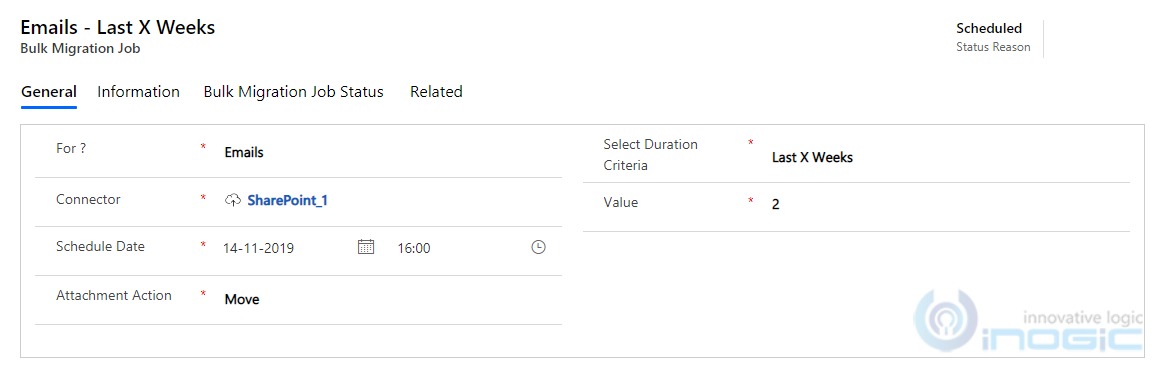
With the help of this, the concern of ClimbClouds for reducing storage costs has been worked upon. But, SharePoint has a limitation of only allowing to save 50,000 items in a single document library. And ClimbClouds needs to overcome this challenge as they maintain most of their client relationships using emails that contain multiple attachments, notes, etc.
Using SharePoint Security Sync’s newest feature ‘Create Custom Folder Structure’, this can be done easily.
Create a Scalable SharePoint Folder Structure for Better Dynamics 365 Document Organization
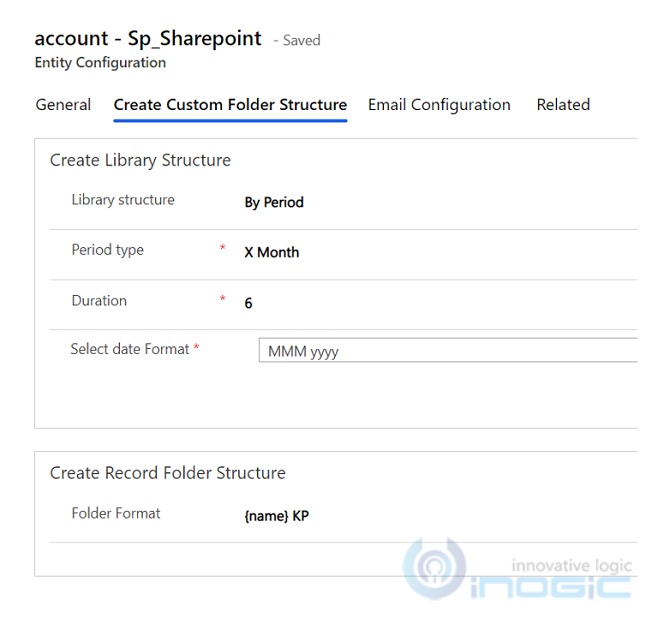
This feature can be configured for any OOB or Custom Entity. Here, ClimbClouds have used it for Accounts. Once configured, ClimbClouds are able to create their own custom document library in SharePoint where they can now easily store attachments and documents. The library structure can be created in three different types namely ‘by period’, ‘by starting character’, or ‘by custom rules’. As Joseph wants all his accounts documents to be stored month-wise, he can do so by selecting the ‘by period’ option.
Storage issue resolved. Organizing and managing issues resolved. But what about the security of all those documents shared on SharePoint Cloud Storage? SharePoint only being cloud storage, does not look at the security aspects of the CRM data.
And this is again where Inogic’s SharePoint Security Sync comes to the rescue.
Sync SharePoint Permission in Dynamics 365 to Secure Every Customer Document Automatically
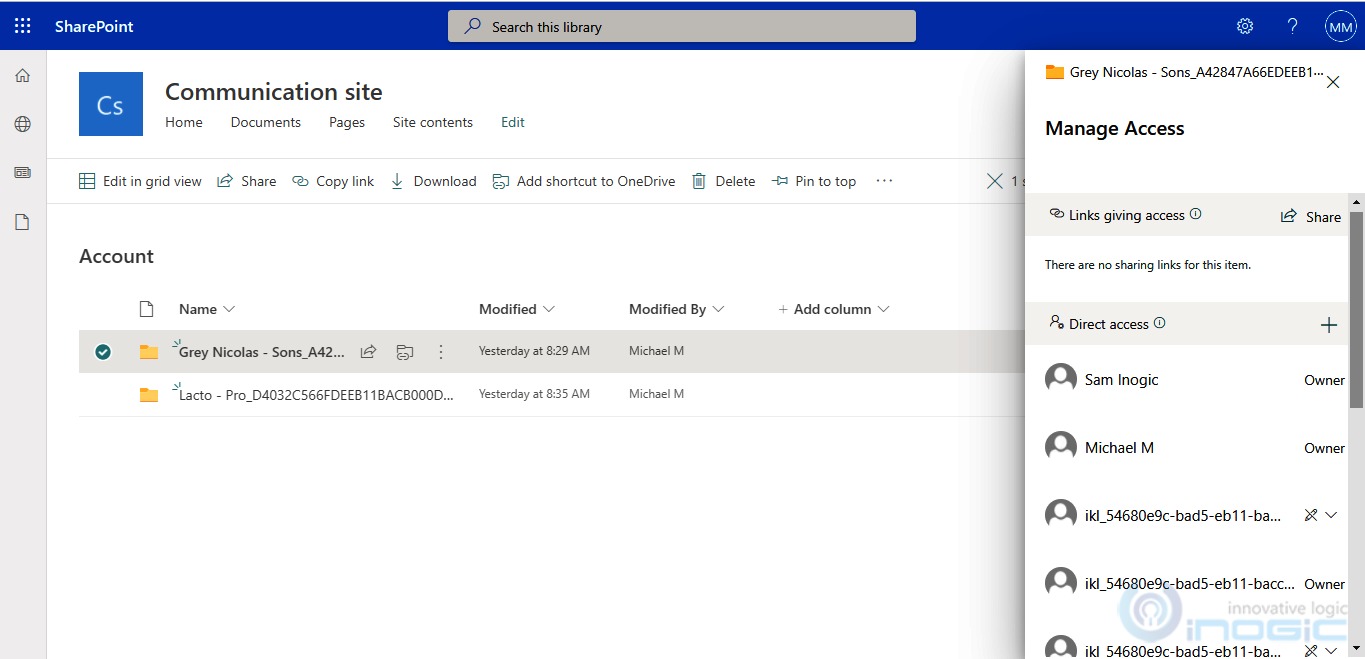
SharePoint Security Sync auto-syncs the security privileges in SharePoint as per the security privileges set in Dynamics 365 CRM. Joseph, who has organization-level access to the CRM, can access all the documents in SharePoint. Lara, a sales rep in ClimbClouds has only user-level access to Dynamics 365 CRM, so she will have limited access to the files and folders in CRM. And the same will be reflected in SharePoint.
Whenever a security role of any user is changed in your Dynamics 365 CRM, the same gets reflected in SharePoint automatically.
It is an all-in-one app for all your Dynamics 365 CRM and SharePoint Integration needs. Want to know what our customers have to say about our app?
Hit us up on crm@inogic.com if you want to secure your SharePoint documents or are looking to save Microsoft Dynamics 365 CRM storage costs. Our experts will be glad to give you a personalized demo.
Already convinced and want to try it yourself? Download 15 days FREE Trial from our website or Microsoft AppSource today!
Get Secured Today!
FAQs
- How do you sync Dynamics CRM security model with SharePoint?
Dynamics CRM security model can be synced with SharePoint by automatically replicating CRM user privileges, ownership permissions, business unit access, and shared record visibility to SharePoint folders and document libraries. This ensures users only access documents they are authorized to view in Dynamics 365 CRM.
- Does native Dynamics 365 SharePoint integration sync SharePoint permissions automatically?
No. Native Dynamics 365 SharePoint integration helps store CRM documents in SharePoint, but it does not automatically replicate Dynamics 365 CRM security roles or record-level access to SharePoint permissions. Additional permission synchronization is required to secure documents.
- Why is Dynamics 365 SharePoint security important for document management?
Dynamics 365 SharePoint security is important because CRM documents often contain contracts, customer files, invoices, and sensitive business records. Without synchronized SharePoint permissions, unauthorized users may gain access to these documents directly from SharePoint.
- How can businesses secure Dynamics 365 documents stored in SharePoint?
Businesses can secure Dynamics 365 documents by using automated SharePoint permission synchronization that mirrors CRM record access, user roles, team permissions, and ownership changes directly to SharePoint document folders.