Seven everyday field problems. One working week. One map. Rather than list features, we follow an imaginary team through a typical week in Dynamics 365 and show how Maplytics handles each problem as it comes up.
Meet a regional company with a sales team, a service team, and a CRM full of addresses. Their managers know where customers are, but only as rows in a grid. Each use case below shows a challenge they face and how Maplytics answers it. These are the same capabilities we will demonstrate live in our upcoming webinar.
Key Takeaways
|
Use case 1: Picking the map that fits the business
The challenge: The sales team already uses Google Maps every day. The service team’s IT group prefers to keep everything inside the Microsoft cloud. The marketing group wants a map styled to the brand. One fixed map would please only one of them.
The answer: Multi-Map Integration lets each business choose between Google Maps, Azure Maps, or Mapbox inside Dynamics 365, whichever best fits its needs. The team picks the map it is comfortable with, and the same Maplytics features sit on top, so there is no trade-off between preference and capability.
Use case 2: Seeing where the accounts really are
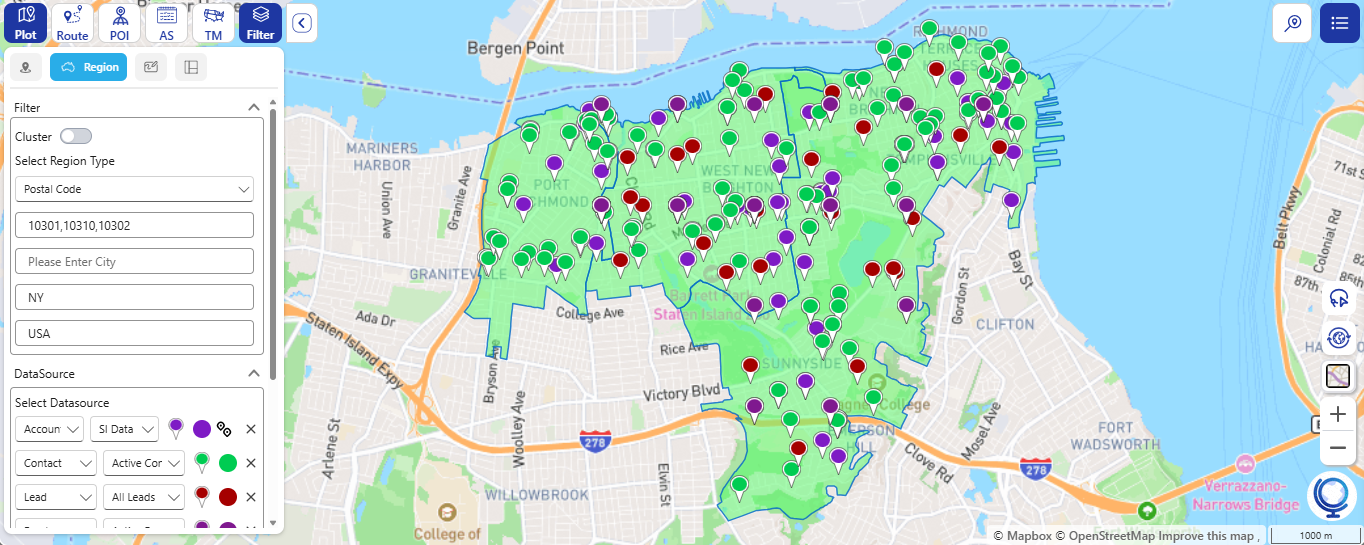
The challenge: A new prospect signs up. The sales manager wants to know which existing accounts sit nearby, but the CRM shows only a list of addresses.
The answer: With Visualize Records on Map, she plots Dynamics 365 records by radius, by drawing a custom area, or by region, and sees exactly where they are. When she is short on time, she asks MapCopilot instead, typing her question in simple language and getting instant, intelligent, visual map insights. What used to mean filtering and cross-checking becomes a single question.
Use case 3: Driving less and visiting more
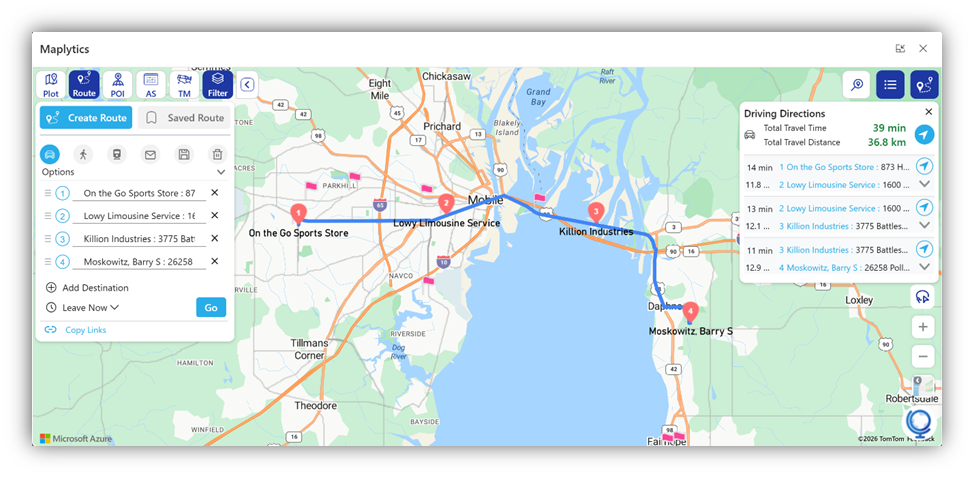
The challenge: A sales rep has a dozen stops this week. She copies addresses into a separate map one by one and ends up with a route that doubles back.
The answer: Optimized Travel Routes turn that list of stops into the shortest, smartest route, so her team drives less and visits more. The route is planned in the CRM, in one step, instead of in a separate tool.
The result: Less time behind the wheel, more time with customers, and a week that fits more visits without adding hours.
Use case 4: Territories that are fair and flexible
The challenge: Two reps keep visiting the same accounts, while another region barely gets covered. The director wants to add two reps next quarter, but is not sure how to split the map.
The answer: Advanced Territory Management lets her build, balance, and categorize multiple territories with flexible filters. She saves each option as a draft territory, compares them on the map, and finalizes the one that works. Nothing changes hands until she is ready, and the plan stays available for future planning.
Use case 5: The right job for the right person
The challenge: The service team’s dispatcher has a morning full of new work orders. Handing them out from a list sends technicians across town, and sometimes to jobs that need skills they do not have.
The answer: Pre-Schedule Bookings automatically allocate work orders to the right resources based on skills and characteristics. Fewer mismatched assignments means fewer repeat visits and less wasted travel.
The result: The dispatcher spends less time matching jobs by hand, technicians arrive prepared, and customers get the right help the first time.
Use case 6: Staying connected on the move
The challenge: Planning happens at a desk, but the work happens in the field. Reps need their maps and insights with them.
The answer: The Mobile Experience with Maplytics keeps CRM maps and field insights available on the go, so what was planned in the office stays within reach on the road.
Use case 7: Maps beyond the standard CRM screen
The challenge: The team built a custom Canvas App for daily visits, and the company also runs a public-facing site on Power Pages. Both show addresses as plain text.
The answer: Canvas Apps Integration lets you embed Maplytics directly into your Canvas Apps for a tailored mapping experience. Power Pages Support displays Dynamics CRM data seamlessly on public-facing sites, such as a store or partner locator. The same map capability reaches more places, without custom mapping code.
Some FAQs1. Can I choose which map to use in Dynamics 365? 2. Do I lose features if I choose a particular map? 3. How can I see where my accounts are in Dynamics 365? 4. What is MapCopilot? 5. How do Optimized Travel Routes help my team? 6. How do I plan territories for new reps without disrupting current accounts? 7. What are Pre-Schedule Bookings? 8. Can my field team use Maplytics on the go? 9. Can I embed Maplytics in Canvas Apps or Power Pages? 10. How can I see these features in action? |
See every use case live on 18 November
A week that once meant guesswork, extra driving, and uneven workloads becomes one planned on a single map, inside the Dynamics 365 the team already uses.
Join the Maplytics team for our live webinar, Choose Your Maps in Dynamics 365 CRM. Every feature above will be shown live, so you can see how it works, not just what it does.
- Date: Wednesday, 18 November 2026
- Where: Microsoft Teams, from anywhere
- Time: 3 PM AEDT | 11 AM CET | 11 AM EST
Reserve your seat today. Pick your map. Pick your session. See it live.