Managing email content across multiple customer journeys can quietly become a headache. You create a great promotion block, paste it into several emails, and the moment that promotion changes you’re back to editing every single one. Microsoft’s new Dynamic Content Blocks in Dynamics 365 Customer Insights Journeys is designed to solve exactly that.
But before getting into what makes dynamic blocks useful, it helps to start from the basics because the difference between static and dynamic content is what this whole feature is built around.
What Is a Content Block?
A content block is a pre-built piece of email content a company tagline, a product banner, a footer with legal text saved once and reused across multiple emails. Instead of rebuilding the same section from scratch every time, you drop the block in and move on.
There are two types: Static and Dynamic. The simplest way to understand the difference is this:
Static vs. Dynamic at a Glance
How it stores in email?
A static block embeds a copy directly into the email. A dynamic block stores only a reference, with the actual content fetched at send time.
What happens on update?
Updating a static block doesn’t affect emails already using it. With a dynamic block, all emails reflect the change automatically.
Can it be edited inside the email?
Static blocks can be edited within the email designer. Dynamic blocks are always protected changes can only be made at the source.
Best used for tatic works best for content that rarely changes. Dynamic is the right choice when the same content needs to stay current across multiple emails and journeys.
Where It Makes the Most Sense in a CRM Context
Within Dynamics 365, email communications are directly tied to segments, customer journeys, and lead nurture flows. Dynamic Content Blocks fit naturally into scenarios where content needs to stay aligned with what’s currently happening in your business not what was accurate when the email was first built.
Practical scenarios where dynamic blocks add real value:
- Weekly promotional banners shared across multiple nurture journeys
- Legal footer text that gets revised periodically by compliance teams
- Company contact details that change after a rebranding or office move
- Product descriptions tied to active inventory or pricing updates
In all these cases, maintaining a static copy per email would mean opening and editing each communication individually. In a large CRM deployment with dozens of active journeys, that’s not just time-consuming it’s a risk to consistency and accuracy.
When Dynamic Wins Over Static and When It Doesn’t
Dynamic Content Blocks are powerful, but they’re not the right fit for every scenario. Here’s an honest breakdown to help you decide which type to use.
| ✓ Why Choose Dynamic | ✕ When Static Still Wins |
| One update reflects across all emails instantly, no manual rework | Campaign-specific content that should remain fixed after sending |
| Ideal for regularly changing content: offers, business hours, copyright year | Emails requiring a custom variation of the same block |
| Reduces human error, no risk of missing an email during bulk updates | Historical emails where content accuracy at send time matters |
| Enforces brand and legal consistency across all outbound communications | When managing live journey update timing is not feasible |
| Works well for distributed teams sharing journey templates | |
| Best for compliance-sensitive content like terms and disclaimers |
Dynamic Content Blocks and How It Actually Works
When you insert a Dynamic Content Block into an email, the email doesn’t store the content itself. It stores a reference to the block. So when that email goes out as part of a customer journey, Dynamics 365 fetches the latest version of the block at send time not at the time you originally designed the email.
This means your team only needs to update the block once. Every journey, every email, every communication that uses it will automatically reflect the change the next time it sends.
How to Enable It
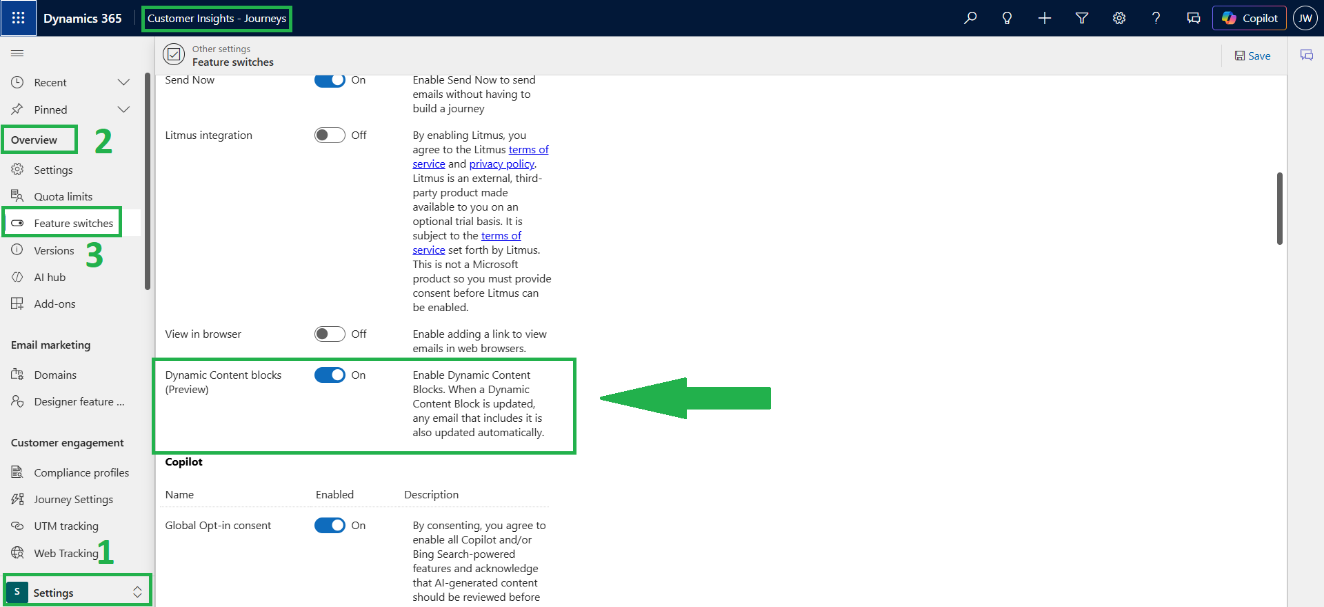
Since this feature is currently in Preview, it needs to be turned on manually before it appears in the email designer.
- Go to Settings in Customer Insights – Journeys
- Navigate to Other Settings → Feature Switches
- Find Dynamic Content Blocks (Preview) under the Email Editor group
- Toggle it on the option will now appear in the Content Block properties panel
Creating a Dynamic Content Block
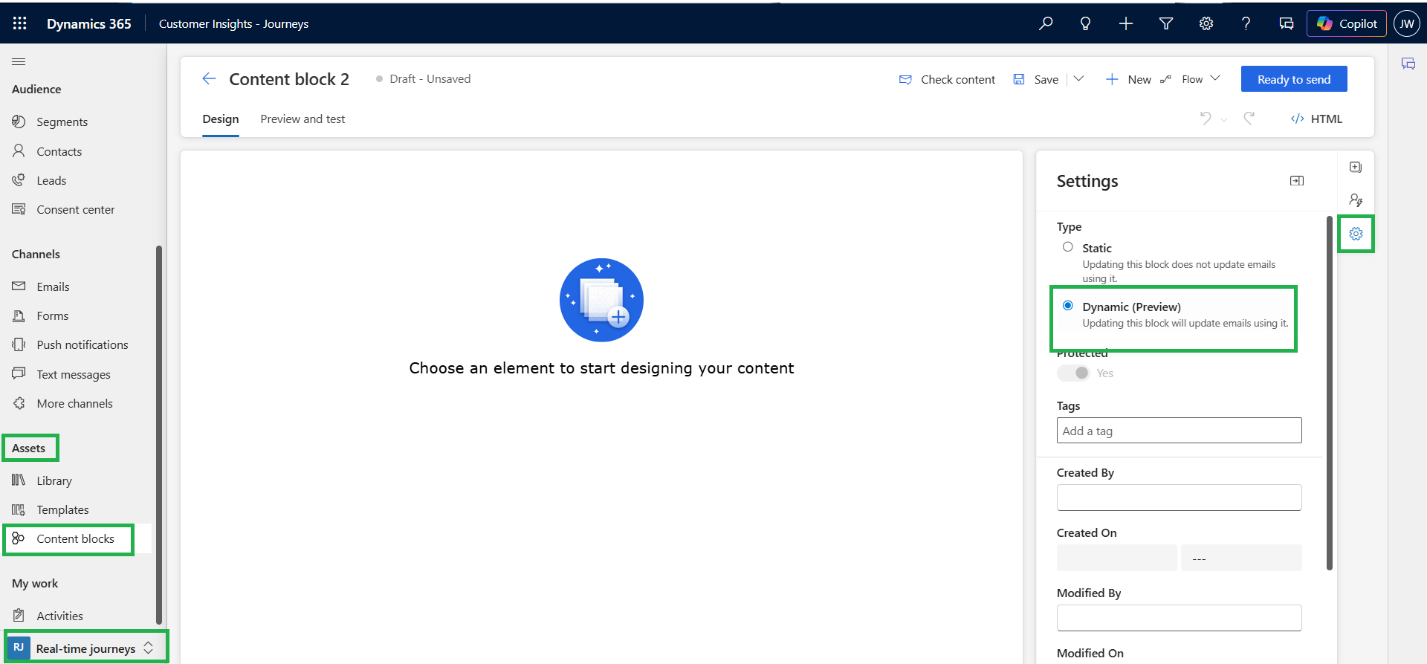
You can create a Dynamic Content Block from two places either from Assets → Content Blocks → + New,
or by selecting any section or element inside the email designer and saving it as a content block. When setting properties, simply switch the Type to Dynamic. Once it’s marked as Ready to Send, it becomes available for any email author on the team.
or by selecting any section or element inside the email designer and saving it as a content block. When setting properties, simply switch the Type to Dynamic. Once it’s marked as Ready to Send, it becomes available for any email author on the team.
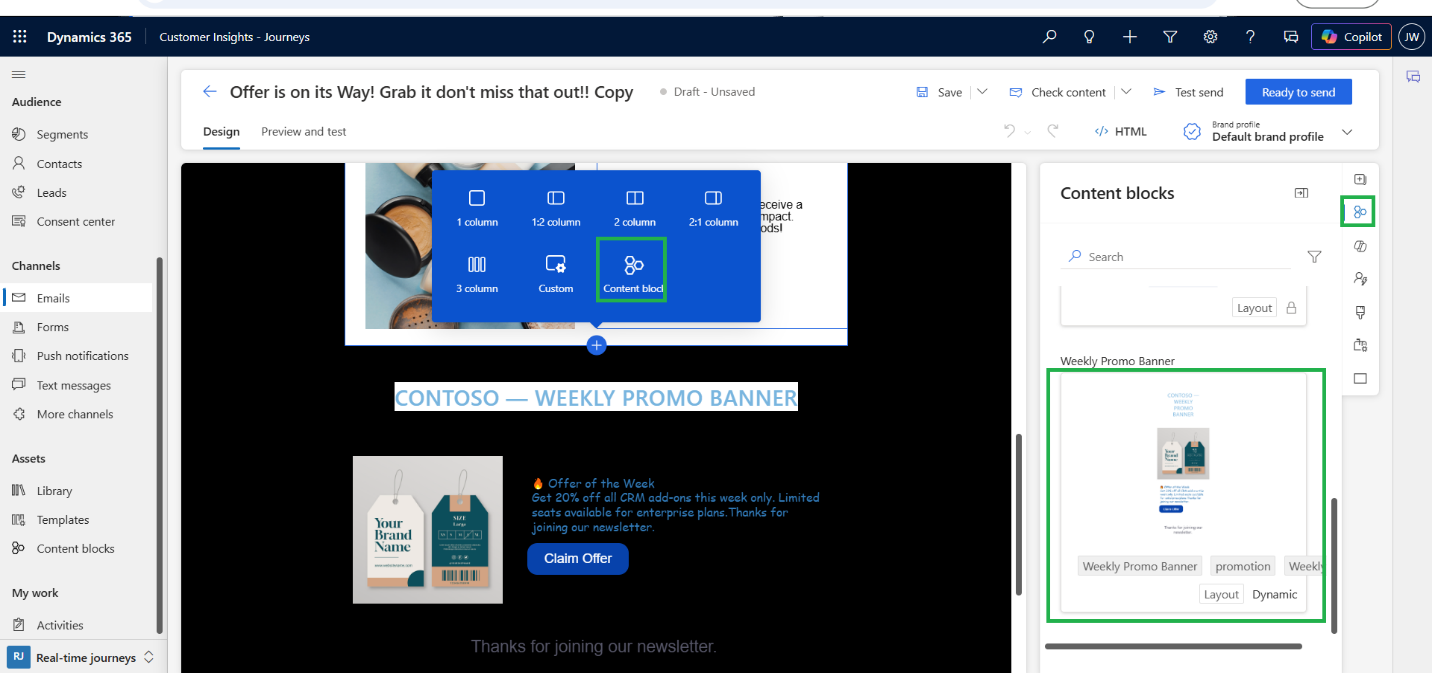
Note: When you update a dynamic block that’s used in emails inside active journeys, recipients may receive different versions depending on when they hit that step in the journey. Always time your content block updates carefully, ideally during low-send windows, to keep the journey experience consistent.
Conclusion:
Dynamic Content Blocks bring a level of operational efficiency to email marketing in Dynamic 365 that static blocks simply can’t offer for frequently updated content. The key idea is straightforward: update once, reflect everywhere. For teams managing a high volume of journeys or content that changes on a regular basis, this preview feature is worth enabling today. Just be mindful of timing your updates when active journeys are running and you’ll have a much cleaner, more maintainable email setup going forward.
Important Consideration
This functionality is currently in preview and is intended for testing and evaluation purposes only. Features available in preview may change without notice and are not recommended for use in production environments.
For additional details and the latest information, refer to the reference documentation linked below.
https://learn.microsoft.com/en-us/dynamics365/customer-insights/journeys/content-blocks
FAQs
What are Dynamic Content Blocks in Dynamics 365 Customer Insights – Journeys?
Dynamic Content Blocks are reusable email content components that store a reference rather than the actual content. When an email is sent, Dynamics 365 retrieves the latest version of the block, ensuring content remains consistent and up to date across multiple emails and customer journeys.
How do Dynamic Content Blocks differ from Static Content Blocks?
Static Content Blocks embed content directly into an email and must be updated individually. Dynamic Content Blocks reference a centralized source, allowing updates to automatically appear across all emails and journeys that use the block.
What are the benefits of using Dynamic Content Blocks in Dynamics 365?
Dynamic Content Blocks help organizations reduce manual updates, maintain brand consistency, improve compliance management, minimize human error, and streamline email content management across multiple customer journeys.
What are the best use cases for Dynamic Content Blocks in Customer Insights – Journeys?
Dynamic Content Blocks are ideal for frequently changing content such as promotional banners, legal disclaimers, company contact information, product descriptions, business hours, and other content that needs to stay consistent across multiple emails.
How do Dynamic Content Blocks improve email marketing efficiency?
By allowing teams to update content once and automatically apply those changes across all connected emails and journeys, Dynamic Content Blocks save time, reduce maintenance efforts, and ensure customers always receive the most current information.