 Modern business applications increasingly rely on AI to provide users with insights rather than just data. However, there are many scenarios where users must manually combine information from multiple records before deciding.
The new preview Client API, Xrm.Copilot.executeEvent, helps bridge that gap by allowing client-side JavaScript in a model-driven app to trigger a specific Copilot Studio topic, pass business data to it, and receive a structured response.
Unlike a traditional chat interaction, the response can contain structured data that your application can consume directly, making it possible to embed AI-powered reasoning into forms, ribbon buttons, or Power Apps Component Framework (PCF) controls.
In this article, we’ll explore how Xrm.Copilot.executeEvent works, discuss its advantages and current limitations, and walk through a real-world scenario where it adds significant value.
Key Takeaways
- Trigger Copilot Studio topics directly from JavaScript in model-driven apps.
- Pass custom business data while automatically receiving page and record context.
- Retrieve structured AI-generated responses instead of plain conversational text.
- Ideal for AI-powered reasoning, summarization, and contextual insights.
- Currently available as a preview feature and not recommended for production workloads.
What Xrm.Copilot.executeEvent Actually Does

The method signature is simple:
EventName: a string identifying the Copilot Studio topic that should handle this call. It has to match a topic registered to respond to that named event.
EventParameters: A JSON payload of whatever data the topic needs to do its job. Inside Copilot Studio, this shows up as Activity.Value, and the topic uses a Parse Value node to break it into usable fields.
What makes this more than ‘just calling an API’ is that the app context is injected automatically. The topic receives global variables describing where the call came from the current record ID, the table’s logical name, the page type, and the app’s unique name without you writing any code to fetch and pass that context yourself.
The response comes back as an array of MCSResponse objects, each with a type, a timestamp, optional attachments, and a value payload. That value isn’t limited to text; Microsoft’s own example uses it to return actual Dataverse query results (e.g., A record’s related activities), which is what makes this useful for real UI binding rather than just displaying a chat bubble.
Context Variables Passed Automatically
The following are the context variables that are passed automatically:
- Record ID: Provides the GUID of the form open to the current record (pageContext.id.guid).
- Table Name: Provides the logical name of the Current table (pageContext.entityTypeName).
- Page Type: The Place the call originates from (view, form, dashboard, etc.).
- App Context: The unique name of the model-driven app is currently open.
(Note: This context-passing is the most easily overlooked part of the documentation, but it’s what saves you from manually wiring up 4-5 parameters every time you want a topic to know where it is.)
Notes:
- Preview feature. Explicitly not supported for production use yet, and the API surface or behavior can change without the usual notice period.
- Tight, implicit coupling. There’s no compile-time contract between your JavaScript payload and what the topic’s Parse Value step expects. If someone changes the topic’s schema, your client call fails silently at runtime.
- Harder to debug. A failure could originate in your JS, in the event dispatch, or deep inside the topic’s own Copilot Studio logic, tracing the actual point of failure takes longer than debugging a direct Web API call.
- Added latency. Routing through a conversational agent runtime is slower than a direct Dataverse call. That matters if you’re tempted to use this on a hot path like form load.
- Quota and cost exposure. Copilot Studio topics typically draw on message/session consumption, so calling this heavily at scale is a licensing conversation, not just a technical one.
- Undocumented edge cases. Behavior across offline mode, mobile clients, and multi-session scenarios isn’t addressed in the current docs worth testing before you rely on it.
Use Case: Case-History Insight Panel for Support Agents
The problem
Customer service agents working cases in Dynamics 365 often lose several minutes per ticket manually piecing together a customer’s history; prior cases, remaining entitlement hours, and recent interactions before they can even start responding. On high-priority cases, that lost time eats directly into SLA windows.
The solution
A ribbon button on the case form which calls executeEvent method and passes the case data retrieved from the primaryControl parameter, which triggers a Copilot Studio topic that:
- Automatically receives the case ID and page context.
- Queries Dataverse for related cases, entitlement balance, and the last three interactions.
- It uses generative reasoning to summarize risk for example, flagging a third case in 30 days against a nearly exhausted entitlement.
- Returns a structured summary that the button renders in a dialog.
The following method is a simple example of how the Xrm.Copilot.executeEvent can be triggered on a ribbon button using its primary control to get the required data.
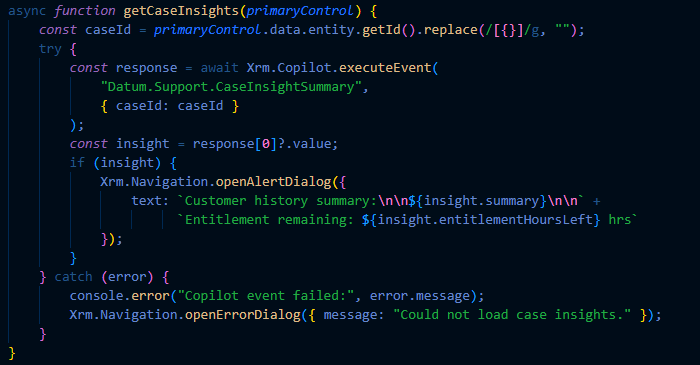
On the Copilot Studio side, the topic parses Activity.Value for the case ID, cross-checks it against the injected page context, runs Dataverse connector queries for related records, and uses a generative-answer step to produce the natural-language risk summary before returning it as an event response.
(Note: Follow the link to know how you can create a topic in your co-pilot agent: Create and edit topics
Note: For this example, when creating the topic, choose the “A custom client event occurs” and the event name should be exactly the same on both script and the topic event name field. For example, the event name “Datum.Support.CaseInsightSummary” should be written exactly like this in the event name of the trigger node.)
executeEvent vs. the Alternatives
| Approach | Best for |
| Xrm.Copilot.executeEvent | Calls that need AI reasoning or summarization layered on top of Dataverse data, invoked from client-side UI |
| Dataverse Web API / FetchXML | Straight reads/writes with no reasoning needed — faster, no AI quota cost |
| Power Automate flow | Background automation not tied to a live user session or form context |
| PCF control | Custom, persistent UI components that need rich rendering beyond a dialog or panel |
Conclusion
Xrm.Copilot.executeEvent provides a powerful bridge between model-driven app user interfaces and Copilot Studio’s AI reasoning capabilities. Rather than simply retrieving business data, it enables applications to generate contextual insights, summaries, and recommendations based on that data.
While the API is best suited for scenarios requiring AI-assisted decision-making, developers should continue using the Dataverse Web API for straightforward data retrieval and updates. Given its current preview status, organizations should evaluate it carefully in test environments before planning production implementations.
Frequently Asked Questions
1. What is Xrm.Copilot.executeEvent?
Xrm.Copilot.executeEvent is a preview Client API that enables JavaScript in model-driven apps to invoke Copilot Studio topics and receive structured responses.
2. What types of components can call executeEvent?
The API can be called from model-driven app forms, ribbon commands, JavaScript web resources, and Power Apps Component Framework (PCF) controls.
3. Does executeEvent automatically pass record context?
Yes. The API automatically provides information such as the current record ID, table logical name, page type, and app context to the Copilot Studio topic.
4. Can the response contain structured data instead of chat text?
Yes. Responses can include structured payloads, allowing developers to display Dataverse records, summaries, or business insights directly in the application UI.
5. Should Xrm.Copilot.executeEvent replace the Dataverse Web API?
No. It is best suited for AI-powered reasoning and summarization. For standard CRUD operations or simple data retrieval, the Dataverse Web API remains the recommended approach.