 Dynamics 365 notifications help users stay updated on leads, opportunities, cases, and record changes. For many teams, they provide a useful starting point. But as CRM processes grow more complex, businesses often need alerts that are smarter, more targeted, and easier to manage.
So the real question becomes: Are native Dynamics 365 notifications enough – or do growing teams need more?
What Are Dynamics 365 Notifications?
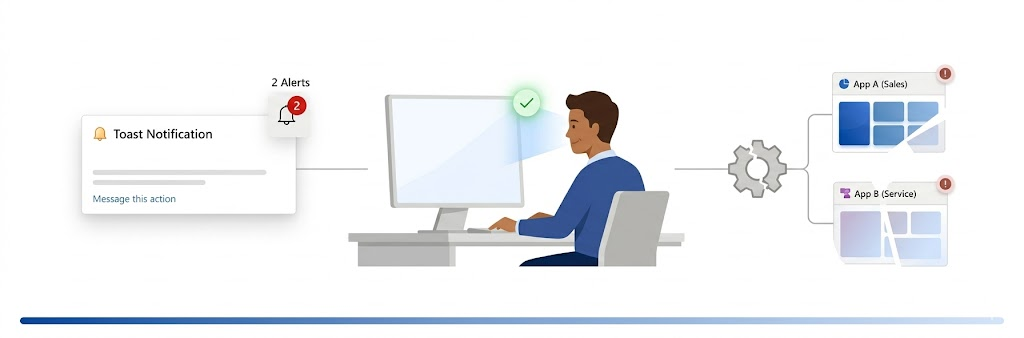
Dynamics 365 notifications (in-app notifications) are designed to inform users about key system events such as record creation, assignments, or status changes.
They typically appear as:
- Toast notifications
- Notification center alerts
These notifications are useful for simple, system-driven updates within a specific app like Dynamics 365 Sales or Customer Service.
Where Native Dynamics 365 Notifications Work Well
For basic requirements, native notifications are effective:
- Informing users about record-level changes
- Providing quick updates within a single app
- Supporting lightweight alerting without additional setup
Where Dynamics 365 Notifications Need Enhancement
As CRM usage scales, certain limitations become noticeable:
Limited Cross-App Visibility
Notifications are app-specific by default and need to be enabled separately across different Dynamics 365 apps.
Basic Trigger Logic
Native notifications are primarily tied to system events. More advanced, condition-based alerts typically require Power Automate or workflow configuration.
Limited Targeting
There is no built-in way to dynamically define detailed audiences or exclude specific users within the native notification framework.
Delivery Constraints
Notifications are limited to in-app experiences (toast and notification center). Sending alerts via email or to external stakeholders requires additional tools or flows.
Minimal Personalization
User-level preferences, multilingual messaging, and advanced customization options are limited out-of-the-box.
How Alerts4Dynamics Extends Native Notifications
Alerts4Dynamics enhances Dynamics 365 notifications by introducing a structured alert management layer within CRM.
Instead of relying only on system-triggered updates, it enables alerts to be aligned with business logic, conditions, and real-world workflows, reducing dependency on multiple tools or complex configurations.
In-Depth Comparison: Dynamics 365 Notifications vs Alerts4Dynamics
| Capability | Dynamics 365 Notifications | Alerts4Dynamics |
| Visibility | App-specific (configured per app) | Available across Dynamics 365 apps and Power Apps |
| Trigger Mechanism | System events; advanced logic requires Power Automate/workflows | Supports condition-based, event-driven, and record-level alerting within CRM |
| Alert Context | Basic message format | Rich, contextual alerts with links, formatting, and details |
| Delivery Channels | In-app (toast, notification centre) | In-app (pop-ups, form alerts) + email notifications |
| User Preferences | Limited | Users can define how they receive alerts |
| Prioritization | Basic visual indicators | Structured priority levels (Information, Warning, Critical) |
| Audience Targeting | Limited | Granular targeting with inclusion/exclusion logic |
| Cross-Entity Alerts | Achievable via flows/workflows | Configurable directly within alert setup |
| Tracking & Logs | Not available natively | Tracks alert status (read, dismissed, active) |
| Search Capability | Manual navigation | Searchable notification panel |
| Multilingual Support | Not available out-of-the-box | Supports multi-language alerts |
| Digest Notifications | Not available | Supports scheduled email summaries |
| Scheduled Alerts | Not native | Supported |
Practical Examples
High-Value Opportunity Monitoring
A sales leader wants visibility when a deal crosses a specific value.
- With native Dynamics 365 notifications, this typically requires Power Automate or workflow setup
- With Alerts4Dynamics, alerts can be configured directly based on defined conditions
Invoice Status Updates Across Related Records
When an invoice is marked as paid, the account owner should be notified.
- Native notifications focus on the primary record unless extended through workflows
- Alerts4Dynamics allows alerts to surface on related records with context
SLA Monitoring in Customer Service
Support teams need alerts before SLA breaches.
- Native setup requires flows or custom logic
- Alerts4Dynamics enables condition-based alerts with prioritization
Industry Relevance
BFSI
Track critical transactions and compliance-related updates
Manufacturing
Monitor order status, delays, and supply chain events
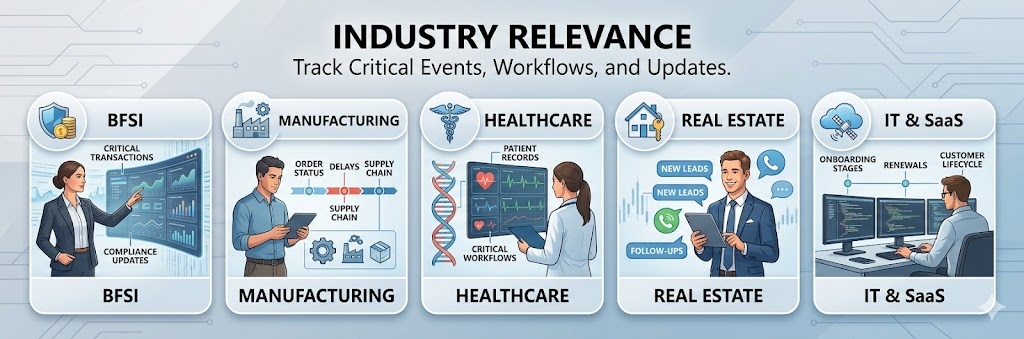
Healthcare
Stay updated on patient-related records and critical workflows
Real Estate
Respond faster to new leads and follow-up activities
IT & SaaS
Manage onboarding stages, renewals, and customer lifecycle events
Productivity-Focused Enhancements
Email Digest
Summarizes notifications into daily, weekly, or monthly updates, reducing alert fatigue.
Searchable Notifications
Helps users quickly locate relevant alerts without manual effort.
Alert Tracking
Offers visibility into whether alerts were viewed or dismissed.
Why Businesses Move Beyond Native Notifications
Many teams start with native Dynamics 365 notifications. But as usage grows, they often need:
- alerts across multiple apps
- business-rule driven notifications
- email + in-app delivery
- alert history and tracking
- priority-based escalations
- fewer missed follow-ups
That is usually the point where advanced notification tools become valuable.
FAQs
What are Dynamics 365 notifications?
Dynamics 365 notifications are in-app alerts that inform users about events like record creation, updates, or assignments. They appear as toast messages or in the notification centre within a specific app. For advanced, business-driven alerts, tools like Alerts4Dynamics extend these capabilities with more flexibility and control.
Can Dynamics 365 notifications be personalized?
Dynamics 365 notifications offer limited personalization options. User preferences and multilingual messaging are not fully supported out-of-the-box. Alerts4Dynamics enables user-level preferences and multi-language alerts, improving usability across teams.
What is the best alternative to Dynamics 365 notifications?
The best alternative to Dynamics 365 notifications for advanced alerting is a solution that offers real-time, condition-based alerts with better visibility. Alerts4Dynamics enhances notification capabilities by adding structured alert management, multi-channel delivery, and tracking within CRM.
Can Dynamics 365 notifications send emails automatically?
Native notifications focus on in-app experiences. Email alerts usually require Power Automate, workflows, or third-party tools such as Alerts4Dynamics.
Final Thoughts
Dynamics 365 notifications provide a solid foundation for basic awareness within CRM. However, as processes become more complex, relying solely on native notifications may require additional tools and configurations.
Alerts4Dynamics simplifies this by bringing structured, configurable alerting directly into Dynamics 365, helping teams respond faster, stay aligned, and reduce missed actions.
Try Alerts4Dynamics free for 15 days from our website or Microsoft Marketplace and experience smarter notifications inside Dynamics 365
Need a personalized walkthrough? Contact our team at crm@inogic.com.