 Organizations are increasingly using Microsoft 365 Copilot agents to simplify everyday tasks and support business processes across industries such as healthcare, finance, HR, and customer service. But deploying an agent is only the first step. To get the most value from it, you also need to understand how people are actually using it.
Which agent is getting the most attention? Are users coming back regularly? Is adoption growing over time? These insights can help you understand whether your Copilot agents are making an impact and where there may be opportunities to improve adoption.
This is where the Microsoft 365 Insights Agent can help. Instead of spending time going through usage reports, administrators can simply ask questions in natural language and get insights into agent adoption, active users, usage trends, and more. This makes it easier to see how your Copilot agents are performing and understand how users are engaging with them.
Real Business Use Case: Healthcare Copilot Agents
Consider a healthcare organization that has deployed two Microsoft 365 Copilot agents to improve clinical efficiency.
The Patient Care Assistant helps doctors and nurses quickly retrieve patient information, medication history, appointment details, and treatment guidelines during consultations. The Medical Documentation Assistant supports clinicians by generating patient summaries, discharge notes, and other medical documentation, reducing the time spent on administrative tasks.
After deploying both agents, the IT and healthcare teams want to understand how effectively these solutions are being adopted. They need answers to questions such as:
- Which agent has higher user adoption?
- How many users interact with each agent daily or weekly?
- Are users returning consistently over time?
- Which agent requires additional improvements or user training?
Rather than manually analyzing reports, the Microsoft 365 Insights Agent enables administrators to retrieve these insights simply by asking questions in natural language.
Before getting started, make sure you have:
- A Microsoft 365 Copilot license assigned to your account.
- Access to at least one deployed Copilot agent in your tenant.
- A few days of agent usage data to generate meaningful adoption and usage insights.
Step 1 – Open Microsoft 365 Copilot
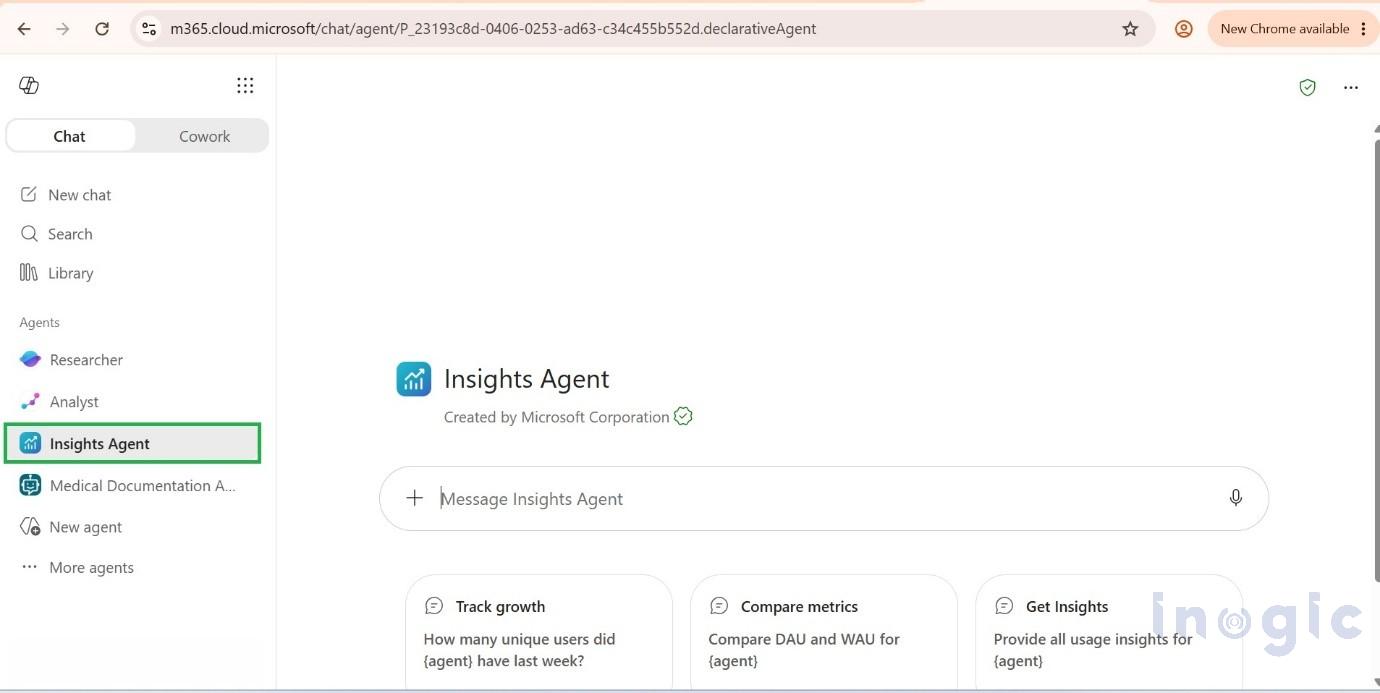
Open Microsoft 365 Copilot Chat and navigate to the Insights Agent.
Step 2 – Select an agent
Select the deployed Copilot agent you want to analyze. The Insights Agent can retrieve usage information for any agent that you have access to within your tenant, regardless of ownership. For this example, we’ll analyze:
- Patient Care Assistant
- Medical Documentation Assistant
Step 3 – Retrieve Usage Insights
Ask the Insights Agent a natural language question.
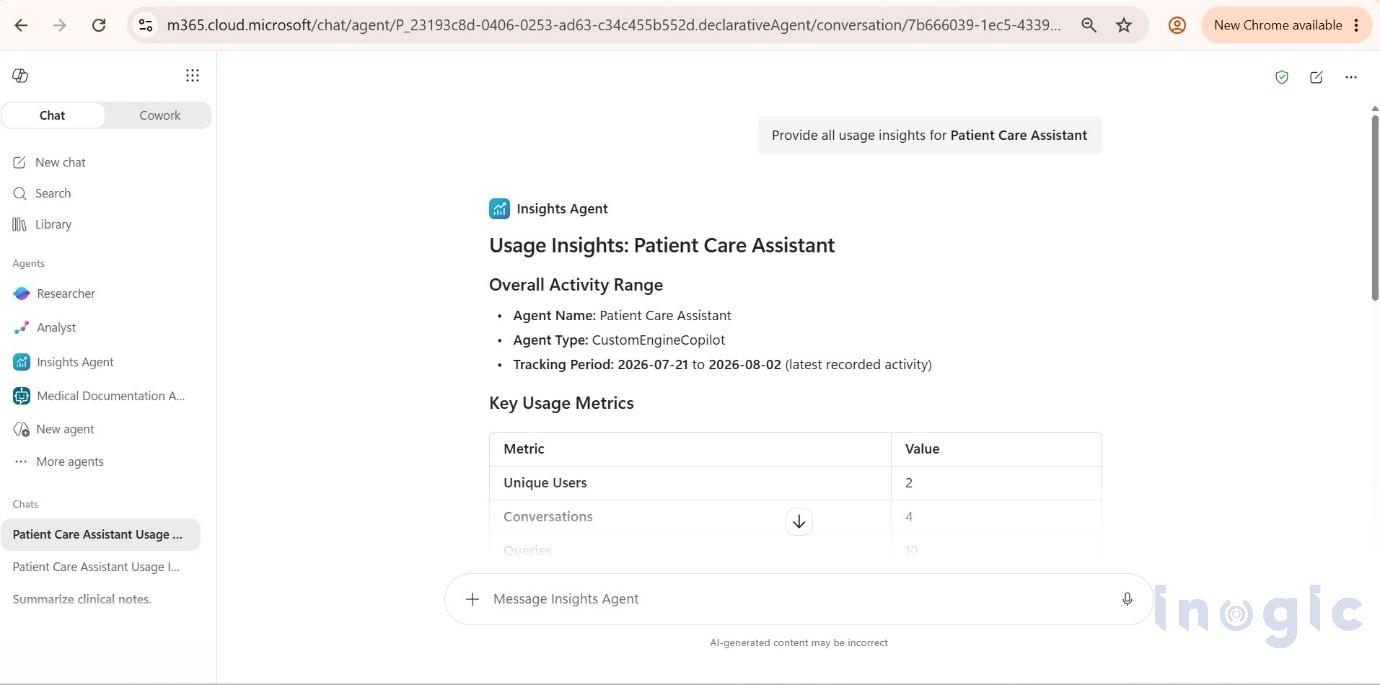
Example: Provide all usage insights for Patient Care Assistant
The Insights Agent returns adoption metrics such as:
- Daily Active Users (DAU)
- Weekly Active Users (WAU)
- Monthly Active Users (MAU)
- User adoption trends
- Overall usage summary
These metrics help determine how frequently healthcare professionals rely on the Patient Care Assistant during their daily workflow.
Step 4 – Try a comparison
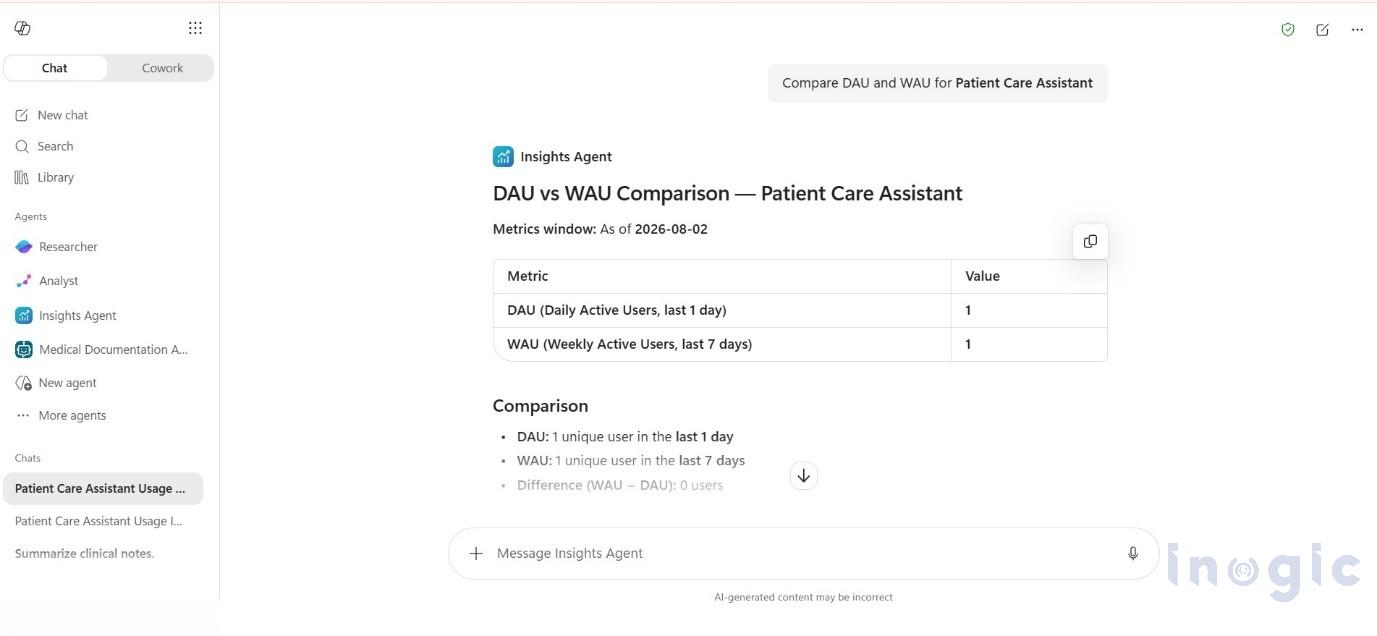
1. Compare DAU and WAU for Patient Care Assistant
This prompt compares the Daily Active Users (DAU) and Weekly Active Users (WAU) for the Patient Care Assistant, helping you evaluate user engagement and adoption over different time periods.
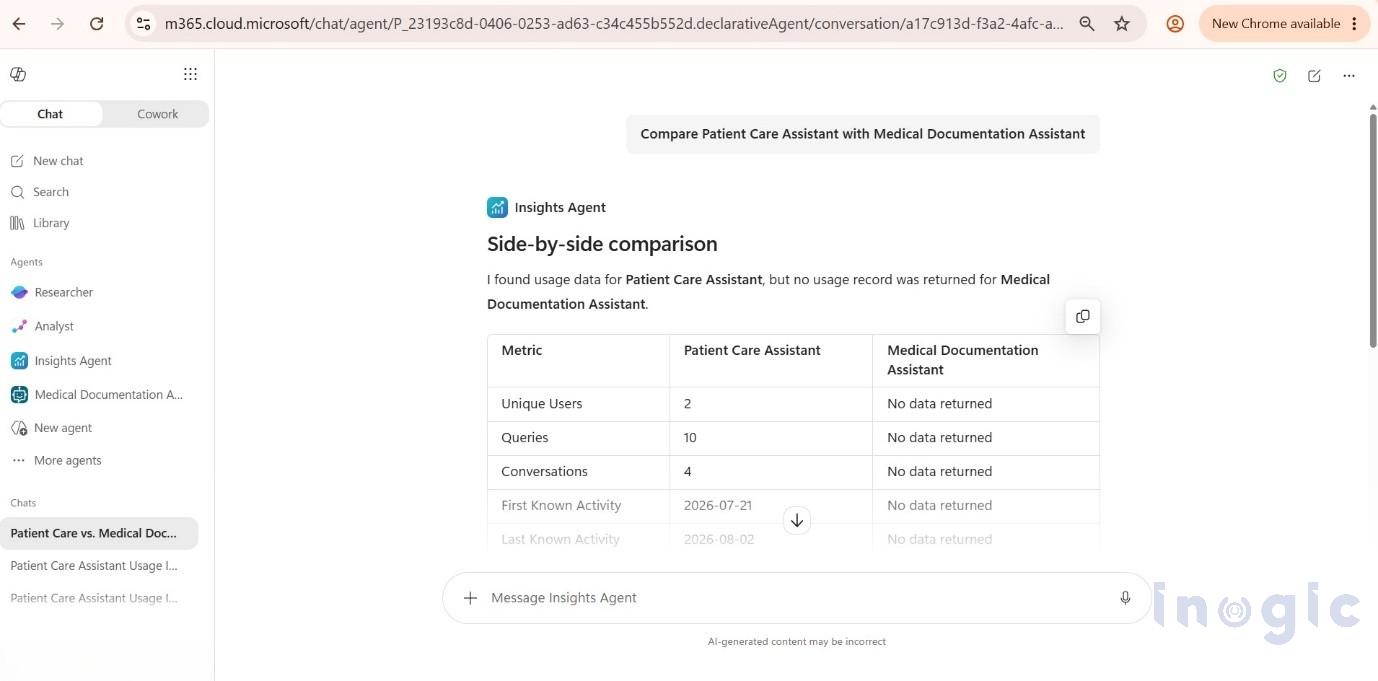
2. Compare Patient Care Assistant with Medical Documentation Assistant
One of the most useful capabilities of the Insights Agent is comparing multiple Copilot agents.
This comparison helps you analyze the adoption and usage of both healthcare agents, making it easier to understand user engagement and identify areas for improvement.
Step 5 – Explore Additional Insights
Beyond comparing agents, the Insights Agent can answer a variety of usage-related questions.
Some useful prompts include:
- Show Daily Active Users for Patient Care Assistant.
- Show Weekly Active Users for Medical Documentation Assistant.
- Compare monthly adoption between both agents.
- Summarize usage trends for my Copilot agents.
- Which agent has the highest adoption?
Conclusion
Building a Microsoft 365 Copilot agent is just the beginning. To get lasting value from your AI investments, it’s equally important to understand how users interact with these agents and whether adoption is growing over time.
The Microsoft 365 Insights Agent makes this easier by giving administrators access to usage analytics through natural language conversations. Whether you’re tracking a single agent or comparing multiple solutions, you can quickly understand adoption trends, user engagement, and areas that may need attention.
As we saw with the Patient Care Assistant and Medical Documentation Assistant, these insights can help healthcare organizations make better-informed decisions about their Copilot agents. By understanding what’s working and where adoption can improve, organizations can support users more effectively and get greater value from their AI investments.
Frequently Asked Questions (FAQs)
1. What is the Microsoft 365 Insights Agent?
The Microsoft 365 Insights Agent helps administrators analyze usage and adoption of Microsoft 365 Copilot agents. You can ask questions in natural language to get insights into active users, usage trends, and agent adoption.
2. How can I measure Microsoft 365 Copilot agent adoption?
You can measure Copilot agent adoption by reviewing usage metrics such as Daily Active Users (DAU), Weekly Active Users (WAU), and Monthly Active Users (MAU). Comparing these metrics over time can help you understand how consistently users are engaging with your agents.
3. What usage metrics can the Microsoft 365 Insights Agent provide?
The Insights Agent can provide metrics such as Daily Active Users (DAU), Weekly Active Users (WAU), Monthly Active Users (MAU), user adoption trends, and overall usage summaries.
4. Can I compare the usage of multiple Copilot agents?
Yes. The Microsoft 365 Insights Agent can help you compare the usage and adoption of multiple Copilot agents. This can help you identify which agents have higher engagement and which may need additional improvements or user training.
5. What questions can I ask the Microsoft 365 Insights Agent?
You can ask the Insights Agent natural language questions about your Copilot agents. For example, you can ask it to show Daily Active Users, compare monthly adoption between agents, summarize usage trends, or identify which agent has the highest adoption.