AI agents are becoming a common way for teams to interact with business data. With Copilot Studio, you can quickly build agents that answer questions and automate everyday tasks. But what happens when users need answers based on thousands of CRM records instead of a handful of documents?
That’s the challenge we set out to solve.
In this blog, we’ll share how we integrated Databricks Genie with Copilot Studio to build a Sales Performance Agent that can query large datasets, provide accurate responses, and generate downloadable reports, all through a simple chat interface.
1. Knowledge Source: Not Reliable for Calculations
Copilot Studio’s Knowledge Source feature works well for static, text-based Q&A (like retrieving company policies), but it sometimes needs additional handling when dealing with enterprise data.
Additionally, Knowledge Source has strict data processing limits per interaction. It gets difficult to feed large datasets into a Prompt Tool to generate Excel or PDF reports.
2. Dataverse MCP Server Tool: Has a 20-Record Limit
Initially, we architected this request with the Dataverse MCP (Model Context Protocol) approach to connect the agent directly to Dataverse so it could query live CRM data.
However, we noticed that there are some known limitations of the Dataverse tool, such as it can only return a maximum of 20 records per query. If you have thousands of accounts, hundreds of sales orders, and a team of 50 reps, the agent is only ever seeing a tiny slice of your data. It’s like trying to analyze your entire sales pipeline by looking at just one page of a 500-page spreadsheet.
After hitting these walls, we completely rethought our approach. Instead of forcing Copilot Studio to query CRM directly, we shifted the entire data layer to Databricks.
Databricks is a powerful cloud-based data platform that gave us everything the native tools couldn’t:
- No record limits: We can query tens of thousands of records simultaneously.
- Improved mathematical accuracy: Calculations are done in SQL, not by an AI formula guessing. When we ask for total revenue, we get the exact number.
- Jobs & Pipelines: We created automated data pipelines that sync data from Dataverse (CRM) to Databricks.
Now, within Databricks, we leverage a built-in AI agent called Genie. Genie acts as the intelligence layer between the user’s natural language and the database. By providing Genie with detailed instructions containing table schemas, JOIN relationships, and business rules, it automatically converts user questions into precise, accurate SQL queries behind the scenes.
The quality of this process depends entirely on the instruction file we provide. Genie understands complex business scenario logic and returns improved response data with a large volume of data.
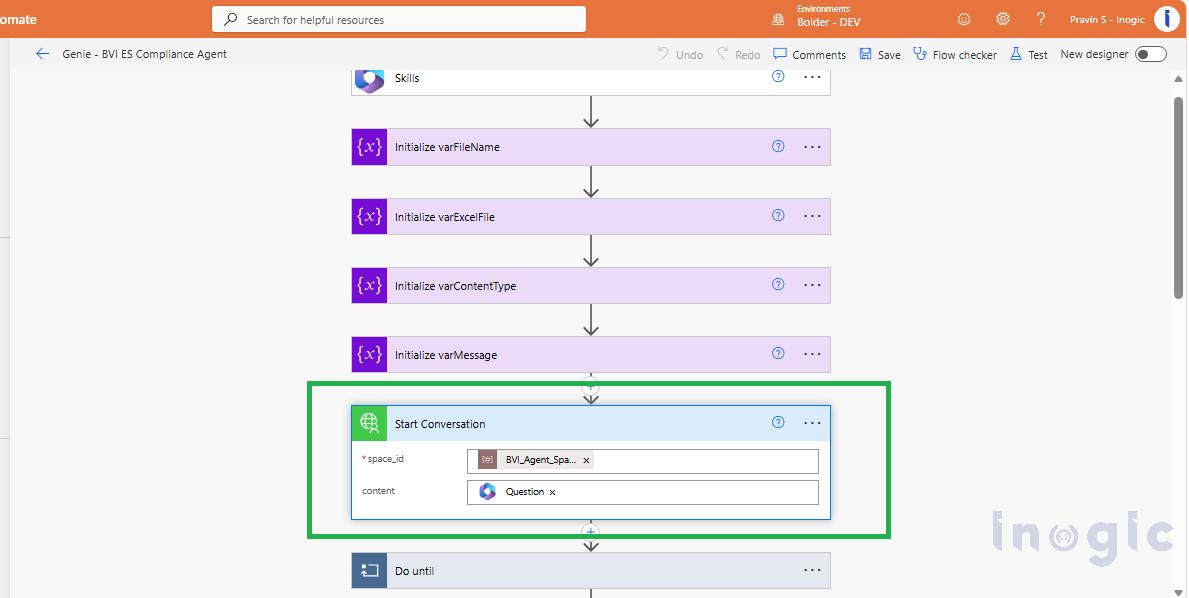
To bridge Copilot Studio and Databricks Genie, we use a Power Automate Flow. Since Genie exposes a REST API, we wrapped all four API calls into a Custom Connector in Power Platform, which makes them available as clean, reusable actions inside our flows. The first action is Start Conversation, where we pass in the space_id (which identifies the specific Genie space configured with our tables and instructions) and the content (the user’s natural language question received from Copilot Studio). Genie receives this question, interprets it using the instruction file, and begins generating the appropriate SQL query.
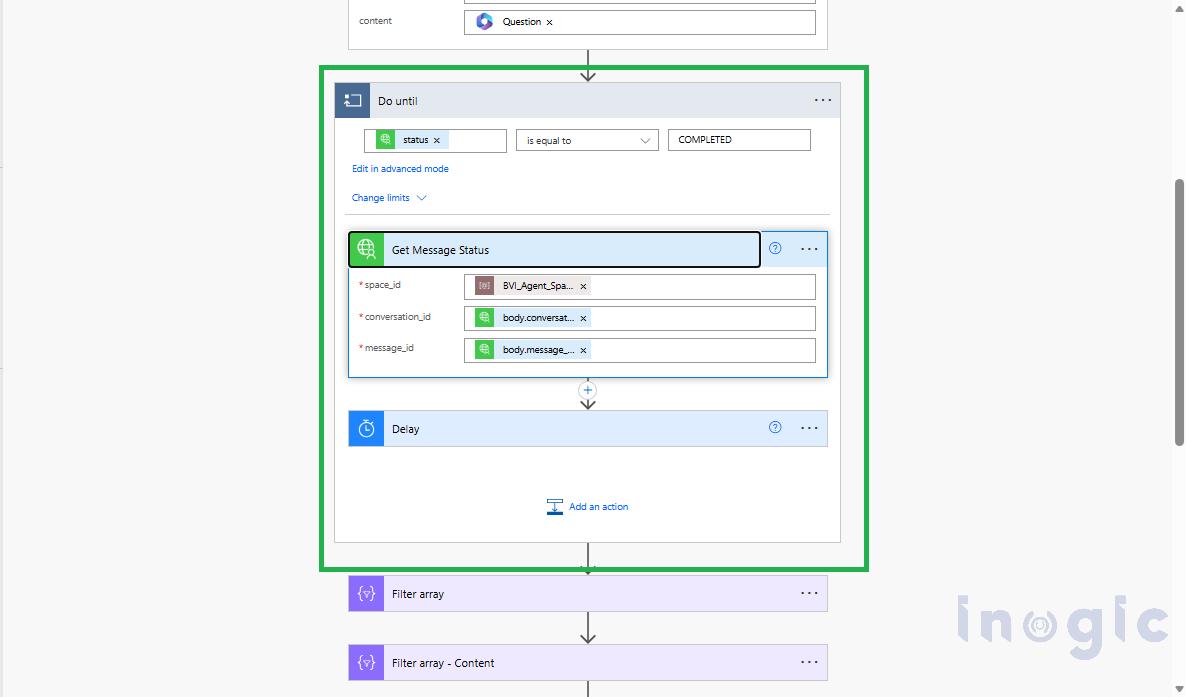
The second action is Get Message, where we pass in the space_id, the conversation_id, and the message_id from the previous response to check the status of the query execution. Once the status confirms that Genie has successfully generated and run the SQL, the response is generated, including an attachment_id pointing to the result set.
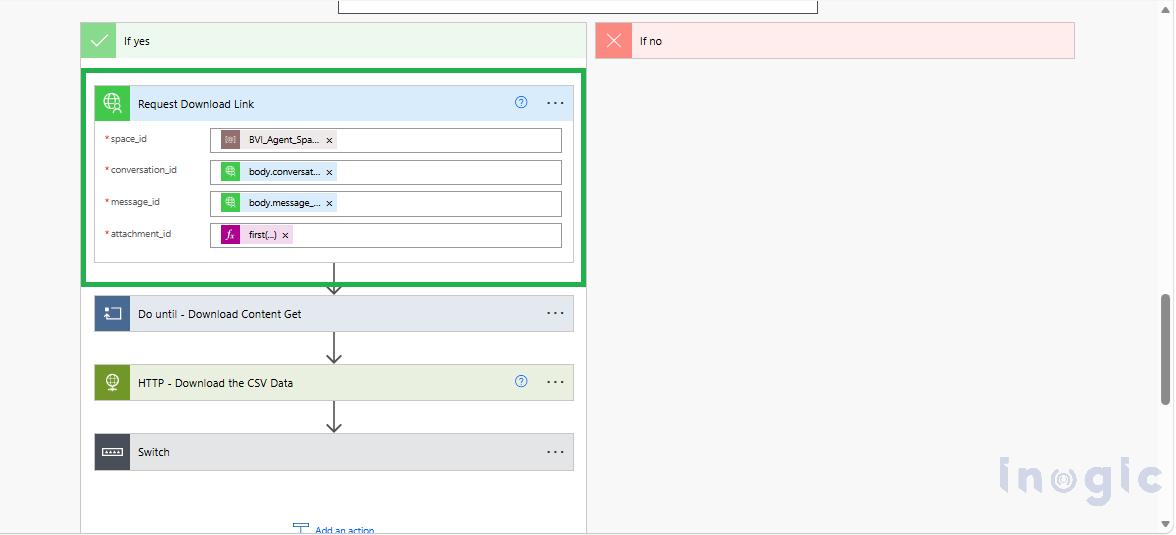
The third action is Request Download Link, where we pass the space_id, conversation_id, message_id, and attachment_id to tell Databricks to prepare the full query result as a downloadable file.
Finally, the fourth action is Get Download URL, where we pass the same identifiers along with a download_id returned from the previous step. This returns a presigned URL containing the CSV data.
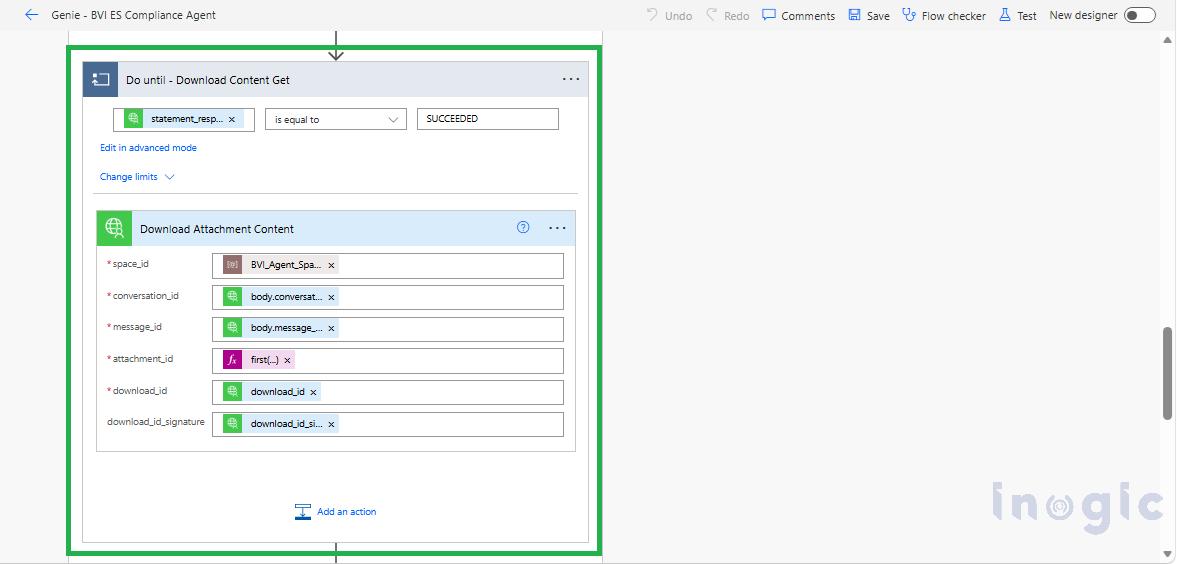
We use the text content from the Get Message action (which contains Genie’s natural language answer) and pass it directly back to the agent to answer the user’s question in the chat. Alternatively, we use the CSV file content from the Download Attachment Content action and pass it into a Prompt Tool to generate the requested Excel or PDF file.
Since Copilot Studio does not natively support passing the user’s identity token to external services with the agent’s Security set to Microsoft Authentication, we built a Custom Connector in Power Platform with Microsoft Entra ID On-Behalf-Of (OBO) authentication. This connector wraps all four Genie API actions into reusable operations. When a user interacts with the agent, their login token is exchanged through Azure AD for a Databricks-scoped token, so Databricks knows exactly which user is making the request. This is essential for applying Row-Level Security, ensuring each user only sees data they are authorized to access.
Now let’s look at how this architecture works through Sales Performance Agent.
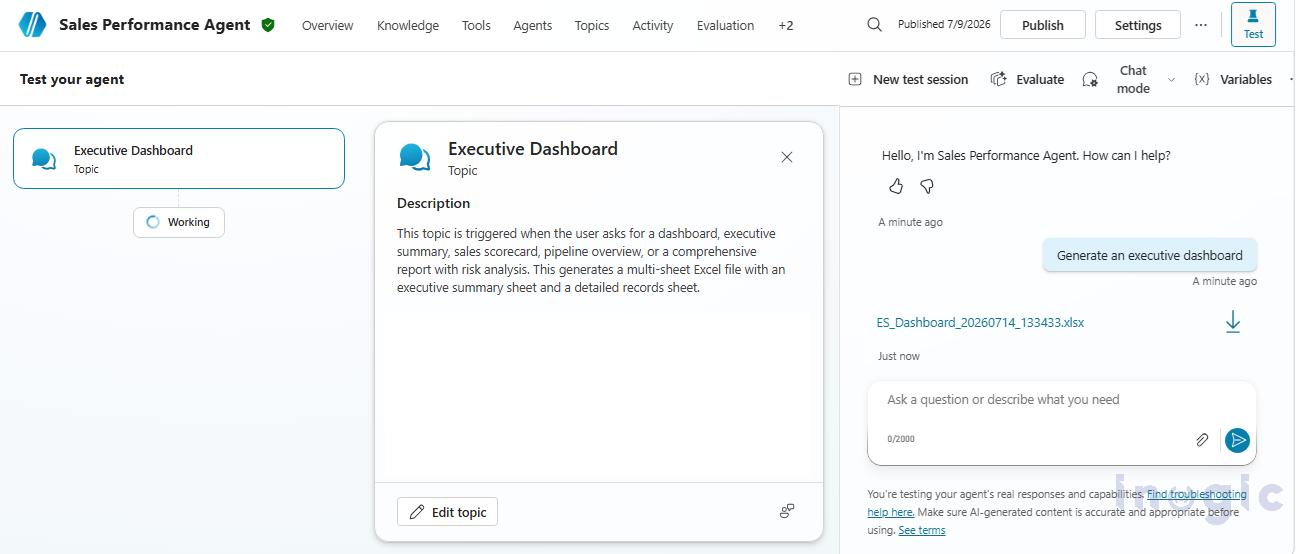
We have the Executive Dashboard Excel topic, which generates a complete sales overview. When the user asks for an executive sales dashboard, Copilot Studio recognizes the intent and routes to this specific topic (Executive Dashboard). It triggers a Power Automate flow that calls the Genie API, asking it to gather all sales orders. Genie writes the SQL, joins all the necessary tables, and returns the full dataset as a CSV. The flow then passes this CSV to a Prompt Tool equipped with a Code Interpreter, which uses Python to generate a beautifully formatted Excel workbook with multiple sheets covering executive summaries. Because Prompt Tools cannot return files directly to the user, the topic receives the generated file and prints a convenient download link directly in the chat.
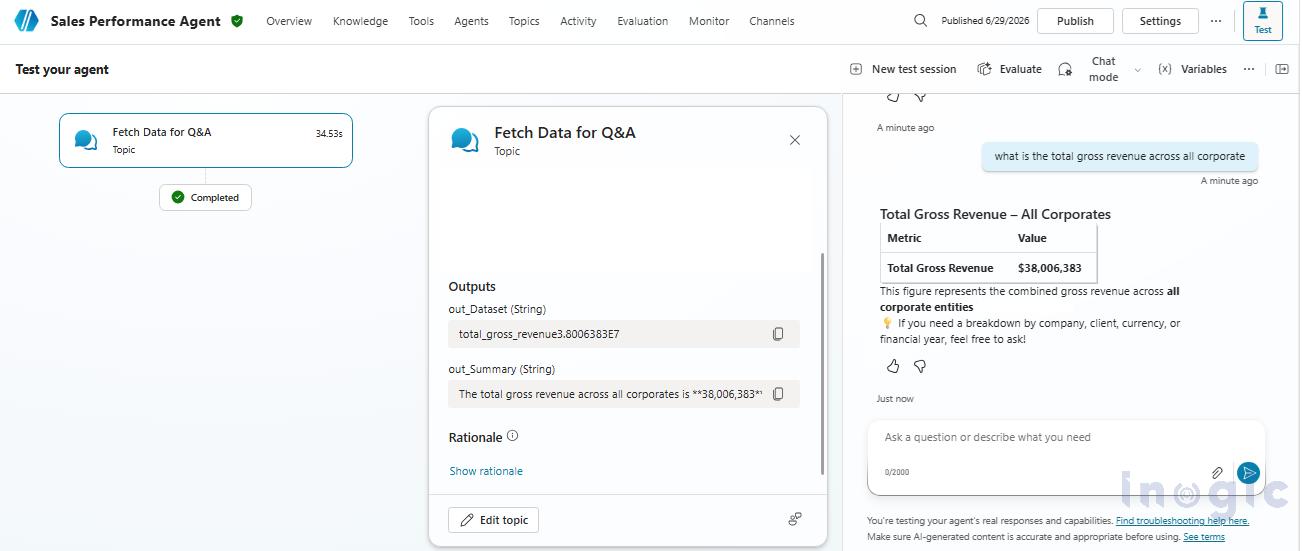
Finally, we have Fetch Data for Q&A topic, which handles data questions directly in the chat without requiring any file downloads. When a user asks a question, Copilot Studio routes the question to this topic and sends it to Genie via Power Automate. Genie generates and runs the SQL, returning the exact result. The flow simply passes the data back to the topic, which forms it into a clean, natural chat response.
Conclusion
Copilot Studio is a great platform for building AI agents, but handling large datasets and complex business queries often requires additional capabilities. By combining Copilot Studio with Databricks Genie and Power Automate, you can build agents that retrieve accurate data, answer complex questions, and generate useful reports. This approach helps you deliver a more reliable and scalable AI experience for your users.
FAQs
1. Can Copilot Studio query large datasets directly?
Copilot Studio can connect to data sources, but retrieving and analyzing very large datasets may require additional services. Using a data platform like Databricks allows you to query large volumes of data more efficiently and return accurate results to your agent.
2. Why use Databricks Genie with Copilot Studio?
Databricks Genie converts natural language questions into SQL queries, allowing users to ask business questions without writing SQL. It helps Copilot Studio retrieve accurate information from large datasets and supports complex business queries.
3. Can Copilot Studio generate Excel or PDF reports?
Yes, but it typically requires additional components. In this approach, Copilot Studio uses Power Automate to retrieve data from Databricks Genie and passes it to a Prompt Tool with Code Interpreter to generate downloadable Excel or PDF reports.
4. How does Power Automate work with Copilot Studio and Databricks?
Power Automate acts as the integration layer between Copilot Studio and Databricks. It sends user questions to Databricks Genie, retrieves the query results, and returns the response or report back to the Copilot Studio agent.
5. Can Databricks Genie respect user permissions when accessing data?
Yes. By using Microsoft Entra ID authentication with the On-Behalf-Of (OBO) flow, Databricks can identify the user making the request and apply row-level security, so users only access data they are authorized to view.