Organizations using Microsoft Dynamics 365 often encounter storage capacity issues as their CRM grows. What starts as sufficient space quickly becomes expensive and restrictive as Dynamics 365 attachments, emails, and notes accumulate.
If you are seeing storage warnings or increasing Microsoft invoices, you’re not alone. Dynamics 365 storage capacity issues are one of the most common challenges faced by CRM administrators.
This guide explains:
- Why storage fills up in Dynamics 365
- What consumes the most capacity
- Native Microsoft options for dynamics 365 document management
- Cost implications of poor attachment management
- The most effective long-term solution for attachments files dynamics 365
Understanding Dynamics 365 Storage Capacity
Microsoft allocates Dynamics 365 document storage across three main categories:
- Database capacity – Stores records, tables, metadata
- File capacity – Stores Dynamics 365 attachments, notes, and email files
- Log capacity – Stores audit logs and system logs
Most organizations run into Dynamics 365 storage capacity issues due to excessive file storage consumption. As more users attach documents, images, and email files to CRM records, the file capacity fills up rapidly, leading to unexpected Microsoft storage bills.
Why Do Dynamics 365 Storage Capacity Issues Occur?
To get to the core of this issue, Inogic conducted a poll to identify key aspects that consume an organization’s CRM space.
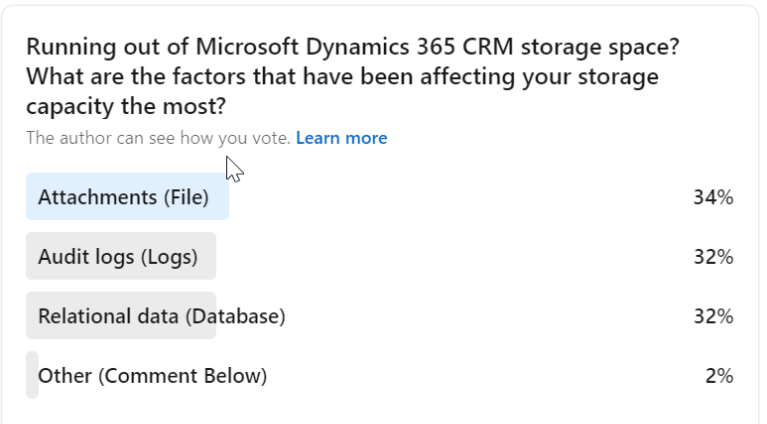
As is seen in the poll, File Attachments in Dynamics 365 consume most of the CRM space. Notes, email attachments, sales literature notes, etc. quickly consume your entire CRM space. Dynamics 365 CRM alone is not the strongest attachment and document management suite, , making third-party solutions like Attach2Dynamics necessary.
We also tried to find out how CRM users are currently tackling this issue.
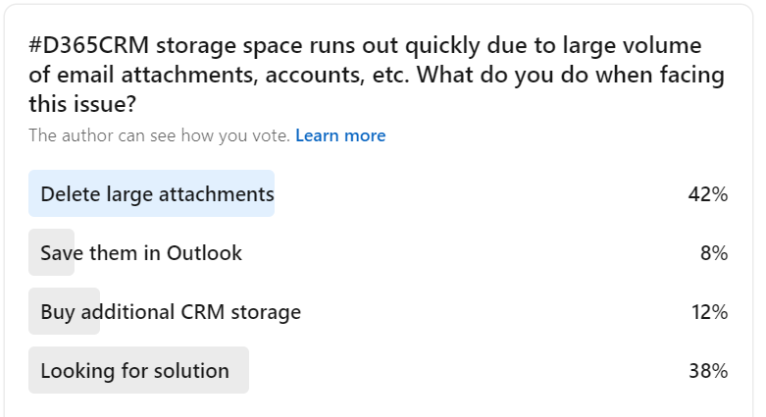
As many as 42% of voters delete their large attachment files. Well, that’s one way to keep your storage space free, but sometimes deleting critical attachments may not always be practical. Another 12% of users are buying additional storage, and as we already mentioned above, buying additional storage space is expensive.
The need of the hour as emphasized by 38% of voters, is a cost-effective attachments and storage management for Dynamics 365 CRM.
Inogic’s Attach2Dynamics, a Microsoft Marketplace certified App for attachment and storage management for Dynamics 365 CRM, is an efficient file management solution that allows SharePoint Integration, Azure Blob integration, and Dropbox integration with Dynamics 365 CRM. So, what are the advantages of using Attach2Dynamics? Let’s find out.
How Organizations Currently Handle Storage Problems
Many businesses attempt to manage Dynamics 365 storage issues by:
- Deleting Dynamics 365 attachments to free up space
- Archiving records manually
- Buying additional storage from Microsoft
- Disabling audit logs
However, these approaches either:
- Risk data loss
- Impact compliance
- Or increase recurring costs
A more sustainable strategy for Dynamics 365 document management is required.
The Smart Way to Resolve Dynamics 365 Storage Capacity Issues
The most cost-effective method to reduce Dynamics 365 document storage consumption is to move attachments out of Dataverse and into external cloud storage. This approach, often called Dynamics 365 attachment migration, keeps your CRM lean while ensuring files remain accessible.
The top cloud storage destinations to move Dynamics 365 files are:
- Dynamics 365 SharePoint integration — Microsoft’s native document platform
- Dynamics 365 Azure blob integration — scalable and cost-efficient object storage
- Dynamics 365 Dropbox integration — flexible cloud storage for teams
Each of these platforms can significantly reduce file capacity usage while keeping secure Dynamics 365 documents accessible directly within the CRM interface.
How Attach2Dynamics Helps Reduce Dynamics 365 Storage Costs
Attach2Dynamics by Inogic is a leading attachment management solution for Dynamics 365 that enables secure cloud-based storage integration directly inside your CRM. It is a Microsoft AppSource Preferred App trusted by organizations to solve Dynamics 365 storage capacity issues permanently.
Instead of storing Dynamics 365 attachments in CRM, files are stored in SharePoint, Azure Blob, or Dropbox while still appearing seamlessly within the CRM interface.
Here’s how it solves storage capacity issues:
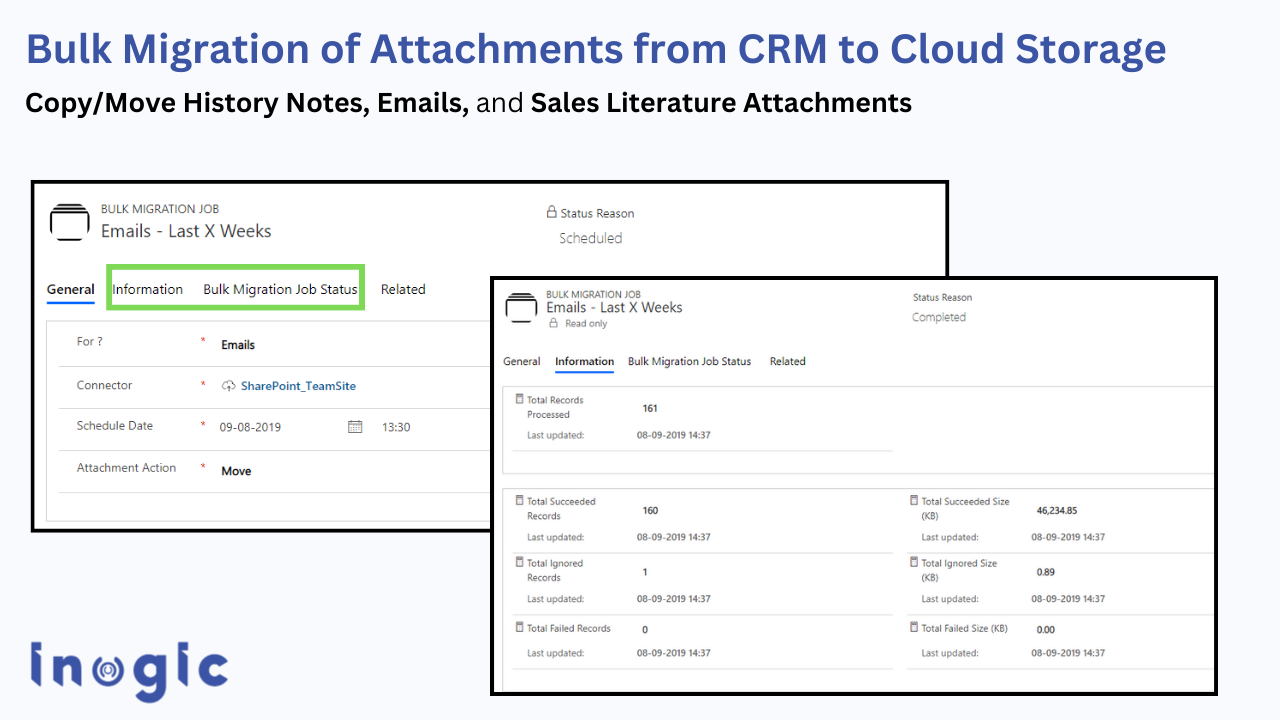
Move:
- Notes
- Email attachments
- Sales literature
- Legacy files
to external cloud storage in bulk.
This immediately frees up CRM file capacity and resolves Dynamics 365 documents storage issues without disrupting users.
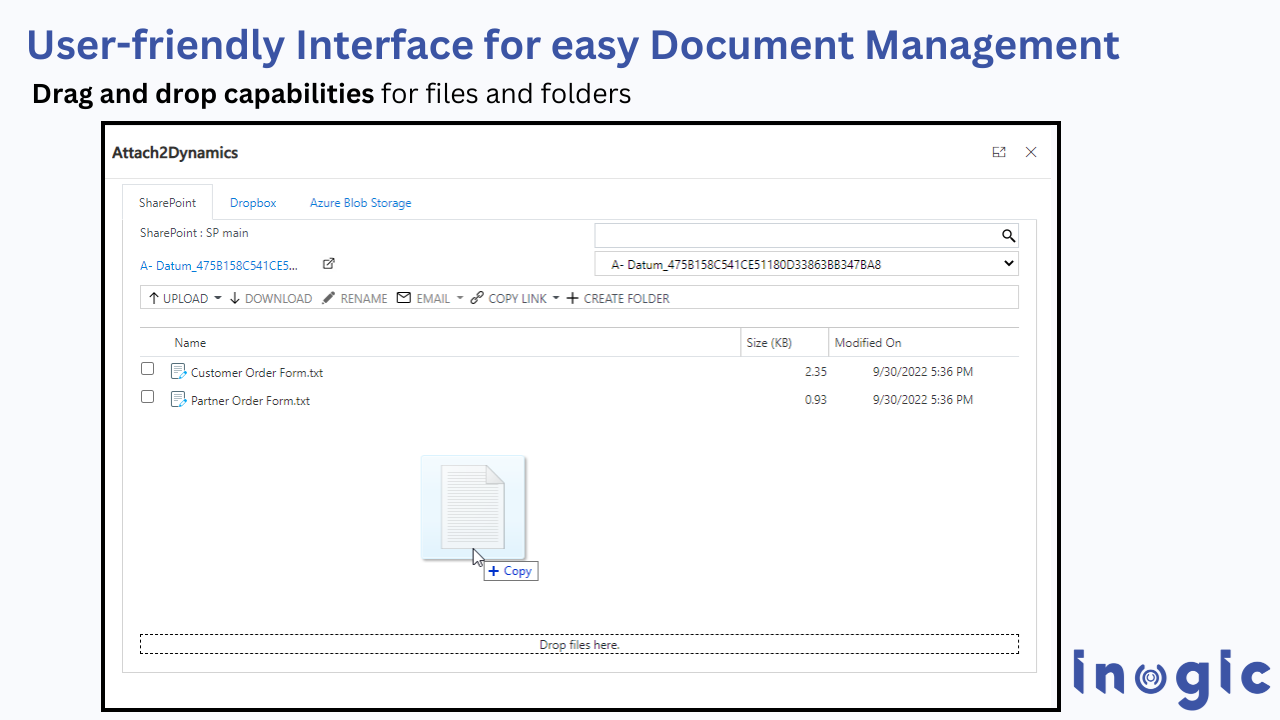
Drag and drop files and folders
Attach2Dynamics’ user-friendly interface allows you to quickly drag and drop multiple files and folders from CRM to the desired cloud storage. This will help you easily upload/download files, save time, and facilitate your daily hustles. This saves time, facilitates daily workflows, and makes managing attachments in Dynamics 365 effortless
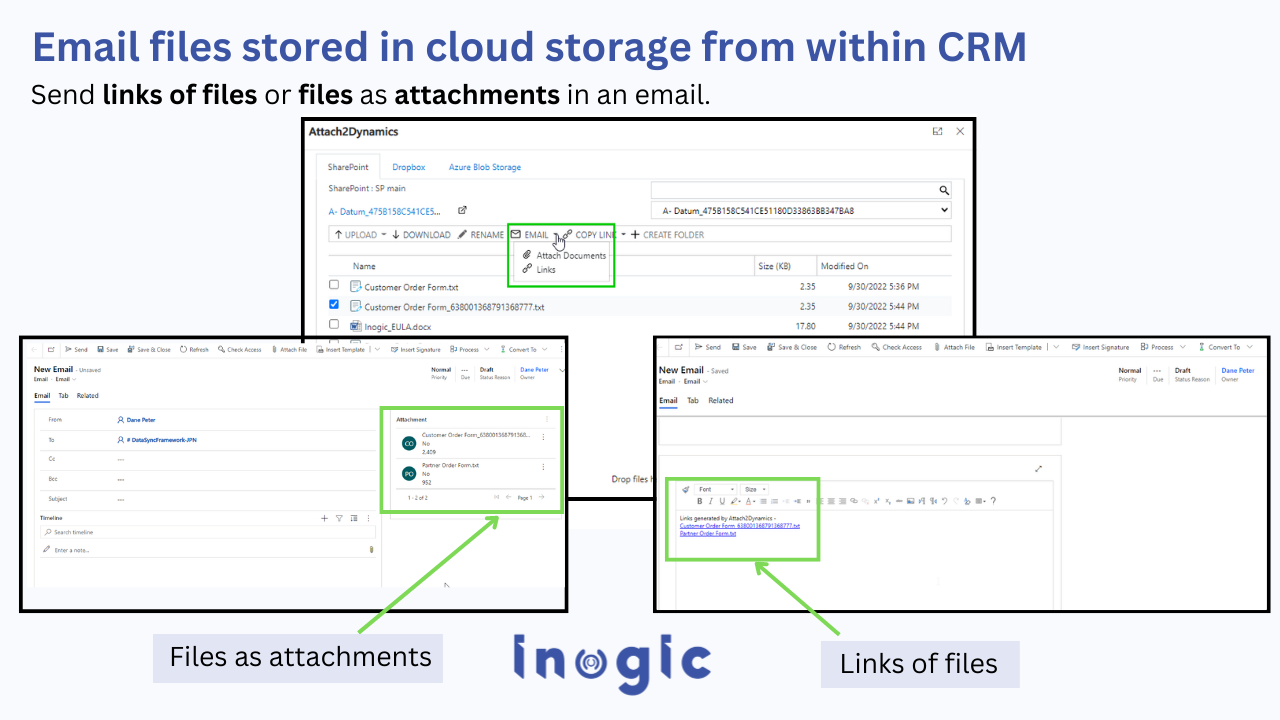
Send files as links and attachments
Attach2Dynamics will allow you to send files as links and attachments in an email. The link is nothing but the SharePoint folder location of a file. With this, you will be able to create anonymous links that help share documents from outside sources. Multiple files can also be sent in a single mail.
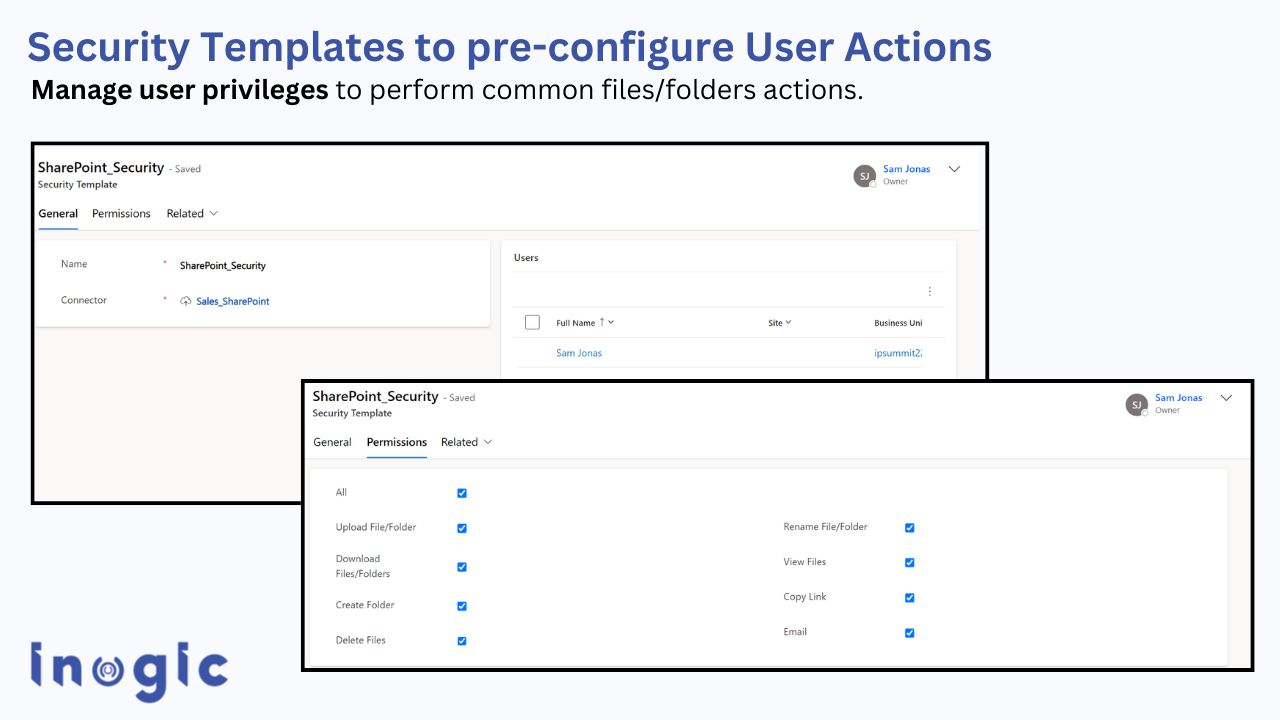
The security templates feature of Attach2Dynamics enables you to create security templates that allow you to manage user access to various Attach2Dynamics functions like upload, download, email, copy link, rename, etc. in all three-cloud storage – SharePoint, Dropbox, and Azure Blob Storage.
For any given record, multiple Document Locations can exist within a SharePoint Site. Attach2Dynamics allows you to easily select the desired folder (Document Location) for file uploads through its user-friendly interface.
Native Microsoft Options vs Third-Party Approach
| Option | Pros | Limitations |
| Buy More Storage | Quick fix | Expensive recurring cost; does not solve the root dynamics 365 storage capacity issues |
| Delete Attachments | Frees space | Risky, data loss; critical Dynamics CRM attachments may be lost permanently |
| Disable Auditing | Reduces logs | Compliance impact |
| Attach2Dynamics
(Attachment Management Solution Dynamics 365) |
Reduces file capacity permanently
supports Dynamics 365 Azure blob integration, Dynamics 365 Dropbox integration, and Dynamics 365 SharePoint integration |
Requires implementation |
Best Practices to Prevent Future Dynamics 365 Storage Capacity Issues
- Regularly monitor storage analytics
- Avoid storing large files and attachments directly in Dynamics 365 CRM
- Limit email tracking for unnecessary attachments
- Move historical attachments to external storage
- Implement a full Dynamics 365 document management strategy before storage issues escalate
Frequently Asked Questions
1. What consumes the most storage in Dynamics 365?
File attachments in emails and notes typically consume the most file storage capacity.
2. How do I check my Dynamics 365 storage capacity?
Go to Power Platform Admin Center → Capacity → Storage to view database, file, and log usage.
3. Is buying additional storage the only option?
No. Moving attachments to SharePoint or Azure Blob is a more cost-effective long-term solution.
4. Does SharePoint reduce CRM storage?
Yes. Files stored in SharePoint do not consume Dataverse file capacity.
Conclusion
Dynamics 365 storage capacity issues are inevitable as CRM adoption grows. However, continuously purchasing additional storage is not sustainable.
A structured Dynamics 365 document management strategy, especially moving attachments from Dynamics 365 CRM to external cloud storage, significantly reduces Dynamics CRM storage costs while maintaining accessibility.
If your organization is facing increasing storage bills, it may be time to rethink how attachments are managed inside Dynamics 365.
You can visit Inogic’s website or Microsoft Marketplace and download Attach2Dynamics for a free 15-day trial because it is always advisable to gather first-hand experience.
Please email us at crm@inogic.com if you want a personal demonstration or have any other document management-related needs.
For a personalized demo or any inquiries about document management, drop us a line at crm@inogic.com. We’re here to help!
PS: Looking for a solution to replicate the Dynamics 365 CRM security model to SharePoint on your Dynamics 365 CRM and SharePoint Integration? A way to sync your Dynamics 365 CRM security model to SharePoint? SharePoint Security Sync by Inogic is just the solution for you.
Till then, keep managing files smartly!