Dynamics 365 uses security roles, teams, ownership, and record-level privileges to control who can access business data. However, these permissions do not automatically replicate into SharePoint document access through the native integration.
This can create a security gap: a user who cannot access a particular CRM record may still have access to its associated SharePoint documents if permissions are not managed separately.
Let’s understand this with a hypothetical example, consider a medical insurance company.
The company uses Dynamics 365 to manage policyholders and insurance claims, while SharePoint stores supporting documents such as medical reports, hospital bills, and claim approvals.
Now, imagine a claims processor moves to another department or loses access to a particular claim in Dynamics 365. Although their CRM access changes, their SharePoint document permissions may remain unchanged if managed separately. This could leave confidential medical documents accessible to someone who is no longer authorized to view them.
SharePoint Security Sync, a Microsoft-certified solution, bridges this gap by replicating Dynamics 365 security privileges in SharePoint. Whenever users’ security roles or access permissions change in Dynamics 365, the corresponding SharePoint permissions are synchronized.
This helps organizations:
- Automatically replicate user, team, and security role permissions.
- Align SharePoint access with Dynamics 365 record ownership and privileges.
- Support permissions from Owner Teams, Access Teams, and Microsoft Entra ID group teams.
- Enforce document-level access based on the CRM security model.
The result? Users access the documents they are authorized to see, while administrators spend less time managing permissions across two platforms.
Create Custom SharePoint Folder Structures for Better Document Organization
Having documents/attachments in SharePoint is only the first step. As your organisation grows, documents related to customers, projects, departments, and opportunities can quickly become difficult to manage. A flat folder structure makes it difficult for your teams to locate specific attachments and maintain a consistent document management process. With Custom SharePoint Folder Structures, you can design document libraries and record-level folder hierarchies based on your business requirements.
For example, you can organize your documents by:
- Customer or Account
- Project or Opportunity
- Department
- Date
- Any relevant Dynamics 365 CRM field
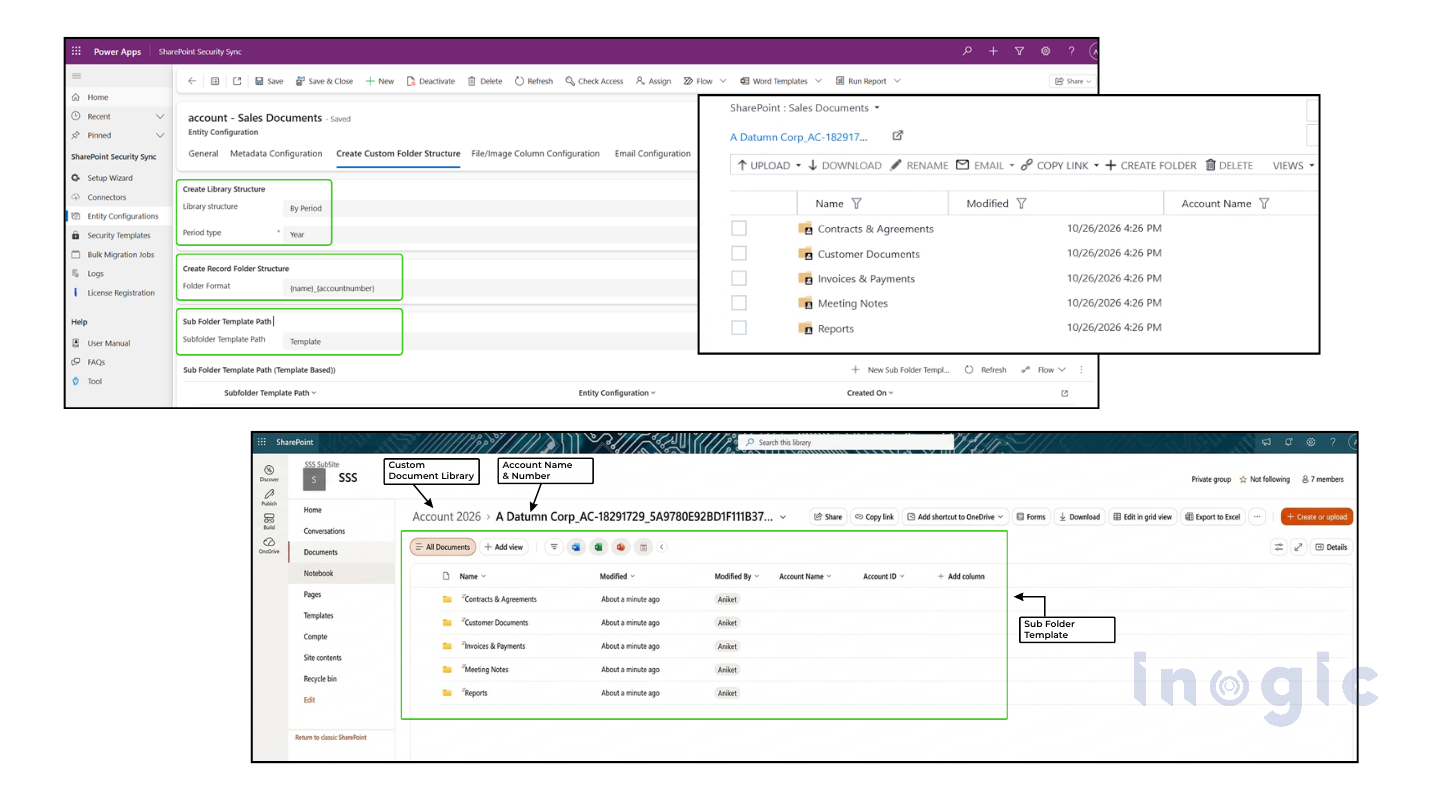
SharePoint Security Sync also supports subfolder structures, helping organizations create a hierarchy that reflects your business processes.
A well-planned folder structure makes documents easier to locate, supports better document organization, and helps you manage SharePoint’s 5,000-item List View Threshold through structured document storage.
Dynamics 365 SharePoint Metadata Mapping
Folders organize where you store your attachments. But how do you find attachments based on specific business information?
This is where SharePoint metadata becomes important.
Instead of relying only on folder names or document titles, organizations can use metadata columns to categorize and filter documents using relevant CRM information.
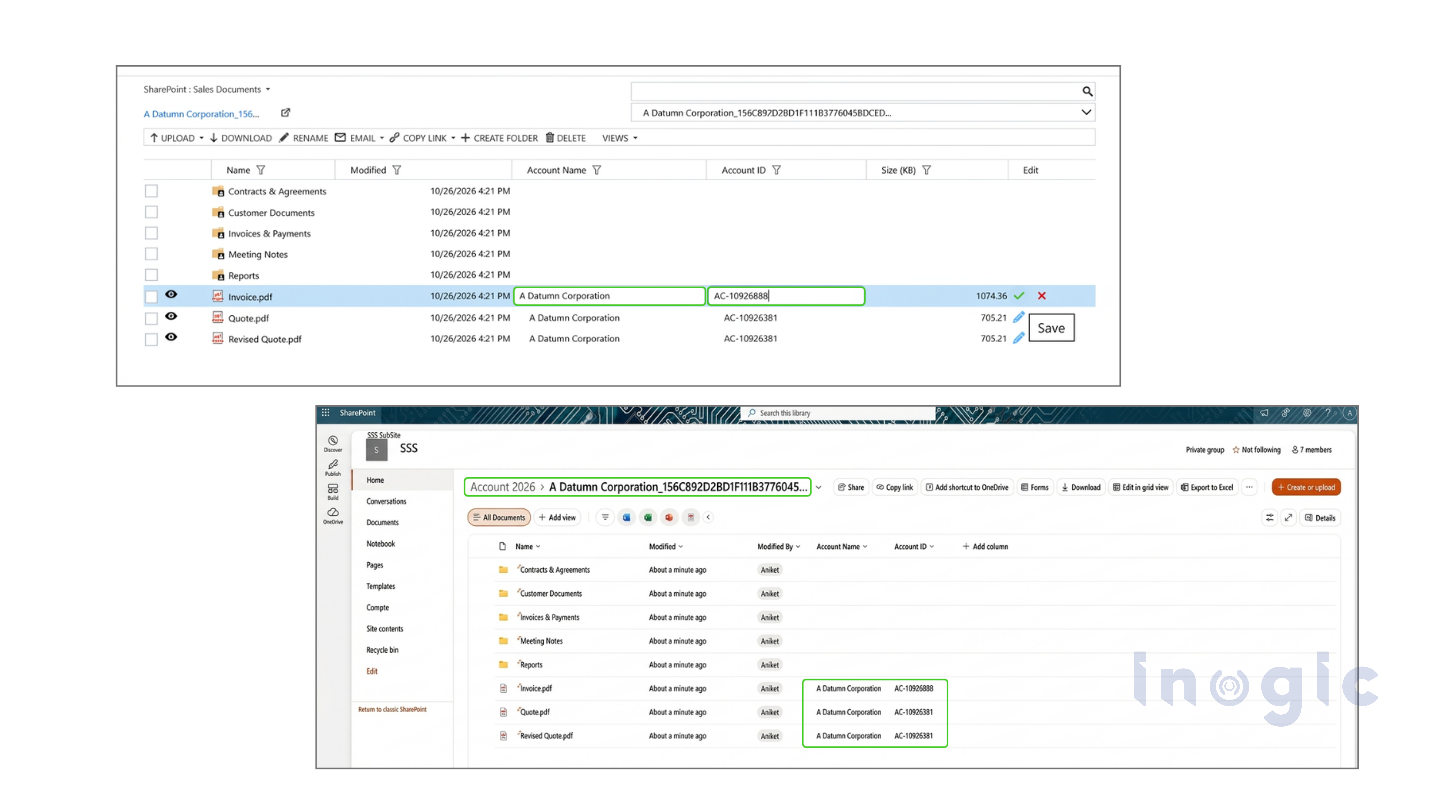
SharePoint Security Sync supports mapping Dynamics 365 fields to SharePoint metadata columns.
For example, businesses can associate documents with information such as:
- Account Name
- Customer Location
- Opportunity Name
- Estimated Close Date
- Customer Status
- Revenue
The solution supports different metadata column types, including text, choice, multiple-choice, lookup, date, number, and yes/no fields. It also provides metadata filters and supports custom SharePoint views within the document management interface.
This means users can:
- Categorize documents using relevant CRM information.
- Filter documents based on specific metadata values.
- Create and access custom document views.
- Maintain metadata when notes and attachments are migrated to SharePoint.
As a result, document retrieval becomes more organized and efficient, even when managing large volumes of business documents.
Discover all SharePoint Security Sync features: Explore the documentation
Reduce Dynamics 365 Storage Consumption
As organizations accumulate years of customer documents, notes, and email attachments, Dataverse storage consumption continues to grow, potentially increasing CRM storage costs. Storing these documents in SharePoint instead of Dataverse offers a more cost-effective way to manage growing document volumes.
With SharePoint Security Sync’s Bulk Migration and Synchronization capabilities, organizations can move existing notes, email attachments, and other CRM documents to SharePoint. Most importantly, automated permission synchronization ensures that moving documents to SharePoint does not mean compromising access control. Users can continue accessing their documents directly from Dynamics 365, while organizations free up Dataverse storage, reduce additional CRM storage costs, and maintain a structured, secure document management environment.
Keep Dynamics 365 Security in Sync with SharePoint
Managing your Dynamics 365 and SharePoint environments separately can create unnecessary work for your administrators and users. A successful Dynamics 365 and SharePoint integration should do more than synchronize files. You also need to maintain access control, organize documents around your business requirements, and make important information easier to find.
SharePoint Security Sync by Inogic brings these capabilities together in one solution.
With automated security privilege synchronization, custom folder structures, and Dynamics 365-to-SharePoint metadata mapping, enterprises can:
- Maintain consistent document access across Dynamics 365 and SharePoint.
- Build structured document libraries around business needs.
- Improve document search and retrieval using metadata.
- Reduce manual permission and document management efforts.
- Manage CRM documents directly from Dynamics 365.
Whether you are managing customer documents, project files, sales records, or business-critical information, SharePoint Security Sync helps extend your Dynamics 365 security model while making SharePoint document management more organized.
Ready to simplify your Dynamics 365 and SharePoint security management? Automate security synchronization, organize your SharePoint documents, and keep access aligned with your CRM security model using SharePoint Security Sync by Inogic, or visit Microsoft Marketplace to explore the solution and start your 15-day free trial.
Have questions or want to see how SharePoint Security Sync fits your business requirements? Email us at crm@inogic.com to schedule a personal demo. We’d be happy to help!
FAQs
- What is the difference between SharePoint folder structures and metadata?
Folder structures organize documents into hierarchical locations, such as customer, project, and department folders. Metadata categorizes documents using information stored in columns, making it easier to filter, search, and retrieve files.
- Can SharePoint folder structures be created using any Dynamics 365 CRM field?
Yes. SharePoint Security Sync allows organizations to build folder structures using relevant Dynamics 365 CRM fields. This includes organizing documents by customers, projects, cases, dates, or other business-specific fields.
- How does SharePoint’s 5,000-item List View Threshold affect document management?
SharePoint has a List View Threshold of 5,000 items for certain list and library operations. Large, unstructured libraries can encounter query and view limitations. Organizing documents into appropriate folders and using metadata-based views can help manage large document libraries more effectively.
- Do custom SharePoint folder structures also maintain Dynamics 365 security permissions?
SharePoint Security Sync combines custom folder organization with permission synchronization. It helps ensure that document access remains aligned with supported Dynamics 365 security permissions.
- Can I manage SharePoint documents directly from Dynamics 365 CRM?
Yes. SharePoint Security Sync lets users manage documents from within Dynamics 365, including uploading files through drag-and-drop, previewing, downloading, renaming, deleting, and working with document metadata.
- Can SharePoint Security Sync synchronize permissions for existing Dynamics 365 records and documents?
Yes. Its Bulk Synchronization Tool supports synchronization of existing records, documents, emails, and attachments to SharePoint, applying the appropriate security permissions during the synchronization process.