Ever asked Copilot a perfectly reasonable business question and gotten back a shrug, even though the data was sitting right there in Dataverse? That’s usually not a Copilot problem. It’s a language problem. Your team doesn’t talk in table and column names; you talk in “client,” “deal,” “ARR,” and “in the oven.” The AI, left to its own devices, only knows what the schema tells it, and schemas are rarely written in plain English.
Microsoft’s answer to this is the Dataverse semantic model, a new piece of Dataverse Intelligence that’s now in public preview. I spent some time setting it up and testing it against my own environment, and this post walks through what it is, how to turn it on, and a real before-and-after example of it doing its job.
What the semantic model actually is
The simplest way to describe it: the semantic model is a layer that sits between your raw Dataverse schema and any Copilot or agent experience that reasons over your data. Instead of an AI agent guessing what a column named ikl_targetarr or a picklist value like 3 means, the semantic model gives it a business-aware understanding of your tables, built partly from what’s already in your environment and partly from vocabulary you define yourself.
Microsoft describes it as combining three building blocks, and once you see them laid out, it’s a lot easier to understand what you’re configuring and why:
- Data scope with semantic indexing: Which tables are actually included. Only tables in scope contribute to what an agent understands, so this is your first lever for both relevance and performance.
- System-inferred signals: Relationships, public views with join conditions, sub-grid views, form display names, and column/table descriptions that the model reads automatically from metadata you’ve already configured. Sample data rows can optionally feed in too, though that’s off by default.
- The glossary: The human-curated layer. This is where you tell the model the things it can’t infer on its own: acronyms, internal slang, and department-specific shorthand.
Worth calling out: system views such as Quick Find, Advanced Find, Associated, and Lookup views don’t feed the model, and neither do personal views. For forms, only the display name is picked up, not the layout. Polymorphic relationships aren’t supported yet. None of this is a dealbreaker, but it explains why a view you expect to contribute to the model sometimes just doesn’t.
Why this is worth your time?
Four things stood out to me as the practical payoff:
- Better accuracy: The agent is interpreting intent instead of pattern-matching against column names.
- Faster answers: A well-scoped model means less ambiguity for the agent to resolve at query time.
- Less setup work over time: The model pulls from metadata you already maintain and refreshes on its own as your schema evolves.
- Consistency across agents: Every agent pointing at the same semantic model shares the same understanding, so you don’t get three different answers to the same question from three different bots.
Setting it up
You’ll need System Administrator access for this. There are two admin surfaces involved before you ever touch the semantic model itself.
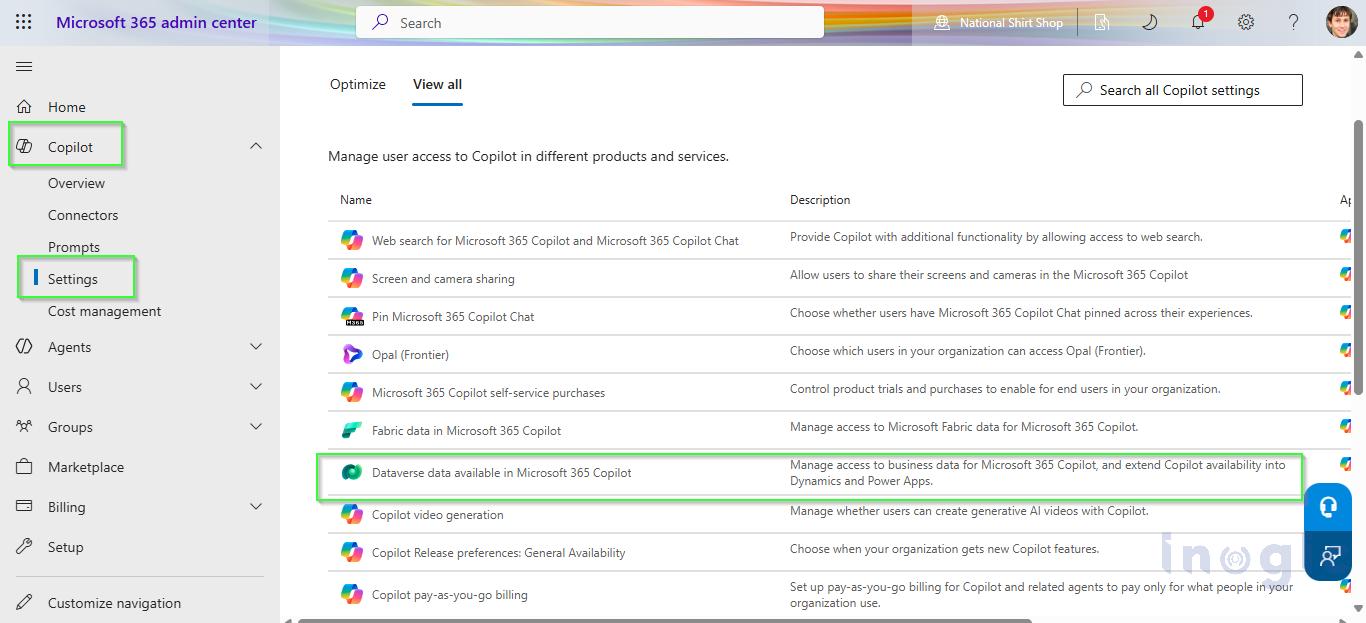
1. Microsoft 365 Admin Center
- Go to Copilot → Settings.
- Find “Dataverse data available in Microsoft 365 Copilot.”
- Choose the access level you want to allow for users querying Dataverse data through Microsoft 365 Copilot.

2. Power Platform Admin Center
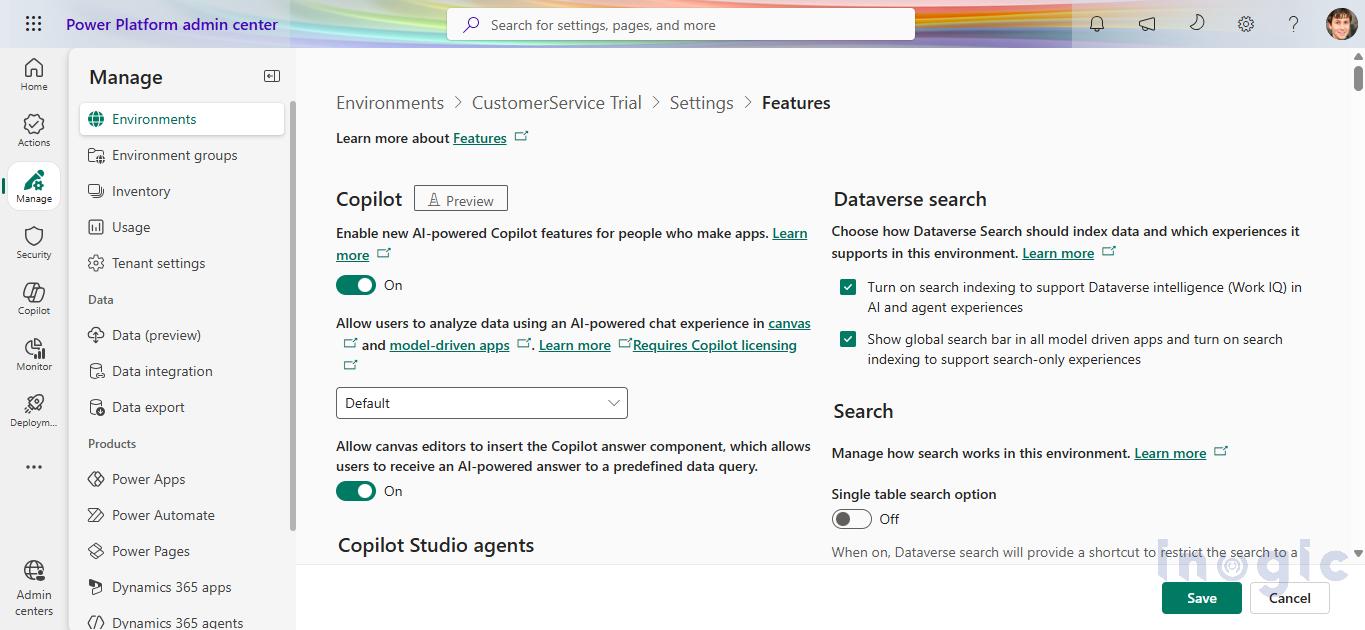
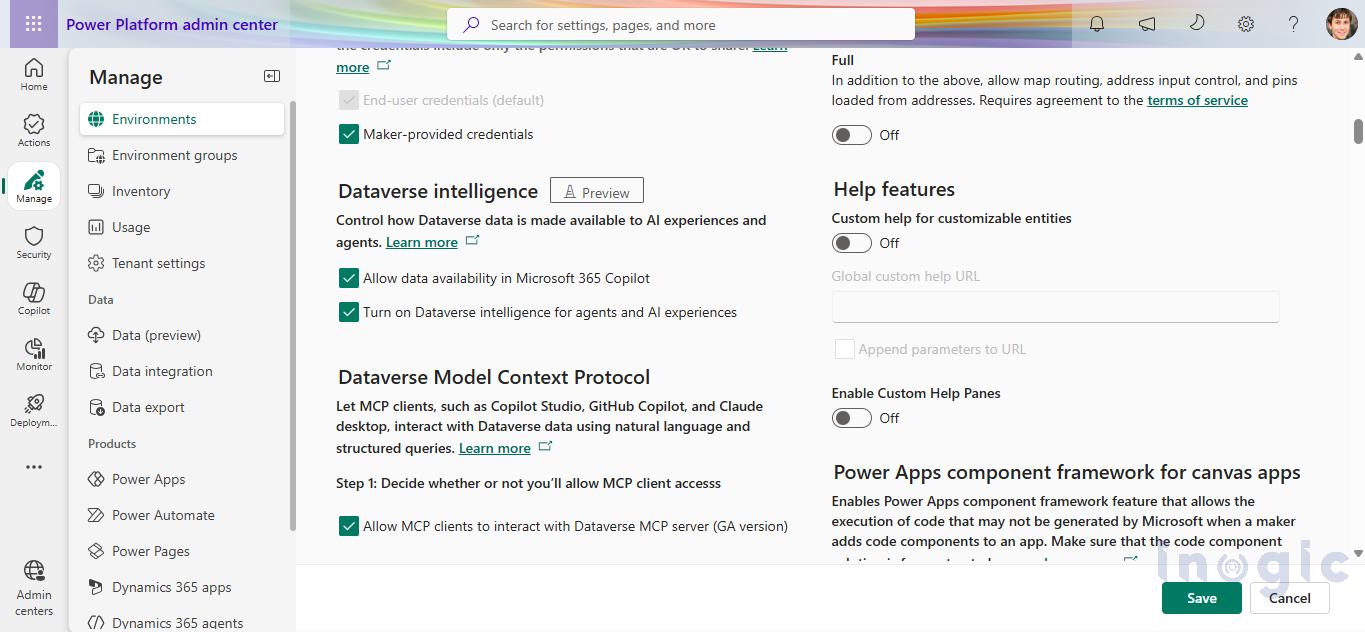
- Open your target environment, then go to Settings → Product → Features, and turn on the following:
- Under Dataverse Search: “Turn on search indexing to support Dataverse intelligence (Work IQ) in AI and agent experiences” and “Show global search bar in all model-driven apps and turn on search indexing to support search-only experiences.”
- Under Dataverse Intelligence: “Allow data availability in Microsoft 365 Copilot” and “Turn on Dataverse intelligence for agents and AI experiences.”
- Turn on both toggles in both groupings. This is the step that actually provisions Dataverse Intelligence for the environment. The semantic model itself gets created automatically once this is enabled; you don’t provision it by hand.
- Note that your environment should be a managed environment to try this out.


3. Find the model in make.powerapps.com
- Head to make.powerapps.com and look for Semantic Models (preview) in the left navigation. Pin it; you’ll be back here often while you’re tuning glossary terms.
- A couple of things to expect the first time through:
-
- Model creation kicks off automatically once Dataverse Intelligence is enabled, and initial generation can take up to two hours before anything shows up.
- Model creation kicks off automatically once Dataverse Intelligence is enabled, and initial generation can take up to two hours before anything shows up.
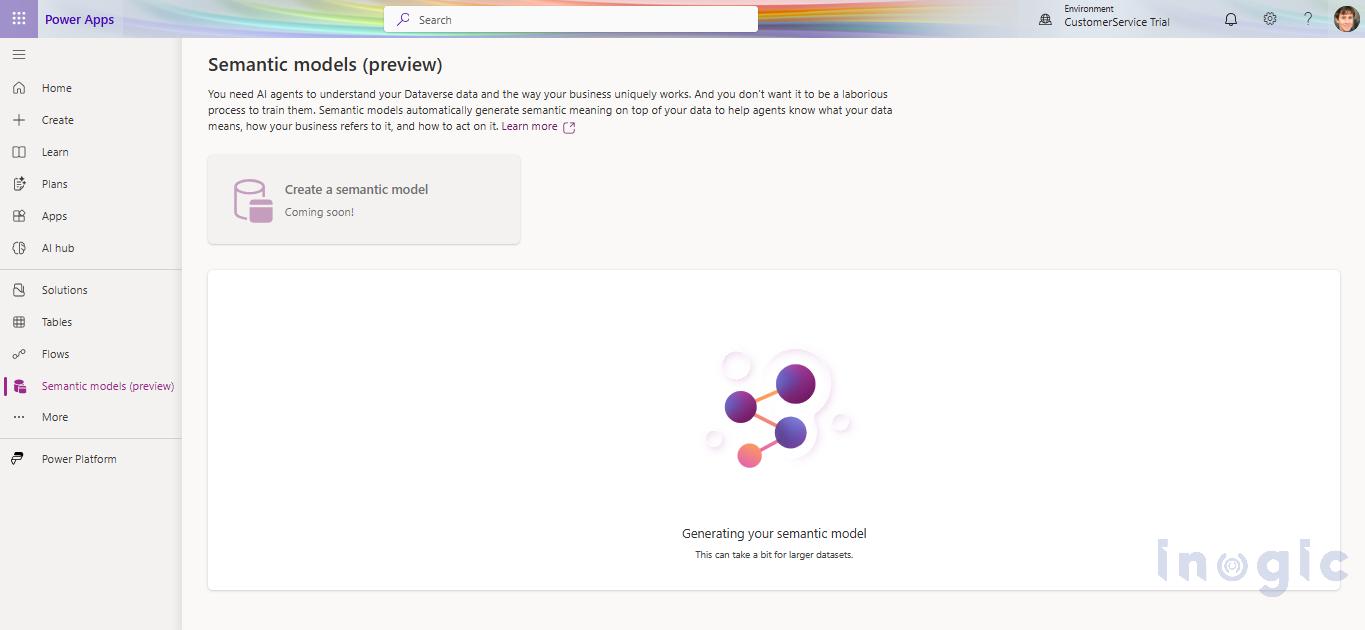
- This is a preview feature, so you can’t create a brand-new custom model yet. What you get out of the box is the SalesQnA model, pre-loaded with the standard sales entities, including Account, Opportunity, Lead, Product, and similar entities.
Configuring the model
Once the model exists, you get real control over it:
- Entity selection: Include or exclude tables to keep the model focused and fast.
- Relationships and views: For each table, choose which relationships and views actually feed the model. This helps it segregate data cleanly instead of drowning in noise.
- Glossary: Add or edit terms that map your organization’s day-to-day language onto specific tables, columns, and choice values.
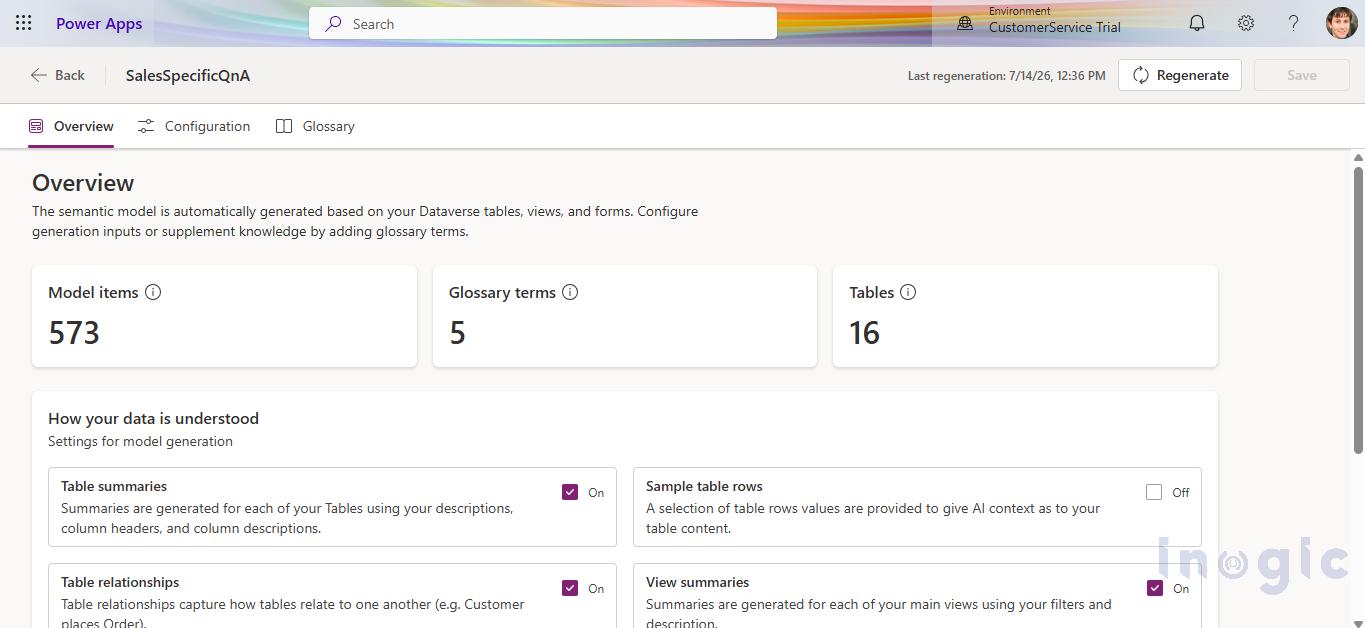 The glossary is genuinely the interesting part, so let’s put it to a real test.
Before and after: putting the glossary to work
Here’s the scenario. My Opportunity table has a few customizations on top of the standard fields: an ARR-style revenue column, a deal category choice column with a “Hardware Refresh” option, and a deployment stage choice column with a “Scoping” option. Nothing exotic, just the kind of custom fields most CRM implementations end up with.
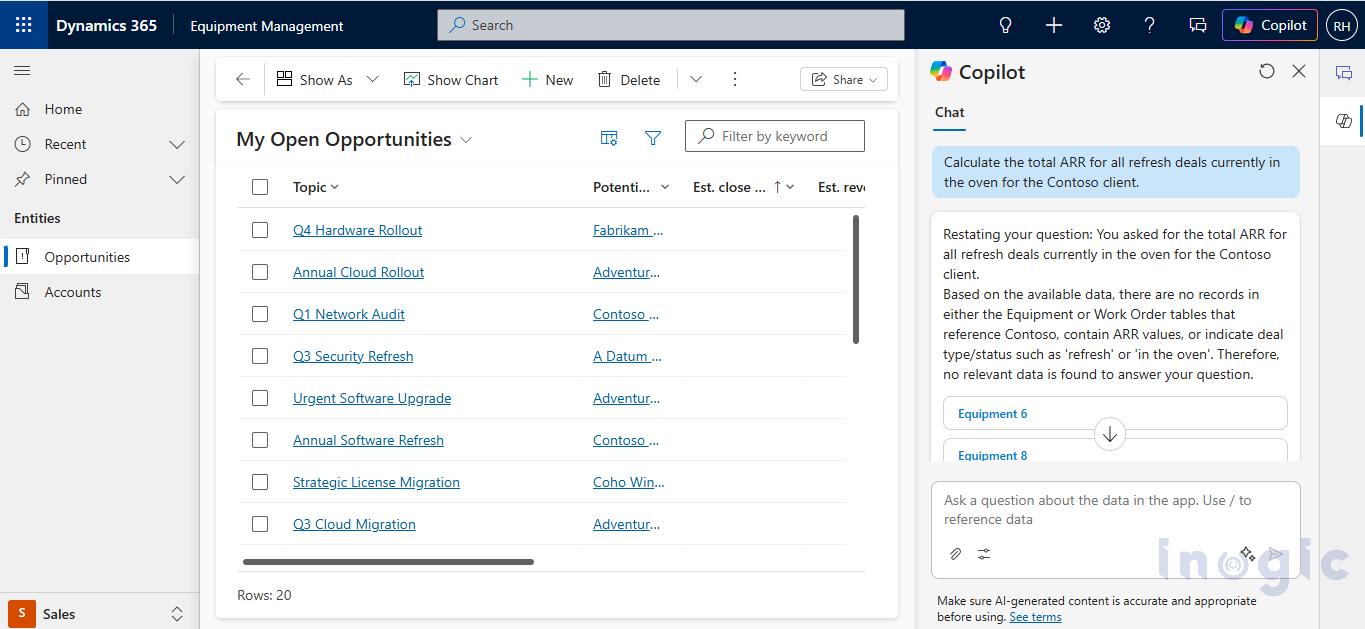
Before touching the glossary, I asked Copilot this, using the way my sales team actually talks:
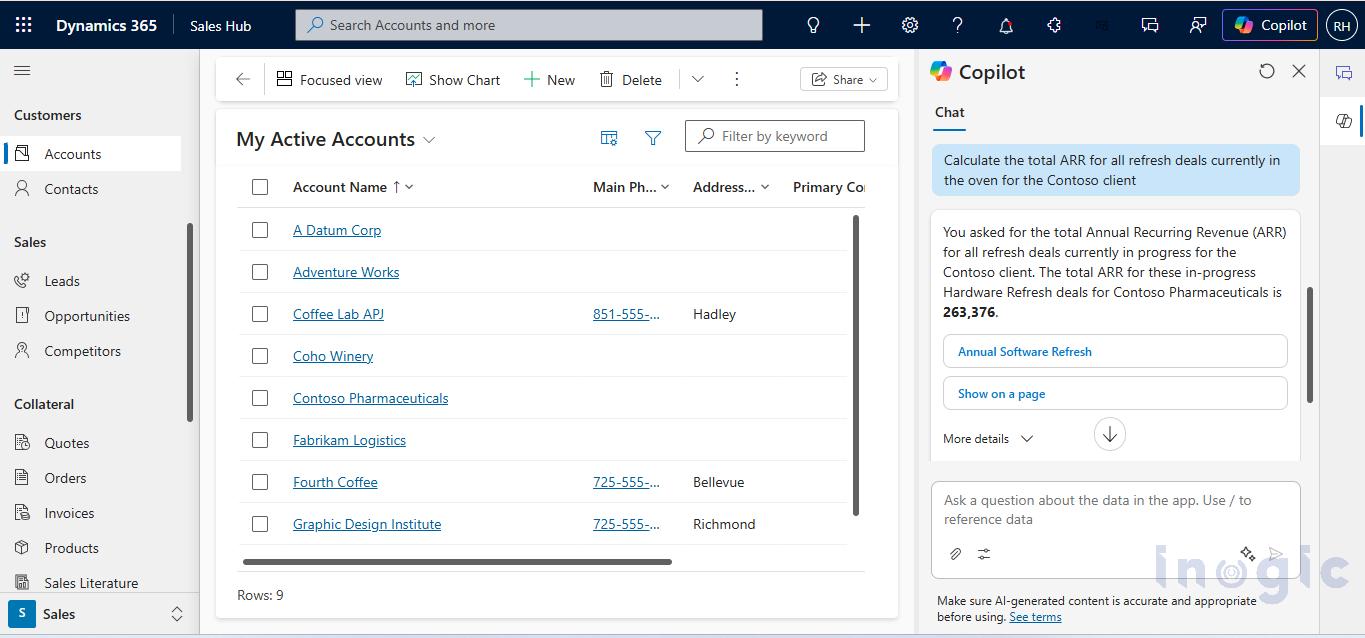
“Calculate the total ARR for all refresh deals currently in the oven for the Contoso client.”
It failed. Not because the data wasn’t there; it clearly was. The problem was that the agent had no way to know that “ARR” meant a specific custom column, that “refresh” meant a specific choice value, that “in the oven” meant another choice value entirely, or that “client” meant Account. It tried, and it came back with something generic and wrong. That’s the exact gap the semantic model exists to close.
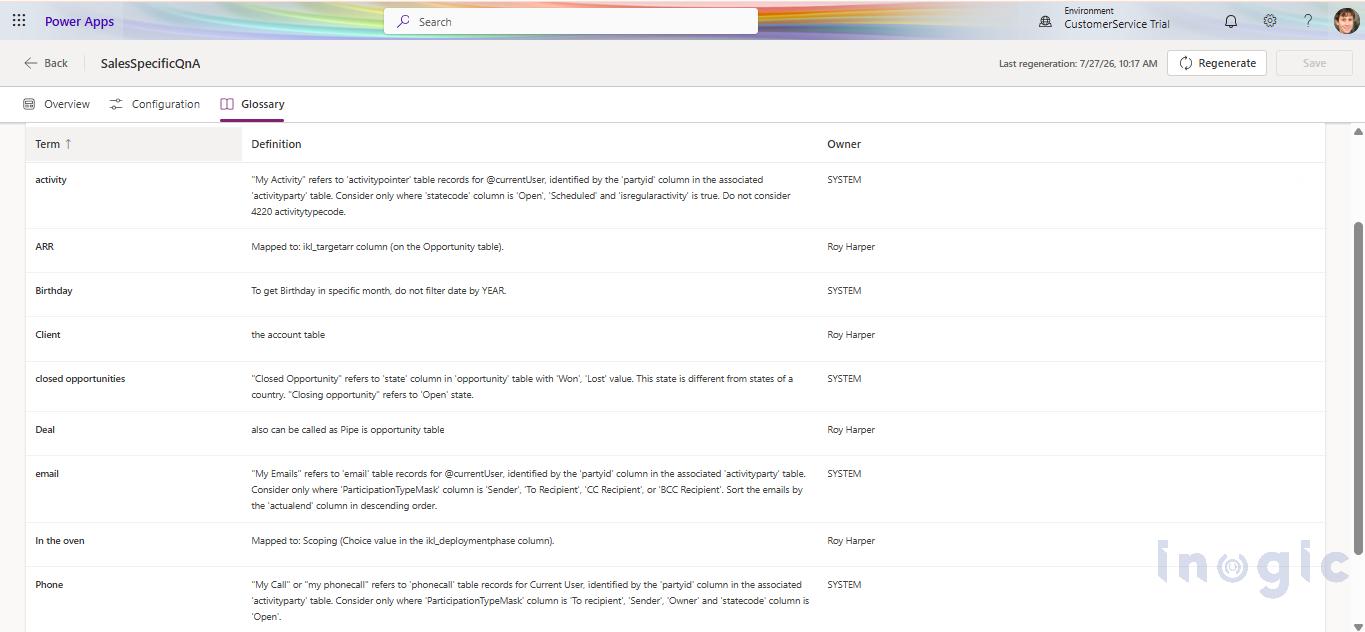
So I went into the SalesQnA model configuration, excluded everything except Account and Opportunity to keep regeneration quick, and added these glossary entries:
| Business term | Maps to |
| Client / Logo | Account table |
| ARR | The custom ARR column on Opportunity |
| Refresh | The “Hardware Refresh” choice value on the deal category column |
| In the oven | The “Scoping” choice value on the deployment stage column |
Glossary changes normally get picked up during the model’s regular 12-hour regeneration cycle, but you don’t have to wait. There’s a manual Regenerate button that syncs your changes on demand. I used it, waited for the status to flip from “Regenerating” back to a completed timestamp, cleared the chat, and asked the exact same question again.
This time, it worked. Correct records, correct math, and no follow-up clarification needed. Same question, same data; the only thing that changed was that the AI now had a translation layer between our internal shorthand and the actual schema.
 Why centralize this instead of configuring it per agent?
 Why centralize this instead of configuring it per agent?
If you’ve built agents in Copilot Studio before, this might feel familiar. You can already add synonyms and glossary terms when you add a Dataverse table as a knowledge source there. So what’s actually new?
The difference shows up the moment you need more than one agent. Say you’re building three or four agents for different teams, each grounded in the same Opportunity and Account data. Configuring glossary terms inside Copilot Studio means redoing that work agent by agent and keeping it in sync by hand as your terminology evolves. Define the same vocabulary once at the semantic model layer instead, and every consuming experience inherits it automatically. You maintain one glossary, not five.
It’s also just a cleaner architecture. You’re not duplicating grounding logic across bots; you’re centralizing it at the data layer and letting every agent on top of it stay consistent by default.
Where this shows up across the Microsoft AI stack
Once the semantic model is provisioned, Microsoft lists four experiences that consume it automatically. You don’t wire this up separately for each one:
- Copilot in Power Apps, inside model-driven apps.
- Microsoft 365 Copilot with Dataverse. This is also what powers the experience inside Teams, Outlook, and Word, since those all run on the same Microsoft 365 Copilot grounding rather than a separate configuration per app.
- Sales Agent in Microsoft 365.
- Copilot Studio agents that use Dataverse tables as a knowledge source.
A word of caution on scope: this list doesn’t currently include the Dataverse MCP Server. MCP is a separate, also-in-preview capability that exposes Dataverse tables and records as tools to MCP clients such as Copilot Studio, GitHub Copilot in VS Code, and Claude Desktop. Useful, but it’s a different integration path with its own governance and billing model, not a semantic-model consumer as of this writing.
If your goal is specifically to have Copilot Studio, Teams, or Microsoft 365 Copilot understand your business vocabulary, the semantic model and its glossary are the right layer. If your goal is to let a coding agent or an external LLM client query and manipulate Dataverse directly, that’s the MCP server, and it’s worth treating as a separate project with its own security review.
Current limitations to plan around
- No custom model creation yet: You’re working with the out-of-the-box SalesQnA model during preview.
- No ALM support: Environment copy or move operations aren’t carried over cleanly. After any copy or move, turn Dataverse Intelligence off and back on in the Power Platform Admin Center to force the model to reprovision.
- It’s preview, full stop: Don’t treat this as production-hardened yet, and keep an eye on the release notes as it matures toward general availability.
Conclusion
The real value here isn’t the demo-friendly “boom, it worked” moment; it’s what it replaces. Without this, closing the gap between how your business talks and how your schema is named means teaching every single agent your vocabulary by hand and hoping you remember to keep them all in sync. The semantic model turns that into a one-time investment: define your glossary once, scope your entities sensibly, and every Copilot experience sitting on top of Dataverse inherits that understanding automatically.
It’s still in preview, and there are real gaps. No custom models, no ALM story yet, but the direction is right. For anyone building or maintaining Copilot-grounded experiences on Dataverse, this is worth setting up in a sandbox environment now, so you’re not starting from zero when it reaches general availability.
Frequently Asked Questions
Does Copilot respect Dataverse security roles?
Yes. The semantic model doesn’t bypass Dataverse security. Copilot still operates within the permissions of the user making the request, so users can only access data they are authorized to see through their Dataverse security roles. The semantic model improves how Copilot understands the data; it does not change the underlying access controls.
What happens when security permissions change?
Changes to Dataverse security roles and permissions continue to apply to Copilot experiences. If a user loses access to a table or record, the semantic model doesn’t grant that access back. This distinction is important when implementing Dynamics 365 professional services, because semantic understanding and data security should be managed as separate layers.
Can it understand N relationships?
The semantic model can use supported relationships and relationship metadata to understand connections between tables, but polymorphic relationships are currently not supported. For more complex relationship structures, test the queries you expect users to ask rather than assuming every relationship will be interpreted automatically.
Can I include custom tables?
Custom tables can be included where they are supported by the semantic model configuration. This is particularly useful for organizations that have extended their CRM beyond the standard Account, Opportunity, Lead, and Product tables. If those custom tables are part of a larger Dynamics CRM development project, keeping their names, descriptions, relationships, and views well defined can also improve how the semantic model interprets them.
Can I include custom columns?
Yes. Custom columns can contribute to the semantic model, which is especially useful when your business uses internal terminology that doesn’t match the column’s technical name. The glossary can then connect terms such as “ARR” or “renewal value” to the appropriate custom column. This can be valuable in environments built through Dynamics CRM development services, where custom fields often reflect organization-specific processes.
Can I use custom entities with SalesQnA?
The current preview experience is centered around the out-of-the-box SalesQnA model and its supported tables. While you can configure the tables and data that contribute to the model, custom model creation is not currently available. If your SalesQnA scenario depends heavily on custom entities, validate the supported configuration in your environment before designing the full solution around it.
How do I connect a Copilot Studio agent to the semantic model?
You don’t typically connect the semantic model to each agent as a separate integration. Once the semantic model is provisioned and configured, supported Copilot experiences, including Copilot Studio agents using Dataverse tables as a knowledge source, can consume the semantic understanding. This is one reason Dynamics 365 Copilot services can benefit from a centralized semantic layer when multiple agents work with the same business data.
How do I maintain Dev → Test → Production?
This is one of the current limitations to plan for. The semantic model does not yet provide a mature ALM experience, so you shouldn’t assume that environment copy or move operations will carry everything over cleanly. During the preview, Microsoft recommends reprovisioning Dataverse Intelligence after certain environment operations. Teams using Dynamics 365 professional services should therefore include semantic model configuration and validation in their environment management process.
Can it be deployed through Azure DevOps?
The semantic model currently doesn’t have the kind of mature ALM support you’d normally expect for a solution that is fully managed through Azure DevOps pipelines. Treat the semantic model configuration separately from your standard solution deployment process until Microsoft provides broader ALM support. For organizations managing Dynamics 365 development services through structured DevOps practices, this means including a manual validation or reprovisioning step where required.
What licenses are required for the Dataverse semantic model?
The Dataverse semantic model is currently a preview capability, so licensing can depend on the Microsoft 365 Copilot, Dynamics 365, and Power Platform capabilities you’re using alongside it. You should verify the current Microsoft licensing requirements for your specific environment before enabling it. If your implementation involves broader Dynamics 365 development services, licensing and environment architecture should be reviewed together rather than in isolation.