 Let us be honest. Managing duplicate records in Dynamics 365 CRM has always been… a lot. Hours of manual review. Guesswork on which record to keep. Field-by-field comparisons that could put anyone to sleep. If you have been waiting for something smarter to come along, we have got some very exciting news for you.
DeDupeD by Inogic, the trusted tool to detect and remove duplicates from Dynamics 365 CRM, has just levelled up in a big way. We are talking full-blown AI integration, powered by InoWiz, Inogic’s very own AI engine.
Here are the 4 key takeaways:
- AI now recommends the best field values when you merge duplicate Dynamics 365 records, with confidence scores and clear reasoning.
- AI picks the strongest master record for you, no more debating which duplicate should survive.
- High-volume merge queues move faster with entity-level auto AI suggestions that fire the moment the merge screen loads.
- You stay in control; every AI suggestion is advisory, and the final merge never happens without your approval.
What is AI-based Data Deduplication in Dynamics 365 CRM and Why Should You Care?
InoWiz is the AI engine that now lives inside DeDupeD. Think of it as your sharpest team member who never gets tired, never makes impulsive decisions, and always picks the best data to keep. When you trigger a merge, AI steps in, analyses every conflicting field across your duplicate records, and recommends the optimal value for each one, complete with a confidence score and a plain-language reason for every suggestion.
This is not a gimmick. This is enterprise-grade AI-based data deduplication in Dynamics 365 CRM, built for teams that actually care about data quality.
AI-Powered Duplicate Merge in Dynamics 365 CRM: How It Works
Here is where things get really interesting. When you open the DeDupeD merge screen, you now see an AI Suggestions toggle. Check it, and InoWiz fires off an inference call to your configured Azure OpenAI model.
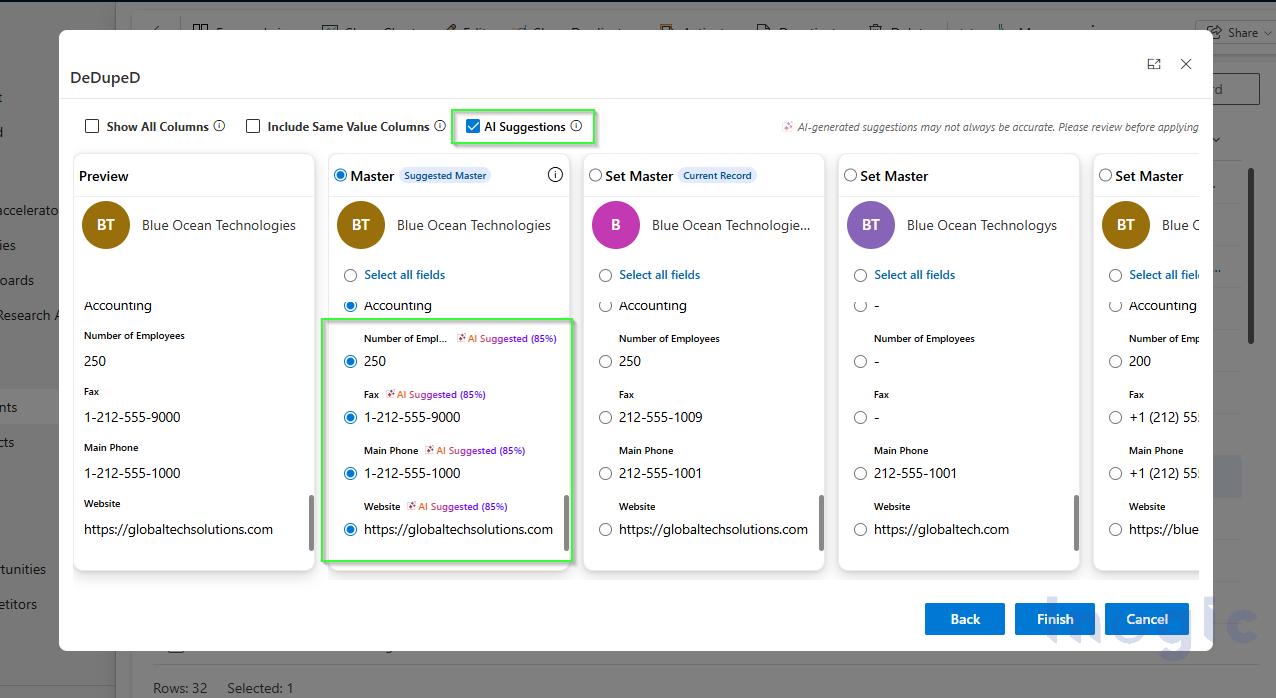
Within seconds, every conflicting field on your merge screen is annotated with an AI-suggested badge showing a confidence percentage. These are not random picks. The AI evaluates:
- Field completeness and data richness
- Format correctness, such as phone number standards
- Cross-field consistency, for example, evaluating address components as a group, not in isolation
- Business context and overall information quality
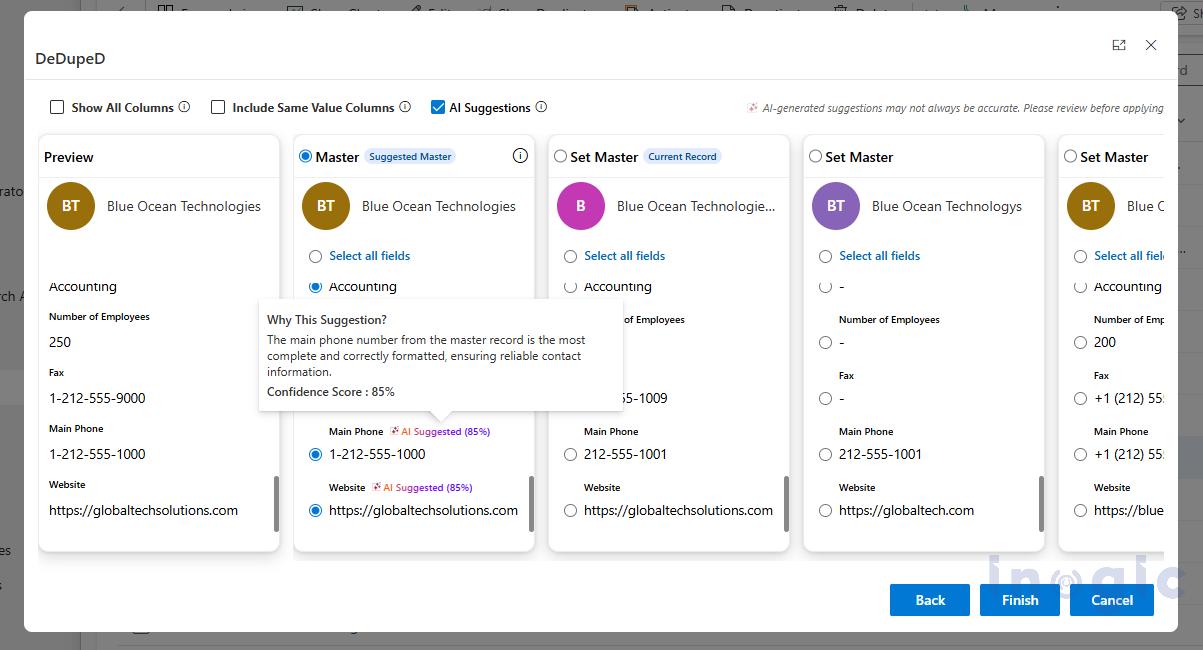
Address fields, for instance, are evaluated as a cohesive unit, city, state, country, and street all together. This prevents the AI from picking a city from one record and a country from another. It is thoughtful, not just fast.
Each AI Suggested badge is clickable. Hover over it and a “Why This Suggestion?” tooltip opens up with a plain-language rationale and a numeric confidence score. High confidence means 90% and above. Moderate confidence falls in the 70 to 89% range. You always know exactly why the AI picked what it picked.
And if you disagree with a suggestion? Just click a different radio button. You are always in control. This is a human-in-the-loop design, which means AI assists, but you decide. The merge does not happen until you click Finish.

AI-Based Master Record Selection to Merge Dynamics 365 CRM Records
One of the most time-consuming parts of any duplicate merge is deciding which record should survive as the master.
- Should it be the oldest one?
- The most recently modified?
- The one with more fields filled in?
Teams spend real time debating this. Not anymore.
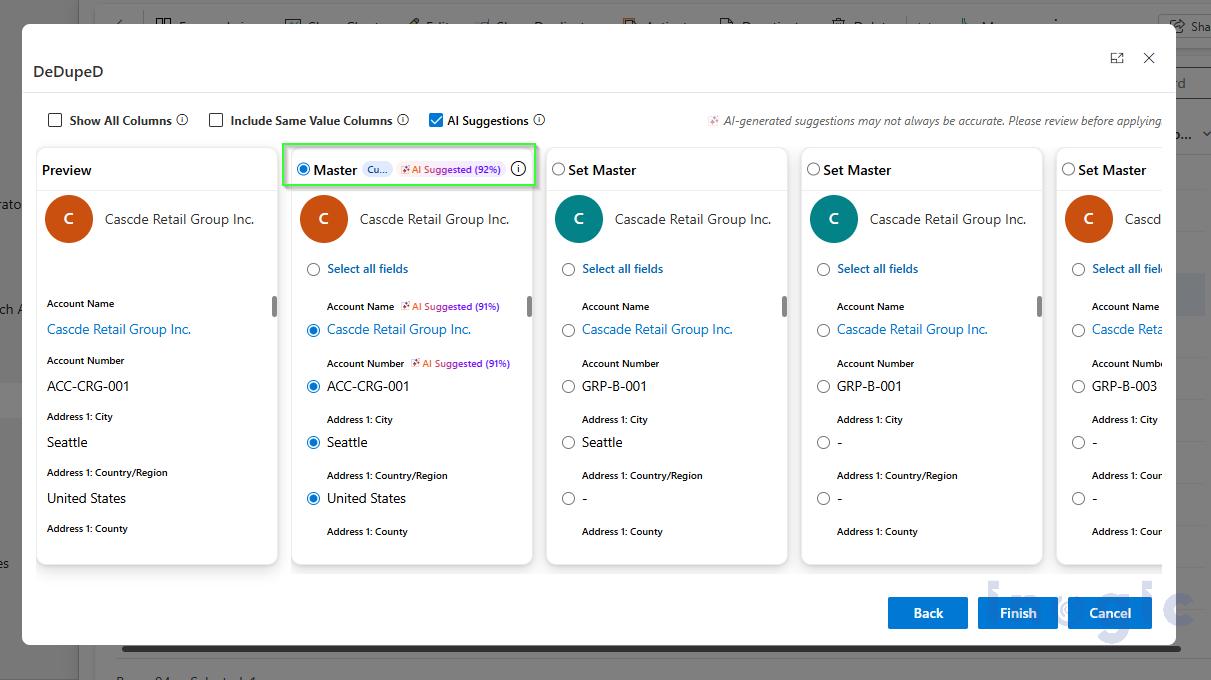
DeDupeD now includes AI-based master record selection to merge Dynamics 365 CRM records. When you initiate a merge, the AI analyses all duplicate records and recommends the one that should serve as the surviving master, based on:
- Overall record completeness
- Quality of address and contact information
- Availability of business identifiers
- Data consistency and reliability
- Overall information richness across the record
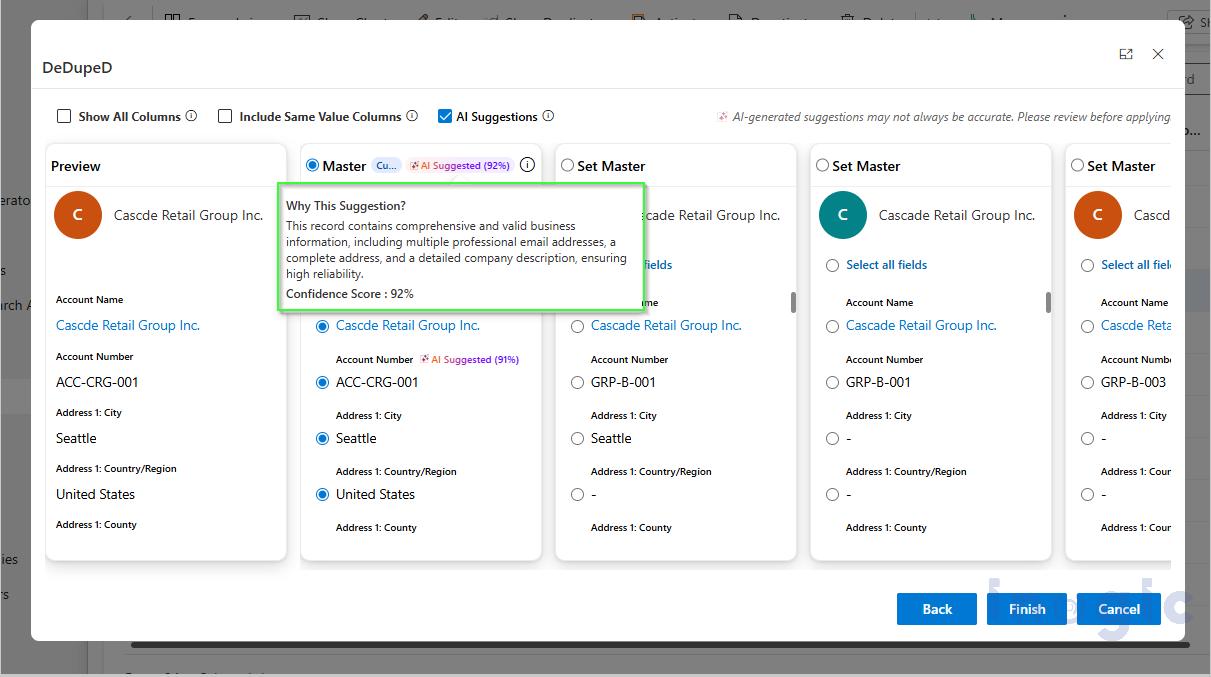
The recommended master record gets highlighted with a confidence score. Click the info icon, and you get a full plain-language explanation of why that record was chosen.
Want to pick a different master? Go ahead. Click Set Master on any record you prefer. The AI recommendation stays visible for reference, but the final call is yours.
This is what truly intelligent data consolidation looks like.
Built for Scale: Auto AI Suggestions and Token Governance
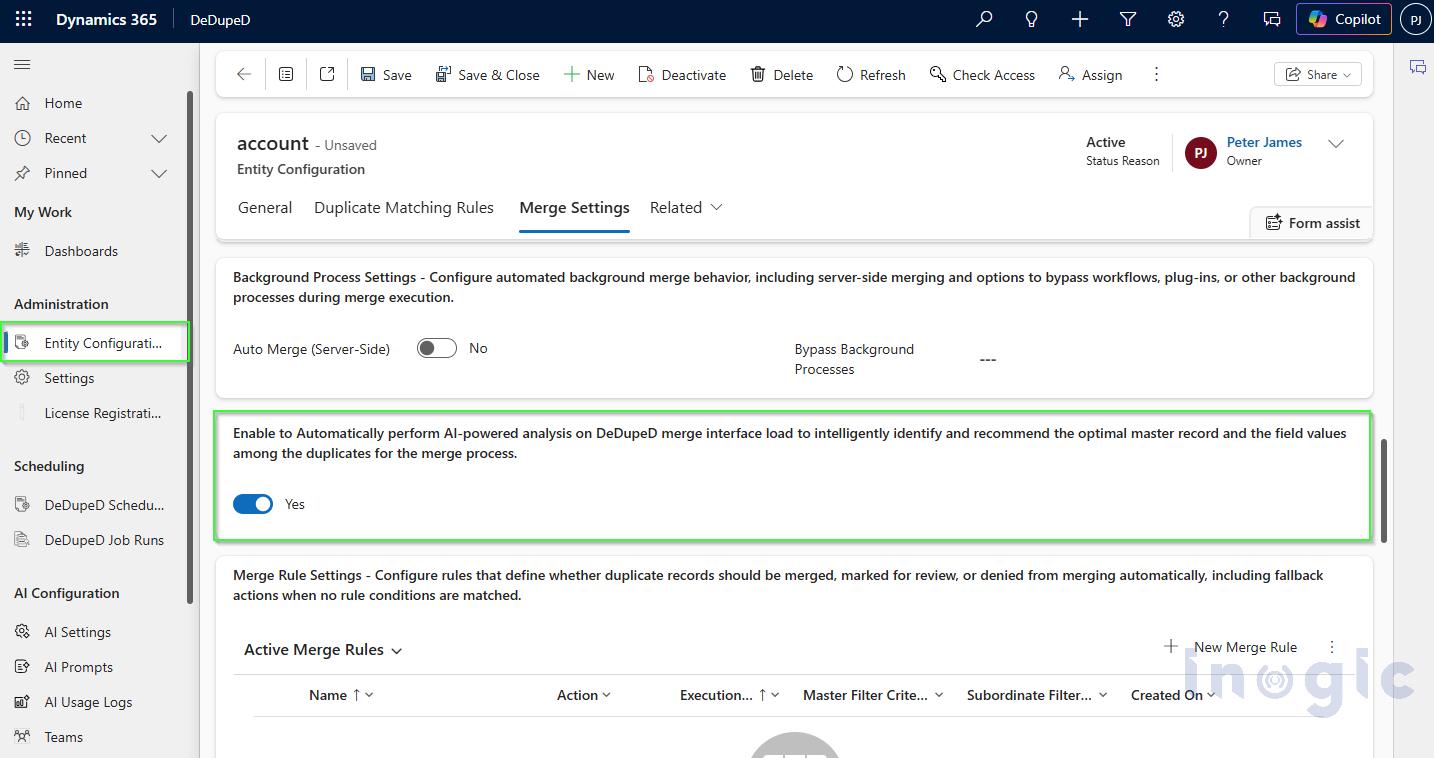
For teams running high-volume deduplication workflows, manually enabling AI Suggestions on every merge screen adds friction. DeDupeD addresses this with an entity-level configuration that auto-enables InoWiz the moment the merge screen loads for entities like Account, Contact, or Lead.
Set it once per entity, and your team does not have to think about it. The AI fires automatically in the background while the screen renders. Merge queues move faster. Data quality stays consistent.
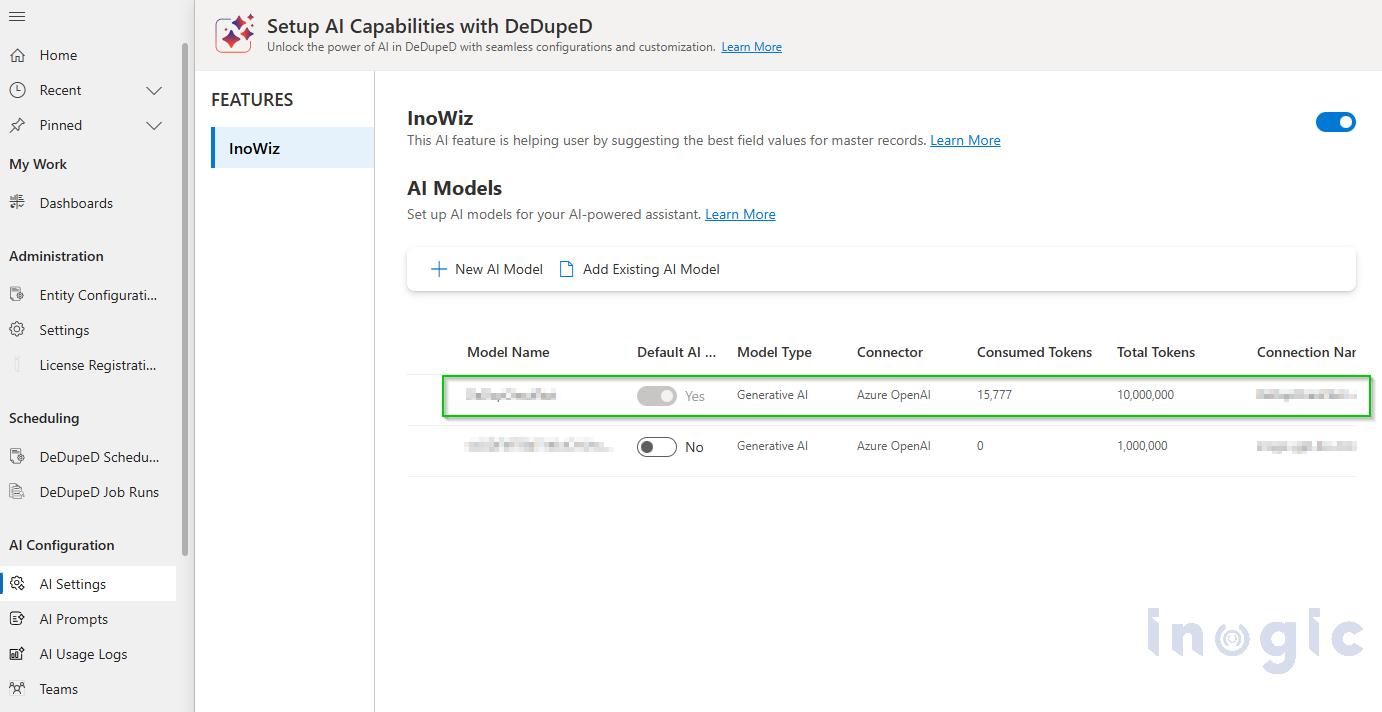
There is also full token budget management built in. Administrators can set per-model token caps, monitor consumed tokens in real time through AI Usage Logs, and rotate API keys without interrupting ongoing operations. For enterprises with strict cost governance requirements, this is a must-have.
Flexible AI Configuration: Your Model or Ours
When you activate your DeDupeD license, Inogic automatically provisions a default AI model so you can start using InoWiz right away, no setup required. But if your organization has specific compliance requirements or wants to use a dedicated Azure OpenAI resource, you can plug in your own.
AI Prompts give you even more control. The default Field Suggestions prompt is pre-wired and ready to go. Need custom survivorship logic for a specific business unit? Add a User Instruction to override the default prompt. You get fine-grained control over exactly how the AI reasons about your data, without writing a single line of code.
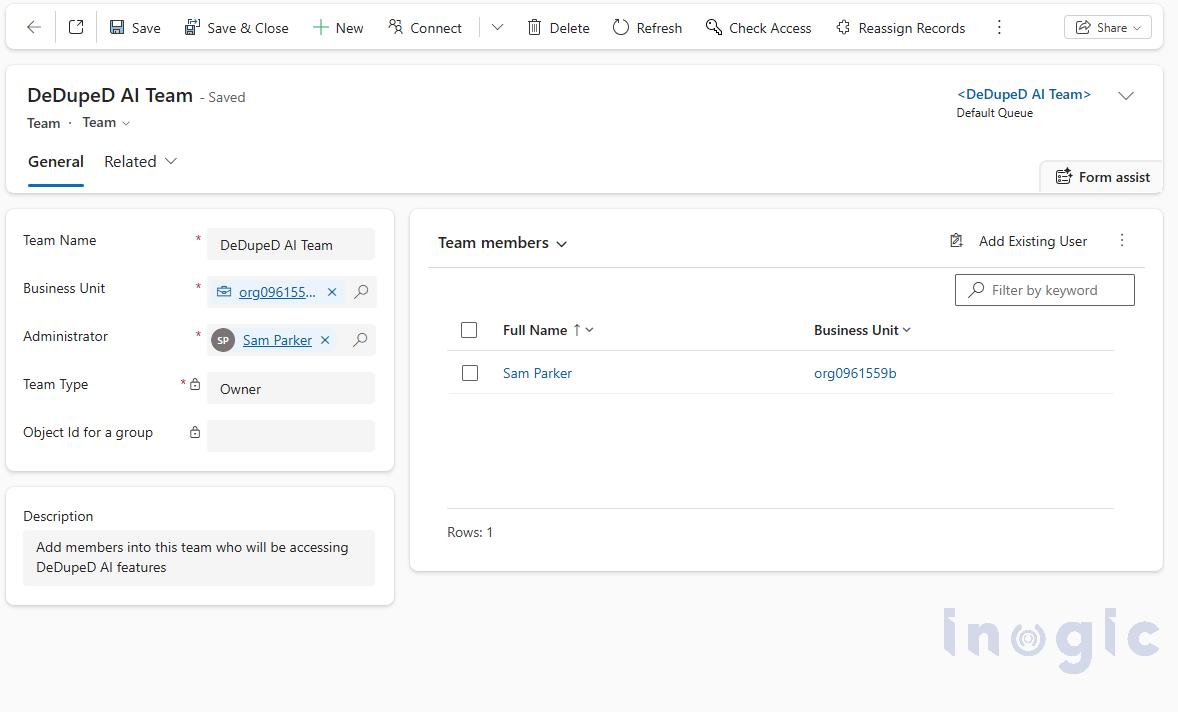
Access to AI features is also managed through DeDupeD AI Teams, a role-based access control layer built right into the application. Only authorized users see AI suggestions, keeping your governance framework intact.
Why This Matters for Your CRM Data Quality
Duplicate records in Dynamics 365 CRM are not just a nuisance. They distort pipeline reporting, inflate marketing lists, create awkward double-touches with customers, and erode trust in your CRM data over time. Teams that do not have a reliable way to detect duplicates in Dynamics 365 CRM and remove duplicates from Dynamics 365 CRM are essentially flying blind.
With InoWiz AI, DeDupeD now brings you:
- Faster merge decisions backed by AI analysis
- Transparent, auditable recommendations with plain-language rationale
- Intelligent master record selection that goes beyond simple timestamp logic
- Field-level AI suggestions with confidence scores you can trust or override
- Enterprise-grade controls over AI models, prompts, tokens, and access
This is not just a feature update. This is DeDupeD repositioning itself as an AI-first application for Dynamics 365 data quality, and Inogic doubling down on its commitment to bringing genuinely intelligent solutions to the Microsoft ecosystem.
Ready to Experience AI-Powered Deduplication in Dynamics 365 CRM?
If your team is still spending hours manually reviewing and merging duplicate records in Dynamics 365 CRM, it is time to change that. DeDupeD with InoWiz is available now.
Try it out, explore the AI suggestions on your own data, and see the difference intelligent deduplication makes.
Start your 15-day free trial from the Inogic website or Microsoft Marketplace.
For any questions about setup, custom prompts, or enterprise configuration, reach out to Inogic at crm@inogic.com. The team is ready.
Welcome to the smarter era of Dynamics 365 data management. It has been worth the wait.