Microsoft Dynamics 365 CRM is a powerful application that can significantly improve the productivity of an organization. To realize the true potential of the application, it is essential to know how the users are adopting Dynamics 365.
The first step to improve user adoption of the application is to educate the users about the benefits of the application. After educating and training the users, the next step is to monitor their activity in the application to track usage of the application and identify the need for further training.
This is where a productivity solution like User Adoption Monitor comes into the picture!
User Adoption Monitor enables managers to track and monitor the user activity of Dynamics 365 CRM users and improve the user adoption of Dynamics 365 by getting insightful utilization reports of user activities.
How can you monitor Dynamics 365 user adoption on a daily, weekly, or monthly basis?
For better analysis, managers can configure the results to be summarized on a daily, weekly or monthly basis. Once the User Adoption Monitor solution is installed and activated, a User Adoption Configuration record is automatically created.
User Adoption Monitor helps you to configure tracking for the operations below. Users can track OOB as well as custom entities.
- Lead – Create
- Lead – Closed
- Account – Create/Update
- Phone Call – Closed
- Appointment – Closed
- Opportunity – Create
- Opportunity – Won
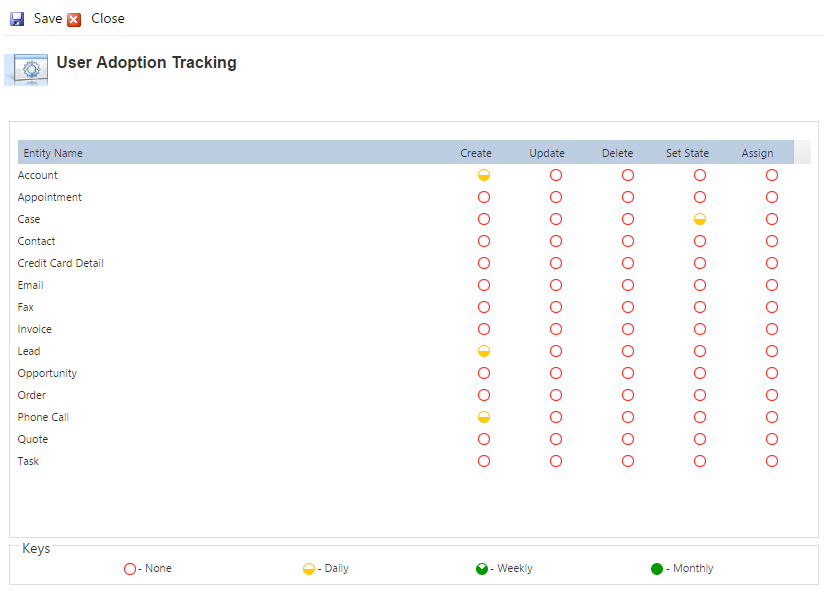
On the same screen, you can also specify which actions need to be tracked per entity in a customized manner. Just click on the red circle (O) for the period you would like the tracking information to be summarized by. Let us understand what these terms None, Daily, Weekly, and Monthly- specify.

The user can also use this tracking data to create visualizations using OOB charts and have them presented in Dynamics CRM Dashboards.
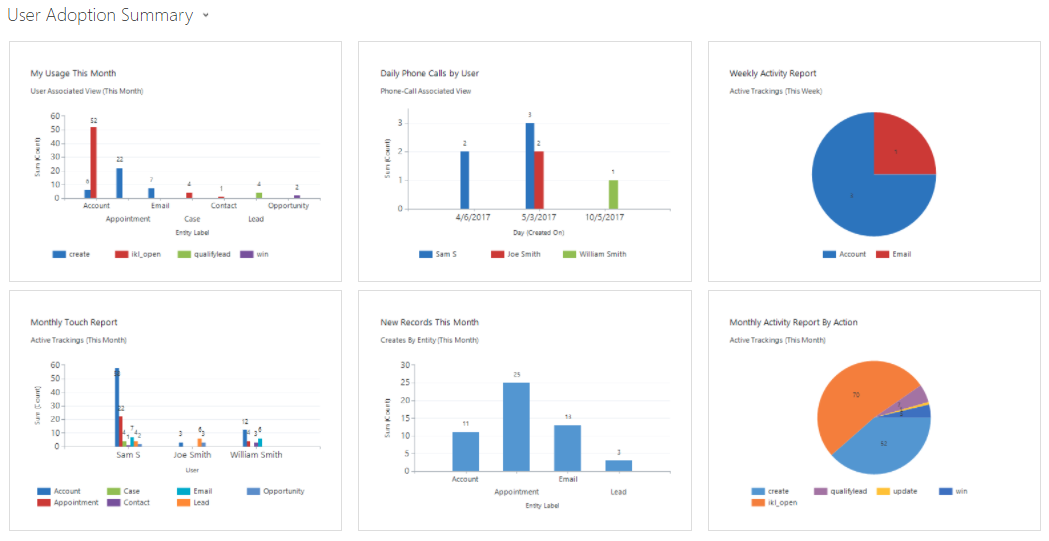
By monitoring the daily actions of Dynamics CRM users, managers can then motivate them to be more active on Dynamics 365, thus increasing overall productivity and efficiency of the organization.
Analyze and evaluate users performance and increase user adoption of Dynamics 365 CRM by using the User Adoption Monitor productivity app. User Adoption Monitor is a productivity app that enables managers to track and monitor user activity or actions and get reports for the same at various frequency periods, such as daily, weekly, or monthly. Managers and administrators can make strategic decisions about training and enhance business processes to increase the user adoption of CRM based on the insightful utilization reports provided by the tool. It is available for Dynamics CRM 2013 & above on-premises, partner hosted, and Dynamics 365, V9.0.
Get started with User Adoption Monitor! Download your free trial from our Website or Microsoft AppSource.
We would like to take a moment to introduce our new product Alerts4Dynamics to you. Alerts4Dynamics lets you schedule and manage alerts in Dynamics 365 CRM to notify users about the updates in CRM, due invoices, reminder to send quotes, etc. You can define target audience and send them priority based alerts via pop-ups, form notifications and emails. You can also view the log of read/dismissed alerts by users and also create alerts for multiple records by defining rules.