In Microsoft Dataverse, Power Automate flows are commonly used to execute business logic when records are created, updated, or deleted. They work well for most user-driven and real-time business operations.
However, in certain scenarios such as integrations, background jobs, bulk data operations, or system maintenance tasks running these flows is not always required and can negatively impact performance or cause unintended automation triggers.
To address this, Microsoft provides a way to bypass Power Automate flow execution when performing operations through the Dataverse SDK. This allows developers to update or delete records without triggering associated flows, giving greater control over when automation should or should not run.
In this blog, we’ll explore when and why bypassing Power Automate flows makes sense, how it works at a technical level, and what to keep in mind before using it in production environments.
Why Bypass Power Automate Flows?
Bypassing flows is useful when the operation is system-driven and the flow logic is not needed.
Some common reasons include:
- Avoiding unnecessary flow execution during background operations
- Improving performance during bulk updates or migrations
- Preventing flows from triggering repeatedly or causing loops
- Keeping business automation separate from technical or maintenance logic
This approach ensures that Power Automate flows run only when they genuinely add business value, rather than during behind-the-scenes system updates.
To better understand the impact of bypassing flow execution, watch this short demo comparing normal record updates with bypass-enabled updates in Dataverse.
Steps to Perform
For demonstration purposes, the logic is implemented using a desktop application. The objective is to clearly compare a standard update operation with one that bypasses Power Automate flow execution.
In both scenarios:
- The same account record is updated
- The only difference is whether the bypass flag is applied during the update request
Update Event Without Bypass
In this scenario, the record is updated using the standard SDK request without any bypass flag.
/// <summary>

/// Update the record Account record

/// </summary>

/// <param name="service"></param>

private static void UpdateRecord(CrmServiceClient service, string accountName, Guid accountId)

{

try

{

//Step 1: Get Record to update

Entity ent = new Entity("account", accountId);

#region Create Account name

ent["name"] = accountName;

#endregion

// Step 2: Update

service.Update(ent);

Console.WriteLine($"Record updated successfully. {DateTime.Now}");

}

catch (Exception ex)

{

SampleHelpers.HandleException(ex);

}
}

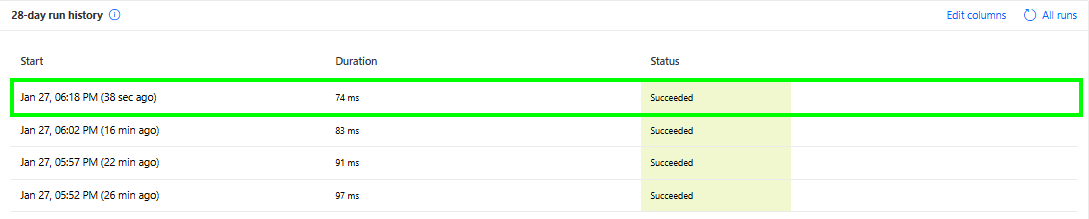
Observed behavior:
- The update operation succeeds
- The associated Power Automate flow is triggered
- Any downstream logic defined in the flow executes as expected (for example, SharePoint operations, notifications, or validations)
This is the default and expected behavior when performing update operations through the SDK.
Update Event with Power Automate Flow Bypass
In this scenario, the same update operation is executed, but the request includes the bypass flag to skip Power Automate flow execution.
/// <summary>

/// Update the record Account record with bypass logic

/// </summary>

/// <param name="service"></param>

private static void UpdateRecordWithBypass(CrmServiceClient service, string accountName, Guid accountId)

{

try

{

//Step 1: Get Record to update

Entity ent = new Entity("account", accountId);

#region Create entity record object

ent["name"] = accountName;

#endregion

// Step 2: Create delete request

var updateRequest = new UpdateRequest

{

Target = ent

};

// Step 3: Bypass Power Automate flows

updateRequest.Parameters.Add("SuppressCallbackRegistrationExpanderJob", true);

// Step 4: Execute

service.Execute(updateRequest);

Console.WriteLine($"Record updated with bypass successfully. {DateTime.Now}");

}

catch (Exception ex)

{

SampleHelpers.HandleException(ex);

}
}


Observed behavior:
- The record is updated successfully.
- Power Automate flow does not execute.
- No SharePoint or automation logic tied to the flow is triggered.
This allows the system to perform controlled updates without affecting existing automation logic.
Conclusion
Bypassing Power Automate flows in Microsoft Dataverse is a powerful capability designed for advanced scenarios, such as:
- System integrations
- Maintenance or cleanup jobs
- Bulk updates and data migrations
When used appropriately, it helps improve performance, avoid unnecessary automation, and maintain clean separation between business logic and technical processes.
However, this feature should be applied carefully and intentionally. Overusing it can lead to missed automation or inconsistent system behavior. When used in the right context, it results in cleaner implementations and more predictable outcomes.