Microsoft Dynamics 365 CRM uses a structured Role-Based Access Control (RBAC) model to secure records at the user, team, business unit, and organization levels. However, when documents are stored in SharePoint using native server-based integration, record-level security does not automatically extend to the corresponding document folders.
This creates a security gap between:
- Dataverse (CRM security authority)
- SharePoint (document storage platform)
In this article, we will explore:
- How RBAC works in Dynamics 365
- How native SharePoint integration manages documents
- Why native integration does not enforce CRM security
- How SharePoint Security Sync enforces RBAC across systems
- The technical architecture behind secure permission synchronization
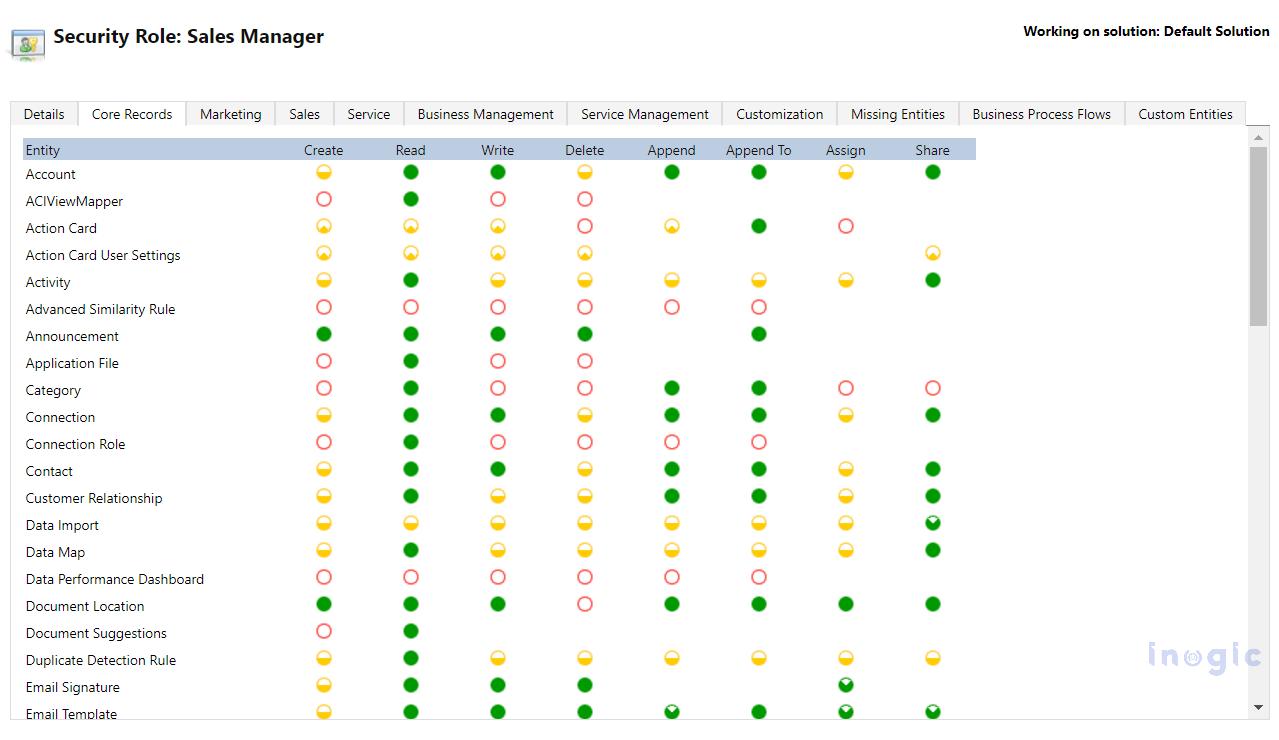
What Is Role-Based Access Control (RBAC) in Dynamics 365?
Role-Based Access Control (RBAC) is a structured access model where:
- Users are assigned security roles
- Roles define privileges
- Privileges determine allowed actions and access depth
Core Components of RBAC in Dynamics 365
- Users
Authenticated through Azure Active Directory. - Security Roles
Define permissions such as:
- Read
- Write
- Create
- Delete
- Append
- Share
- Assign
- Privilege Depth Levels
Each privilege can apply at:
- User level
- Business Unit level
- Parent-Child Business Unit level
- Organization level
- Ownership Model
Records are:
- User-owned
- Team-owned
Access is evaluated as:
User → Assigned Role → Privileges → Access Depth → Record Ownership/Sharing
This ensures granular and structured record-level security within CRM.

How SharePoint Document Integration Works in Dynamics 365
Dynamics 365 supports server-based SharePoint integration for document storage.
Basic Workflow
- SharePoint is configured as a document management system.
- Document locations are mapped to CRM entities.
- When a record is created, a corresponding SharePoint folder is generated.
- Documents uploaded from CRM are stored in that folder.
Authentication occurs through Azure AD.
Default Permission Behavior
By default:
- SharePoint folders inherit permissions from the parent document library.
- CRM record-level security is not automatically applied to SharePoint folders.
- Access to documents is controlled by SharePoint permissions, not CRM RBAC evaluation.
This separation creates a security inconsistency.
The Security Gap: Why Native Integration Does Not Enforce RBAC
Native SharePoint integration does not synchronize CRM security changes with SharePoint folder permissions.
Example Scenarios
|
Event in CRM |
Impact in SharePoint (Native Integration) |
| Record reassigned | No folder permission update |
| User removed from team | No change in folder access |
| Security role modified | No update to SharePoint |
| Record access revoked | Folder remains accessible |
| User disabled | May retain SharePoint access |
Because SharePoint permissions operate independently, document access may not reflect current CRM access rights.
This can result in:
- Orphaned folder permissions
- Unauthorized document access
- Compliance exposure
- Increased administrative effort
To maintain consistent access governance, RBAC must be extended beyond CRM.
Enforcing RBAC in SharePoint Using SharePoint Security Sync
To bridge this security gap, organizations require a synchronization mechanism that aligns SharePoint folder permissions with Dynamics 365 record-level access.
SharePoint Security Sync is designed to enforce Dynamics 365 RBAC directly at the SharePoint folder level.
It ensures:
- CRM remains the source of truth for access control
- SharePoint automatically reflects CRM security updates
- Folder-level permissions align with record-level access
- Access is granted and revoked dynamically
Rather than manually managing SharePoint permissions, SharePoint Security Sync programmatically enforces RBAC across both platforms.
Technical Architecture: How SharePoint Security Sync Enforces RBAC
1️. CRM as the Security Authority
SharePoint Security Sync evaluates the Dataverse security model, including:
- Security roles and privilege depth
- Record ownership
- Team membership
- Shared access
- Business unit hierarchy
It calculates the effective list of users who should have access to a specific record.
This evaluation becomes the basis for SharePoint folder permissions.
2. Permission Mapping Between CRM and SharePoint
It maps CRM access rights to SharePoint permission levels.
Example:
| CRM Access | SharePoint Permission Applied by SharePoint Security Sync |
| Read | Read |
| Write | Contribute |
| Full Access | Full Control |
Key architectural considerations include:
- Selective breaking of folder inheritance
- Avoiding excessive unique permission scopes
- Supporting both user-owned and team-owned records
- Maintaining performance in large environments
This structured mapping ensures secure and scalable enforcement.
3 Automatic Access Revocation
One of the most critical enforcement controls is automatic revocation.
Example: Opportunity Reassignment
- Opportunity owned by Sales Rep A
- SharePoint folder access granted based on ownership
- Ownership changes to Sales Rep B
- CRM updates record-level access
- SharePoint Security Sync detects the change
- SharePoint folder permissions are updated:
- Sales Rep A access removed
- Sales Rep B access granted
Without SharePoint Security Sync, SharePoint permissions would remain unchanged.
This automation is essential for:
- Insider risk mitigation
- Offboarding governance
- Audit compliance
Benefits of Enforcing RBAC in SharePoint
By implementing SharePoint Security Sync, organizations achieve:
- Consistent cross-platform security
- Automatic permission alignment
- Elimination of orphaned document access
- Reduced administrative workload
- Stronger compliance posture
- Centralized access governance
SharePoint becomes a governed extension of the Dynamics 365 security framework rather than a separate permission system.
Frequently Asked Questions
1. Does Dynamics 365 automatically secure SharePoint documents?
No. Native SharePoint integration does not automatically apply CRM record-level security to SharePoint folders.
2. How does SharePoint Security Sync enforce RBAC?
SharePoint Security Sync evaluates CRM access rights and applies corresponding folder-level permissions in SharePoint, updating them dynamically when CRM access changes.
3. What happens when record ownership changes?
With SharePoint Security Sync, SharePoint folder permissions are automatically recalculated and updated to reflect the new ownership.
4. Can SharePoint follow Business Unit security from CRM?
Not natively. SharePoint Security Sync evaluates Business Unit-based access in CRM and synchronizes the corresponding permissions to SharePoint.
5. Is breaking SharePoint folder inheritance safe?
It can be safe when implemented strategically. SharePoint Security Sync manages inheritance intelligently to balance security and performance.
Conclusion
Dynamics 365 CRM enforces a robust Role-Based Access Control model at the record level. However, native SharePoint integration does not extend this enforcement to stored documents.
Without synchronization, document access can become misaligned with CRM security policies.
SharePoint Security Sync closes this gap by:
- Using CRM as the authoritative security source
- Evaluating effective record-level access
- Automatically synchronizing folder-level permissions in SharePoint
- Ensuring access is dynamically granted and revoked
With SharePoint Security Sync, organizations can confidently enforce consistent RBAC across Dynamics 365 and SharePoint, enabling secure, compliant, and scalable document management.
You can download it for a 15-day free trial from our website or Microsoft Marketplace.
If you want to know how you can enforce role-based access control for your CRM-SharePoint setup, you can register for our webinar.