Duplicate data is one of the most common challenges in Microsoft Dynamics 365 CRM. When multiple records exist for the same customer, teams work with inconsistent information, reports become inaccurate, and customer insights suffer.
Studies show that 15–30% of CRM records may contain duplicate entries, directly affecting CRM data accuracy, reporting, and customer insights.
To maintain a clean CRM database, organizations need to:
- Find duplicate Dynamics 365 records
- Prevent duplicate records from being created
- Merge and clean existing duplicates
- Maintain long-term CRM data quality
In this guide, we explore how Dynamics 365 duplicate detection works, where native capabilities fall short, and how advanced deduplication solutions such as DeDupeD help maintain a single source of truth in CRM.
Why Do Duplicate Records Appear in Dynamics 365 CRM?
Duplicate records can enter Dynamics 365 CRM in several ways. Manual data entry, Excel imports, system integrations, and data migrations can all create multiple records for the same customer.
For example, John Smith, Jon Smith, and John A. Smith may represent the same customer but appear as separate CRM records because their details are not identical.
Common sources of duplicate Dynamics 365 data include:
- Manual entry: Different users create records for the same customer.
- Imports: Bulk uploads introduce existing customers as new records.
- Migrations: Data moved from legacy systems may contain duplicates or inconsistent formats.
- Integrations: Connected systems can create duplicate records when matching logic is not properly configured.
- Data variations: Differences in names, email addresses, phone numbers, or addresses can make the same customer difficult to identify.
As CRM data grows, identifying and cleaning these duplicates becomes increasingly important. Native duplicate detection can help identify potential matches, but organizations may need more advanced deduplication capabilities to find, review, merge, and manage existing duplicate records.
How Does Duplicate Detection Work in Dynamics 365 CRM?
Dynamics 365 CRM uses built-in duplicate detection rules to identify potential duplicates in leads, contacts, accounts, and other supported tables. The process is straightforward:
- Set the rules: Administrators choose the table and the fields Dynamics 365 should compare, such as name, email address, phone number, company name, or address.
- Check for matches: Dynamics 365 compares new or updated records with existing data using the configured criteria and match codes.
- Flag potential duplicates: When a match is found, users receive a duplicate warning and can review the suggested records.
- Detect existing duplicates: Duplicate detection can also be used during data imports, bulk operations, and scheduled detection jobs to identify potential duplicates already in the CRM.
- Review and resolve: Users decide whether to update, retain, delete, or merge the records where supported.
What Are the Limitations of Duplicate Detection in Dynamics 365?
Dynamics 365 native duplicate detection provides a useful first layer of protection, but it may not be enough for organizations managing large or complex CRM datasets.
Some common limitations include:
- Limited rule capacity: Dynamics 365 allows a maximum of five published duplicate detection rules per table type at one time.
- Rule-based matching: Native detection relies on configured matching criteria, which may not identify records with significant variations in names, addresses, phone numbers, or other data.
- Existing duplicate cleanup: Detecting potential duplicates does not automatically resolve them. Historical duplicates still need to be reviewed and cleaned.
- Large-scale deduplication: Organizations dealing with thousands of duplicate records may need a more efficient way to identify, review, and merge records in bulk.
- Complex data scenarios: Data migrations, imports, and integrations can introduce duplicate records that require more advanced matching and cleanup workflows.
For organizations that need more than basic duplicate detection, DeDupeD provides advanced capabilities for matching, reviewing, merging, and continuously managing duplicate Dynamics 365 data.
Dynamics 365 OOB Duplicate Detection vs. Inogic’s DeDuplication App
Dynamics 365 native duplicate detection provides essential capabilities for identifying potential duplicate records. However, organizations with large datasets, complex matching requirements, or ongoing data quality challenges may need a more comprehensive deduplication approach.
The key differences include:
| Features | Native Duplicate Detection Rules | DeDupeD |
|---|---|---|
| Duplicate Detection |
|
|
| Duplicate prevention |
|
|
| Merge Duplicates |
|
|
| Merge Duplicates in Bulk |
|
|
Note: OOB Dynamics 365 duplicate detection uses configurable rules and match codes, with a maximum of five published duplicate detection rules per table type. It can detect duplicates during record creation or updates, imports, and scheduled detection jobs.
DeDupeD goes beyond identifying potential duplicates by providing a dedicated workflow for finding, matching, reviewing, merging, and managing duplicate Dynamics 365 data. This makes it particularly useful when organizations need to clean existing data or handle duplicate records that simple rule-based matching may not identify.
How Does DeDupeD Improve Duplicate Management in Dynamics 365?
The difference becomes clearer when looking at the complete deduplication process. While Dynamics 365 provides native duplicate detection, DeDupeD extends that capability across four key stages: find, prevent, merge, and clean.
1. Find Duplicate Records
OOB duplicate detection rules: Dynamics 365 CRM includes default duplicate detection rules for accounts, leads, and contact entities, but to detect duplicates in other entities, you must create rules. You can create rules based on three different matching criteria, i.e., Exact, First N Characters, or Last N Characters. You can publish only up to five duplicate detection rules per entity.
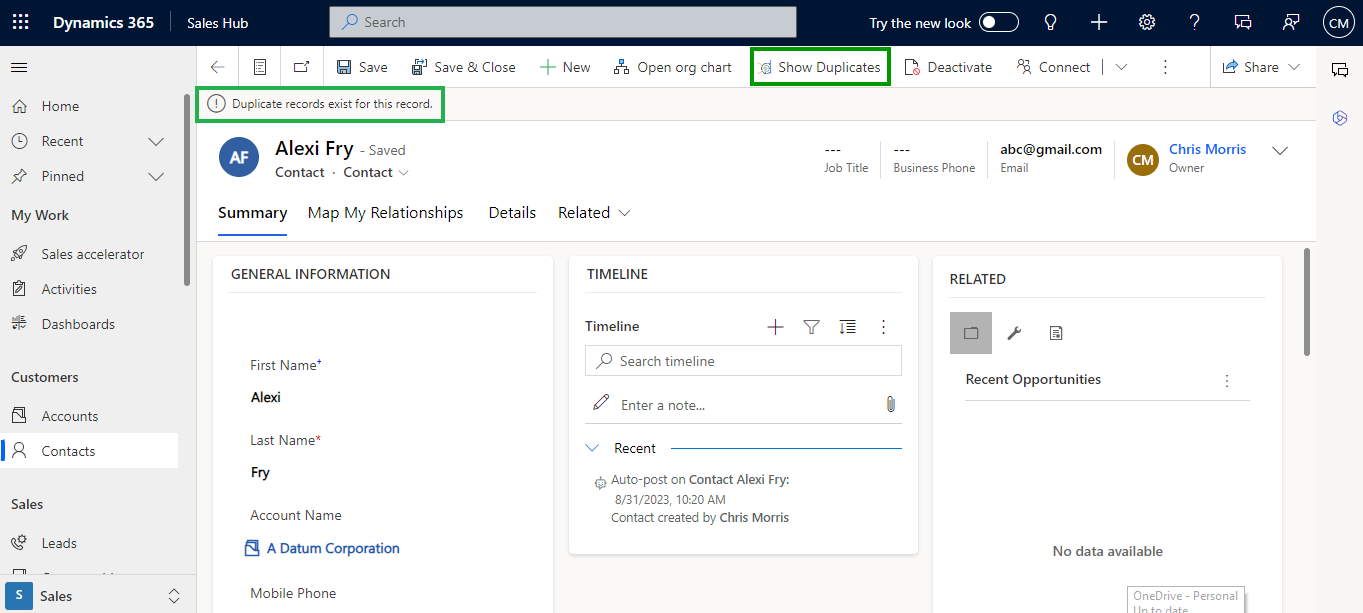
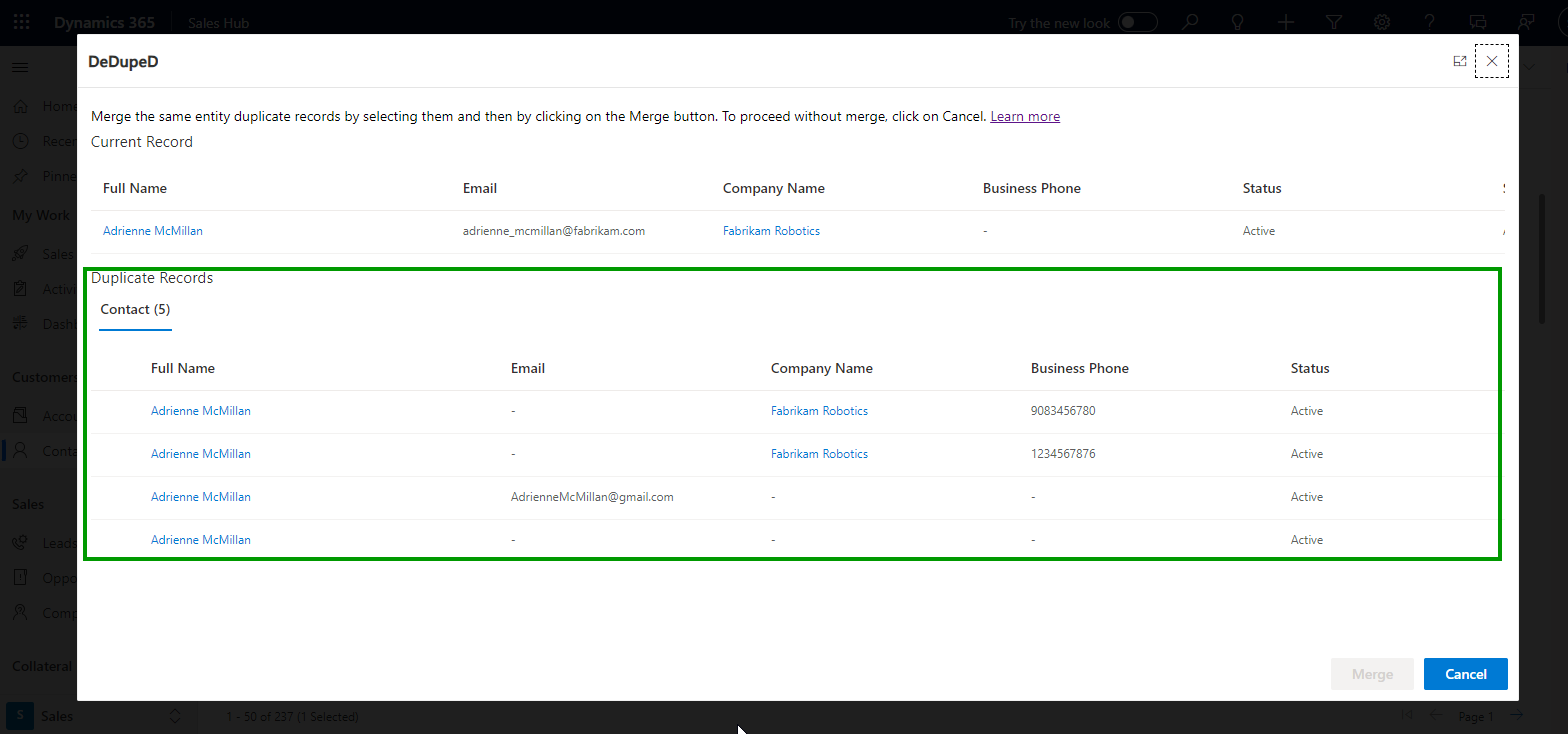
DeDupeD: The app enables you to detect duplicate records for every Dynamics 365 CRM entity (including OOB or Custom). You can detect duplicate records on demand across multiple entities by simply clicking on the “Show Duplicate” button. Duplicate matching rules can be created based on five different methods: Exact, First N Characters, Last N Characters, Contains, or Fuzzy Matching Method. You can publish more than five duplicate matching/detection rules per entity.
2. Prevent New Duplicates
OOB duplicate detection rules: You can prevent duplicate contacts, leads, and more from entering the CRM system while importing data in bulk. The CRM records are flagged as duplicates when a user adds or updates a record. This prevents users from entering duplicate records in the CRM system.
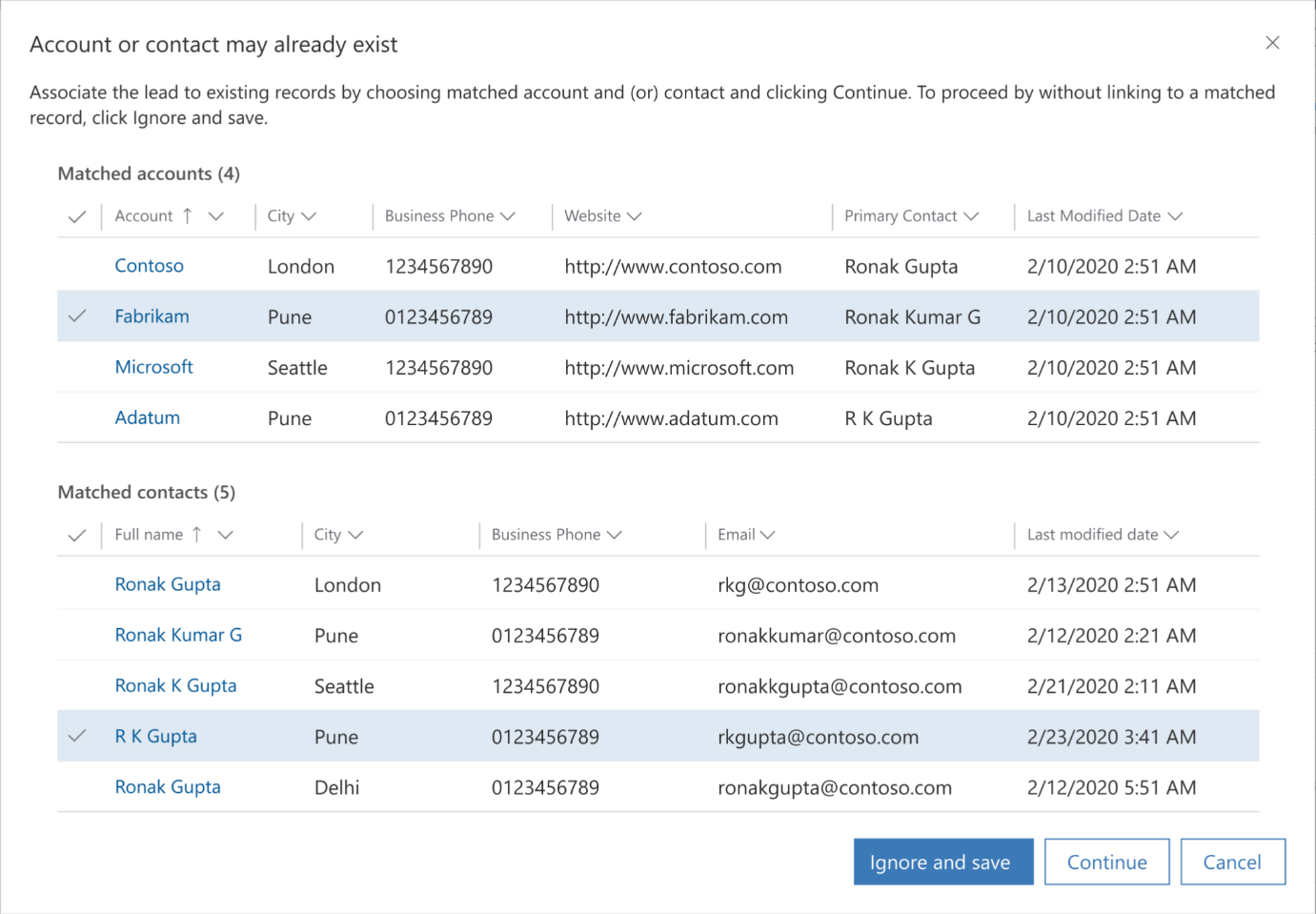
DeDupeD: With DeDupeD, you can prevent duplicates from entering the CRM from both the client and server side. A duplicate prevention pop-up is displayed whenever a user enters a duplicate record in the CRM. It allows users to prevent duplicates when existing records are updated, or new ones are created on the server side using the Assembly, WPF Application, Data Import Processes, Power Automate, or Workflow.
3. Merge Duplicate Records
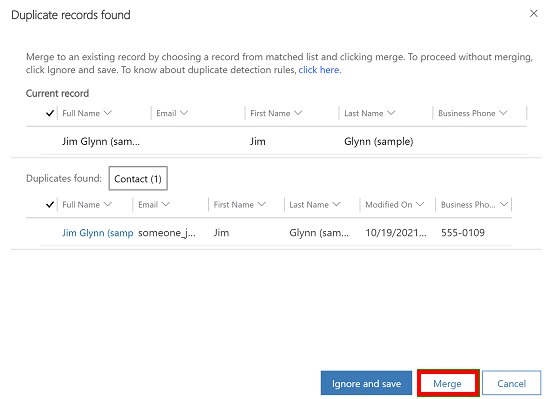
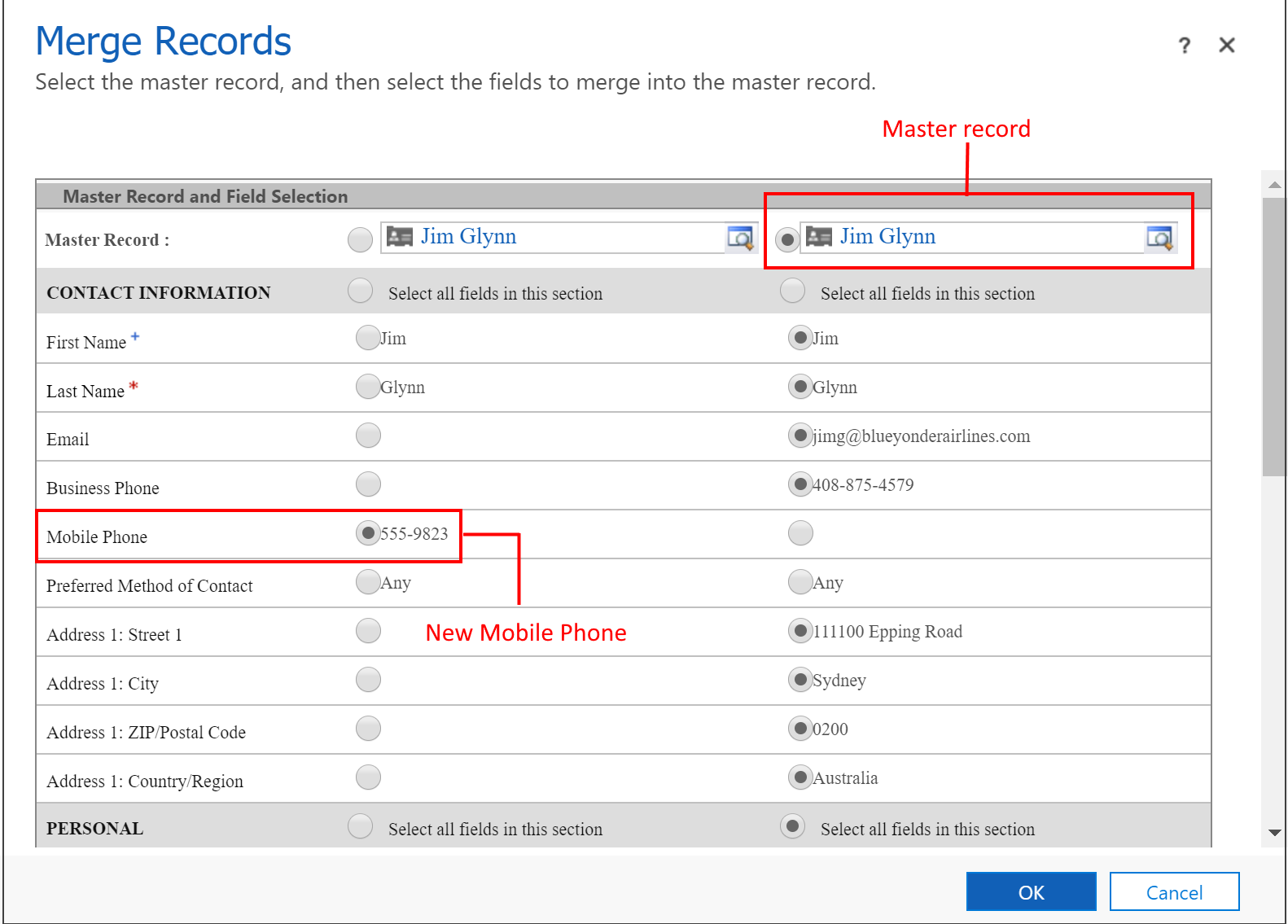
OOB duplicate detection rules: You can merge up to four duplicate records directly from the merge record dialog box for account, contact, and lead entities. You can also select a master record and control which field from the subordinate records you want to retain in the master record. You can also override the existing data in the master record.
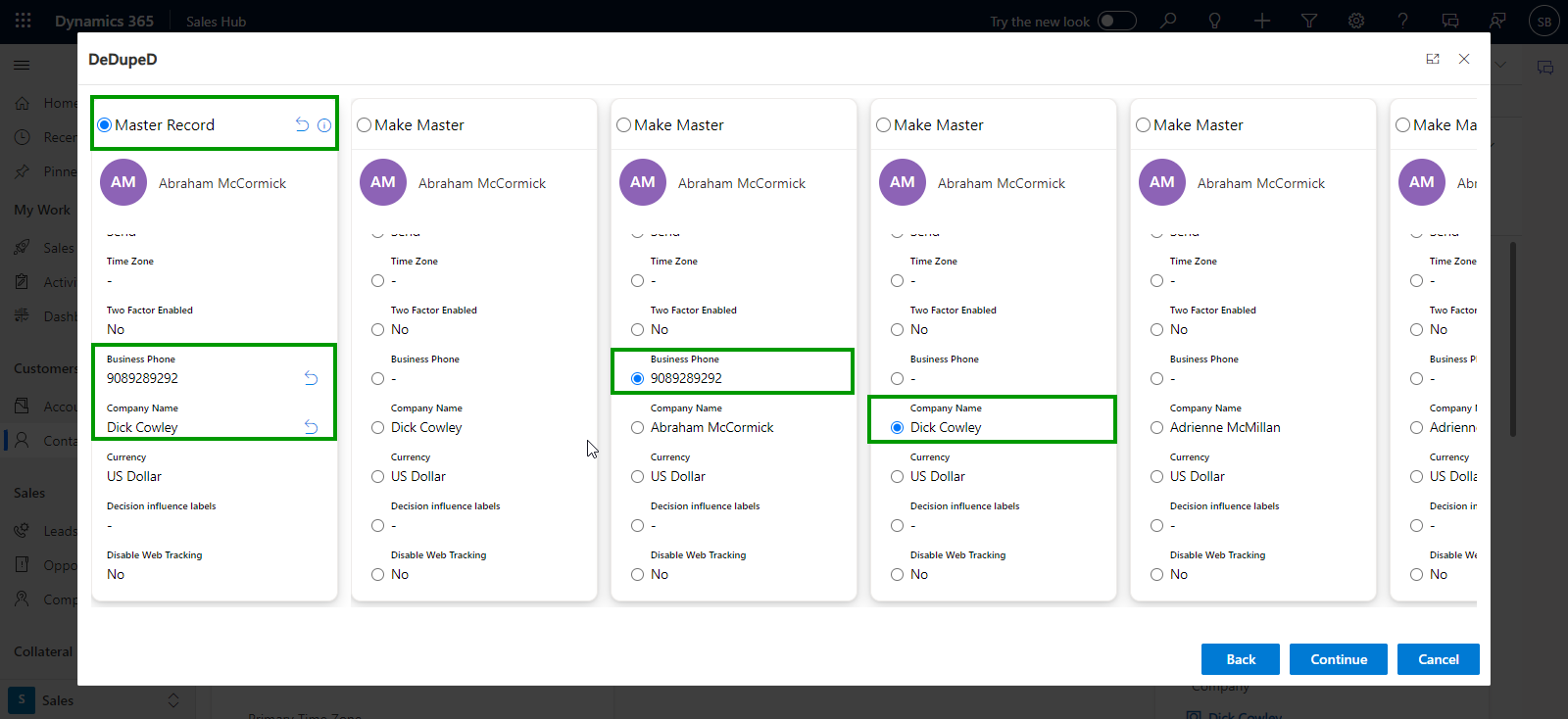
DeDupeD: You can merge up to ten duplicate records directly from the DeDupeD merge UI for any and all Dynamics 365 CRM entities. During the merging process, you have the option to designate a specific record as the master record, allowing you to merge fields from subordinate records to the master record. This helps maintain data integrity and avoids inconsistencies in the data.
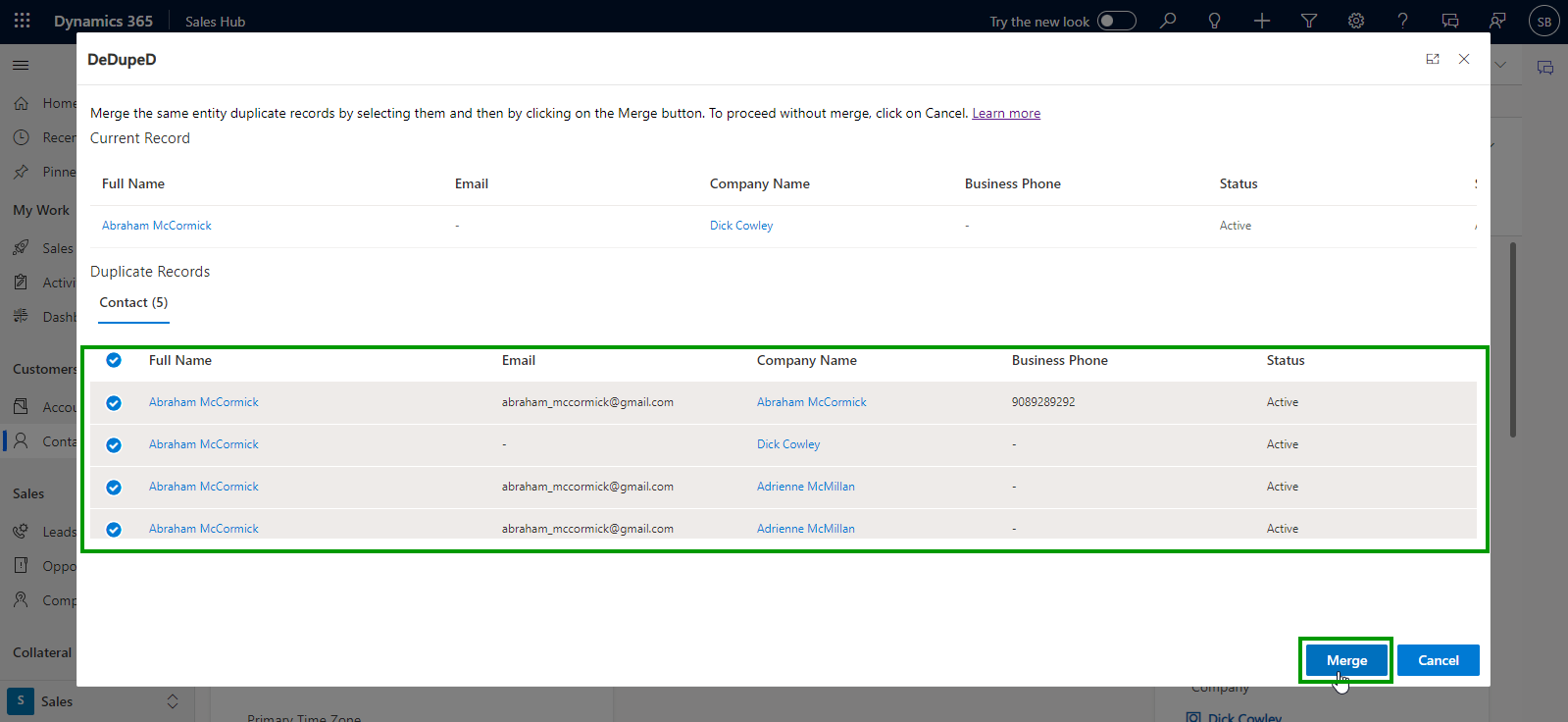
4. Merge/Clean Up Duplicates in Bulk
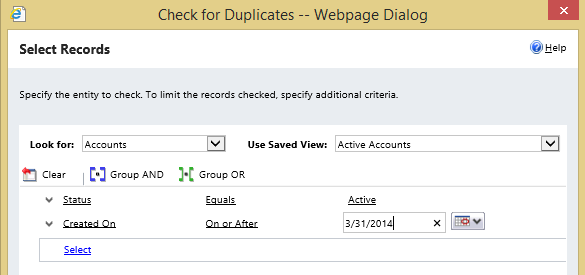
OOB Duplicate Detection Rules: You can set up bulk system jobs to detect and clean up duplicate records in Bulk. You can schedule the job to run daily and receive an email confirmation when the job finishes.
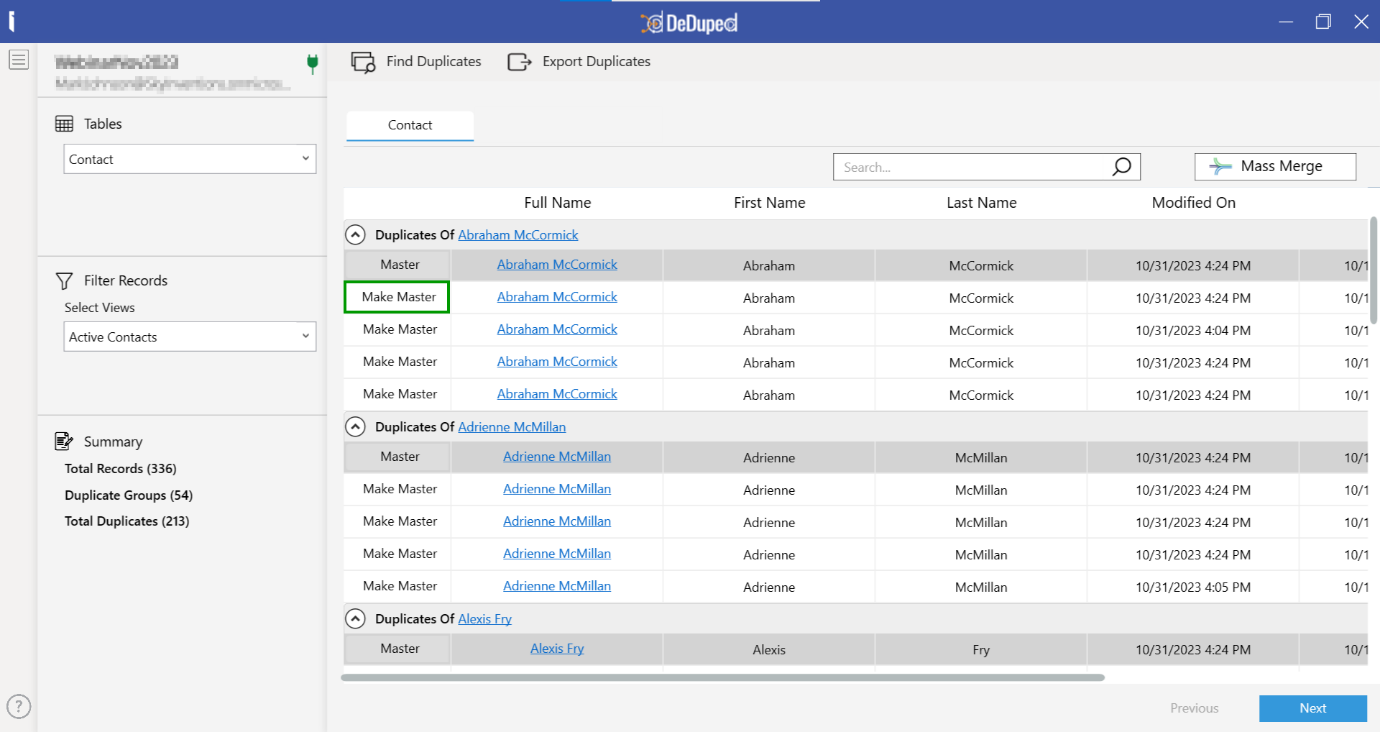
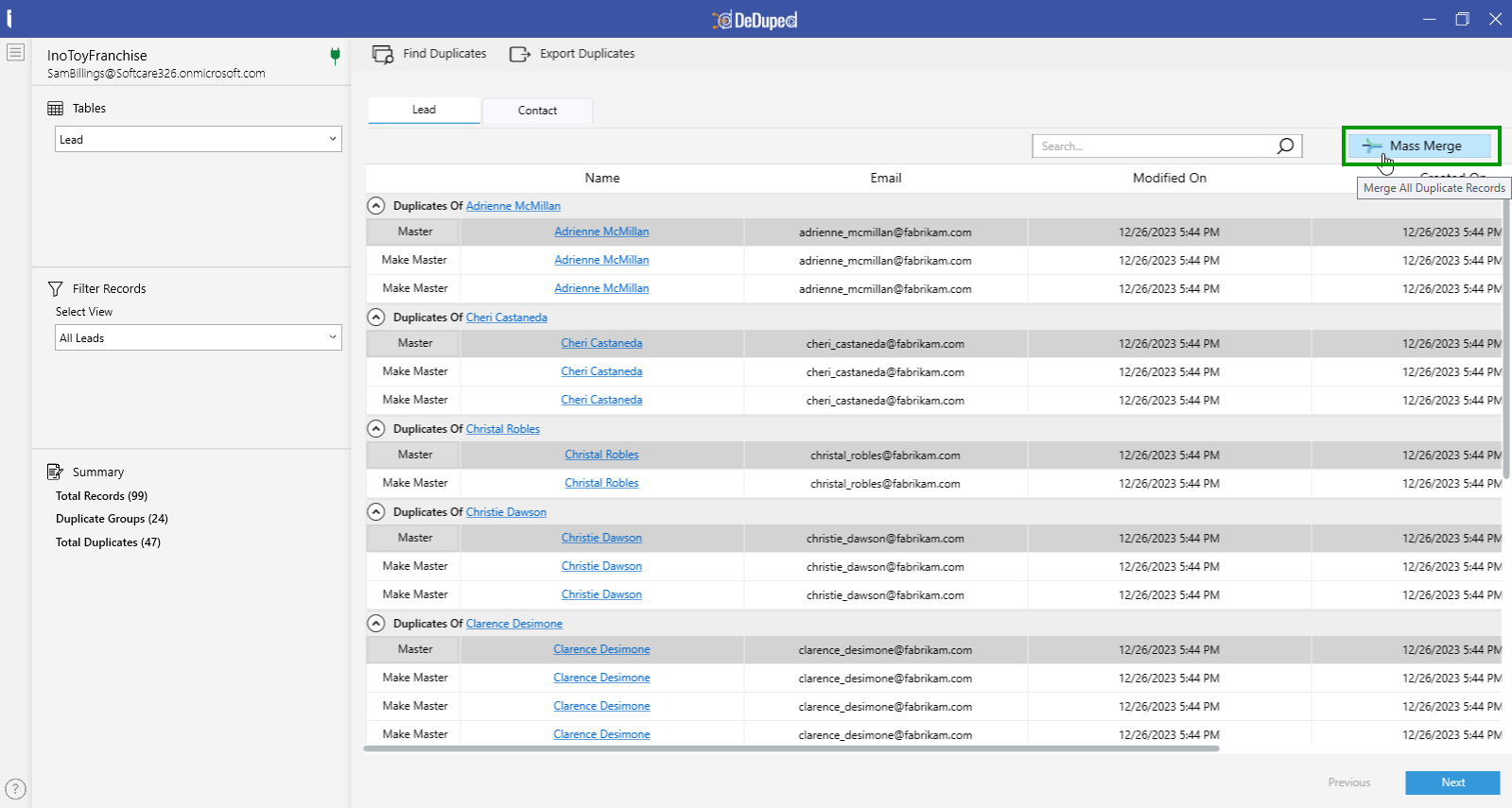
DeDupeD: By using DeDupeD’s Windows-based tool, you can detect and merge up to N number of historical duplicate records in bulk based on set criteria simply by clicking on the “Mass Merge” button. Additionally, while merging, you can transform any desired record into a master record. You can also export all the duplicate records before merging them.
How Does AI Improve Data Deduplication in Dynamics 365?
AI can make CRM deduplication more intelligent by helping identify near-duplicate records and making merge decisions easier.
DeDupeD uses AI to assist with duplicate management by providing:
- AI-powered field recommendations: Suggests which field values should be retained when merging duplicate records.
- Smart master record selection: Recommends the best record to keep as the master based on available data.
- Confidence scores: Shows how confident the AI is in its recommendations, helping users make informed merge decisions.
- Advanced fuzzy matching: Identifies near-duplicate records with spelling, phonetic, and formatting variations that exact-match rules may miss.
- Related-entity detection: Helps uncover duplicate records through relationships between connected CRM data.
With AI-assisted matching and merging, organizations can reduce manual effort while making duplicate cleanup more consistent and scalable.
Do You Need a Dedicated Dynamics 365 Deduplication Tool?
The right approach depends on the volume and complexity of duplicate data in your Dynamics 365 CRM.
- Choose native Dynamics 365 duplicate detection when basic rule-based duplicate identification and prevention meet your CRM requirements.
- Choose DeDupeD when you need advanced matching, real-time prevention, bulk cleanup, automated merging, related-record detection, or greater control over how duplicate records are consolidated.
For organizations dealing with duplicates from migrations, imports, integrations, or ongoing CRM activity, DeDupeD provides a more comprehensive approach to maintaining clean and accurate Dynamics 365 data.
Conclusion
Duplicate data affects CRM reporting, customer insights, and sales productivity. While Dynamics 365 native duplicate detection helps identify potential duplicates, effective data management requires detection, prevention, merging, and cleanup.
For complex matching, large-scale cleanup, and ongoing duplicate management, DeDupeD provides a comprehensive way to keep Dynamics 365 data clean and maintain a single source of truth.
Ready to Take Control of Duplicate Data?
See how DeDupeD can help you find, prevent, merge, and clean duplicate Dynamics 365 records. Email us at crm@inogic.com or download it from Microsoft Marketplace.
Frequently Asked Questions:
Q: How do I find duplicate records in Dynamics 365?
Dynamics 365 uses duplicate detection rules to identify potential duplicate records based on configured fields and matching criteria. For more complex scenarios, deduplication tools can use additional matching methods such as fuzzy matching to identify records with variations in names, email addresses, phone numbers, or other details.
Q: How do I remove duplicate records in Dynamics 365?
Duplicate records should generally be reviewed and merged rather than simply deleted, especially when each record contains valuable customer information. Dynamics 365 supports duplicate detection and merging for supported records, while DeDupeD provides additional capabilities for reviewing and merging duplicates individually or in bulk.
Q: How do I deduplicate Dynamics 365 data after a migration or import?
Start by identifying duplicate records created during the migration or import, then group potential matches, select the appropriate master records, and merge the duplicates while preserving important data. DeDupeD can help automate this process through advanced matching, bulk duplicate management, and governed merging.
Q: What is the difference between duplicate detection and data deduplication?
Duplicate detection identifies records that may represent the same customer or organization. Data deduplication goes further by identifying, preventing, reviewing, merging, and continuously managing duplicate records to maintain a single, reliable customer view.
Q: Can fuzzy matching find duplicate Dynamics 365 records?
Yes. Fuzzy matching can identify records that are similar but not identical, such as “John Smith” and “Jon Smyth” or “Microsoft Inc.” and “Microsoft Incorporated.” DeDupeD uses fuzzy matching to identify spelling, phonetic, partial, and formatting variations that exact-match rules may overlook.
Q: Can duplicate records be merged in bulk in Dynamics 365?
Native Dynamics 365 provides duplicate detection and merge capabilities for supported records, but organizations handling large volumes of duplicates may need dedicated bulk-merging capabilities. DeDupeD allows users to select and merge multiple duplicate records while preserving important relationships, activities, and history.
Q: How can I prevent duplicate records from entering Dynamics 365?
Duplicate prevention requires checking records before they are created or updated and applying consistent matching logic across different data-entry points. DeDupeD provides real-time duplicate detection and prevention across users, imports, workflows, integrations, and other CRM processes.