 Most duplicate records in Dynamics 365 aren’t obvious; they’re hidden across related entities.
And native duplicate detection doesn’t catch them.
Standard duplicate detection in Dynamics 365 compares fields within a single record, but what happens when duplicates are hidden across related entities?
That’s exactly the gap that DeDupeD – #1 Data Deduplication app for Dynamics 365 CRM by Inogic’s latest release addresses, introducing the ability to find duplicate Dynamics 365 data based on related entity fields.
Key Takeaways:
- Native Dynamics 365 duplicate detection only compares fields within a single record, missing duplicates hidden across related entities
- DeDupeD enables matching rules using related entity (lookup) fields, unlocking a completely new layer of duplicate detection
- Fuzzy matching ensures real-world variations (names, companies, formats) are accurately identified
- Detect, review, and merge duplicate records directly within Dynamics 365, individually or in bulk
- Transform CRM data quality by identifying duplicates that standard tools simply cannot detect
What is Duplicate Detection based on Related Entity?
Traditional duplicate detection only compares fields within a single record.
This means duplicates linked through related entities often go unnoticed.
DeDupeD changes this by allowing matching rules based on related entity fields, enabling detection across relationships, not just within records.
DeDupeD’s new Duplicate Detection based on Related Entity in Dynamics 365 CRM feature changes this. It allows you to:
- Use fields from related entities (via lookup relationships) in matching rules
- Apply advanced matching techniques like fuzzy matching to handle variations in related data
- Detect hidden duplicates across relationships, not just within individual records
Why Does This Matter for Dynamics 365 Data Accuracy?
Consider a common real-world scenario. Two Contact records exist in your CRM:
- John Smith | john.smith@email.com | Company: ABC Pvt Ltd
- Smith | jsmith@email.com | Company: ABC Private Limited
On the surface, standard duplicate detection would not flag these as Dynamics 365 duplicate records. But both contacts are linked to the same company, just written slightly differently. This is precisely where detecting duplicate Dynamics 365 records fails without related entity support, and where DeDupeD steps in.
By comparing Account Name from the related entity and applying matching techniques, DeDupeD correctly identifies that “ABC Pvt Ltd” and “ABC Private Limited” refer to the same organization, surfacing potential duplicate records in Dynamics CRM that would otherwise slip through.
How to Set Up Duplicate Detection Using Related Entity Fields
Configuring this feature in DeDupeD follows a straightforward step-by-step process. Here’s how to detect duplicate Dynamics CRM records using related entity data:
Step 1: Create a Duplicate Matching Rule
- Navigate to DeDupeD → Entity Configuration
- Select your entity (e.g., Contact)
- Go to Duplicate Matching Rules, and click + New Duplicate Matching Rule.
- Give it a meaningful name, such as Contact_Related_Account_Name
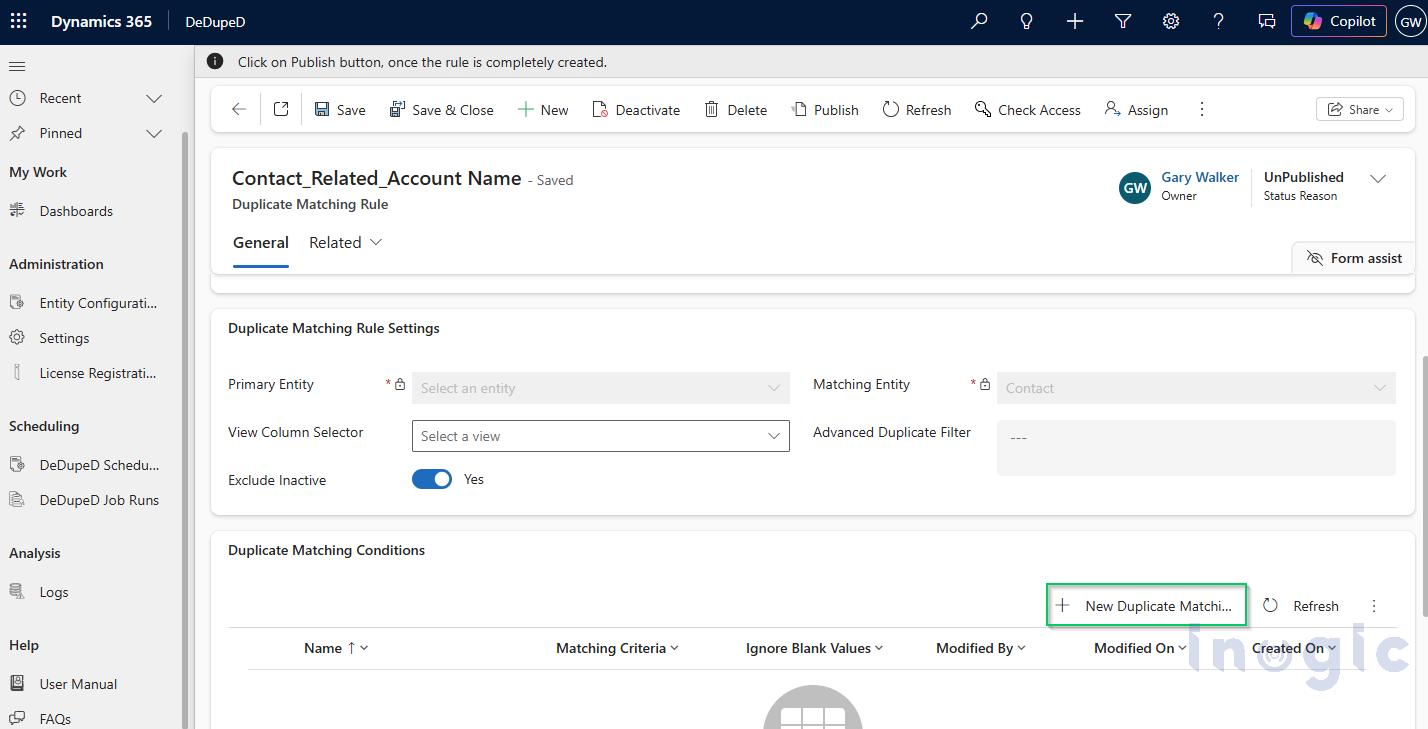
Step 2: Configure Rule Settings
- Set Primary Entity to Contact and Matching Entity to Contact.
- Enable Exclude Inactive = Yes to ensure only active, relevant records are evaluated during deduplication.
Step 3: Add the Related Entity Field
This is where the magic happens.
- Click New Duplicate Matching Condition
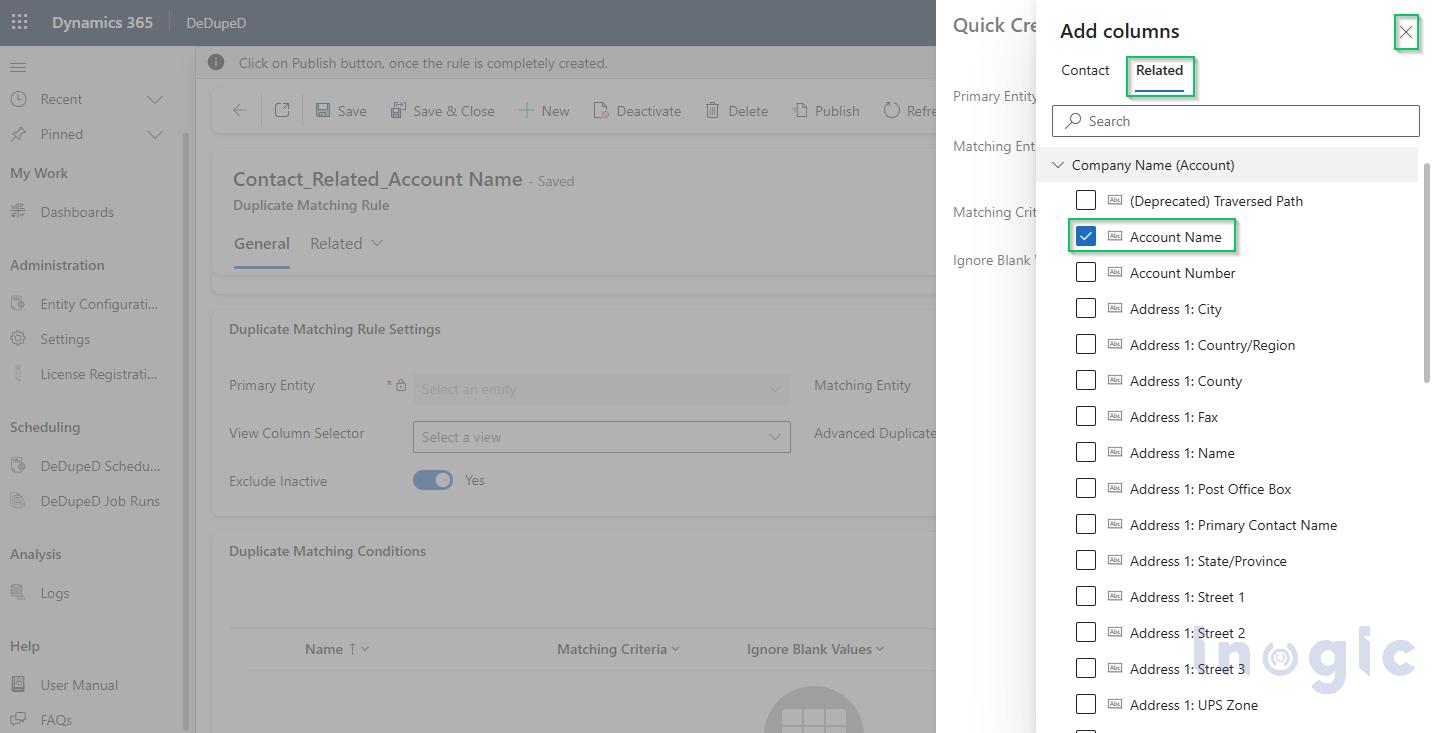
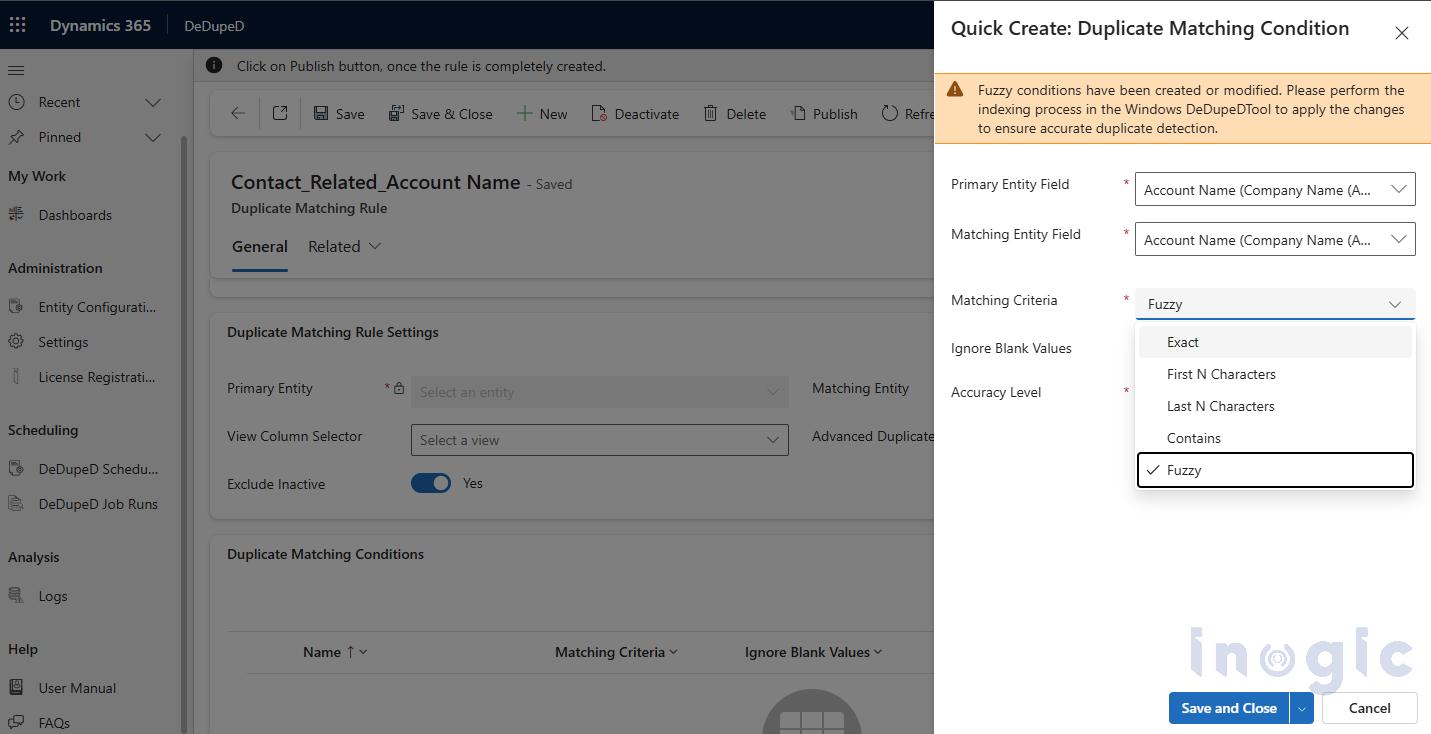
- Now in Primary Entity Field → Select an attribute, switch to the Related
- Expand Company Name (Account) and select Account Name.
You are now matching Dynamics CRM records based on a lookup’s related field, something that out-of-the-box duplicate detection simply cannot do.
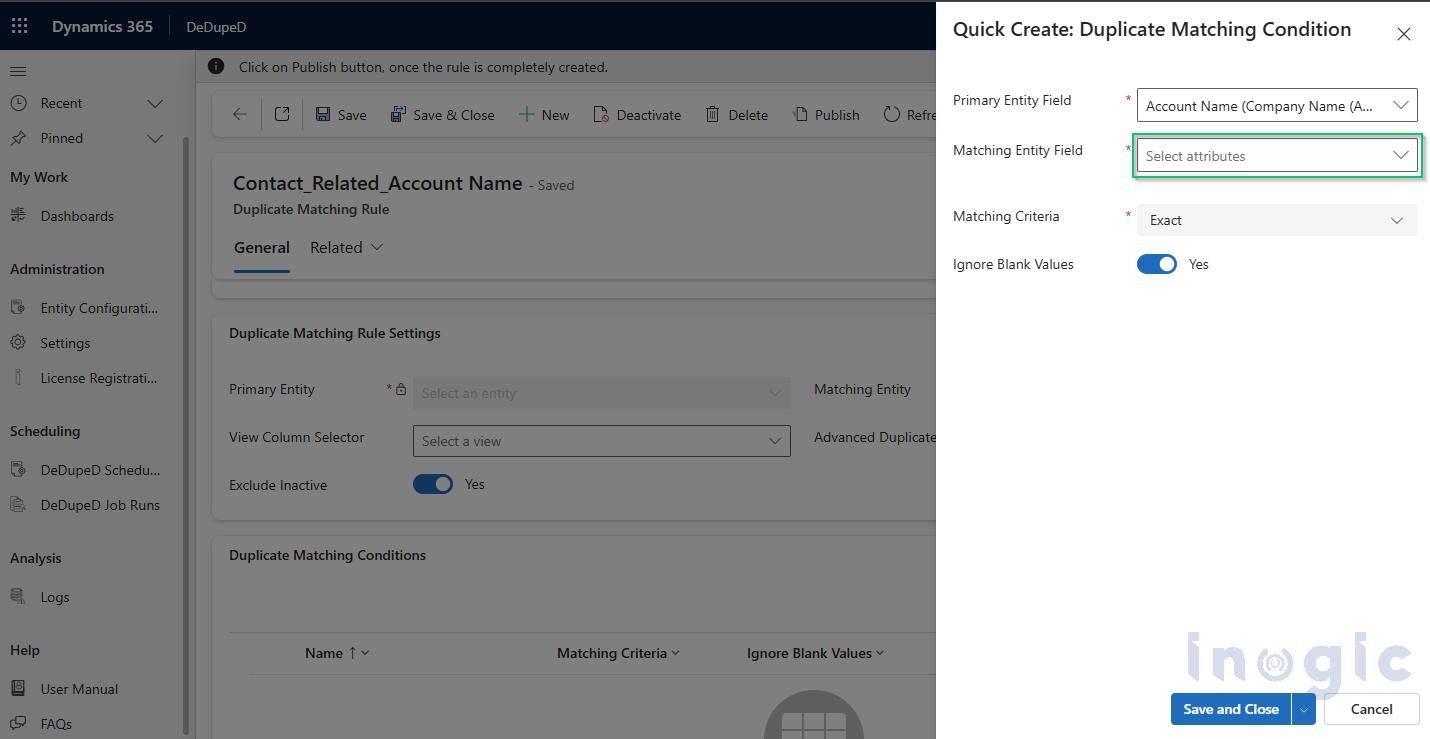
Step 4: Map the Matching Entity Field
Repeat the same selection on the Matching Entity side, choosing Account Name from the related Account. This ensures both sides of the comparison use the same logic and data source for symmetrical matching.
Step 5: Choose Matching Criteria
Select the criteria that best suit your business needs. For company name variations, set Matching Criteria to Fuzzy, Accuracy Level to High, and Ignore Blank Values to Yes.
Fuzzy matching is ideal here because it gracefully handles common real-world inconsistencies such as “ABC Pvt Ltd” vs. “ABC Private Limited” or “Brian Robinson” vs. “B. Robinson”—variations that would defeat an exact-match rule but are clearly the same entity to any human reviewer.
Step 6: Save, Publish & Verify
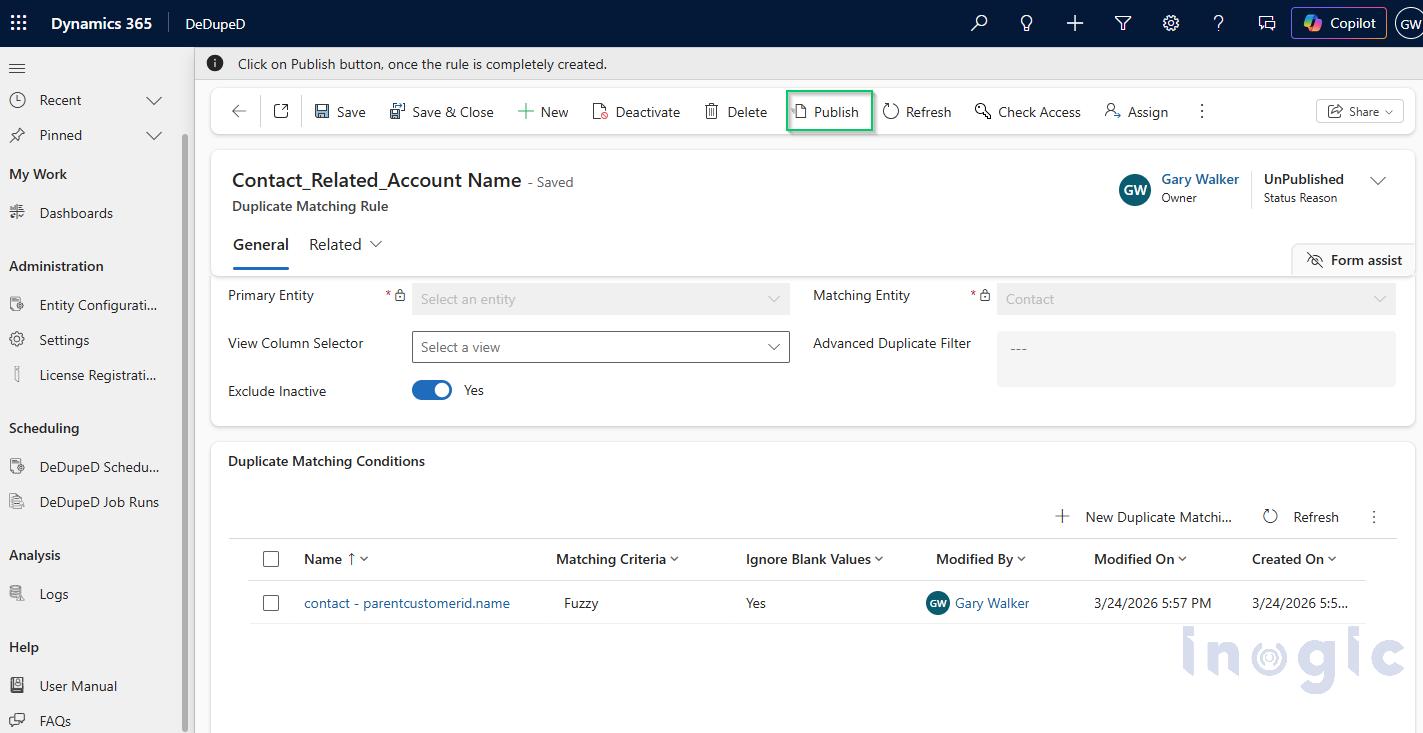
Click Save and Close, then Publish.
Navigate back to Entity Configuration to confirm the rule appears under Published Rules with a Status of Published. Your configuration is now active and ready to deduplicate Dynamics 365 records.
Detecting and Merging Duplicate Dynamics 365 Records
Once the rule is published, there are two ways to find duplicate Dynamics 365 data:
From the CRM UI (Record-Level Duplicate Identification in Dynamics 365)
Navigate to Contacts, select a record, and click Show Duplicates.
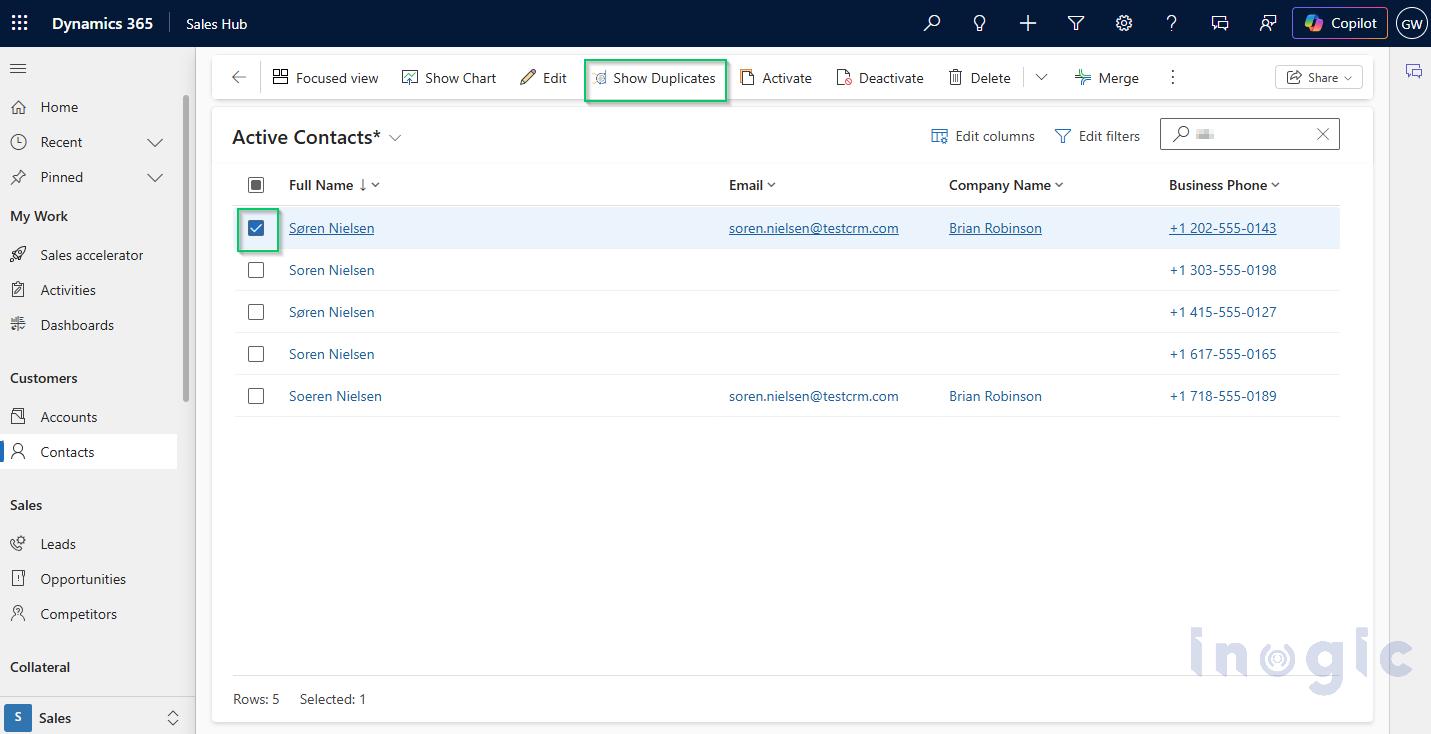
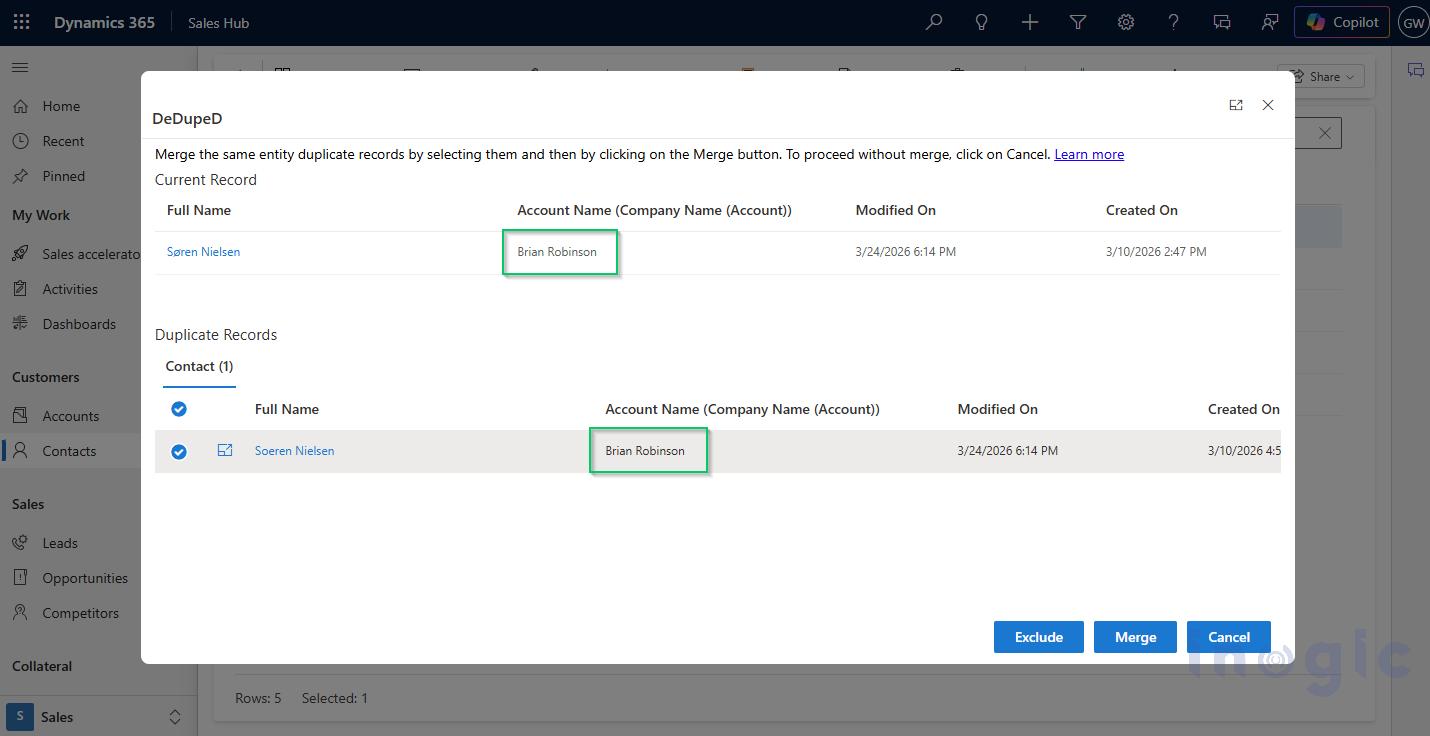
The system will evaluate duplicates based on the related Account Name using fuzzy logic and surface any matches for review. From the duplicate dialog, you can view Full Name, Account Name, and Created/Modified dates, then choose to Merge, Exclude, or Cancel. Best practice: select the most complete record as the Master before merging.
Bulk Deduplication via DeDupeD Tool
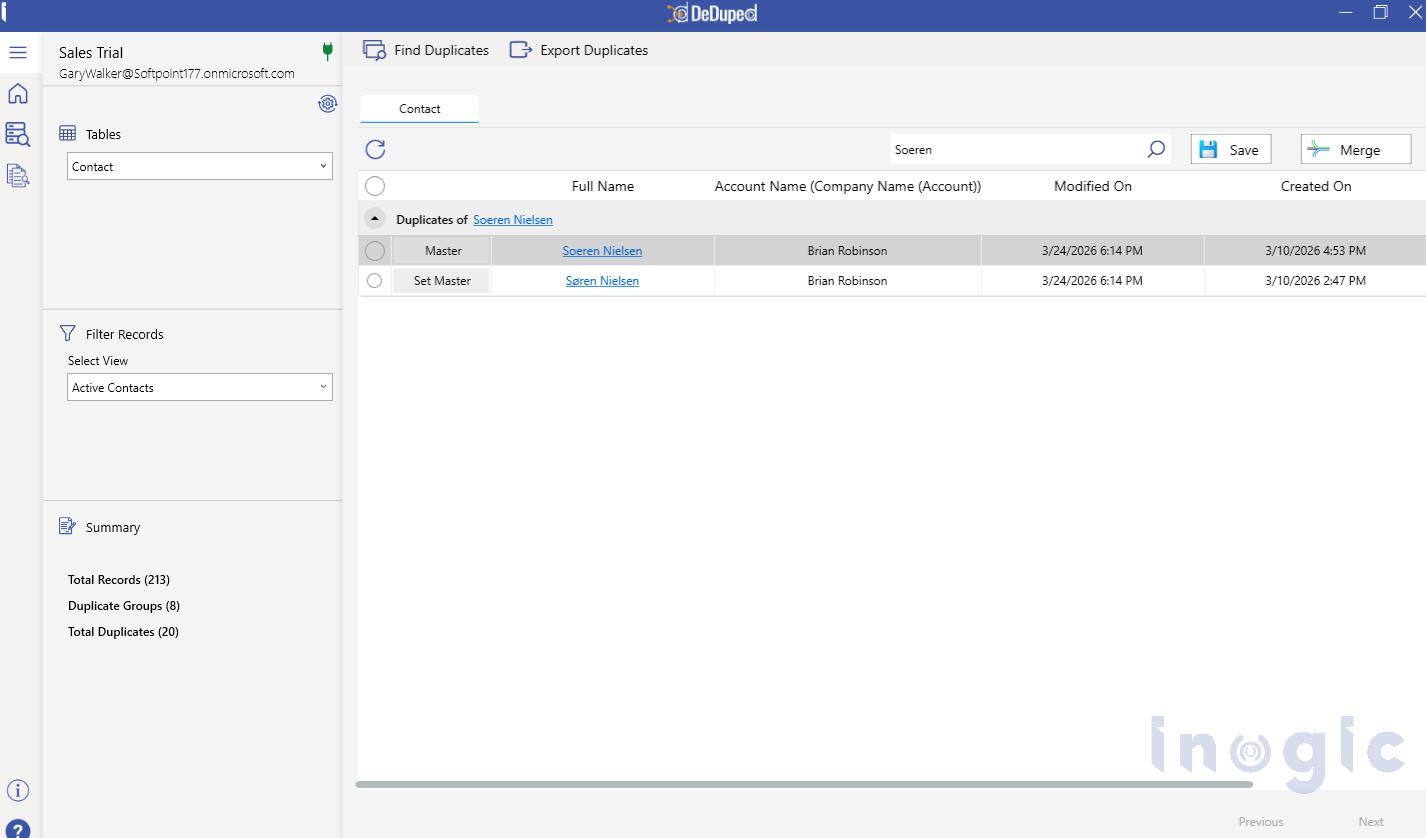
For large datasets, this duplicate merge tool for Dynamics 365 truly shines. Open the DeDupeD Tool, select Entity → Contact and View → Active Contacts, then click Find Duplicates. From here you can:
- View all duplicate groups surfaced by the related entity rule
- Assign a Master Record for each group
- Perform a Bulk Merge to remove duplicate Dynamics 365 data at scale
- Export duplicates for audit or reporting purposes
Why DeDupeD Is the Go-To Duplicate Merge Tool for Dynamics 365
This new capability takes DeDupeD far beyond native Dynamics 365 duplicate detection. It’s not just about finding duplicates; it’s about identifying, controlling, and resolving them at scale with precision.
Here’s why teams rely on DeDupeD for Dynamics 365 data cleansing:
- Cross-entity intelligence: Detect duplicates using lookup and related entity fields, uncovering hidden data overlaps that native tools simply cannot see
- Advanced Fuzzy matching: Identify variations in names, companies, and other fields despite typos, abbreviations, or inconsistent formatting
- Fully Configurable Matching Rules: Design deduplication logic tailored to your business context, not limited by rigid system rules
- Bulk merge capability: Deduplicate Dynamics 365 data across thousands of records in a single operation, dramatically reducing manual effort and cleanup time
- Seamless In-CRM Experience: Detect, review and merge duplicate records in Dynamics CRM directly from within the native Dynamics 365 interface
Conclusion
Duplicate Dynamics CRM data rarely looks obvious, especially when inconsistencies exist across related entities. And that’s exactly where most native detection approaches fall short.
With DeDupeD’s Related Entity Duplicate Detection, this gap is no longer a blind spot. By enabling matching across lookup and related entity fields, organizations can finally identify hidden duplicates, unify fragmented records, and maintain a true single source of truth in Dynamics 365.
If data accuracy, reporting reliability, and AI-readiness are priorities for your organization, this capability is not optional; it’s essential.
Explore DeDupeD on the Inogic website or visit the Microsoft Marketplace to learn more and get started.
Want a walkthrough of the new feature in action? Reach out to us at crm@inogic.com.