 In Dynamics 365, when working with Power Apps inside the Dynamics 365 ecosystem, especially when consuming Dataverse APIs or Power Automate responses, developers often encounter challenges while handling structured data within a Canvas App.
Many Dataverse entities, such as Account, contain nested or related records (for example, a Primary Contact). While it is possible to parse this data dynamically, working with complex or hierarchical JSON without a defined structure can quickly become difficult. Validation becomes harder, IntelliSense support is limited, and maintaining readability across the app becomes increasingly challenging as the application grows.
During this process, we discovered an approach that significantly improves data structure, developer experience, and overall data consistency: the Type() and RecordOf() functions in Power Fx.
Note: It is important to Note that Type() and RecordOf() are currently Power Fx experimental features. To use them, please follow the official documentation.
RecordOf and Type functions – Power Platform | Microsoft Learn
The Problem: Working with Untyped Records
The most common approach when handling JSON in Canvas App is to parse the response directly:
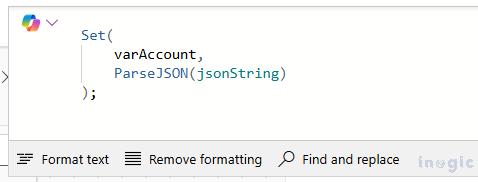
As your app grows and APIs become more complex, this loosely structured approach can lead to fragile implementations.
1. Introducing Type()
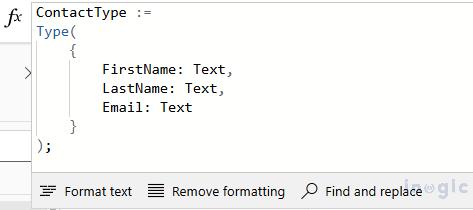
Type functions allow developers to define the structure or schema of a record or table. Instead of handling data as loosely defined objects, it enforces contracts that specify field names and their data types.
Example: Contact record schema:
When Data Becomes Hierarchical
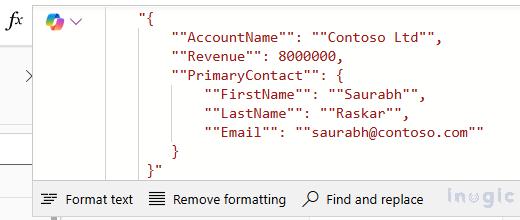
In actual business scenarios, records are rarely standalone. An Account often includes additional information, such as details about it’s Primary Contact.
2. RecordOf()
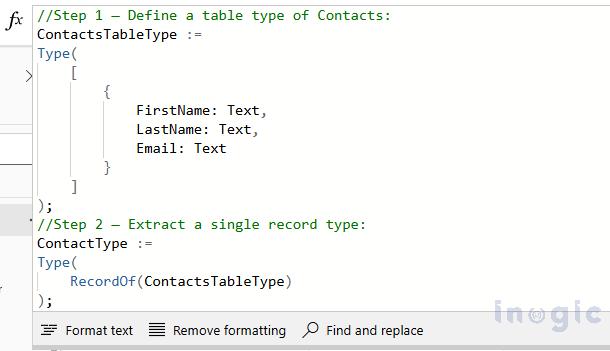
The RecordOf function is used to define the structure or schema of a single record based on the existing table type. It extracts the structural definition of a record from a table and does not generate data.
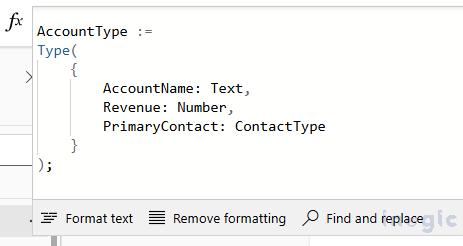
Building the Parent Schema
Once the Contact record type is defined, it can be included inside a Parent entity like Account. This matches how business data usually works: one record often contains related details from another.
Using ContactType inside AccountType keeps the structure clean and reusable, and it makes upcoming updates much easier to manage.
Key Benefits
- Introduces a clear structure or schema for handling data.
- Makes parsing JSON data more consistent and reliable.
- Encourages reuse of schema definition.
- Support scalable and maintainable app design
Conclusion
The Type() and RecordOf() functions bring structure to nested or complex data in Power Fx. Instead of relying on loosely defined objects, schema definitions make data easier to understand, validate, and manage.
This approach also improves IntelliSense support and helps developers build more reliable Canvas Apps.
When building apps that connect to APIs or process dynamic JSON responses, schema typing provides a structured and predictable way to work with otherwise unstructured data.
As a result, applications become more maintainable, scalable, and extensible over time.
FAQs
1. What does the Type() function do in Power Fx?
The Type() function allows developers to define the schema of a record or table by specifying field names and their data types.
2. What is RecordOf() used for in Power Fx?
RecordOf() extracts the structure of a single record from an existing table type, enabling developers to define nested record schemas.
3. Are Type() and RecordOf() production features?
No. These functions are currently experimental features in Power Fx and must be enabled before use.