As AI agents become deeply embedded in enterprise workflows, ensuring their reliability, accuracy, and consistency is no longer optional it is essential. Unlike traditional software systems, Copilot agents are powered by Large Language Models (LLMs), which inherently introduce response variability.
Manual testing methods such as ad hoc question-and-answer validation do not scale effectively and fail to provide measurable quality assurance in enterprise environments.
To address this challenge, Microsoft introduced Agent Evaluation in Copilot Studio, a built-in automated testing capability that enables makers and developers to systematically validate Copilot agent behavior both before and after deployment.
This feature helps teams move from subjective validation (“it seems to work”) to structured, repeatable, and auditable quality testing aligned with enterprise standards.
Why Use Automated Testing for Copilot Agents?
Manual testing of AI agents has several limitations:
- It is time‑consuming and does not scale
- Results are subjective and inconsistent
- Regressions caused by prompt, model, or data changes often go unnoticed
- There is no objective pass/fail signal for production readiness
Agent Evaluation addresses these challenges by introducing a structured testing approach that aligns with enterprise software quality practices.
Key Benefits of Automated Evaluation
- Repeatability – Run the same test set multiple times to compare results
- Early defect detection – Identify hallucinations, incomplete answers, or incorrect grounding
- Regression testing – Detect quality drops after changes to prompts, models, or data sources
- Production confidence – Establish objective criteria for go‑live decisions
What Is Copilot Agent Evaluation?
Agent Evaluation is an automated testing framework built directly into Microsoft Copilot Studio. It allows you to validate your Copilot agent’s responses against predefined expectations using multiple evaluation methods.
With Agent Evaluation, you can:
- Create reusable test sets (up to 100 test cases per set)
- Define success criteria per question
- Run tests under specific user identities
- Analyze pass/fail results and quality scores
Enterprise Scenario Example
Let’s consider a scenario, an organization builds a Copilot agent that answers employee questions about HR policies using SharePoint documents.
Risks without automated testing:
- The agent may hallucinate policy details
- Responses may become outdated after document updates
- Model changes may alter tone or completeness
By using Agent Evaluation, the team can:
- Validate that answers are grounded in approved documents
- Ensure consistent responses across model updates
- Catch regressions before publishing changes
We will walkthrough an Step‑by‑Step Configuration,
Step 1: Open Your Agent in Copilot Studio
- Go to Microsoft Copilot Studio
- Open the agent you want to test
- Navigate to the Evaluation tab
Step 2: Create a Test Set
A test set is a collection of questions your agent should handle correctly.
You can create test cases in multiple ways:
- AI‑generated questions based on agent description and knowledge
- Manual entry of questions and expected responses
- Reuse questions from test chat history
- Import a CSV file with up to 100 test cases
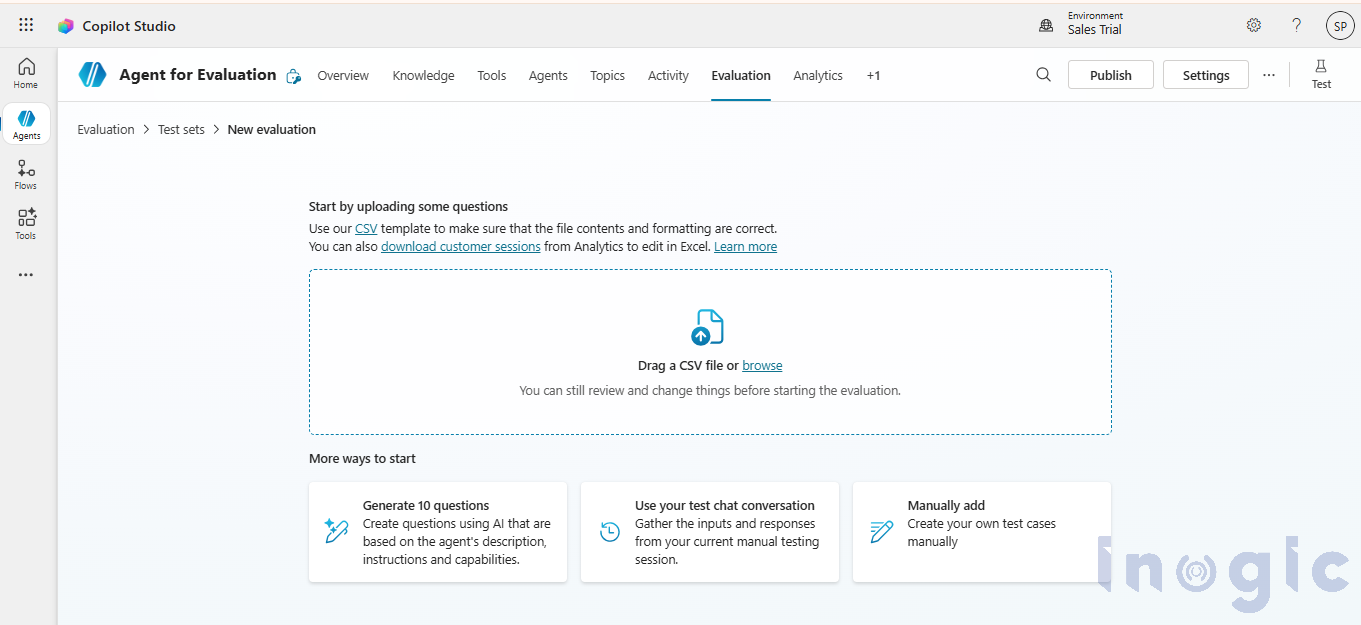
Each test case can include:
- Question
- Expected response (where required)
- Evaluation method
- Threshold for success
NOTE : In Part 2 of this blog, we will explain how to create test set with a detailed example.
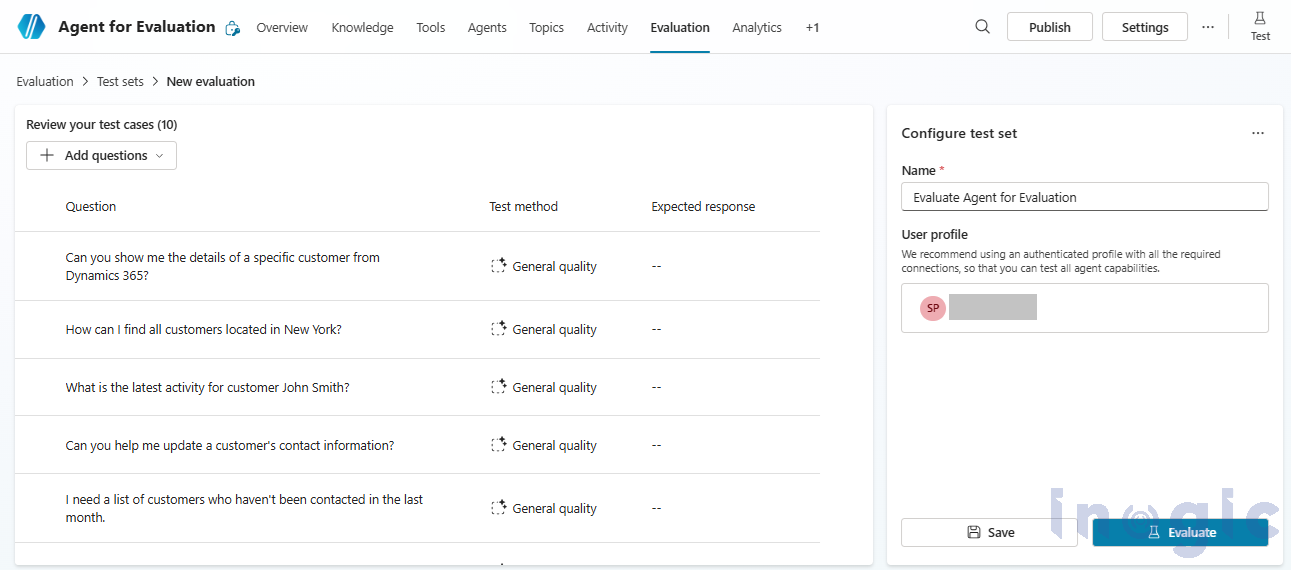
Step 3: Configure User Context
You can run evaluations under a specific user profile:
- Ensures the agent accesses the same data and connectors as real users
- Helps identify permission‑related issues early
This is especially important for agents using secured SharePoint, Dataverse, or external connectors.
Results and Insights
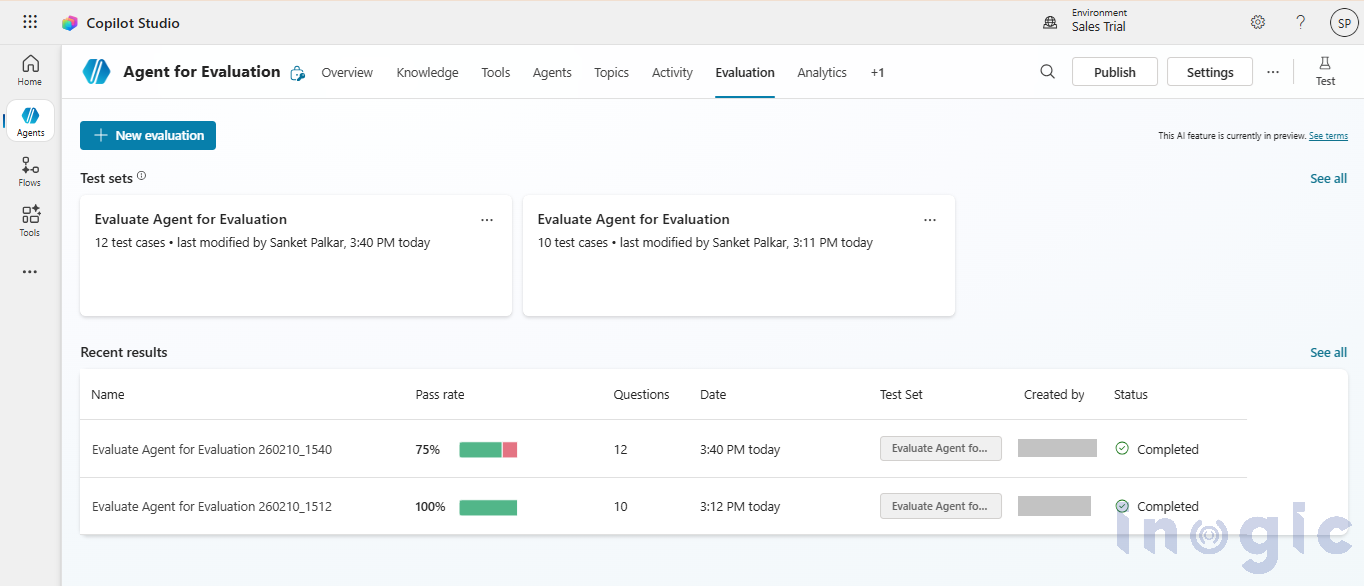
After execution, Copilot Studio provides:
- Pass/fail status per test case
- Quality scores (for LLM‑based evaluations)
- Visibility into which questions failed and why
- Historical results for comparison across run
These insights help teams:
- Identify weak knowledge areas
- Improve prompts and grounding
- Establish quality gates before production releases
Conclusion
Automated testing is no longer optional for AI‑powered solutions. With Agent Evaluation in Copilot Studio, Microsoft brings enterprise‑grade testing discipline to Copilot agent development.
By adopting automated evaluations, organizations can:
- Improve trust in AI responses
- Reduce production risks
- Scale Copilot adoption with confidence
- Continuously improving agent quality over time
Agent Evaluation transforms Copilot agents from experimental tools into reliable, governed, and production‑ready digital assistants.
FAQs
What is Agent Evaluation in Copilot Studio?
Agent Evaluation is a built-in testing framework in Copilot Studio that allows structured validation of Copilot agent responses using predefined test cases and quality scoring methods.
Why is regression testing important for Copilot agents?
Because LLM-based agents can change behavior due to prompt, model, or data updates, regression testing ensures consistent performance and prevents quality degradation.
How many test cases can be included in a test set?
You can include up to 100 test cases per test set, including AI-generated and manually created questions.
Can Agent Evaluation detect hallucinations?
Yes. By validating expected grounding and response quality, Agent Evaluation helps detect hallucinated or incomplete answers.
Is Agent Evaluation suitable for enterprise AI governance?
Yes. It supports measurable quality gates, historical tracking, and structured testing making it ideal for enterprise AI governance and compliance strategies.