 Duplicate records remain one of the most underestimated problems in Dynamics 365 CRM.
Not because teams don’t care about data quality, but because traditional duplicate detection methods no longer match how CRM data is created today.
In 2026, CRM data comes from:
- Multiple regions and time zones
- Sales reps, marketing imports, APIs, integrations, and Copilot-driven automation
- Inconsistent formats, partial values, and human input
This guide explains how to identify duplicate records in Dynamics 365 CRM step by step, using modern, real-world techniques, and why real-time duplicate identification is now essential for scalable CRM success.
Why Duplicate Identification in Dynamics 365 CRM Is Still Broken
Most organizations already “have duplicate detection enabled.” Yet duplicates still appear daily.
That’s because native duplicate checks focus on rules — not behavior.
Common reasons duplicates slip through:
- Users don’t know an existing record exists while entering data
- Phone numbers and names are entered in different formats
- Leads and contacts are created across different entities
- Imports and integrations bypass UI-level checks
Duplicate identification fails at the moment data is created, not during cleanup.
What does Duplicate Identification in Dynamics 365 Really Mean in 2026
Duplicate identification is not:
- A nightly cleanup job
- A manual audit
- A once-a-quarter data exercise
Modern duplicate identification means:
Detecting potential duplicates as data is being entered, imported, or updated — before CRM trust is broken.
This shift is why advanced teams now separate:
- Duplicate identification (finding duplicates)
- Duplicate prevention (blocking creation)
- Duplicate merging (consolidating safely)
Step-by-Step Guide for Duplicate Identification in Dynamics 365 CRM (2026)
Step 1: Identify Where Duplicates Are Actually Coming From
Before configuring anything, answer one critical question:
How are duplicates being created in your CRM today?
Most Dynamics 365 environments face duplicates from four sources:
- Manual data entry by sales or service users
- Marketing list imports
- System integrations (ERP, portals, APIs)
- Automation (workflows, Power Automate, Copilot actions)
If you only identify duplicates in one of these paths, you’re only solving part of the problem.
Step 2: Enable Real-Time Duplicate Identification while CRM Records are created and updated
What Is Client-Side Duplicate Identification?
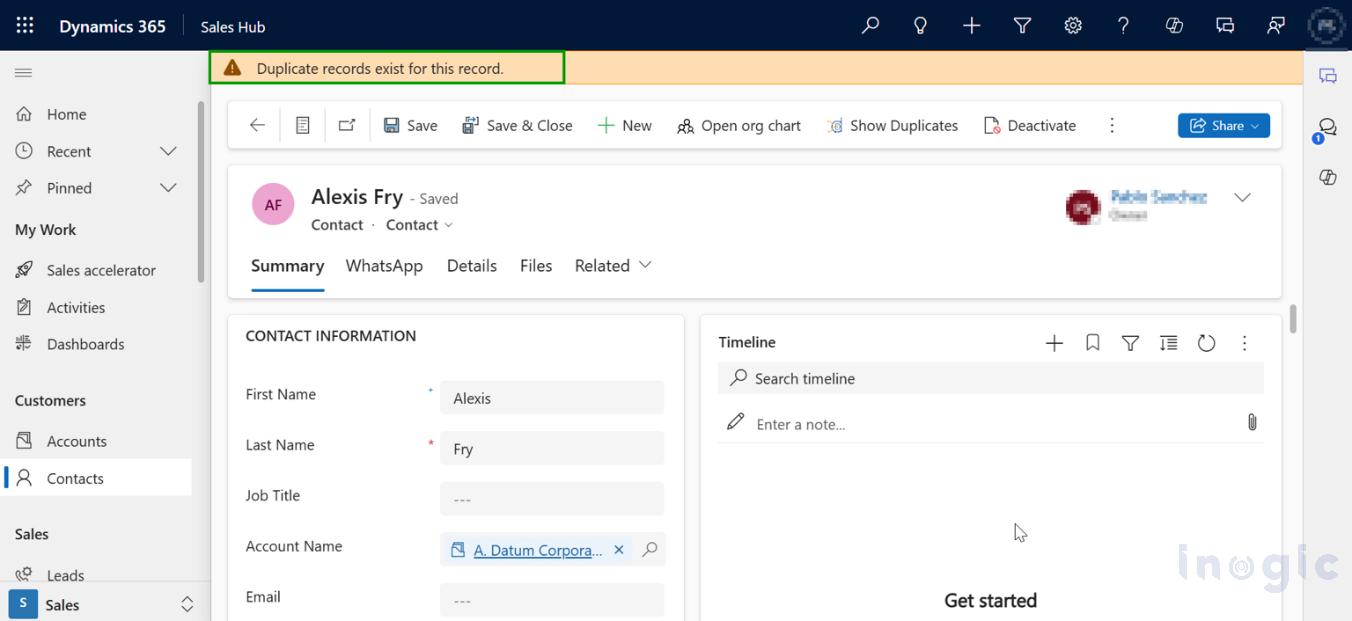
Client-side duplicate identification detects duplicates directly on the CRM form, while a user is:
- Creating a record
- Editing key fields
- Saving changes
Instead of discovering duplicates later, users are alerted instantly.
Client-side duplicate identification is nothing but identifying the duplicates while creating or updating records. It easily prevents duplicate records from being added to your CRM.
 Why This Matters
Most duplicates are created unintentionally.
Users don’t search — they assume.
Real-time duplicate identification in CRM:
- Shows existing records immediately
- Prevents accidental duplication
- Improves user trust instead of blaming users
When do real-time duplicate identification triggers?
- When you create or update any field (email, phone, name) of the CRM record
- When you try to save the record as final safety check
This is where DeDupeD begins to differentiate.
DeDupeD acts as a real-time intelligence layer on Dynamics 365 CRM forms — not just a blocking rule.
Step 3: Configure Duplicate Identification to prevent duplicates while third-party integration, Imports & Automation
Not all duplicates are created by users.
Many are created silently by:
- Excel imports
- Marketing platforms
- APIs and integrations
- Background automation
What Is Server-Side Duplicate Identification?
Server-side identification runs without user interaction, checking records created or updated by system processes.
It ensures:
- Imports don’t inflate CRM data
- Integrations don’t silently create duplicates
- Automated workflows respect data integrity
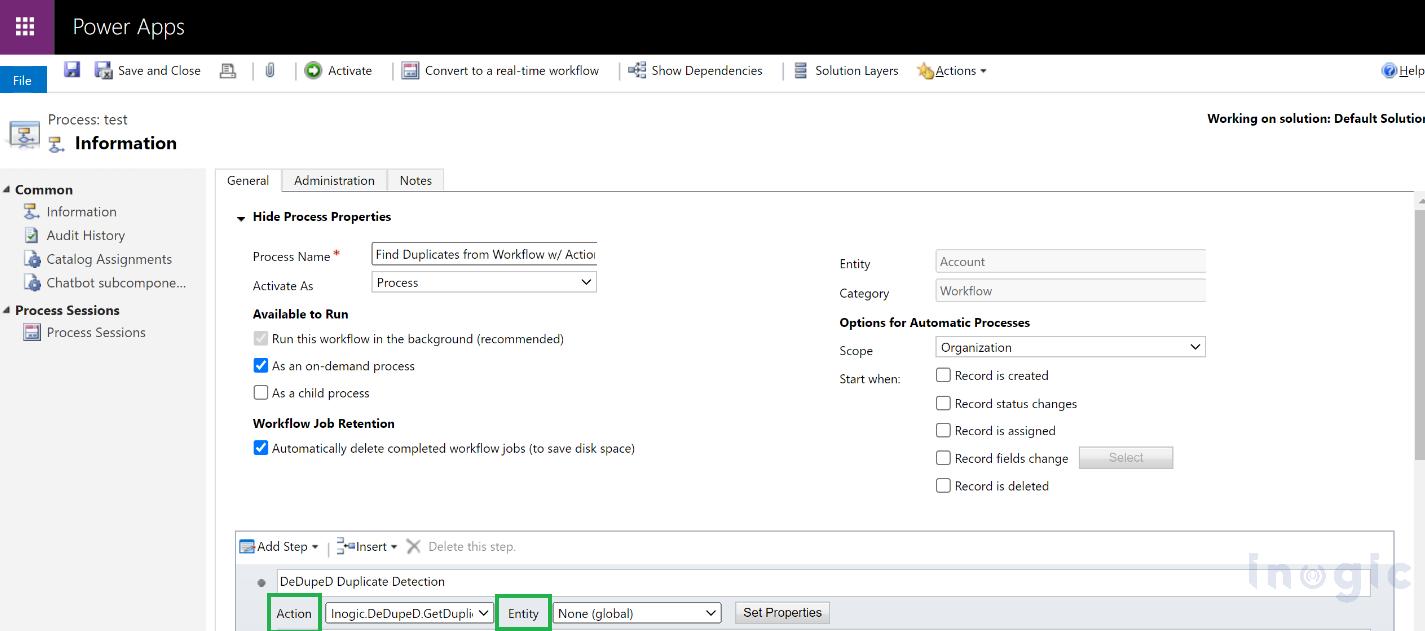 Server-side duplicate identification is nothing but identifying the duplicates while 3rd party integration, data imports, automation, or workflows. It easily prevents duplicate records from being added to your CRM.
Why It’s Essential in 2026
With AI, Copilot, and automation increasing:
If duplicate identification isn’t server-side, it isn’t future-proof.
DeDupeD enables background, real-time server-side duplicate identification that works alongside client-side checks — not instead of them.
Step 4: Define Smart Duplicate Matching Rules (Not Just “Exact Matches”)
Duplicate identification only works as well as its matching logic.
Why Exact Matching Fails
Real CRM data is messy:
- “John Smith” vs “Jon Smyth”
- “+1 415 555 2671” vs “415-555-2671.”
- “Alex” vs “Alexander”
Exact matching misses these completely.
Advanced Duplicate Matching Techniques You Should Use
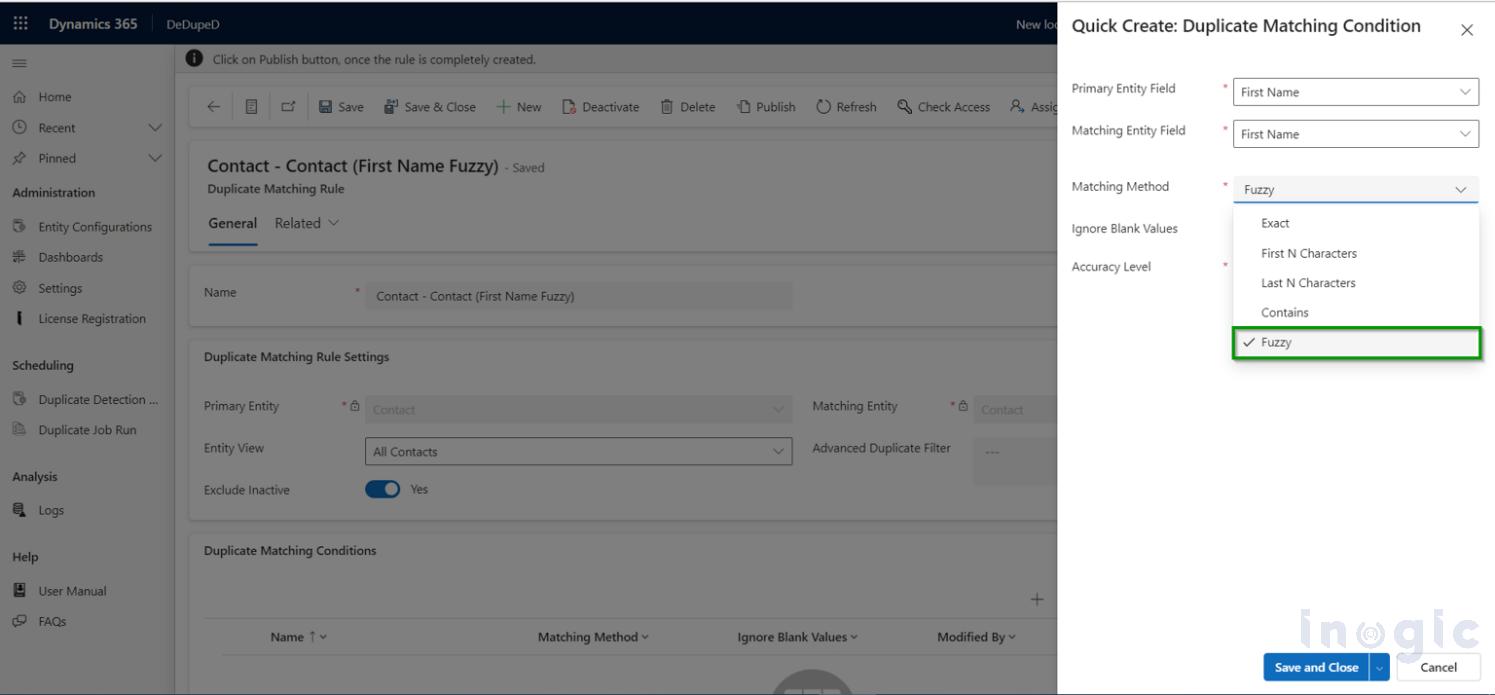
- Partial matching (start / end based)
- Contains-based matching
- Sound-alike (phonetic fuzzy) matching
- Multi-field matching (name + phone + email)
These techniques reflect how humans recognize identity, not how databases compare strings.
 Step 5: Handle Phone Number–Based Duplicates Correctly
Phone numbers are one of the largest hidden duplicate sources in global CRMs.
The same number can exist as:
- (415) 555-2671
- +1 415 555 2671
- 001-415-555-2671
To users, these are identical.
To CRM systems, they are often different.
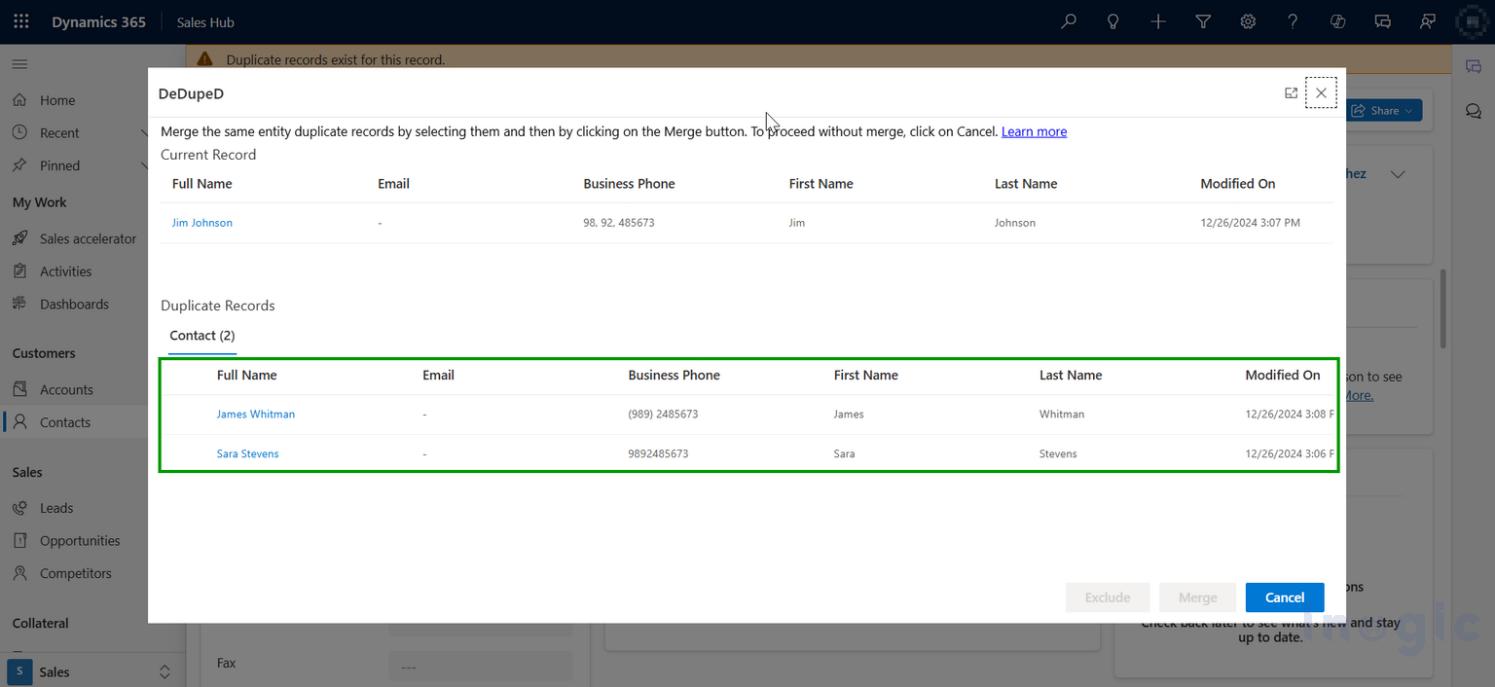 Format-Aware Identification Solves This
Advanced duplicate identification in CRM:
- Normalizes phone numbers
- Understands regional formats
- Identifies duplicates even when formats differ
This capability alone can reduce duplicate contacts dramatically in multi-region CRMs.
Step 6: Identify Duplicates Across Entities (Lead ↔ Contact)
Many duplicates exist across entities, not within them.
Example:
- A lead is imported
- The same person already exists as a contact
- CRM treats them as separate
Advanced duplicate identification checks:
- Lead → Contact
- Account → Contact
This ensures:
- One customer identity
- No fragmented history
- Accurate reporting and AI insights
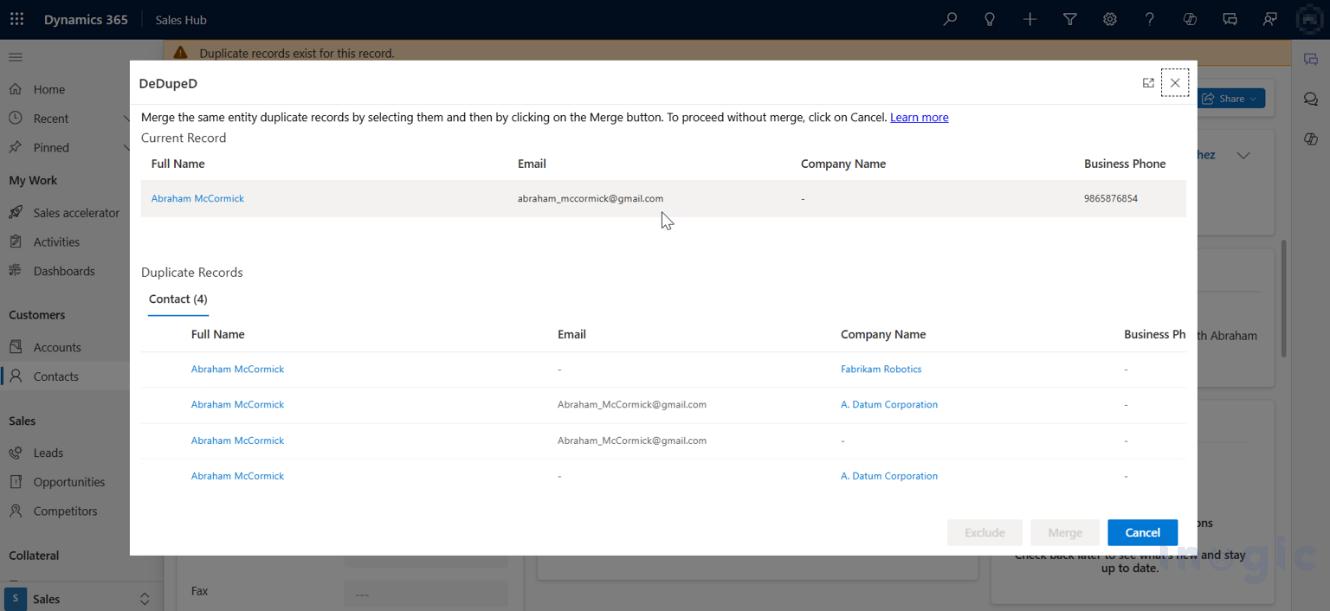
Step 7: Present Duplicates Clearly to Users
Duplicate identification should inform, not confuse.
Best-practice duplicate alerts:
- Show why the record is flagged
- Display relevant comparison fields
- Allow informed decisions
This is where many systems fail — they block users without context.
DeDupeD surfaces duplicates with clarity, not friction, which is critical for adoption.
What is better for Duplicate Identification in Dynamics 365 CRM
DeDupeD is the most advanced real-time duplicate identification engine built specifically for Dynamics 365 CRM.
What makes it different:
- CRM-native (not external cleanup tooling)
- Real-time client-side + server-side identification
- Advanced, human-aware matching logic
- Built for scale, global teams, and automation
It doesn’t just find duplicates.
It protects CRM intelligence at the moment data is created.
Client-Side vs Server-Side Duplicate Identification in Dynamics 365 CRM
| Aspect | Real-time Duplicate Identification while Creating or updating Records within CRM | Duplicate Identification during 3rd party integrations, data imports, or automation |
| User involvement | Requires users to be actively creating or editing records | Works automatically in the background |
| Works with workflows and automation | No, only applies when users interact with CRM | Yes, applies to automated processes and flows |
| Supports data imports | Limited, mainly user-driven data | Yes, protects large and bulk data imports |
| Provides real-time on-screen alerts | Yes, users see duplicate warnings immediately | No, runs silently without UI prompts |
| Designed for automation | Not suited for automated data creation | Built for integrations, workflows, and system processes |
Why This Matters
Client-side duplicate checks protect data entered by users, while server-side duplicate identification ensures records created by automation, imports, and integrations remain clean. Together, they provide complete duplicate prevention across Dynamics 365 CRM.
When Should Organizations Invest in Advanced Duplicate Identification?
You need advanced identification if:
- Your CRM spans multiple regions
- You rely on imports or integrations
- You’re adopting Copilot or AI insights
- Data trust impacts revenue decisions
In 2026, duplicate identification isn’t optional — it’s infrastructure.
Final Takeaway
Duplicate identification in Dynamics 365 CRM is no longer a cleanup task.
It’s a real-time intelligence function that protects data, reporting, automation, and AI-driven decisions.
Organizations that rely on delayed or rule-only detection will continue to struggle.
Those that adopt real-time, advanced duplicate identification will maintain a single, trusted customer view — at scale.
Frequently Asked Questions: Duplicate Identification in Dynamics 365 CRM
How do I find duplicate records in Dynamics 365 CRM?
Duplicate records in Dynamics 365 CRM can be identified by comparing key fields such as name, email, phone number, and company across records using matching rules. Advanced duplicate identification goes further by detecting phonetic similarities, partial matches, and different data formats in real time, instead of relying only on exact matches.
Why does native duplicate detection in Dynamics 365 CRM miss duplicates?
Native duplicate detection relies heavily on strict rules and exact field matching. It often misses duplicates caused by spelling variations, phone number formats, cross-entity records (Lead vs Contact), and data created through imports or integrations. This is why many organizations still experience duplicates even when native rules are enabled.
Can duplicates be identified before saving a record in Dynamics 365 CRM?
Yes. With real-time client-side duplicate identification, potential duplicates can be detected while a user is entering data or before clicking Save. This prevents duplicates from being created instead of discovering them later during cleanup or audits.
How can I identify duplicates created by imports and integrations?
Duplicates created by imports, APIs, workflows, or automated processes require server-side duplicate identification. This type of detection runs in the background and checks records created or updated by non-UI processes, ensuring data integrity even when users are not involved.
How does CRM identify duplicate phone numbers in different formats?
Advanced duplicate identification normalizes phone numbers and understands regional and international formats. This allows CRM to detect duplicates even when phone numbers are entered with country codes, spaces, dashes, or local formats that would otherwise appear different.
Is duplicate identification important for AI and Copilot features in CRM?
Absolutely. AI-driven features like forecasting, recommendations, and Copilot insights rely on clean, unified data. Duplicate records fragment customer history and distort AI outputs, making advanced duplicate identification essential for accurate AI-driven CRM decisions.
What is the difference between duplicate identification and duplicate merging?
Duplicate identification finds potential duplicate records and alerts users or systems. Duplicate merging consolidates those records into a single master record. Identification must happen first; merging without accurate identification can lead to data loss or incorrect consolidation.
When should an organization upgrade to advanced duplicate identification?
Organizations should consider advanced duplicate identification when they operate across regions, rely on imports and integrations, adopt AI and Copilot features, or experience declining trust in CRM reports and customer data.
Ready to Identify Duplicates Before They Damage Your CRM?
Duplicate records don’t just clutter Dynamics 365 CRM — they quietly undermine reporting accuracy, sales efficiency, and AI-driven insights.
DeDupeD helps organizations move from reactive cleanup to real-time duplicate intelligence, identifying duplicates the moment data is created — across users, imports, and integrations.
- See how real-time duplicate identification works inside Dynamics 365 CRM
- Protect CRM data quality without slowing down users
- Build a single, trusted customer view at scale
Explore DeDupeD and get 15 day free trial from the Inogic Website or the Microsoft Marketplace.
Request a personalized walkthrough at crm@inogic.com to see how advanced duplicate identification fits into your CRM environment.