In many Dynamics 365 Sales implementations, sales users need a simple and intuitive way to preview a quote, generate a PDF, and share it with customers. Traditionally, this requirement is handled using Word templates, which often feel rigid, require backend configuration, and do not provide a smooth preview experience for users.
Microsoft has introduced PDF generation and PDF preview capabilities in Canvas apps, making it possible to convert Canvas app screens or containers into PDF files and preview them directly within the app. These capabilities open new possibilities for creating user-friendly, preview-first document generation experiences in D365 Sales.
In this blog, we demonstrate how to build a Canvas app that allows users to view quotes, preview quote details as a PDF, and prepare the PDF for sharing, all using native Power Apps functionality.
How This Works (High-Level Overview)
This approach uses a Canvas app embedded in D365 Sales to display quote data. A specific container holding the quote layout is converted into a PDF using the PDF() function. The generated PDF is stored in a variable and passed to the PDF Viewer control, allowing users to preview the document before sharing or processing it further.
App Design Overview
To keep the user experience simple and intuitive, the app is designed with two screens.
Screen 1: Active Quotes
The first screen displays active quotes in a gallery, as shown below.
This screen acts as the entry point for the user and allows quick selection of a quote.
When a user selects a quote:
- The selected quote is stored in a variable
- The app navigates to the quote preview screen
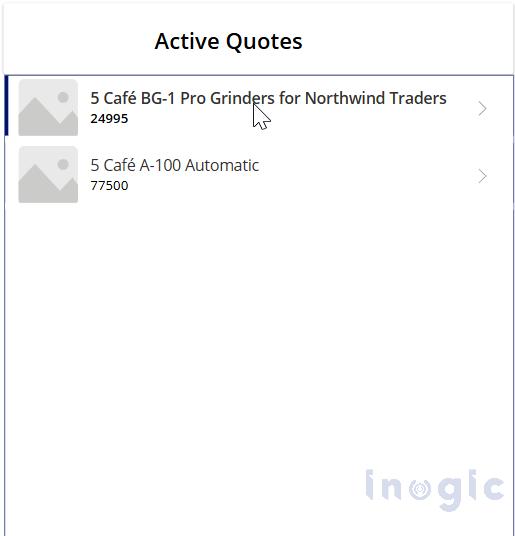
This approach keeps quote selection fast and avoids unnecessary navigation between screens.
Screen 2: Quote Details and Quote Preview
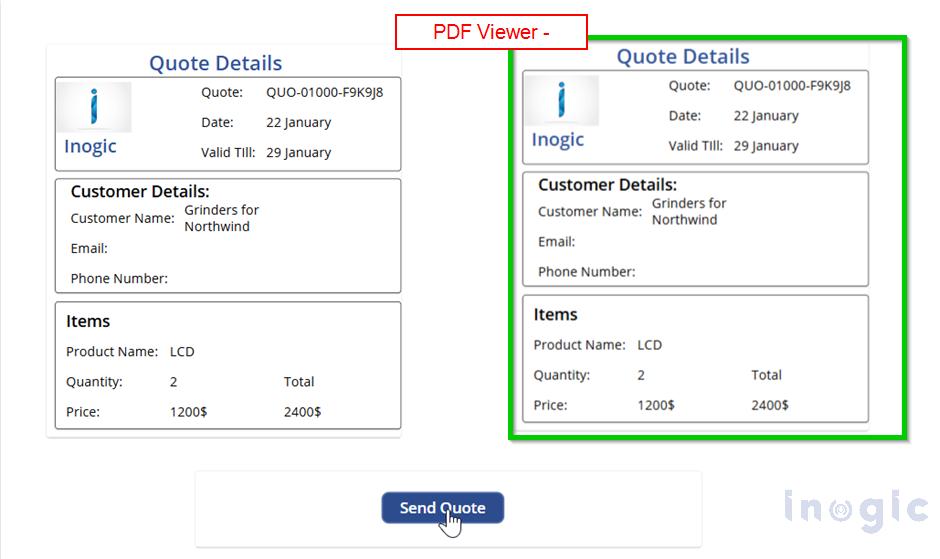
The second screen is designed to display quote details and a PDF preview side by side.
On this screen, I have used two containers:
- One container to display the quote details
- Another container to preview how the quote will appear in the PDF Viewer
To display the PDF in the PDF Viewer, the following approach is used:
Generating the PDF
The PDF() function is used to generate a PDF from the quote details container.
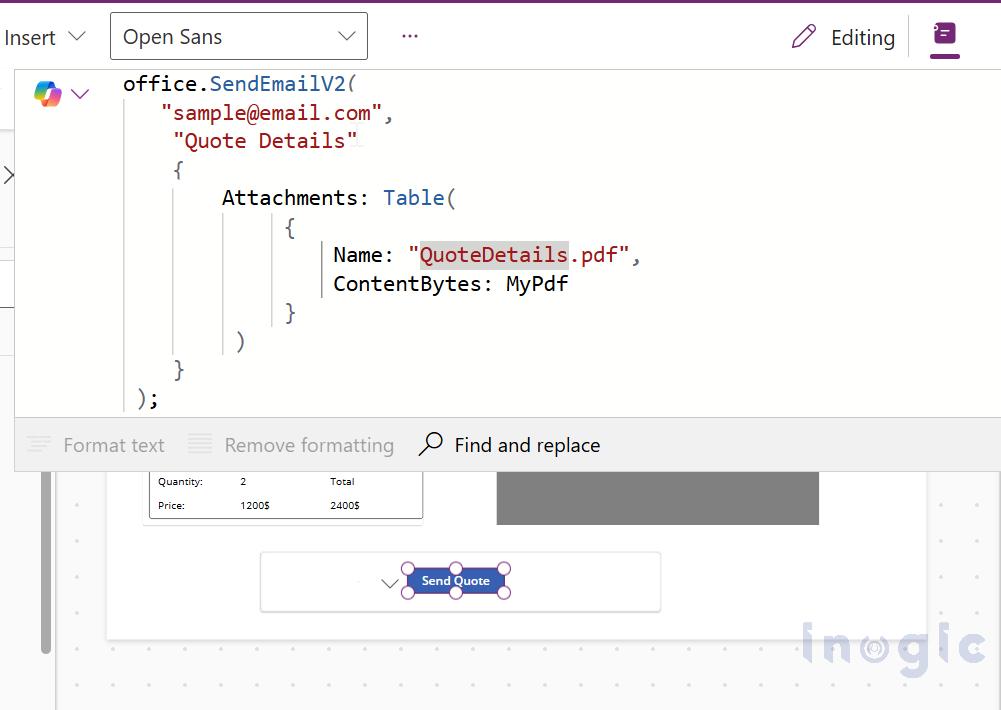
The generated PDF is stored in a variable (MyPdf).
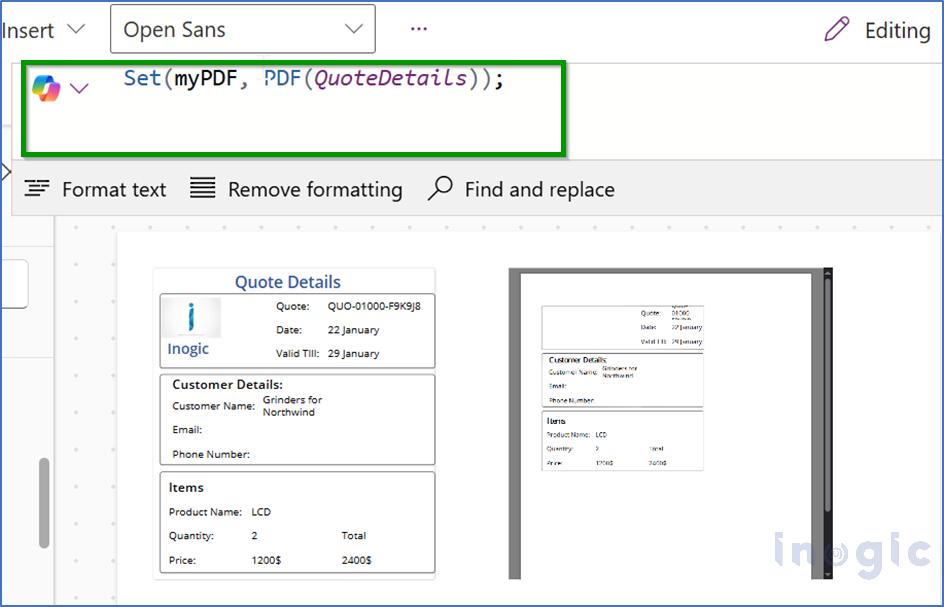
This ensures that the same layout used to display quote details is reused for PDF generation.
Previewing the PDF
The MyPdf variable is then passed to the PDF Viewer control, allowing users to preview exactly how the PDF will look before it is shared.
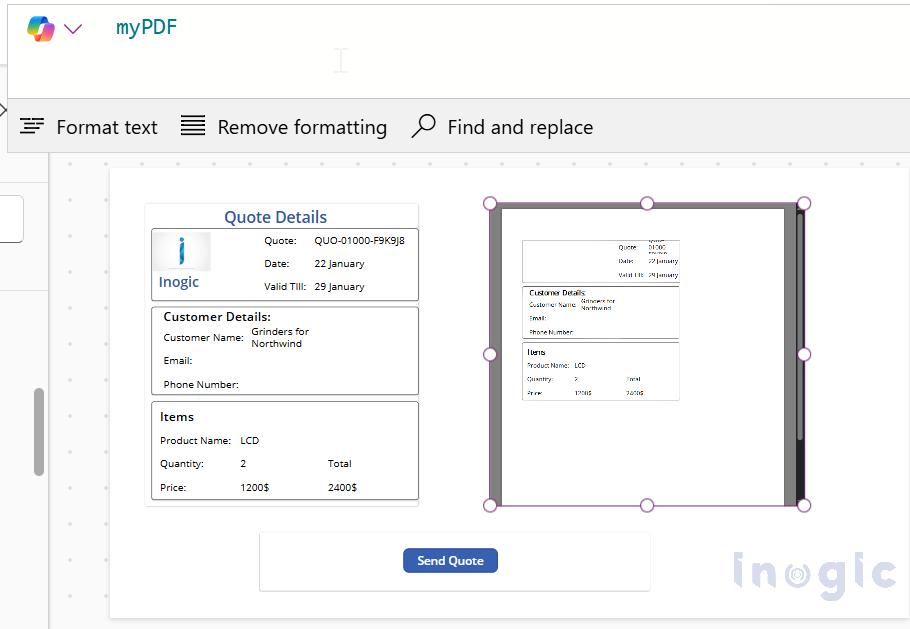
This provides a true “what you see is what you get” experience for the user.
Below is how the page layout looks with the quote details on one side and the PDF preview on the other.
Important Note on Experimental Features
At the time of writing, both the PDF () function and the PDF Viewer control are marked as Experimental features in Power Apps.
Benefits of This Approach
- Preview-first user experience
- No dependency on Word templates
- Flexible and easily customizable layouts
- Consistent PDF output
- Simple integration with Power Automate for further processing
Real-World Use Cases
This pattern can be applied across multiple D365 Sales and business scenarios, including:
- Quote generation and sharing
- Invoice previews
- Order confirmations
- Service reports
- Custom sales documents
The same reusable layout approach ensures consistency across documents while keeping the user experience simple.
FAQs
Can Canvas apps generate PDFs in D365 Sales?
Yes. Canvas apps support the PDF() function, which allows screens or containers to be converted into PDF files that can be previewed or shared.
Do I need Word templates to generate PDFs in D365 Sales?
No. This approach removes the dependency on Word templates by generating PDFs directly from Canvas app layouts.
Can users preview PDFs before sharing them?
Yes. The PDF Viewer control allows users to preview the generated PDF inside the Canvas app before sharing.
Can this be integrated with Power Automate?
Yes. The generated PDF can be easily passed to Power Automate for emailing, storage, or further processing.
Conclusion:
By combining Canvas apps with the PDF() function and PDF Viewer control, it is now possible to create lightweight and flexible document generation experiences directly within D365 Sales.
This approach allows users to preview, generate, and share quote PDFs using a single reusable layout, improving usability and reducing dependency on backend templates.
The same pattern can be extended to other scenarios such as invoices, orders, service reports, or any use case where formatted documents are required.