For managers, keeping track of crucial CRM alerts and notifications is vital for smooth operations and timely decisions. However, with the constant flow of alerts from different CRM activities, it’s easy to overlook important updates, leading to missed actions and delays.
Alert4Dynamics by Inogic is designed to solve this problem for users of Dynamics 365 CRM. It sends email notifications for unread, read-but-not-dismissed, or all types of alerts, so no important update goes unnoticed. Users can receive these notifications daily, weekly, or monthly, without having to check their CRM system constantly. This way, managers can stay informed and respond quickly, even if they’re not actively using the CRM or checking their email, improving efficiency and ensuring timely actions.
What are the 4 effective steps to set up email notifications in Dynamics 365 CRM?
- Create a Custom Email Template: In CRM, go to the advanced settings and create a custom email template with the “Global” Set permissions to ensure enhanced security.
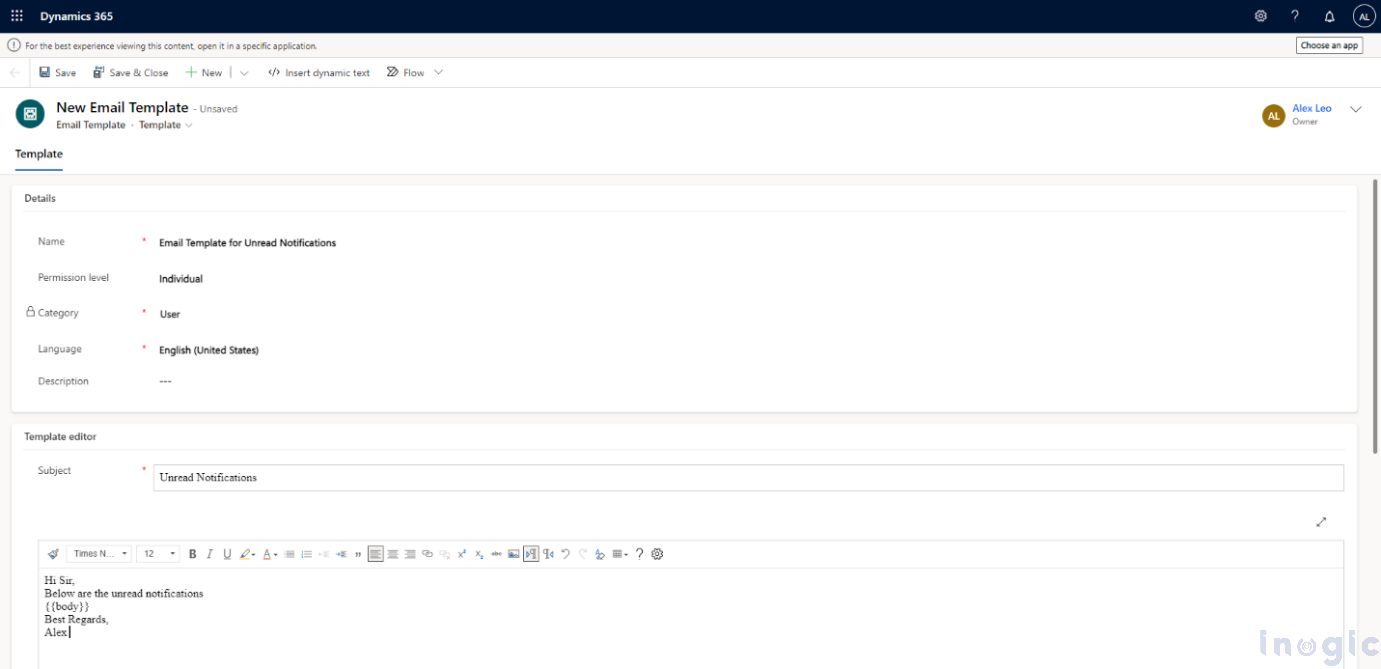
- Set the Subject Line: Create a subject line tailored to your needs to easily identify and differentiate Dynamics 365 CRM alerts from other types of notifications. For example, “New Account Created Details – Missed Alerts” will let you know that the respective mail contains the details of the account created on a particular time instance.
- Configure Security Settings:
- Assign the email template to a specific user or set it as an individual template.
- Notification Type: Choose “Unread Notifications” if you want to receive emails for unread alerts.
- Notification Frequency: Select how often you want to receive notifications (Daily, Weekly, or Monthly). For example, choose “Daily” to get updates every day.
- View Columns Display Order: Pick between “Active Notifications” or “Inactive Notifications” to display in the email as per CRM layout. For instance, select “Active Notifications.”
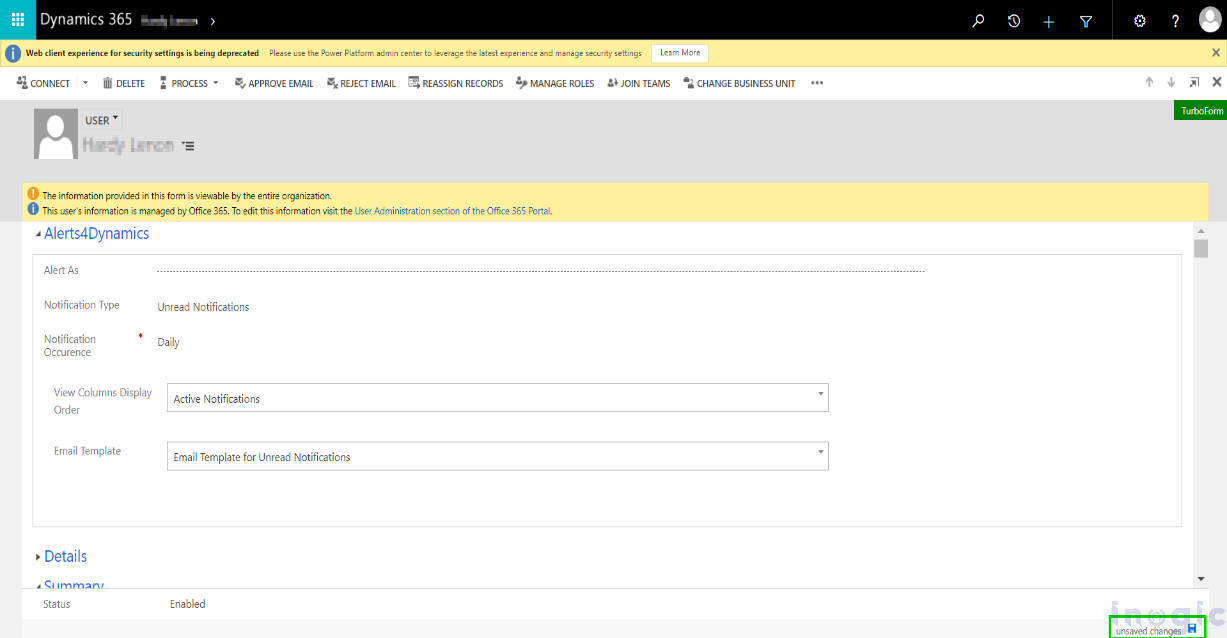
- Select Your Email Template: Choose the “Email Template for Unread Notifications” that you created earlier.
This setup ensures that you receive timely email notifications with the relevant alerts of CRM updates.
Let’s see the result with a real-life example!
Imagine Alex, a sales manager, who is now able to streamline reporting and never miss a crucial alert, even if a sales team member overlooks it in the CRM. With Inogic’s Alert4Dynamics, Alex receives daily unread notifications across both Dynamics 365 CRM and external email accounts like Outlook. This eliminates the risk of human error, ensuring that no important update is missed. Alex can act promptly on key alerts, track team performance, and maintain oversight without relying solely on his team’s manual input, significantly reducing the chances of missed opportunities or delays.
Outlook:
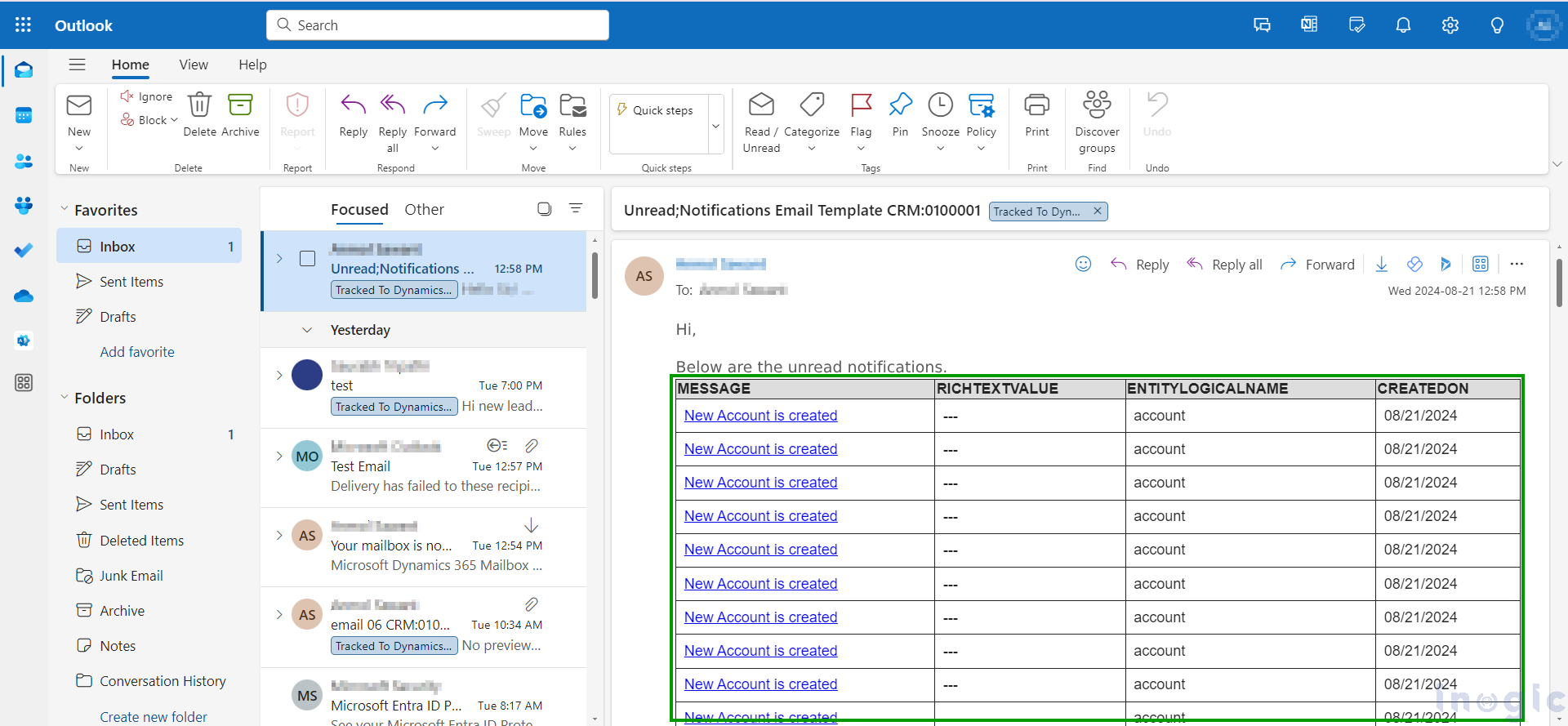
CRM:
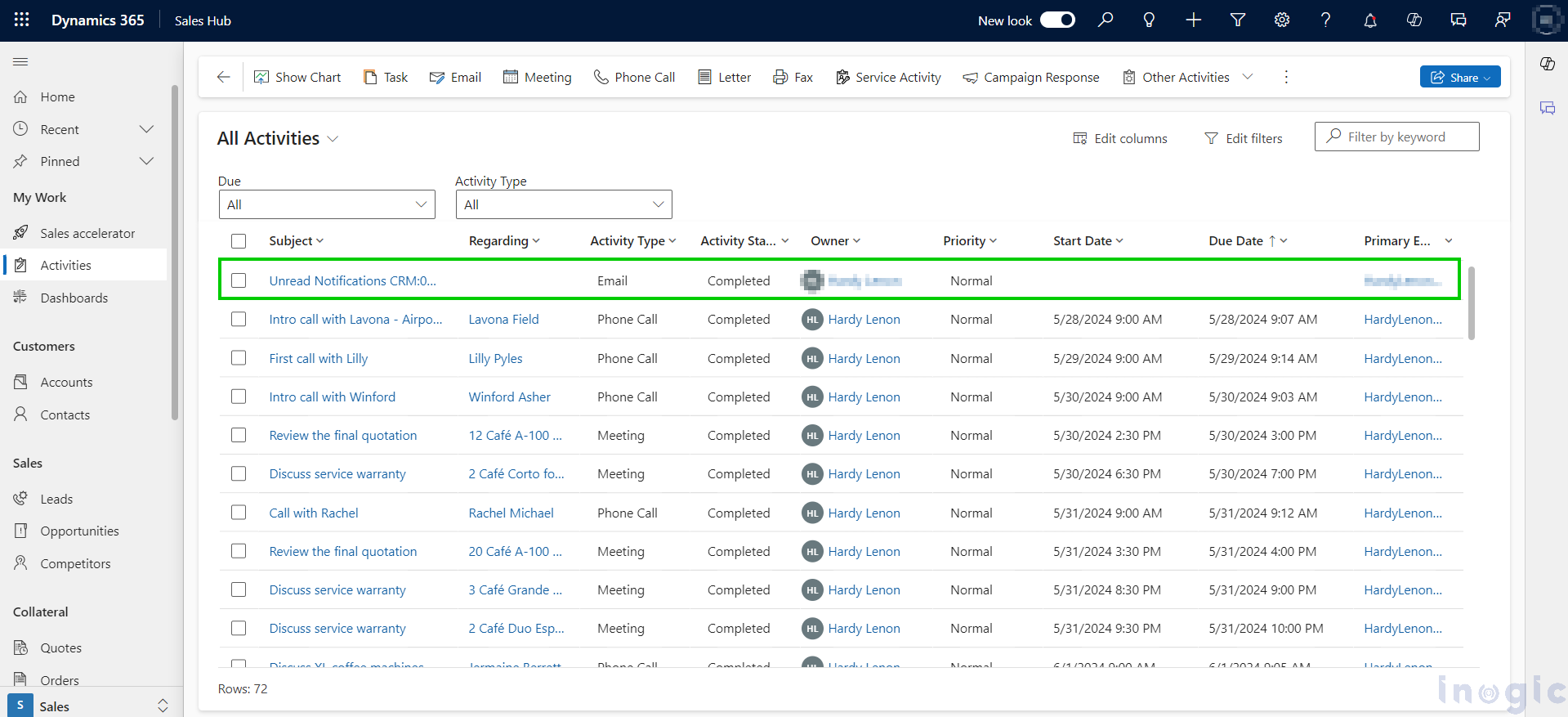
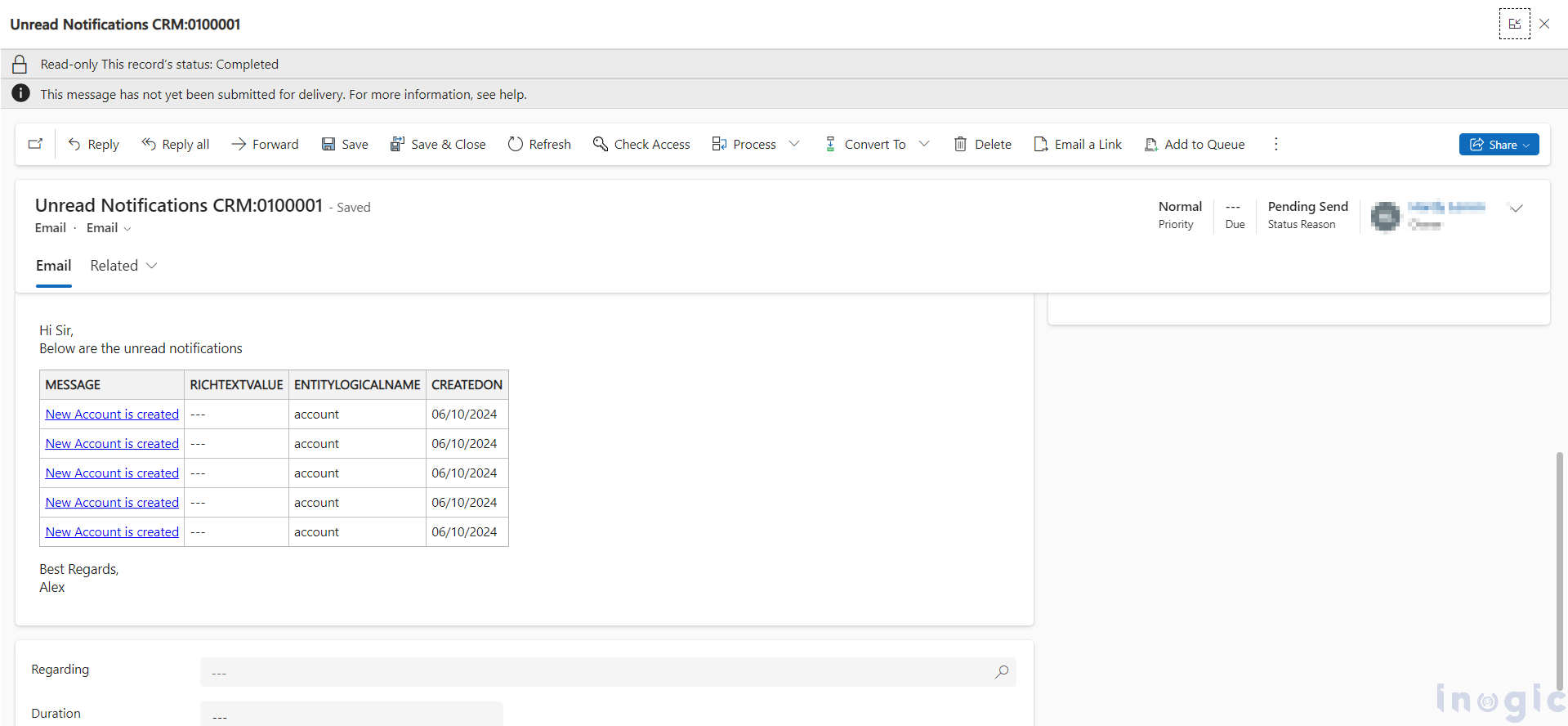
How this enhancement will help you?
Never Miss Updates: Ensure you don’t miss any notifications, alerts or updates related to business processes, helping you make informed decisions.
Simplified Search: Easily find old updates or alert by searching for the name of the email template, reducing the hassle of manual searches.
Stay Informed Anywhere: Remain updated and respond quickly even when you’re not logged into the CRM.
Streamlined Tracking: Track crucial CRM communications directly from your external email, enhancing your ability to oversee important information.
Manage on the Go: Stay connected to key CRM updates wherever you are, ensuring you’re always in the loop.
Frequently Asked Questions (FAQs)
- How can businesses stay updated on important CRM activities?
Businesses can stay informed by using Alerts4Dynamics, which delivers real-time notifications for critical events directly from Dynamics 365 CRM.
- Why are real-time notifications important in CRM systems?
Real-time notifications ensure no critical updates are missed. Alerts4Dynamics instantly alerts users about important CRM actions and changes.
- How can teams respond faster to CRM changes?
Teams can respond faster by receiving instant alerts. Alerts4Dynamics ensures timely notifications for high-priority CRM events.
- Is it possible to get alerts outside of Dynamics 365 CRM?
Yes, Alerts4Dynamics sends notifications via email, in-app alerts, and other channels to keep users informed anywhere.
- What types of CRM events can trigger notifications?
Events like record creation, updates, assignments, and status changes can trigger alerts using Alerts4Dynamics.
- How do CRM alerts improve productivity?
CRM alerts reduce the need for manual monitoring. Alerts4Dynamics keeps users focused by notifying them only when action is required.
- Can alerts be customized for different users or teams?
Yes, Alerts4Dynamics allows alerts to be tailored based on roles, records, and business rules.
Set up your alerts today and enhance your CRM efficiency!
Want to stay alert? Embark on a 15-day free trial with Inogic’s app, available on Microsoft AppSource. Install now and experience a journey into unparalleled CRM brilliance!
For more information or to begin your trial, contact us at crm@inogic.com.