If you’re using Microsoft Dynamics 365, you probably already have pipeline visibility.
- You can see your opportunities by stage.
- You can drag deals across columns.
- You know what’s open and what’s moving.
But here’s the real question:
Does your Kanban board help you close deals, or does it only help you see them?
Most Dynamics 365 users quickly realize the gap.
Even with native Kanban, you still find yourself:
- Opening individual records just to update fields
- Switching screens to create follow-ups
- Managing leads, opportunities, and cases in separate views
- Exporting data just to understand pipeline totals
- Spending more time navigating CRM than selling
If that sounds familiar, your pipeline has visibility, but not execution.
And that’s exactly where modern Kanban comes in.
Why Native Kanban in Dynamics 365 Stops Short for Growing Teams
The built-in Kanban view in Dynamics 365 works well for basic visualization.
But as your sales operation scales, execution becomes fragmented.
- You move a card.
- Then open the record.
- Then create an activity.
- Then update fields.
- Then switch views.
Now multiply that by dozens of deals every day.
This is when CRM starts feeling heavy.
- Sales reps lose momentum.
- Managers lack real-time operational clarity.
- Pipeline data becomes inconsistent.
Native Kanban shows status, but it doesn’t help your team do the work.
Modern sales teams need more than visual pipelines. They need pipeline execution inside CRM.
How Inogic’s Kanban Board Turns Dynamics 365 into an Execution Workspace
Inogic’s Advanced Kanban Board is built for one purpose:
to help you execute deals directly inside Dynamics 365, not just visualize them.
Instead of acting as a display layer, it becomes your team’s daily working surface.
Here’s what that looks like in real life:
Execute deals directly from the board
If your reps are opening records just to update stages or add activities, that’s wasted time.
With Inogic’s Kanban Board, your team can:
- Drag and drop deals across stages
- Edit records inline
- Create activities instantly
- Progress opportunities without leaving the board
Everything happens in one view.
Fewer clicks. Less navigation. Faster follow-ups.
This alone saves hours every week for active sales teams.
Manage multiple pipelines in one place
Sales rarely happen in a single entity.
You work with:
- Leads
- Opportunities
- Cases
- Custom entities
Native Kanban limits this.
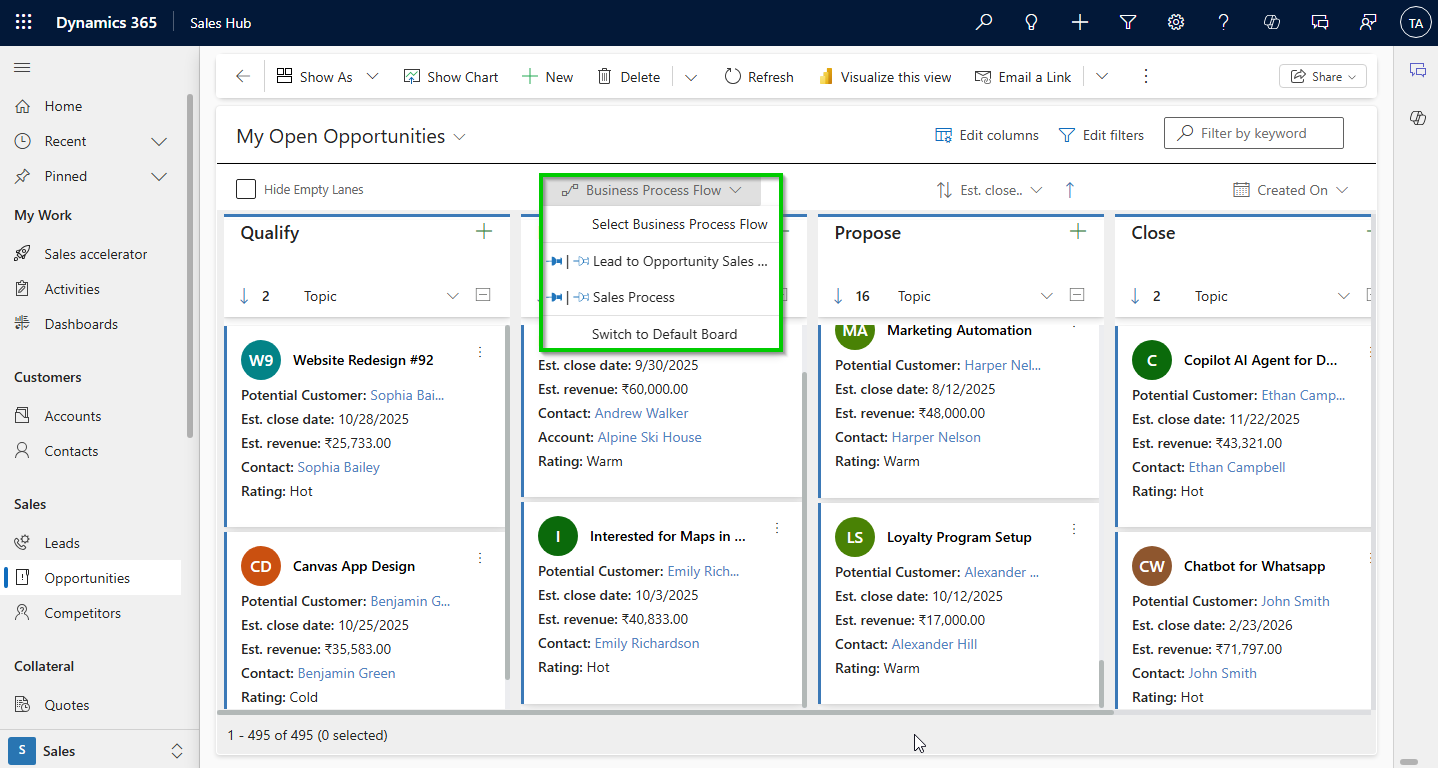
Inogic’s Kanban Board supports multi-entity Kanban, so you can visually manage and execute workflows across your entire CRM, from lead qualification to deal closure to post-sale processes.
Get real-time pipeline insights without exporting data
Managers shouldn’t need external tools like Power BI just to understand pipeline health.
With Inogic’s Kanban Board, you can see:
- Stage-wise totals
- Record counts
- Value summaries
directly on the board.
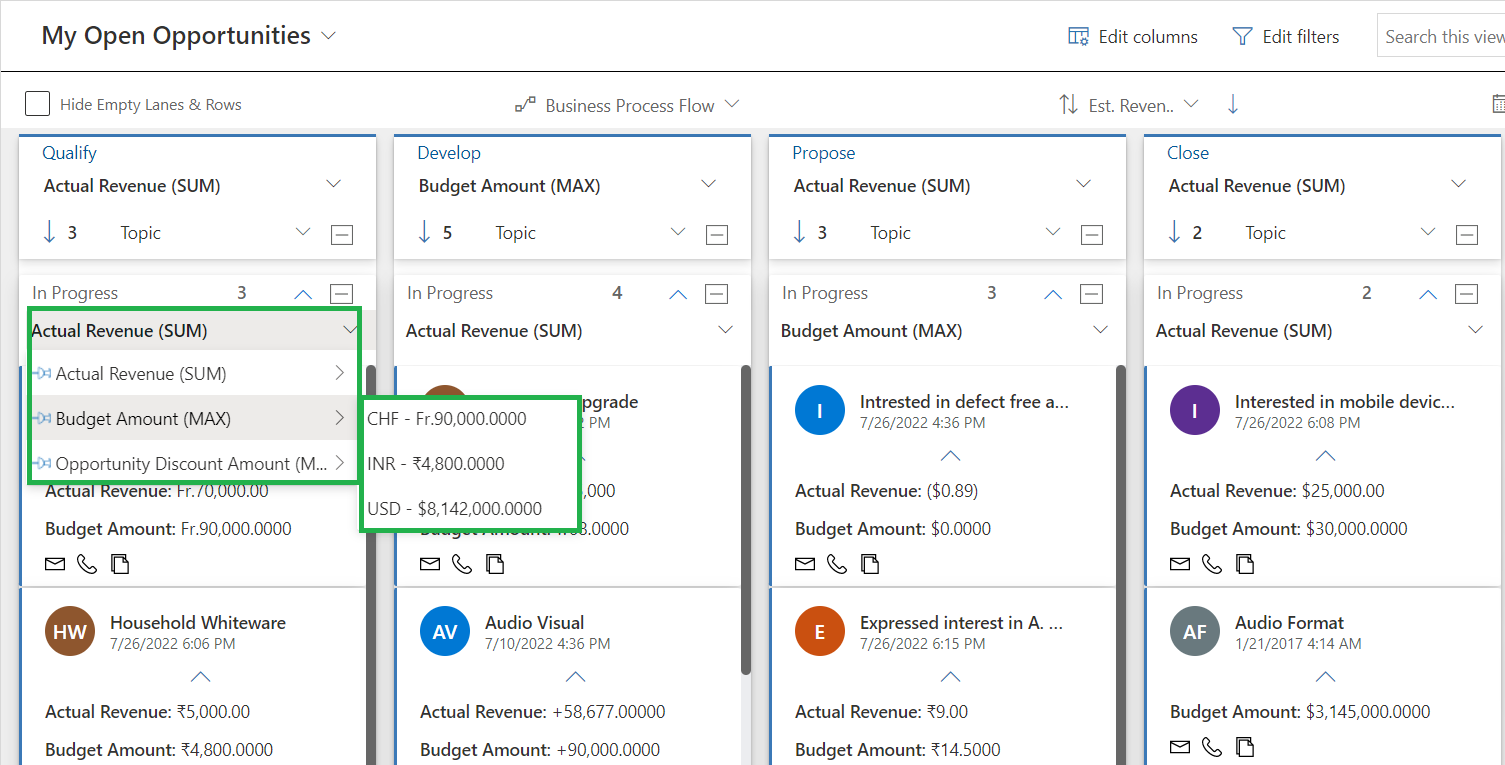
So you instantly know:
- Where deals are getting stuck
- Which stage carries the highest value
- Who owns the most open opportunities
No spreadsheets. No dashboards. No delays.
Reduce CRM fatigue and improve adoption
When reps can complete real work from one screen, CRM stops feeling like admin.
They update data naturally as part of execution, not as an afterthought.
This improves:
- Data accuracy
- User adoption
- Forecast reliability
without forcing behavior change.
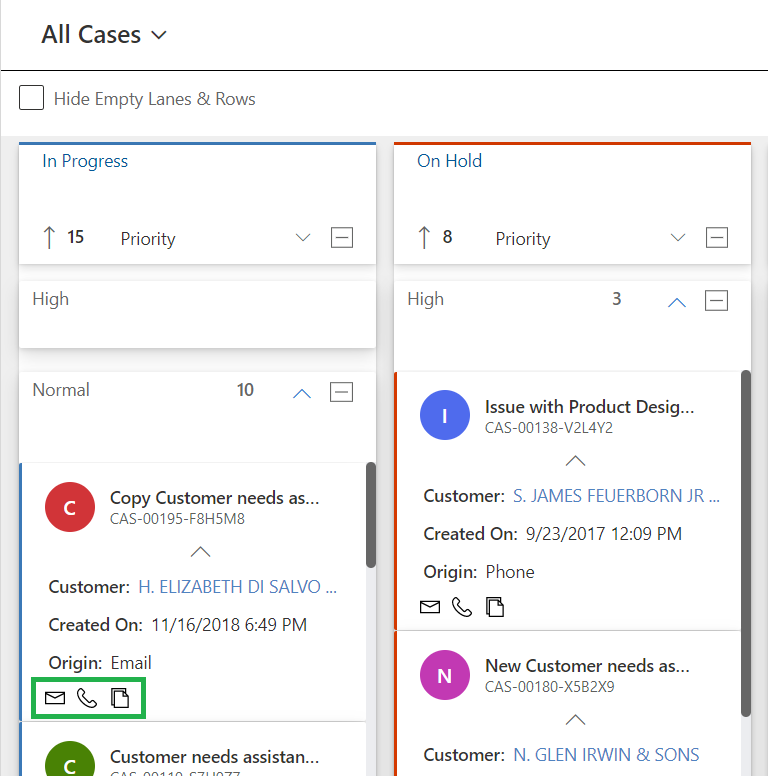
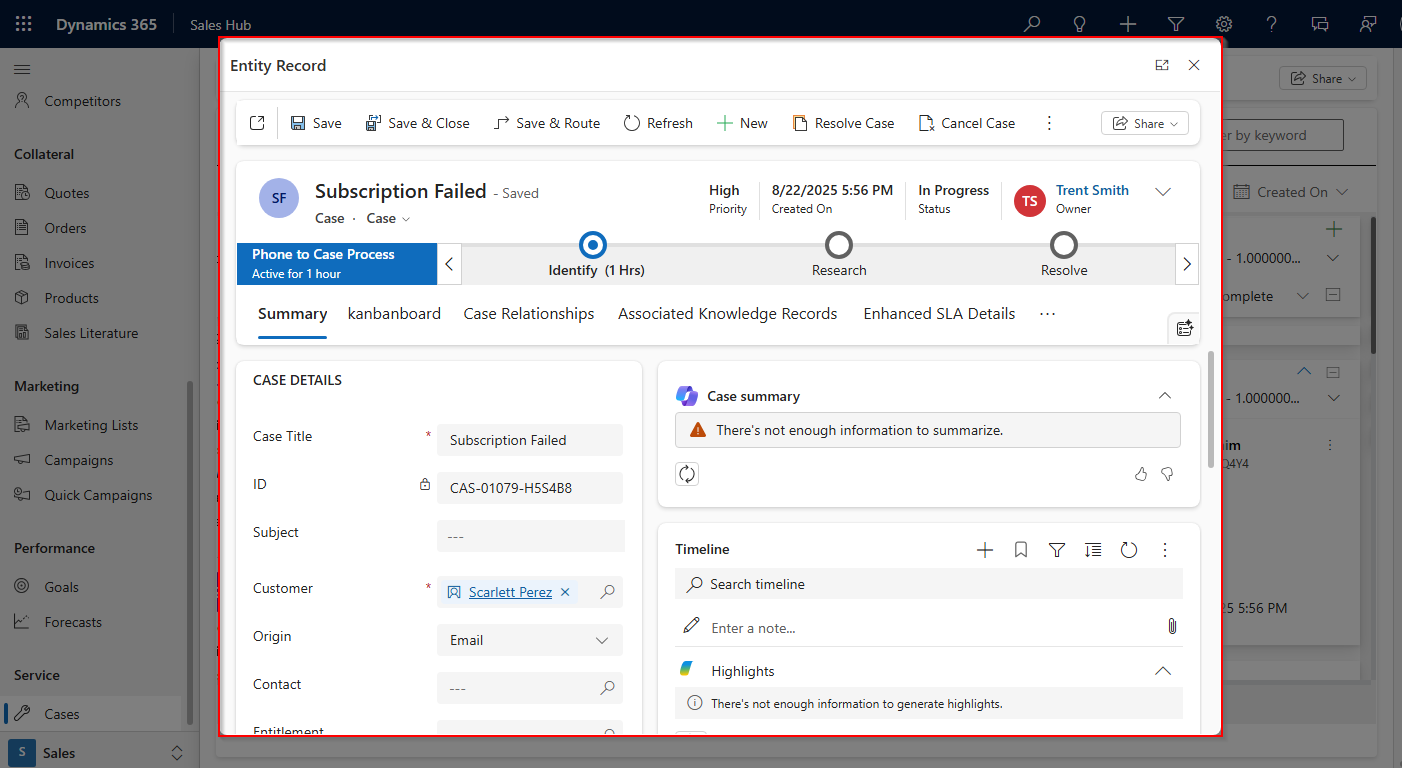
For example, when a high-priority case like “Subscription Failed” is dragged from In Progress to On Hold, a custom function can automatically open the case record and check whether all required details are filled in.
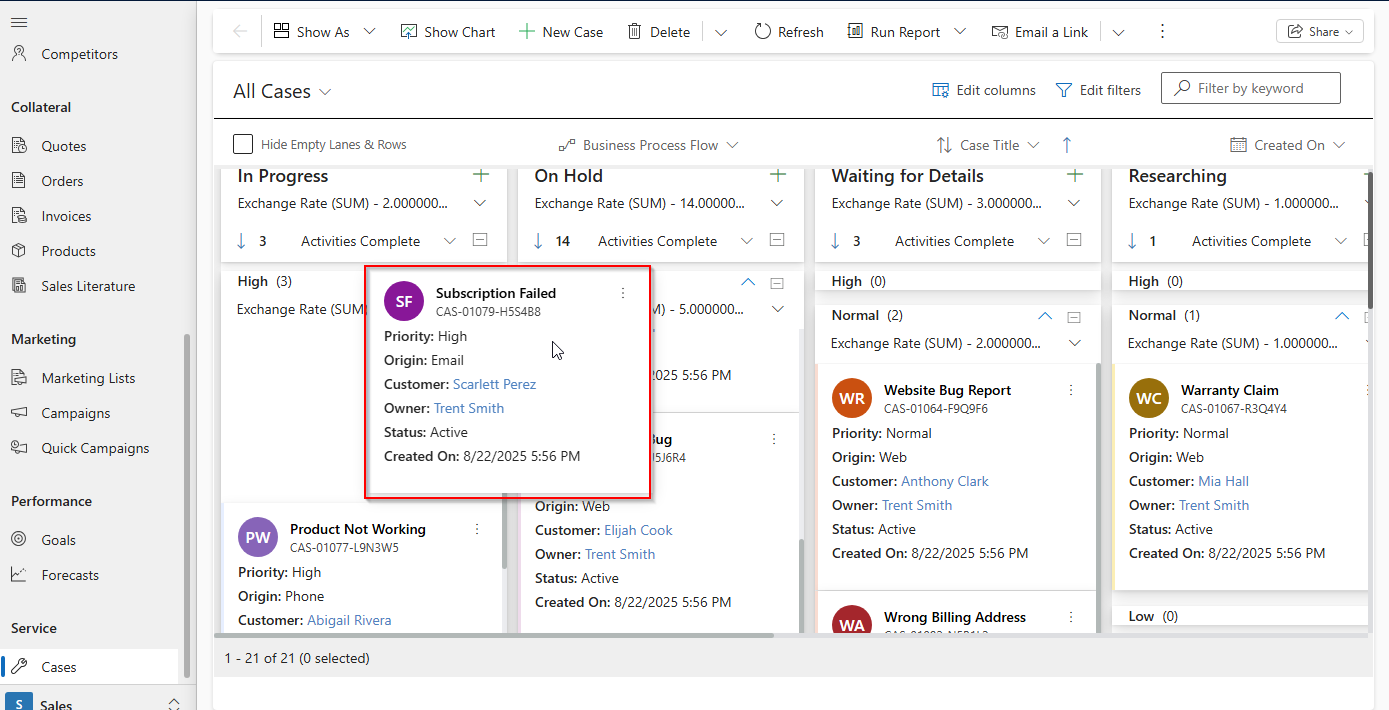
If a field is missing, the user can instantly modify and save the form details before dropping it to another lane, like Hold.
Native Dynamics 365 Kanban vs Modern Execution-Focused Kanban
If you’re already using Dynamics 365, you might be wondering:
Why do I need another Kanban board?
Here’s the practical difference.
Native Kanban helps you see your pipeline.
Inogic’s Kanban Board helps you run your pipeline.
| Capability | Native Dynamics 365 Kanban | Inogic Kanban Board |
| Visual pipeline | ✅ Yes (Basic) | ✅ Yes (Advance) |
| Drag & drop stages | ✅ Basic | ✅ Advanced |
| Inline record editing | ❌ Limited | ✅ Yes (when record form open allowed to update) |
| Create activities from board | ❌ | ✅ |
| Multi-entity boards | ❌ (Supported only Opportunity and activity) | ✅ (Opportunities, Leads, Cases, Custom ) All OOB Entity and Custom entity. |
| Stage-wise totals & values | ❌ | ✅ |
| Execute workflows from Kanban | ❌ | ✅ |
| Reduce CRM navigation | ❌ Basic | ✅ Advanced |
| Manager pipeline insights | ❌ (Limited)(Basic) | ✅ Built-in (Strong) (Advanced insights & real-time tracking) |
| Designed for execution | ❌ Visualization only | ✅ Execution-first (Better to take action based on the visualization) |
What You Get with Inogic’s Advanced Kanban Board (Built for Execution)
Inogic’s Advanced Kanban Board helps your team execute work directly inside Dynamics 365 — with fewer clicks, clearer pipelines, and faster deal movement.
Here’s how its capabilities translate into real outcomes:
Guided Pipeline Execution
Run structured sales and service workflows across Leads, Opportunities, Cases, and custom entities using Business Process Flow support with global and personal pinning, so your most important pipelines are always accessible.
Faster Day-to-Day Sales Execution
Move deals with drag-and-drop, update records inline using compact cards, create activities instantly, search records quickly, and even progress multiple deals together, all from one Kanban view. This dramatically reduces CRM navigation and admin effort.
Built-In Manager Insights (No External Dashboards)
See stage-wise totals, record counts, and workload distribution directly on the board using aggregates, row grouping, swim lanes, and smart lane sorting, giving managers immediate clarity on bottlenecks and pipeline health.
Precision Control Over Your Pipelines
Focus only on what matters with advanced lane and row filters, global sorting, CRM-native filters, and FetchXML criteria, enabling highly targeted, execution-ready Kanban views.
Personalized, High-Volume Friendly Views
Adjust card width, use compact layouts, apply colors and persona images, and convert any CRM view into Kanban, helping teams stay visually focused even with large pipelines.
Enterprise-Ready Performance & Integration
Handle thousands of records smoothly with lazy loading, integrate Kanban actions with other systems via custom events, and keep execution fast at scale.
What this means for you
Instead of just seeing your pipeline, you can now:
- Execute deals directly from one screen
- Manage multiple entities in a single workflow
- Gain real-time pipeline insights
- Reduce CRM clicks and admin work
- Keep processes structured and consistent
Your Kanban board becomes a daily execution workspace, not just a visual report.
With native Kanban, you manage status.
With Inogic’s Kanban Board, you execute work.
Your reps stop jumping between records.
Your managers gain real pipeline clarity.
Your CRM finally supports how sales actually happens.
From Sales Visibility to Sales Velocity
When Kanban becomes executable, three things change immediately:
Faster deal progression: Follow-ups happen on time. Stages move with intent.
Clear operational control: Managers spot bottlenecks early and rebalance workload instantly.
Less admin, more selling: Reps spend less time navigating CRM and more time engaging prospects.
You’re no longer managing a pipeline. You’re actively driving it.
Preparing Dynamics 365 for AI Starts with Executable Pipelines
As AI capabilities expand inside Dynamics 365, clean and structured pipeline data becomes critical.
AI relies on:
- Consistent stage movement
- Logged activities
- Predictable workflows
Inogic’s Kanban Board helps create this foundation by embedding execution into everyday CRM usage.
Simply put:
Better execution today = smarter AI tomorrow.
Final Thoughts
Pipeline visibility is no longer the differentiator.
Execution is.
If your current Kanban setup only shows progress but doesn’t help your team create progress, it’s time to rethink how you work inside Dynamics 365.
Inogic’s Advanced Kanban Board transforms your CRM from a tracking system into an execution workspace, helping sales teams close deals faster, managers gain clarity, and organizations build AI-ready pipelines.
Turn Your Pipeline into an Execution Workspace
If your team is spending more time navigating CRM than closing deals, it’s time to upgrade how you work inside Dynamics 365.
See how Inogic’s Kanban Board helps you:
- Execute deals directly from one screen
- Reduce CRM clicks and admin work
- Manage multiple pipelines visually
- Gain instant pipeline clarity
Want to book a personalized Kanban walkthrough? Reach us at crm@inogic.com.
Want to see Kanban Board in action? Download 15 day free trial from the Inogic website or Microsoft Marketplace.