For more than five years, Map My Relationships has defined how Dynamics 365 CRM users understand, analyze, and navigate customer relationships. It introduced CRM teams to visual relationship mapping through Mind Map View and Hierarchy Views, transforming raw CRM records into connected business intelligence.
In 2026, Inogic takes this leadership further.
With the launch of Tree View Visualization, Map My Relationships introduces a powerful new way to visualize CRM relationships, one that brings structure, clarity, and execution-grade insight to even the most complex CRM data.
This is not just a new view.
It is the next chapter in CRM relationship intelligence.
What Is Tree View Visualization in CRM?
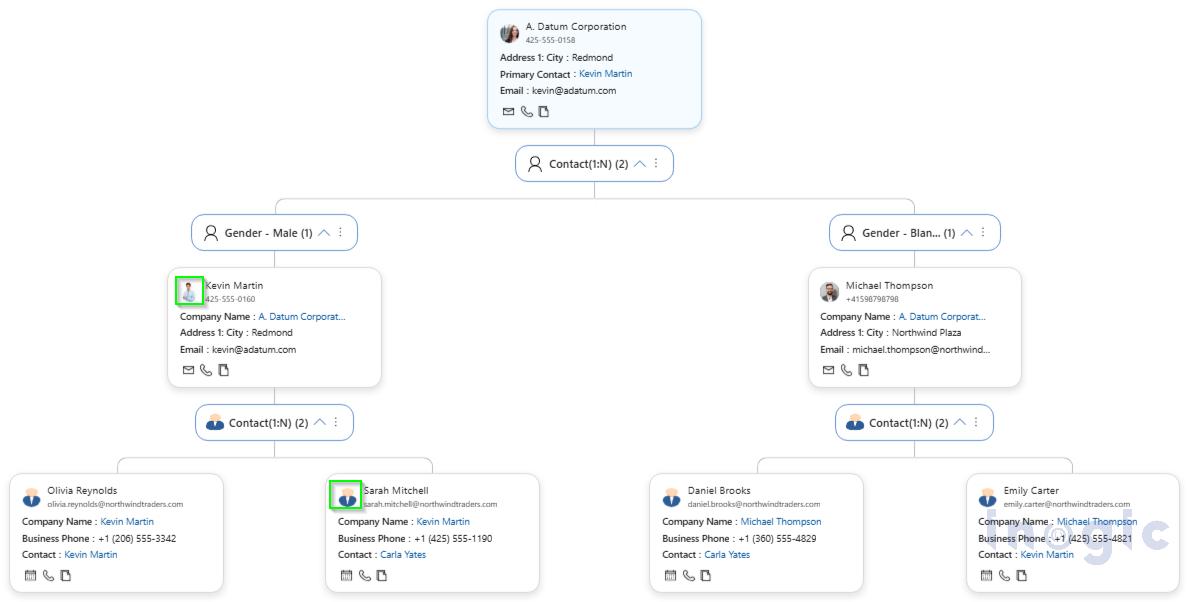
Tree View Visualization is a structured relationship view that displays Dynamics 365 CRM records in a parent-to-child, top-to-bottom view. Accounts, contacts, opportunities, and other related records appear as connected nodes, allowing users to instantly understand how data flows across the organization.
Instead of jumping between forms, subgrids, and lookups, users can see their entire relationship structure in one clean, interactive view
In simple terms, Tree View answers one powerful question:
“Who belongs to whom, and how are they connected?”
What Does Tree View Include for Relationship Visualization in CRM?
Tree View is not just a visual; it is a complete relationship workspace.
Below are the key capabilities that make it powerful:
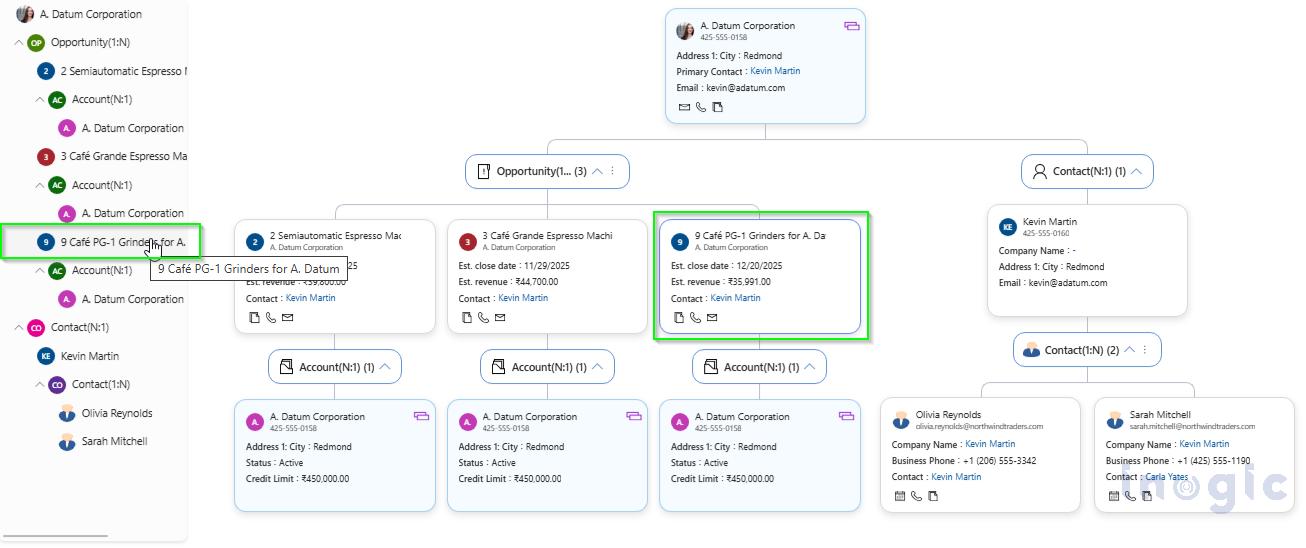
- Top-to-Bottom Tree View: Displays CRM records as nodes connected through relationships, allowing users to visually explore how accounts, contacts, opportunities, and other entities relate to one another in a structured format. Shows the complete relationship in a vertical flow, starting from the parent record and expanding downward through all connected records, making reporting lines and ownership easy to understand
- Tree Navigation Panel: A collapsible side panel that mirrors the entire tree structure, allowing users to instantly jump to any record without scrolling or zooming through large hierarchies
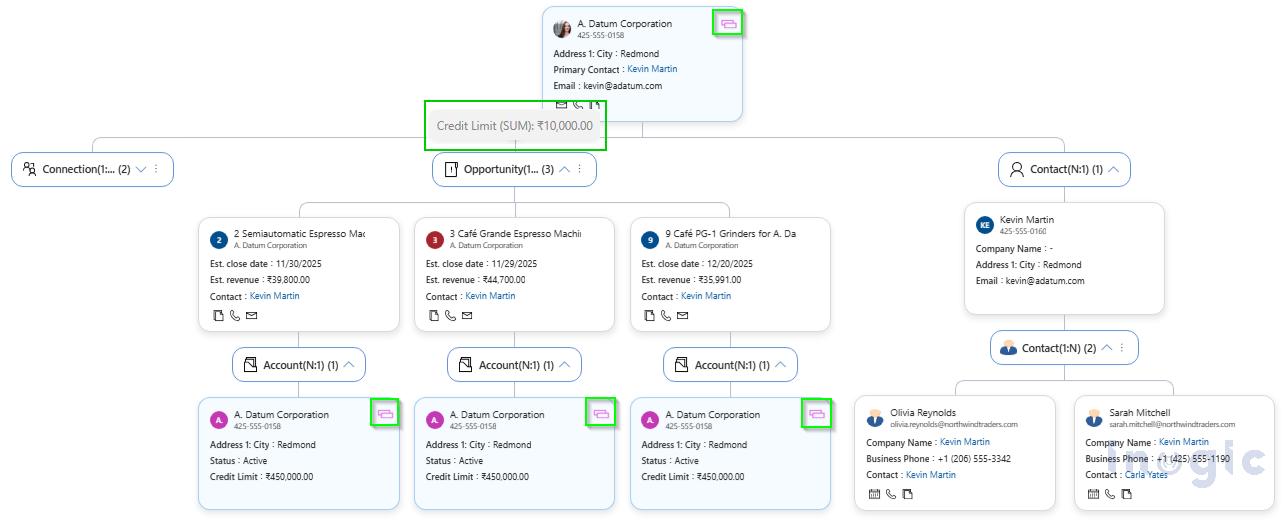
- Drill-Down N-Level Relationship: Allows users to expand any node to view deeper levels of related records, no matter how complex the relationship structure becomes
- View Detail in Tree View Card: Each record card displays key fields such as name, company, email, and phone, enabling users to understand and recognize stakeholders without opening the full CRM form

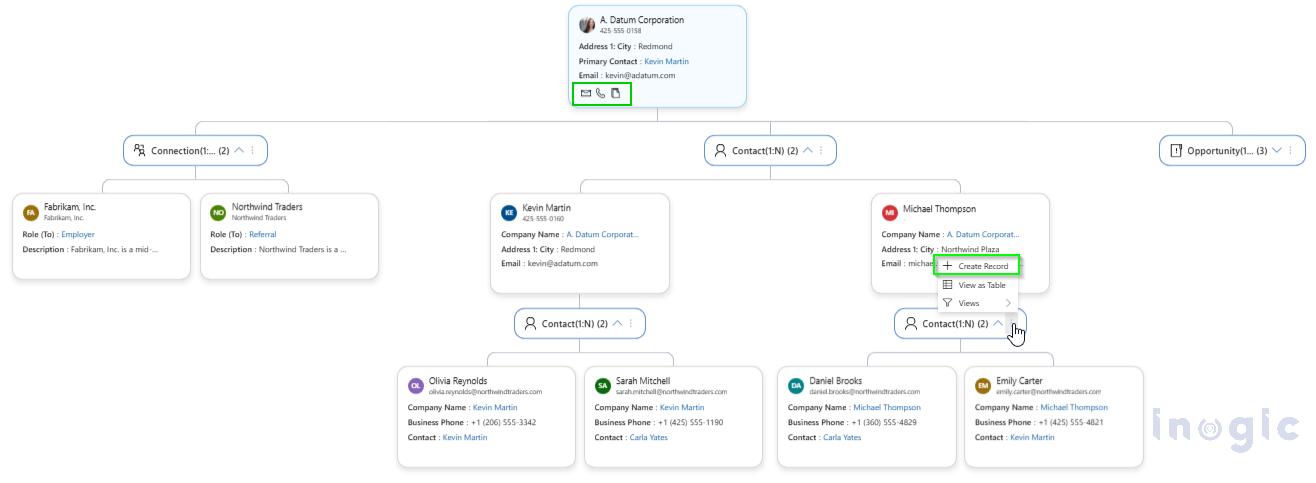
- Create Associate Records within Tree View: Users can create new related records directly from the tree, such as adding contacts or sub-accounts under a parent, without leaving the relationship view
- Perform Quick Actions within Tree View: Users can call or email contacts directly from the record cards, turning the Tree View into an interactive working interface rather than just a visualization
- Auto Expand Node: Automatically expands child records when the tree loads, allowing users to see connected data instantly without manually opening each node

- Custom Page within Tree View: Allows Tree View to open in a full-page experience, giving users more screen space to analyze complex relationship structures
- Display Images in Tree View: Shows profile photos, account logos, or record icons on each node, making it easier to visually identify people and organizations in large hierarchies

- Duplicate Record in Tree View: When the same record appears in multiple branches, Tree View highlights it with a duplicate indicator, ensuring users understand cross-relationships and avoid confusion
- Grouping and Aggregation in Tree View: Records can be grouped by fields such as region, status, or gender, and business metrics like SUM, COUNT, and AVG can be displayed directly on the group nodes for instant insights
- Custom Label: Allows organizations to rename relationship nodes and group labels using business-specific terminology instead of default CRM system names
- Filter Records: Users can apply CRM views and filters directly within Tree View, allowing them to analyze subsets like Active Contacts, No Orders, or Campaign Respondents without leaving the relationship map

Why One Relationship View Is Never Enough
Every CRM team works in two modes:
- Exploration — discovering who is connected to whom
- Execution — managing accounts, stakeholders, and deals
Mind Map excels at discovery | Tree View excels at structure.
Map My Relationships does not force you into one visualization style. Instead, it gives you the right perspective for the right job, and Tree View is designed for moments when clarity, hierarchy, and decision-making matter most.
Mind Map View vs Tree View for CRM Relationship Visualization
Both views serve different CRM needs.
Mind Map View
- Designed for exploration and discovery
- Ideal for finding unknown connections
- Shows relationships in a free-flowing format
Tree View
- Designed for execution and structure
- Ideal for account management and stakeholder clarity
- Displays relationships in a clean, hierarchical layout
Mind Map helps you explore | Tree View helps you act.
When to Use Mind Map View vs Tree View
Use Mind Map when:
- You are exploring unknown relationships
- You want to discover influence patterns
- You are in the research phase
Use Tree View when:
- You are managing accounts
- You need stakeholder clarity
- You are tracking deal structures
- You need execution-grade insight
Why Tree View Matters for CRM Teams for Relationship Visualization
Tree View transforms CRM from a data system into a relationship intelligence platform.
It helps:
- Sales teams identify who really influences deals
- Account managers understand customer ecosystems
- Support teams see who belongs where
- Leaders visualize revenue and relationship risk
FAQs — Tree View Visualization for Dynamics 365 CRM
What is Tree View Visualization in Dynamics 365 CRM?
Tree View Visualization is a structured relationship view that displays CRM records in a parent-child hierarchy, allowing users to see how accounts, contacts, and opportunities are connected.
How is Tree View different from Mind Map View?
Mind Map is designed for exploring unknown relationships, while Tree View is designed for managing and analyzing known structures such as accounts, stakeholders, and reporting lines.
Can I create and manage records from Tree View?
Yes. Users can create related records, make calls, and send emails directly from Tree View without leaving the relationship context.
Does Tree View support complex CRM relationships?
Yes. It supports multi-level relationships, cross-linked records, duplicate detection, grouping, and aggregation for enterprise-grade CRM structures.
Is Tree View part of Map My Relationships?
Yes. Tree View is a new visualization mode inside Map My Relationships, alongside Mind Map and Hierarchy View.
Conclusion: The Next Chapter of CRM Relationships Visualization
After more than five years of leading CRM relationship visualization, Inogic has expanded the Map My Relationships vision.
Mind Map View enables discovery.
Hierarchy View shows structure.
Tree View delivers execution-grade clarity.
Together, they give Dynamics 365 CRM users the most complete relationship visualization platform in the market.
If your CRM data feels connected but not visible, Tree View Visualization transforms it into a living relationship map your teams can actually work with.
Start a 15-day free trial from the Inogic Website or Microsoft Marketplace and experience a smarter way to manage accounts, contacts, and opportunities.
Have questions or want a live demo? Reach us at crm@inogic.com, and get exclusive walkthrough with our CRM experts.
Turn CRM Data into Relationship Intelligence — Try Tree View